
The Platform
The enterprise AI API testing platform
Import OpenAPI, Swagger, or WSDL specs. Generate tests with a self-hosted LLM inside your perimeter. Run in CI/CD, track coverage, and gate releases — REST, SOAP, and GraphQL all first-class.
ImportGenerateRunMocksAnalytics
Or get the free Citizen Developer Edition →No credit card. No expiry.
Trusted by API testing teams worldwide
Join developers and QA teams who have transformed their API testing workflow.
API Tests Generated
AI-generated test cases
Endpoints Under Test
APIs automated
Coverage Achievable
Functional and production-grade
Uptime
Platform reliability
Platform capabilities
What's on the platform
Jump to any area—import specs, generate tests, run them, and track results.
Import API to Project
Bring your API definitions into the platform in one step—projects, features, and endpoints are created automatically.
In practice: upload a file or paste a URL; the platform parses your spec and builds the structure so you can start testing immediately.
- Choose REST API with OpenAPI/Swagger specification.
- Import from URL or upload a file (.json, .yaml, .yml).
- Projects, features, and endpoints are created automatically so you can start generating tests right away.
Accepted formats
OpenAPI 3.0, Swagger 2.0 — .json, .yaml, .yml or URL
AI-powered test generation and coverage
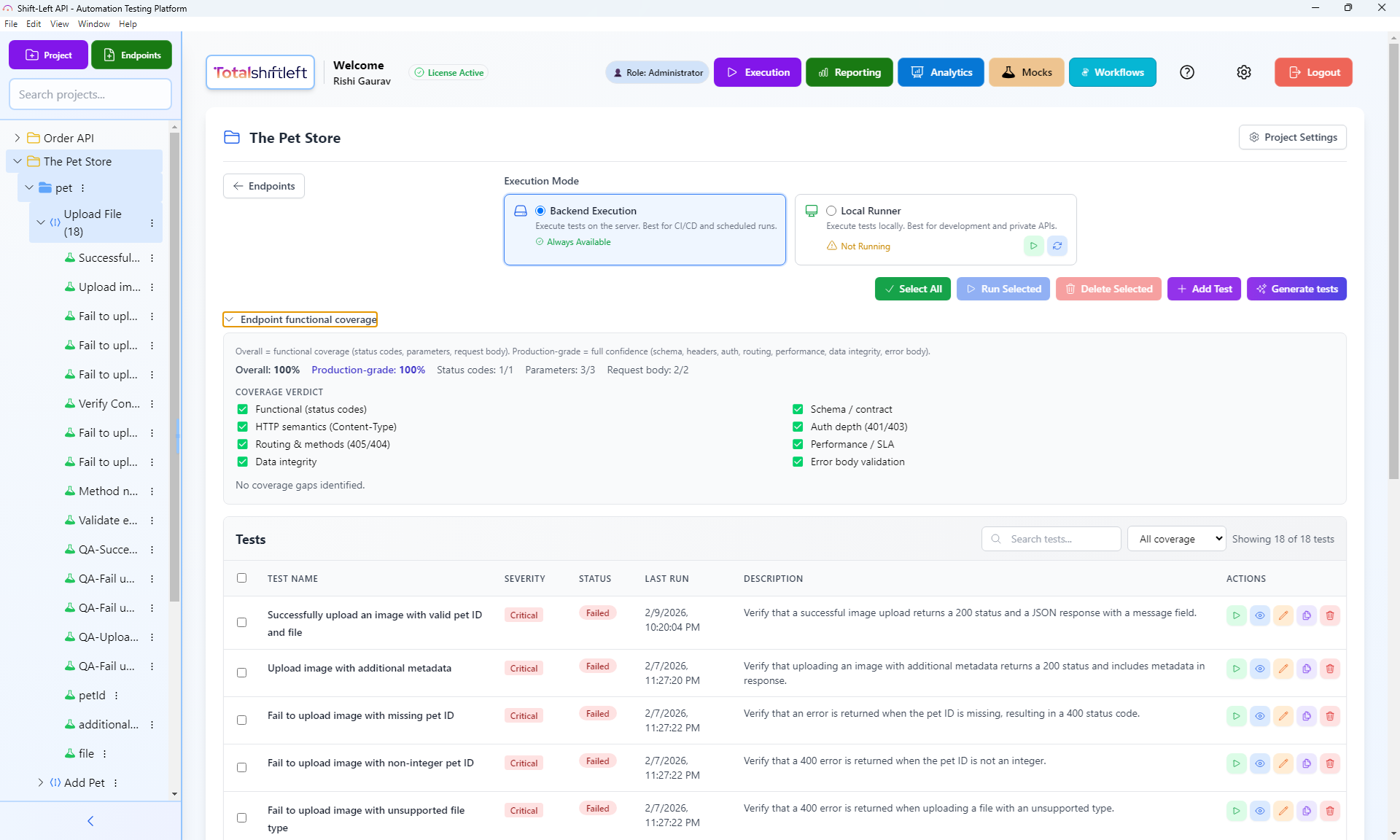
Reach 100% functional and production-grade coverage with one-click generation and gap-fill suggestions.
The AI analyzes your OpenAPI/Swagger schemas and suggests tests for happy paths, edge cases, and missing parameters.
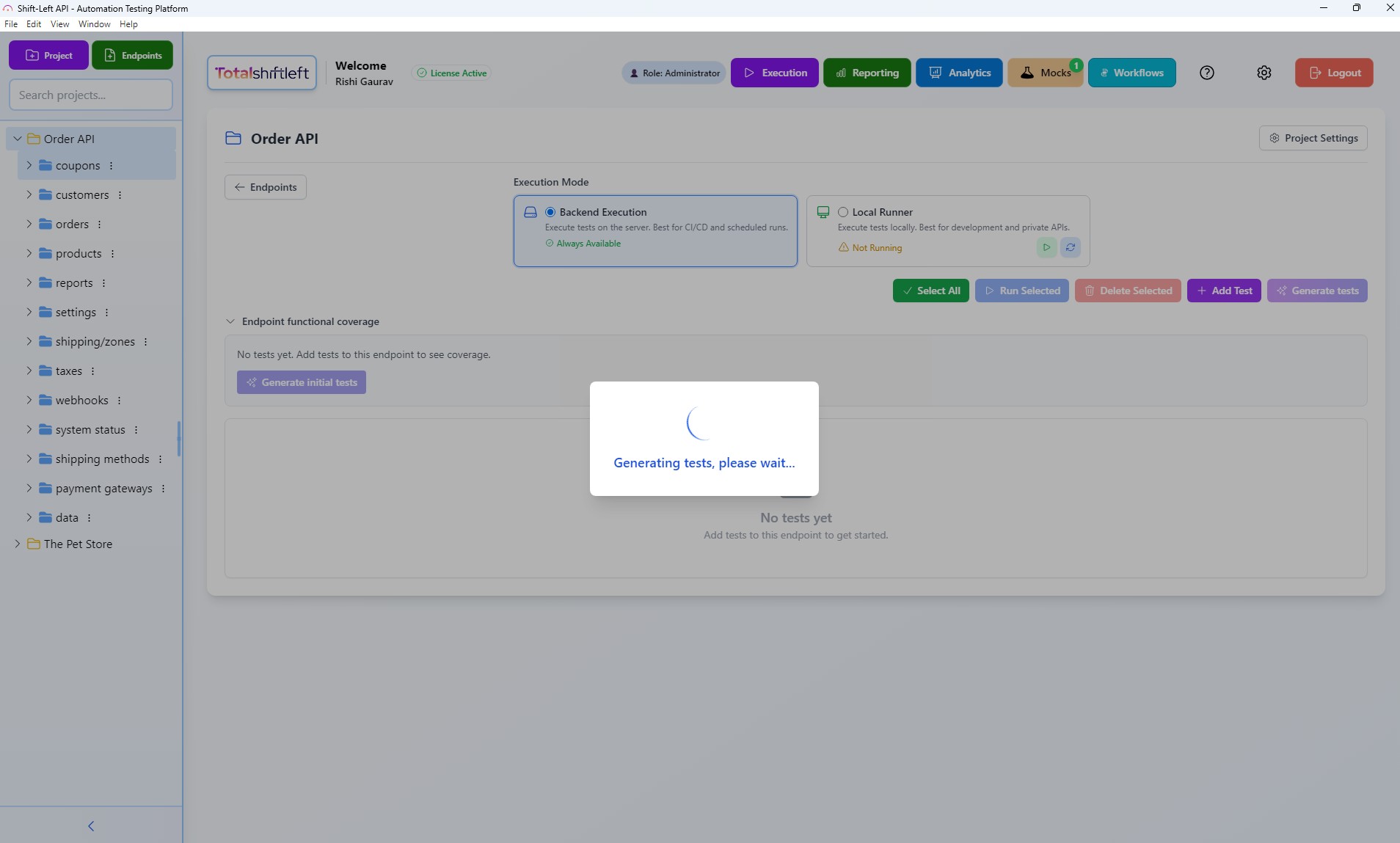
- Generate initial tests for any endpoint to get coverage started.
- Overall coverage = status codes, parameters, request body.
- Production-grade coverage = schema, headers, auth, routing, performance, data integrity, error body.
- See a clear coverage verdict and use Generate tests for gaps to reach 100%.

Run tests your way
Execute API tests on the server for CI/CD and scheduled runs, or run them locally for development and private APIs.
Same test packs run in both modes—choose the Shift-Left Engine for pipelines or the Shift-Left Agent for private APIs.
- Shift-Left Engine—trigger test packs via REST API from GitHub Actions, GitLab CI, Jenkins, Azure DevOps.
- Shift-Left Agent—run the same tests on your machine for fast feedback and private endpoints.

Two ways to run
Shift-Left Engine
Best for CI/CD and scheduled runs. Always available.
Shift-Left Agent
Best for development and private APIs. Start when you need it.
How AI-Powered No-Code API Testing Works
Total Shift Left turns your OpenAPI, Swagger, and Postman collections into executable API regression and contract tests—enabling shift-left API testing in your CI/CD pipeline.
How it works
One platform for API testing and automation.
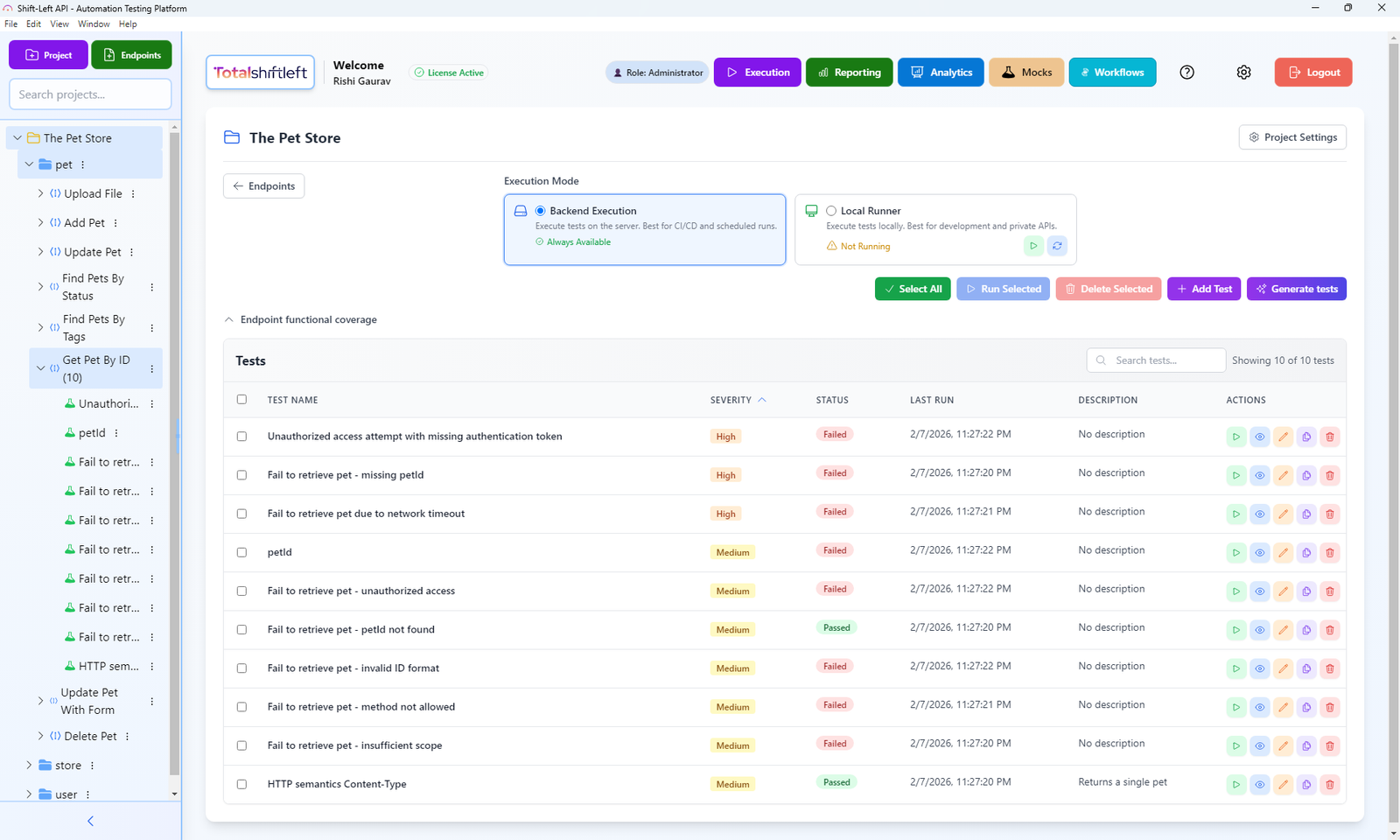
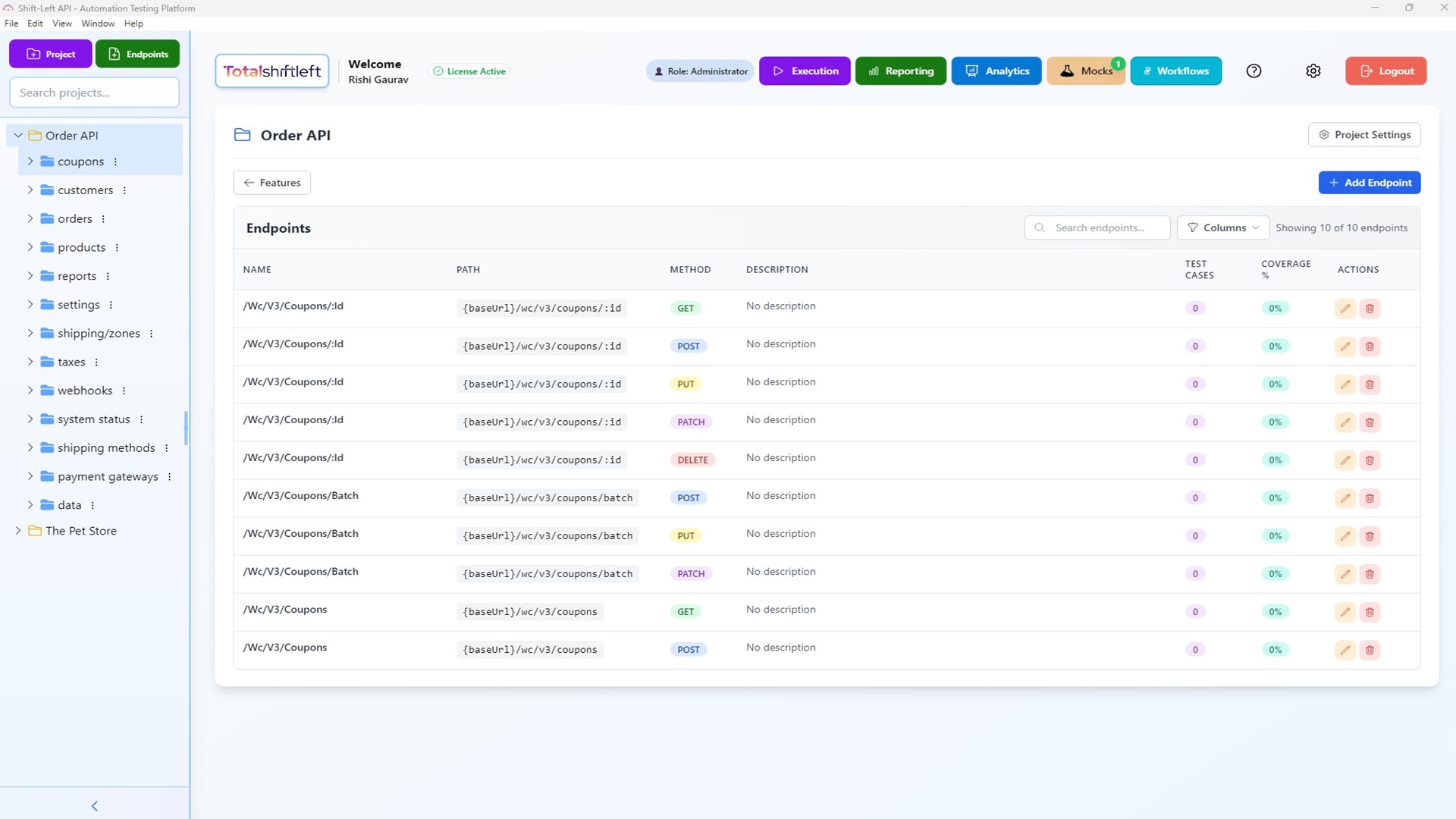
Endpoint and test management
Organize projects, features, and endpoints with full test visibility and coverage at a glance.
Navigate by project → features → endpoints; view test cases and coverage % per endpoint.
- Navigate by project → features → endpoints with search.
- View test cases and coverage % per endpoint.
- Add tests manually or use Generate tests for AI-generated suites.

API mocks for development and testing
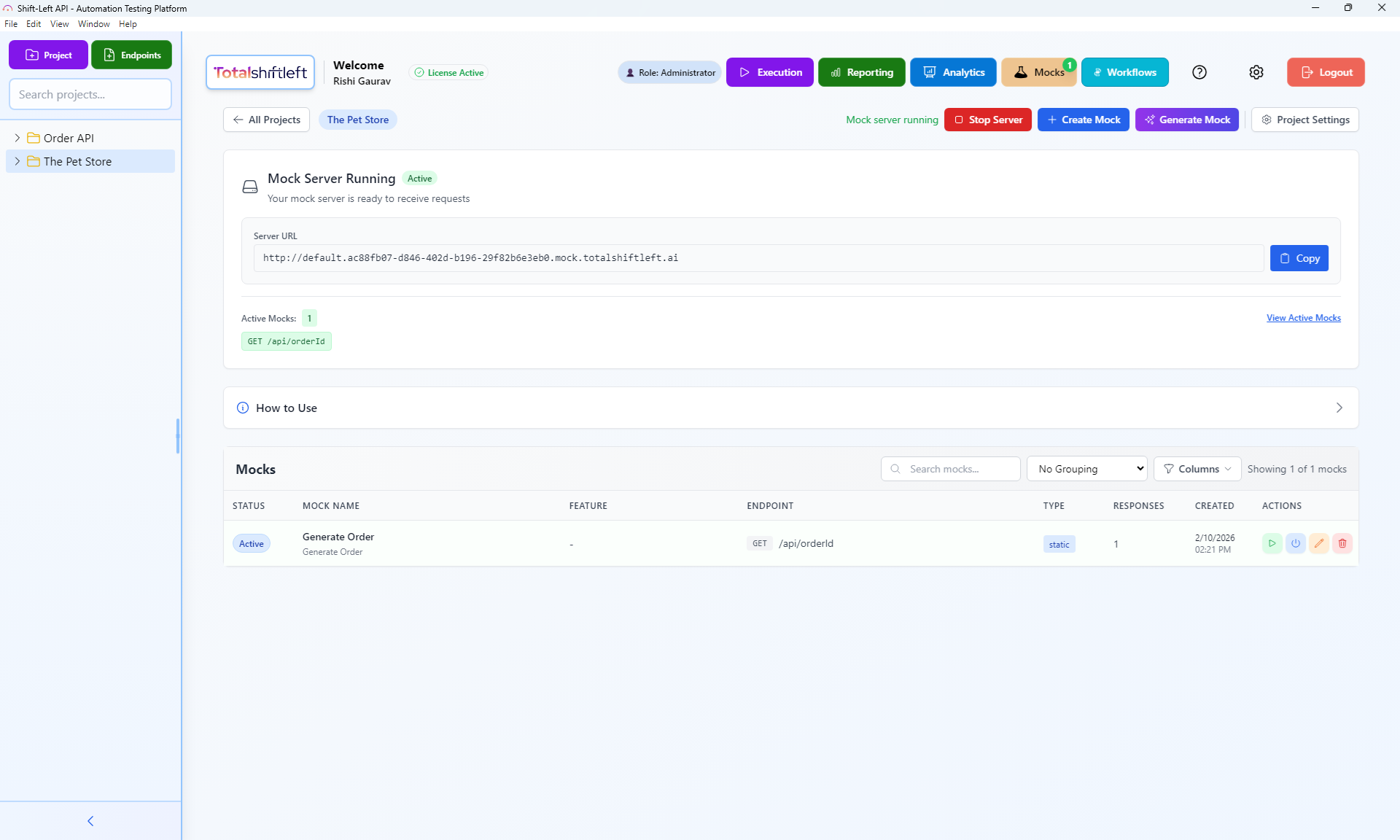
Create static or dynamic mock responses so frontend and backend teams can work in parallel without live backends.
Run mocks as a standalone server or use them automatically during test execution with condition-based responses.
- Static and dynamic responses—fixed JSON or templates with variables.
- Run mocks as a standalone server for external testing.
- Test integration—mocks are used automatically during test execution.
- Condition-based responses and endpoint linking.
Analytics and reporting
Track total tests, success rate, response time, and coverage so you can ship with confidence.
See average response time, 95th percentile, throughput, and test case creation over time.
- Total tests, success rate, failed tests, and coverage %.
- Average response time, 95th percentile, and throughput.
- Test case creation over time and most active users.
Platform in action

Who the platform is built for
We built this for teams that need automated API quality at scale — not another API exploration tool.
Built for you if you...
- + Ship REST or SOAP APIs and need automated test coverage without writing test code
- + Lead QA and need to automate regression suites from API specifications
- + Run DevOps/Platform and want API quality gates in your CI/CD pipeline
- + Manage engineering and need visibility into API test coverage across services
- + Want to import OpenAPI, Swagger, or WSDL specs and get a working test suite instantly
- + Need built-in API debugging with detailed request/response inspection for developers
Probably not the right fit if you...
- - Only need API documentation generation, not testing
- - Are looking for API documentation tools, not testing
- - Have a mature custom test framework you want to keep maintaining
Complete Feature Overview
Every capability of the Total Shift Left platform — organized by category with links to detailed feature pages.
| Feature | Description | Plan | Details |
|---|---|---|---|
AI-Powered TestingFor Developers & QA Leads | |||
AI Test Generation | Generate comprehensive test suites from OpenAPI specs with one click. | All plans | Details |
Coverage Gaps | Identify untested endpoints and missing scenarios automatically. | All plans | Details |
Edge Cases | Discover boundary conditions and edge cases humans miss. | All plans | Details |
Multi-AI | Choose between OpenAI, Anthropic Claude, or Google Gemini. | All plans | Details |
RAG & Learning | AI that learns from your team — every edit, every failure, every document makes tests smarter. | All plans | Details |
AI Test Fix | Repair failing tests with one click when your API changes. | All plans | Details |
Project Assistant | Ask about your project in plain language, and let it do the work once you approve. | All plans | Details |
Requirements IntelligenceFor Business Analysts & QA Leads | |||
Requirements | Turn specs and business documents into testable requirements. | All plans | Details |
Traceability (RTM) | Prove coverage from every requirement to the tests that verify it. | Professional+ | Details |
Test Strategy | Generate a full test strategy across proven design techniques. | All plans | Details |
Use-Case Workflows | Approved use cases become end-to-end workflows as soon as each step has a test. | All plans | Details |
Test Execution & CI/CDFor DevOps & Developers | |||
Shift-Left Agent | Run API tests on-premise behind your firewall. | Enterprise | Details |
CI/CD | First-party GitHub Action, Jenkins plugin and Azure DevOps task, plus a REST API for any other CI/CD tool. | Enterprise | Details |
Scheduler | Run tests automatically on a cron schedule. | Enterprise | Details |
Test Packs | Group and batch-execute tests for focused regression runs. | All plans | Details |
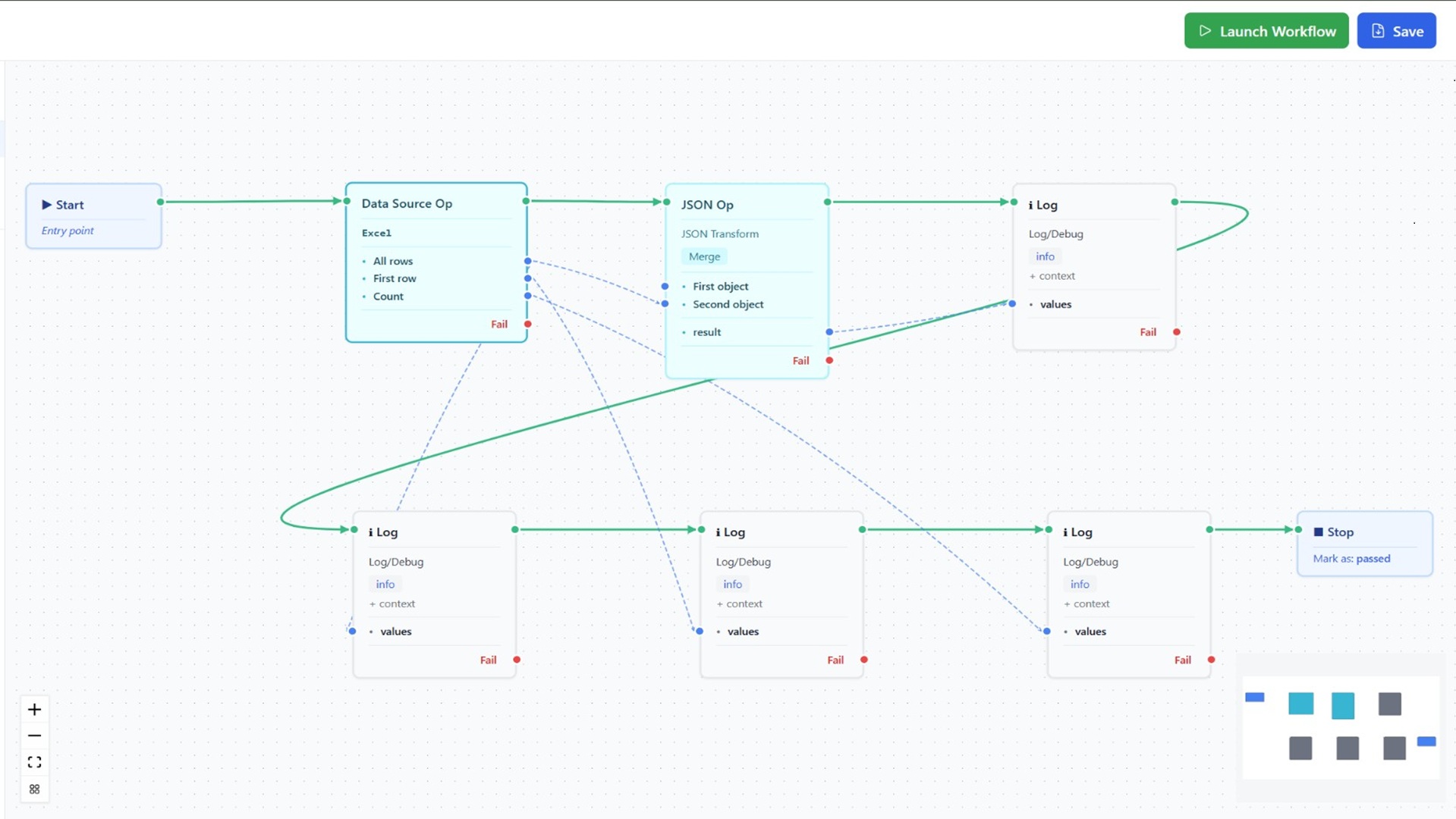
Workflows | Build multi-step API flows with a visual DAG editor. | All plans | Details |
Test Data ManagementFor QA Engineers & Developers | |||
Data-Driven Testing | Run one test across many rows of data automatically. | All plans | Details |
Data Sources | Connect the data your tests need from the sources you already use. | All plans | Details |
Multi-Protocol SupportFor Architects & Tech Leads | |||
REST | Full support for REST APIs with OpenAPI and Swagger import. | All plans | Details |
GraphQL | Test GraphQL queries and mutations with schema validation. | All plans | Details |
SOAP | Test SOAP web services with WSDL import and XML validation. | All plans | Details |
Assertions | Validate every aspect of API responses with 40+ built-in assertions. | All plans | Details |
Mock Server | Create mock APIs for parallel development and testing. | Enterprise | Details |
Postman Import | Bring your Postman collections in and keep your tests. | All plans | Details |
JSON-RPC & MCP | Test JSON-RPC services and Model Context Protocol servers alongside your REST, SOAP, and GraphQL APIs. | Enterprise | Details |
WebSocket-RPC | Test RPC over WebSockets, with one authenticated connection across ordered steps. | Enterprise | Details |
Enterprise & ComplianceFor CTOs & Engineering Managers | |||
RBAC | Control who can view, edit, and execute tests. | Enterprise | Details |
HIPAA/GDPR | Meet healthcare and privacy regulations with built-in compliance features. | Enterprise | Details |
Multi-Tenant | Isolated workspaces for teams, departments, or clients. | Enterprise | Details |
Auth Profiles | Manage OAuth, API keys, AWS Sig V4, and more per project. | All plans | Details |
SSO | Sign in with your identity provider — SAML, OIDC, and Entra ID. | Enterprise | Details |
API Keys | Scoped, rotatable keys for automation and integrations. | Professional+ | Details |
Webhooks | Push test events to your tools with signed, reliable delivery. | Professional+ | Details |
Secret Managers | Pull credentials from Vault, AWS, and Azure at run time. | Enterprise | Details |
Workspaces | Organize projects into teams with per-project roles. | Enterprise | Details |
Audit Logs | A complete, filterable record of who did what, when. | Professional+ | Details |
Comments | Discuss tests and requirements in context, with @mentions. | Professional+ | Details |
Analytics & MonitoringFor QA Leads & Product Owners | |||
Dashboard | Track test coverage, pass rates, and response times at a glance. | All plans | Details |
Regression | Detect test regressions and failure trends over time. | Enterprise | Details |
Change Detection | Detect breaking API changes before they reach production. | Enterprise | Details |
Shared Reports | Share live test reports with stakeholders via secure links. | Enterprise | Details |
Persona Dashboards | Role-tailored views for every stakeholder, plus TV mode. | Enterprise | Details |
Scheduled Reports | Deliver test summaries to stakeholders on a schedule. | Professional+ | Details |
Failure Analysis | A handful of causes with verdicts, instead of a long list of red rows. | All plans | Details |
Why teams choose the platform
An all-in-one no-code API automation platform—from import to CI/CD and mocks.
See pricingTrue no-code API testing
Design, run, and maintain API tests without scripting. Import OpenAPI and Swagger specs, generate tests with AI, and execute from a visual interface—accessible to QA and developers alike.
Schema-driven AI test generation
AI analyzes your endpoints and schemas to generate tests for happy paths, edge cases, and gaps. Reach 100% functional and production-grade coverage with one-click generation.
CI/CD and local execution
Run tests on the server for CI/CD and scheduled runs, or use the Shift-Left Agent for development and private APIs. Always available when you need it.
API mocks and analytics
Create static or dynamic mocks from your specs for parallel development. Track total tests, success rate, response time, and coverage with built-in analytics.
Integrate with your CI/CD and tools
Connect Total Shift Left with your pipelines and API specifications for shift-left test automation.
CI/CD Pipelines
Collaboration Tools
API Specifications
Don't see your tool? We're always adding new integrations.
Request an integrationPlatform FAQs
What API formats can I import?
Total Shift Left supports OpenAPI 3.0, Swagger 2.0, and WSDL specifications in JSON, YAML, or .yml format. It also supports REST, SOAP, and GraphQL APIs. You can import from a URL or by uploading a file. Once imported, the platform discovers all endpoints and organizes them into projects and features.How does AI test generation work?
The platform analyzes your OpenAPI/Swagger specs and endpoint schemas to suggest test cases. You can generate initial tests for an endpoint or use "Generate tests for gaps" to add tests that cover missing parameters, status codes, or request-body scenarios. Coverage is tracked as overall (functional) and production-grade (schema, headers, auth, routing, performance, data integrity, error body).How do I run tests in CI/CD?
Use the Shift-Left Engine for CI/CD and scheduled runs—it is always available. The platform exposes a REST API (Swagger-documented) to trigger test packs, check status, and retrieve results so you can integrate with GitHub Actions, GitLab CI, Jenkins, Azure DevOps, and other pipelines.What are API mocks used for?
API mocks let you create static or dynamic mock responses for your endpoints. You can run mocks as a standalone server for external testing or use them automatically during test execution. Mocks are linked to your existing endpoints and support condition-based responses.How is coverage calculated?
Overall coverage reflects functional coverage: status codes, parameters, and request body. Production-grade coverage adds schema/contract validation, HTTP semantics, routing and methods, data integrity, auth depth, performance/SLA, and error body validation. The platform shows a coverage verdict and identifies gaps so you can generate tests to reach 100%.
Try a lesson before you try the product.
Run real REST, GraphQL, and SOAP requests against a live sandbox — no signup, no install. 32 free, hands-on lessons covering protocols, authentication, contract testing, and AI-assisted testing.
Related reading
Learn more about no-code API testing, CI/CD integration, and shift-left practices.
Ready to shift left?
Get the forever-free Citizen Developer Edition (single user, no expiry) or start a 15-day Enterprise trial. No credit card required.