
AI API testing, from a requirement to a secured, load-tested API.
Shift-Left API turns your requirements and OpenAPI, WSDL or GraphQL specs into tests that run in your pipeline, then load-tests and security-checks the same endpoints. Self-hosted, with your own LLM (Ollama, vLLM, LM Studio), so specs never leave your perimeter.
15-day trial, no credit card · or the free Citizen Developer Edition

- 12 guided steps, requirement to release gate
- One project for functional, load and security tests
- Runs on your infrastructure with your own LLM
- Rated 4.8/5 on G2
- Security questionnaire and reference architecture shared before the demo
- Release notes for every release
How to start API testing with Shift-Left API
- Start the 15-day trial (no credit card), or the free Citizen Developer Edition for solo use.
- Import an OpenAPI, Swagger, WSDL or GraphQL spec or a Postman collection, and upload your requirement documents (Word, PDF or Excel) if you have them.
- Pick a model: a cloud provider, or your own self-hosted LLM on the Trial and Enterprise plans. AI generates the tests, then closes the coverage gaps it finds.
- Run the suite locally or from GitHub Actions, Jenkins or Azure DevOps, and gate each release on the results.
Page updated . Product changes are listed in the release notes.
From requirement to release gate, in one platform
The same five phases you see the moment you sign in. Each one links to the pages that explain it in depth.
- Phase 1 · Plan
Start from the requirement, not the endpoint
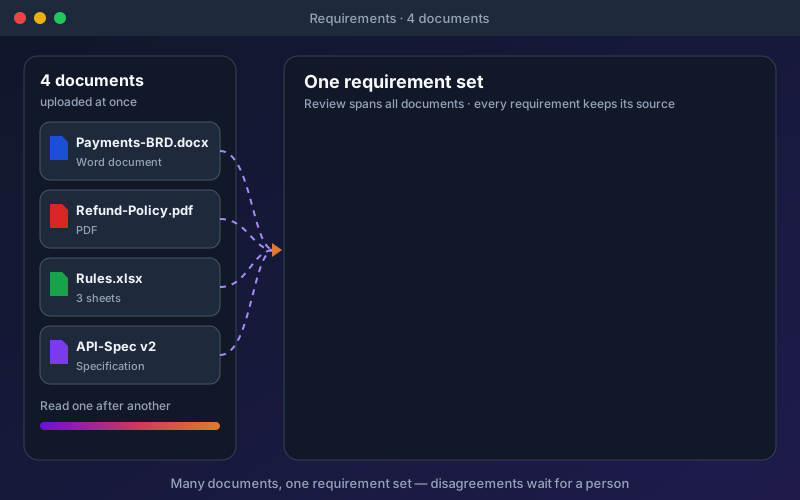
Upload BRDs, policies and Excel workbooks together and Shift-Left API extracts one requirement set, counts each rule once and holds conflicts for a person to decide. Then import OpenAPI, Swagger, WSDL, GraphQL, a Postman collection or a pasted cURL into the same project.
- 01 Add requirements
- 02 Add your Swagger / API spec
- Phase 2 · Build
AI writes the suite, then closes the gaps it finds
Happy-path, edge-case, negative and auth tests are generated from the spec and your requirements, with no code to maintain. A coverage verdict lists what is still untested and one click generates tests for exactly those gaps.
- 03 Create tests
- 04 Manage tests

- Phase 3 · Run
Run anywhere, gate every release
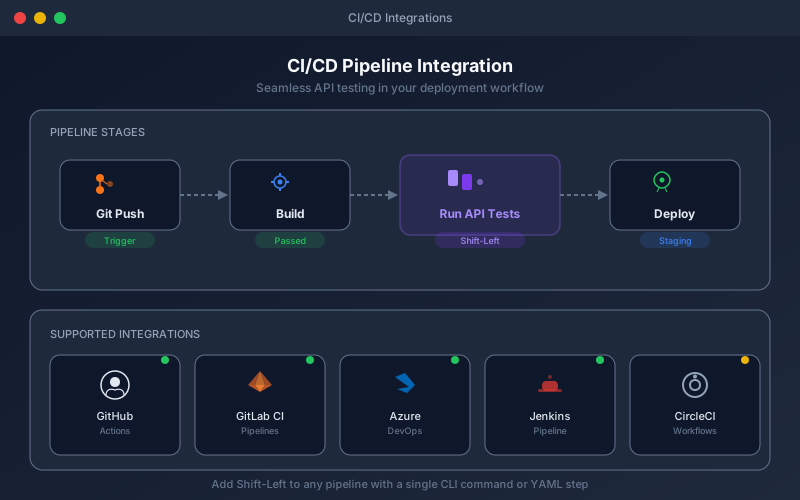
Run a test, an endpoint or a whole pack against any environment: on the server, on a schedule, from GitHub Actions, Jenkins or Azure DevOps (the public REST API covers GitLab CI, CircleCI and Bitbucket Pipelines), or on the desktop Agent for private APIs.
- 05 Execute tests
- 06 Schedule runs
- Phase 4 · Understand
See why it failed, and what to do about it
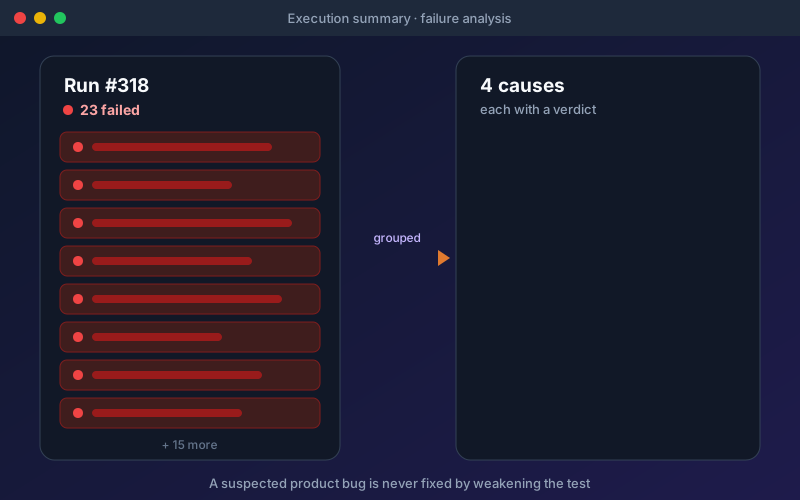
A failed run is grouped by cause, each with a verdict and a fix you can apply. Dashboards show trends, reliability and coverage by role, and a traceability matrix links every requirement to its test results for the auditor.
- 07 Read the reports
- 08 Track analytics
- Phase 5 · Go further
Mock, chain, load-test and security-test in the same project
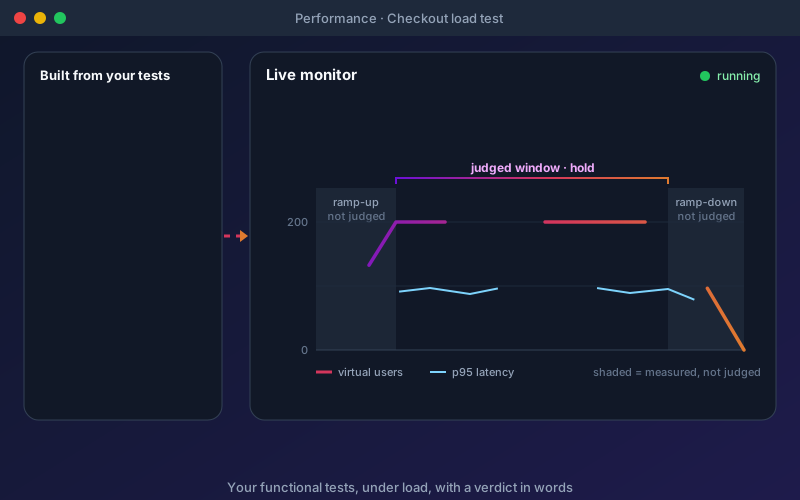
Stand in for services that are not ready, chain calls into end-to-end workflows, and run load and security checks built from the tests you already have, using the same environments and credentials.
- 09 Mock APIs
- 10 Build workflows
- 11 Test performance
- 12 Test security
One set of tests, three jobs
The functional tests Shift-Left API generates also become your load tests and your security checks. One project, the same endpoints, environments and credentials, so nothing drifts out of step.
- Generate, run and gate
Functional and contract
REST, SOAP and GraphQL suites generated from specs and requirements, validated against the contract on every run, with coverage you can read.
On every planHow generation works → - Reuse the same tests under load
Load and performance
Smoke, load, stress, spike, soak, breakpoint, concurrency and rate-limit probe runs, with a verdict in words and performance targets in the traceability matrix. No scripts to write.
Paid add-on · included in the trialSee load testing → - Check the same endpoints for weaknesses
API security
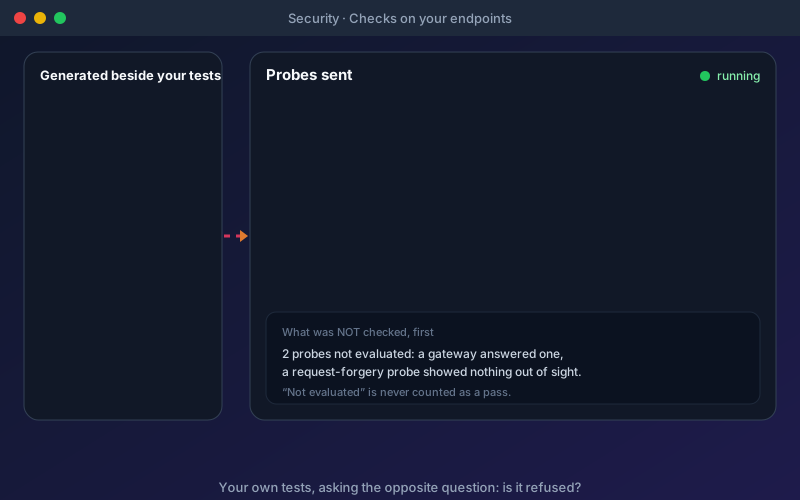
OWASP-mapped checks including BOLA with a second test user, injection markers, SSRF and configuration. Findings carry a CVSS v3.1 score and every report lists what was not checked first.
Paid add-on · included in the trialSee security testing →

AI test generation that never has to leave your perimeter
Built for banks, insurers, healthcare and government teams that cannot send API specifications to a third-party model.
Your model, your network
Run AI test generation on Ollama, vLLM, LM Studio or any OpenAI-compatible endpoint inside your perimeter (Trial and Enterprise). Cloud providers are an option you switch on, never a requirement.
Specs and prompts stay put
On a self-hosted deployment, API specifications, prompts and generated tests stay on infrastructure you control. A Windows installer on your own MongoDB today.
SOAP and modern, together
WSDL parsing for SOAP alongside REST and GraphQL on every plan, for estates that still run both. JSON-RPC 2.0, MCP servers and WebSocket-RPC testing are on Trial and Enterprise.
Self-hosted API testing →Self-hosted LLM setup →Regulated industries →
What leaves the perimeter: nothing, unless you configure a cloud provider.

OpenAI, Anthropic, Gemini, Azure OpenAI and other cloud providers, or self-hosted Ollama, LM Studio and vLLM.
Watch a five-minute walkthrough
Import a spec, generate tests, close the coverage gaps and run the suite.
Everything in the platform, in one place
The journey above is the short version. Here is every capability behind it, grouped by what it does for you, with the plan it is on where it is not on all of them.
Requirements and traceability
Start from the documents your team already writes. Rules are counted once, conflicts wait for a person, and a matrix shows what verifies each requirement.
Every API style, one project
REST, SOAP and GraphQL on every plan, with the newer RPC styles alongside. Assertions, mocks, workflows, packs and reports behave the same for all of them.
Authentication, built in
Configure how your API signs in once per environment and every test, workflow, load test and security check reuses it. Credentials are stored encrypted (AES-256).
AI you can check and control
Generation, repair and answers run on the model you choose, including one inside your network. Nothing changes until a person accepts it.
Test data
Keep inputs separate from test logic, run one test across many rows, and push a data set into tests you already have, with a preview and an undo.
Run, schedule and connect
Run on the server, on a schedule, from your pipeline, or on a desktop Agent next to a private API. Results can be pushed to your other tools.
- Test run packsProfessional and up
- Scheduler with email on failureProfessional and up
- Integration workflows
- Desktop Agent for private APIs
- GitHub Actions, Jenkins and Azure DevOpsProfessional and up
- Signed outbound webhooksProfessional and Enterprise
- Scoped, rotatable API keysProfessional and up
Understand and report
Failures arrive as a few causes with verdicts, passing tests are checked too, and each audience gets the view it needs.
- Failed runs explained as causes
- Regression analysisProfessional and up
- API change detection
- Analytics dashboardProfessional and up
- Persona dashboards with TV modeTrial and Enterprise
- Shareable dashboardsTrial and Enterprise
- Scheduled reportsTrial and Enterprise
Load and security, from the same tests
The tests you generated become load tests and security checks. Both are paid add-ons, and both are included in the 15-day trial.
Teams, governance and compliance
Roles and permissions, single sign-on, an audit trail and tenant isolation, for teams that have to show who did what.
- Role-based access controlProfessional and up
- SSO configuration: SAML, OIDC, Entra IDTrial and Enterprise
- Audit logs and activity feedProfessional and up; activity feed Trial and Enterprise
- Per-project roles and team groupsProfessional and up
- Comments on tests and endpointsProfessional and up
- HIPAA and GDPR controls
- Multi-tenant isolation
See every feature with the plan it is on in the platform feature table or compare plans and add-ons.
Built for the people who sign off on quality
Rated 4.8/5 on G2 from three verified reviews. Here is what they say, by role.
- QA and test leads
A traceable suite without hand-writing it
Requirements become tests, gaps are found and filled, and the matrix shows what each requirement is verified by.
See traceability →“…it also suggests meaningful test cases on its own, which has been really helpful.”
Lead QA Automation, mid-market company · verified G2 review - Security and compliance
Weaknesses found before production, with evidence
Security checks run in the same packs as your functional tests, with findings, decisions and an audit trail you can hand over.
See what it checks →“…makes security testing more proactive, helps reduce risks before production…”
Security Delivery Analyst, small business · verified G2 review - Platform and DevOps
In your pipeline and inside your perimeter
Self-hosted with your own LLM, first-party GitHub Actions, Jenkins and Azure DevOps integrations, and a REST API for everything else.
See integrations →“We reduced our API testing time by 20X.”
IT services reviewer, mid-market company · verified G2 review
How Shift-Left API compares to ReadyAPI, Tosca and SOAtest
A side-by-side from each vendor's own documentation, including the places where the established platforms are broader.
| Aspect | ReadyAPI | Tricentis Tosca | Parasoft SOAtest | Shift-Left API |
|---|---|---|---|---|
| AI test generation | SmartBear AI plugin (2026) generates tests from API definitions and prompts | Agentic Test Automation and Copilot, delivered through Tosca Cloud | Agentic AI Assistant generates multi-service scenarios, data and assertions | Generated from specs and requirements, with your choice of cloud or self-hosted model |
| Your own or self-hosted LLM (Trial and Enterprise) | Not documented for the built-in AI; the MCP plugin works with your own assistant | Not documented; on-prem customers get Tricentis-hosted AI (announced for fall 2026) | Yes — any OpenAI-compatible endpoint, including local models (LLM Integration licence) | Yes — Ollama, vLLM, LM Studio or any OpenAI-compatible endpoint |
| Where AI data goes | A SmartBear endpoint (provider not stated); core testing works without it | Tricentis-managed Azure OpenAI and Claude; needs internet and Tosca Cloud credentials | The LLM provider you configure | Your own model inside your perimeter when self-hosted |
| MCP / AI agent integration (Claude, Cursor) | ReadyAPI MCP plugin lets an agent generate, run and heal tests | Tosca MCP server (2026.1 patch 1 or later) | Tests MCP servers; Virtualize adds an MCP server (2026.1) | MCP server on Professional, Trial and Enterprise (September 2026 release) plus a public REST API |
| CI/CD integrations | Jenkins, Azure DevOps and TeamCity plugins; Docker, Maven and command line | Script-based Execution Client and API; a legacy Jenkins plugin | Jenkins, Azure DevOps, Bamboo and TeamCity plugins; GitHub Marketplace action; command line | GitHub Actions, Azure DevOps extension and Jenkins plugin file, plus a REST API for any other tool |
| Protocol coverage | REST, SOAP, GraphQL, gRPC (unary), JMS, JDBC, Kafka, MQTT, AMQP | REST, SOAP, JMS, WebSocket, MLLP, plus message queues such as Kafka and IBM MQ | 120+ protocols and formats, including REST, SOAP, GraphQL, gRPC, JMS, IBM MQ, Kafka and FIX | REST, SOAP, GraphQL; JSON-RPC 2.0/MCP and WebSocket-RPC on Trial & Enterprise. The incumbents are broader on legacy messaging |
| Load testing | ReadyAPI Performance is a separate licence; a limited base comes with any licence | A separate product, Tricentis NeoLoad | Parasoft Load Test installs with SOAtest; capacity set by the virtual-user licence | Built from your existing tests, no scripts; paid add-on, included in the trial |
| API security testing | Security scans (SQL injection, XSS, fuzzing and more); basic scans on any licence, the full set needs ReadyAPI Test | No dedicated feature found in the documentation | Penetration testing from functional tests via embedded OWASP ZAP (API Security Testing licence feature) | OWASP-mapped checks beside your tests, including BOLA with a second test user; paid add-on, included in the trial |
| Requirements to tests | Not a core capability; tests start from specs | Requirements managed in Tosca or linked ALM tools; extraction from documents not documented | Traceability through DTP and ALM integrations | Extracts requirements from Word, PDF and Excel, with a traceability matrix that includes load targets |
- ReadyAPI
- SmartBear AI plugin (2026) generates tests from API definitions and prompts
- Tosca
- Agentic Test Automation and Copilot, delivered through Tosca Cloud
- Parasoft
- Agentic AI Assistant generates multi-service scenarios, data and assertions
- Shift-Left API
- Generated from specs and requirements, with your choice of cloud or self-hosted model
- ReadyAPI
- Not documented for the built-in AI; the MCP plugin works with your own assistant
- Tosca
- Not documented; on-prem customers get Tricentis-hosted AI (announced for fall 2026)
- Parasoft
- Yes — any OpenAI-compatible endpoint, including local models (LLM Integration licence)
- Shift-Left API
- Yes — Ollama, vLLM, LM Studio or any OpenAI-compatible endpoint
- ReadyAPI
- A SmartBear endpoint (provider not stated); core testing works without it
- Tosca
- Tricentis-managed Azure OpenAI and Claude; needs internet and Tosca Cloud credentials
- Parasoft
- The LLM provider you configure
- Shift-Left API
- Your own model inside your perimeter when self-hosted
- ReadyAPI
- ReadyAPI MCP plugin lets an agent generate, run and heal tests
- Tosca
- Tosca MCP server (2026.1 patch 1 or later)
- Parasoft
- Tests MCP servers; Virtualize adds an MCP server (2026.1)
- Shift-Left API
- MCP server on Professional, Trial and Enterprise (September 2026 release) plus a public REST API
- ReadyAPI
- Jenkins, Azure DevOps and TeamCity plugins; Docker, Maven and command line
- Tosca
- Script-based Execution Client and API; a legacy Jenkins plugin
- Parasoft
- Jenkins, Azure DevOps, Bamboo and TeamCity plugins; GitHub Marketplace action; command line
- Shift-Left API
- GitHub Actions, Azure DevOps extension and Jenkins plugin file, plus a REST API for any other tool
- ReadyAPI
- REST, SOAP, GraphQL, gRPC (unary), JMS, JDBC, Kafka, MQTT, AMQP
- Tosca
- REST, SOAP, JMS, WebSocket, MLLP, plus message queues such as Kafka and IBM MQ
- Parasoft
- 120+ protocols and formats, including REST, SOAP, GraphQL, gRPC, JMS, IBM MQ, Kafka and FIX
- Shift-Left API
- REST, SOAP, GraphQL; JSON-RPC 2.0/MCP and WebSocket-RPC on Trial & Enterprise. The incumbents are broader on legacy messaging
- ReadyAPI
- ReadyAPI Performance is a separate licence; a limited base comes with any licence
- Tosca
- A separate product, Tricentis NeoLoad
- Parasoft
- Parasoft Load Test installs with SOAtest; capacity set by the virtual-user licence
- Shift-Left API
- Built from your existing tests, no scripts; paid add-on, included in the trial
- ReadyAPI
- Security scans (SQL injection, XSS, fuzzing and more); basic scans on any licence, the full set needs ReadyAPI Test
- Tosca
- No dedicated feature found in the documentation
- Parasoft
- Penetration testing from functional tests via embedded OWASP ZAP (API Security Testing licence feature)
- Shift-Left API
- OWASP-mapped checks beside your tests, including BOLA with a second test user; paid add-on, included in the trial
- ReadyAPI
- Not a core capability; tests start from specs
- Tosca
- Requirements managed in Tosca or linked ALM tools; extraction from documents not documented
- Parasoft
- Traceability through DTP and ALM integrations
- Shift-Left API
- Extracts requirements from Word, PDF and Excel, with a traceability matrix that includes load targets
Based on each vendor's published documentation, reviewed 6 October 2026. “Not documented” means we did not find it in their documentation, not that it does not exist. Products change often, so check the vendor's current documentation before you decide.
GitHub Actions, Jenkins and Azure DevOps integrations, plus a public REST API and an MCP server
Real, vendor-native integrations — not generic webhooks — for GitHub Actions, Jenkins and Azure DevOps. GitLab CI, CircleCI, and Bitbucket Pipelines connect via the same public REST API, which covers trigger / poll / artifact lifecycle and quality gates. The MCP server connects Claude, Cursor, and other AI agents to the platform on Professional, Trial and Enterprise.
CI/CD pipelines
Run and failure events can also go to chat and incident tools through signed webhooks.
Request an integrationTry it on your own APIs before anyone talks to you
Three ways in, from free to enterprise-wide.
- Free
Citizen Developer
A single-seat licence with caps (50 endpoints, 50 mocks, 50 workflows). REST, SOAP and GraphQL authoring, AI test and mock generation with your own cloud LLM key, and the desktop Local Runner. Reports carry a watermark.
Get the free licence → - Everything unlocked
15-day trial
Evaluates the Enterprise feature set, including the load and security testing add-ons, JSON-RPC/MCP and WebSocket-RPC testing and persona dashboards, SSO configuration and Vault secret references (outbound webhooks are not part of the trial). Unlimited users and endpoints. No credit card.
Start the trial → - Annual contracts
Professional and Enterprise
Up to 25 seats on Professional, unlimited on Enterprise with a self-hosted LLM, SSO configuration, Vault secret references and governance. Load and security testing are add-ons to either. We scope pricing with an architect, not a sales script.
See pricing →
Going deeper
Comparisons against legacy enterprise platforms, deployment and security details, and long-form context for procurement and architecture review.
- The full platform, step by step
- Shift-Left API vs ReadyAPI
- API load testing from your existing tests
- API security testing from your existing tests
- Pricing & tier comparison
- CI/CD integrations
- OpenAPI Testing: How to Test an API from Its Spec
- API Test Automation: What It Is and How to Start
- Shift-Left Testing Framework
- How to Automate API Testing Without Code
- API Test Automation with CI/CD
- Best API Testing Tools, Compared by Job
Shift-Left API: frequently asked questions
What is Shift-Left API, and how does it relate to Total Shift Left?
Shift-Left API is an AI-native API test automation platform. It turns requirements and OpenAPI, Swagger, WSDL or GraphQL specifications into tests, then load-tests and security-checks the same endpoints. Total Shift Left is the company that builds it, so review sites and documentation use either name for the same product.
Total Shift Left is not affiliated with ShiftLeft Inc. (Qwiet AI), an unrelated application security company.
Can Shift-Left API run fully on-prem with our own LLM?
Yes. Shift-Left API supports self-hosted LLM inference through Ollama, LM Studio and vLLM, or any OpenAI-compatible endpoint. On a self-hosted deployment, API specifications, prompts and generated tests stay inside your perimeter. Nothing is sent to OpenAI, Anthropic or any other third-party LLM unless you configure a cloud provider.
The deployment is single-tenant, on infrastructure you control. Self-hosted models are available on the Trial and Enterprise plans.
Can it generate tests from business requirements, not just API specs?
Yes. Upload Word, PDF and Excel documents and Shift-Left API extracts one requirement set from all of them, counts each rule once and holds conflicts for a person to decide. Tests are then generated from the requirements together with your specification.
A requirements traceability matrix is a table that maps each requirement to the tests that verify it. Shift-Left API builds it for you, including performance targets verified under load.
How is this different from ReadyAPI, Tricentis Tosca, or Parasoft SOAtest?
Shift-Left API is AI-native, while ReadyAPI, Tricentis Tosca and Parasoft SOAtest predate modern LLMs and added AI to long-established testing engines. Shift-Left API offers a choice of cloud and self-hosted model providers, an MCP server for Claude, Cursor and other AI agents, a public REST API, and load and security testing built from the same functional tests.
It covers the same enterprise needs: on-prem deployment, REST, SOAP and GraphQL, RBAC and audit logs. The incumbents are broader on legacy messaging protocols such as JMS, MQ and Kafka.
Why not just use Postman or Apidog for AI test generation?
Cloud-based AI testing tools typically send your API specifications and request bodies to third-party LLMs. For BFSI (banking, financial services, insurance), healthcare, government and other regulated workloads, that is often a non-starter under security and data-residency policies. Shift-Left API keeps specs and prompts inside your perimeter while still generating tests with AI.
What does deployment look like for a regulated enterprise?
Self-hosted on infrastructure you control: a Windows installer sets up the backend service and desktop client against your own MongoDB. Multi-tenant SaaS is also available for non-regulated workloads. There is no Docker or Kubernetes image for the backend today. Implementation timelines are scoped per environment with our architect on the demo call.
How does Shift-Left API integrate with AI agents?
MCP (Model Context Protocol) is an open standard that lets AI agents call external tools. The Shift-Left API MCP server, available since the September 2026 release on Professional, Trial and Enterprise, lets you connect Claude, Cursor or another MCP client to the platform. The public REST API also works from any agent framework that supports custom HTTP tool calls.
What is included in the Citizen Developer free tier?
The Citizen Developer free tier is a free, single-seat licence with no end date, renewed free every 6 months. It includes REST, SOAP and GraphQL authoring, AI test and mock generation with your own cloud LLM key, and the desktop Local Runner. It is designed for solo evaluation, not team use.
Its caps are 50 endpoints, 50 mocks, 50 workflows, 1 concurrent run and 3 auth profiles per project. Self-hosted models need Enterprise or the Trial. Reports include a "Powered by Shift-Left Studio" watermark.
How do enterprise procurement and security reviews work?
Talk to our architect on the demo call, not a sales rep. We share a security questionnaire response, deployment topology diagram and reference architecture upfront, so your security team can review in parallel with the technical evaluation. Contracts are annual only: we do not sell month-to-month, because regulated procurement does not buy month-to-month.
Talk to our architect, not a sales rep
30-minute demo with the engineer who'll run your deployment. We share security questionnaire responses, deployment topology, and reference architecture upfront — so your security team can review in parallel with the technical evaluation.