
Generate API Tests from OpenAPI: From Spec to CI Suite
Quick answer
To generate API tests from OpenAPI, lint the spec and declare response schemas, constraints and security schemes, then import it into a generator that plans positive, negative, boundary, authentication and security cases for every endpoint. Add business rules and realistic test data, review a sample of the output, and run the suite in CI.
Reviewed by Smeet Gohel
Part of the OpenAPI, Contract & Schema Testing hub. Start with the pillar guide: OpenAPI testing: how to test an API from its spec.
Most API teams already maintain a machine-readable description of their whole API surface: the OpenAPI (or older Swagger 2.0) specification. It lists every endpoint, parameter, request body, response schema and security scheme, which is most of what a test generator needs. When you generate API tests from OpenAPI, the spec becomes the contract your suite checks against, so this guide sits under our API contract testing pillar. The AI side of the story, which models do what and where they go wrong, is in the AI API testing guide.
This is the practical version: what a generator can and cannot derive from a spec, how to prepare the spec so the output is worth keeping, how a plan-first pipeline turns it into tests, how to review what comes out, and how the main tools differ.
In this guide
- What a generator can derive from an OpenAPI spec
- Prepare your OpenAPI spec
- How test generation works: plan, build, enrich
- What generation cannot derive, and how to fill it
- Review and roll out a generated suite
- OpenAPI test generator tools compared
- Generate API tests from OpenAPI FAQ
What a generator can derive from an OpenAPI spec
An OpenAPI 3.x or Swagger 2.0 document is a structured list of promises. A generator reads each one and turns it into a check. From a typical spec it can extract:
- Every path and every method declared on it.
- Path, query and header parameters, and the request body schema for each operation.
- The response schema for each documented status code.
- Security schemes (API key, bearer token, OAuth 2.0 scopes) and which operations require them.
- Field constraints:
type,format,minimum/maximum,minLength/maxLength,pattern,enum,required, andadditionalProperties: false. exampleandexamplesvalues.
From that it can produce, per operation:
- Positive tests. A minimal and a full valid request, each asserting the success status and a body that matches the response schema.
- Field-validation tests. A missing required field, a wrong type, a bad format, a pattern violation, and an extra property where the schema forbids one.
- Boundary and equivalence tests. Values at and just past each declared limit, and invalid enum values.
- HTTP-semantics tests. A wrong method on the path (405), an unsupported media type, a route that does not exist.
- Authentication tests. No credentials, bad credentials, and token-level attacks such as an expired token, a wrong signature or a JWT with
alg: none. - Schema conformance. Every response checked against its declared schema, so a dropped required field or a
stringthat became anintegerfails the run.
That is the mechanical floor of a suite, and it is exactly the part people skip when they write tests by hand. The test count depends on the spec, not on the tool: an operation with no constraints and only a 200 response gives a generator very little to work with.
Prepare your OpenAPI spec
A generator can only reason about what the spec tells it. Before importing anything, get five things right.
Complete response schemas. Every operation should declare success and error responses with schemas: at least 200/201, 400, 401, 403 and 404 where they apply. Without error responses, there is nothing for a negative test to assert except "not 2xx".
Parameter constraints. A field declared as type: integer, minimum: 1, maximum: 100 gives the generator the boundaries 0, 1, 100 and 101 for free. A bare type: integer gives it a type check and nothing else.
Example values. example and examples anchor positive tests to plausible data. A username with example: "jane.doe" produces a test that passes business validation; a random string often does not.
Security schemes. Define them in components.securitySchemes and apply them with security. This is what tells the generator that an operation should reject unauthenticated calls with 401.
Request body schemas. For POST, PUT and PATCH, declare required fields, nested objects and their constraints. The more precise the body, the more targeted the missing-field and wrong-type tests.
A small but well-constrained operation looks like this:
paths:
  /orders/{orderId}:
    get:
      operationId: getOrder
      parameters:
        - name: orderId
          in: path
          required: true
          schema:
            type: string
            format: uuid
      responses:
        '200':
          description: Order found
          content:
            application/json:
              schema:
                $ref: '#/components/schemas/Order'
        '401':
          description: Missing or invalid auth token
        '404':
          description: Order does not exist
      security:
        - bearerAuth: []
Run a linter such as Spectral or swagger-cli validate first: a spec that fails validation produces incomplete or broken tests. Invalid example values are a common trap, because many generators use them as-is. Our free OpenAPI test-readiness scorer flags missing error responses, security requirements and request-body schemas before you generate anything. Check which OpenAPI version you are on as well: 3.1 aligns with JSON Schema 2020-12, which changes what some validators accept.
How test generation works: plan, build, enrich
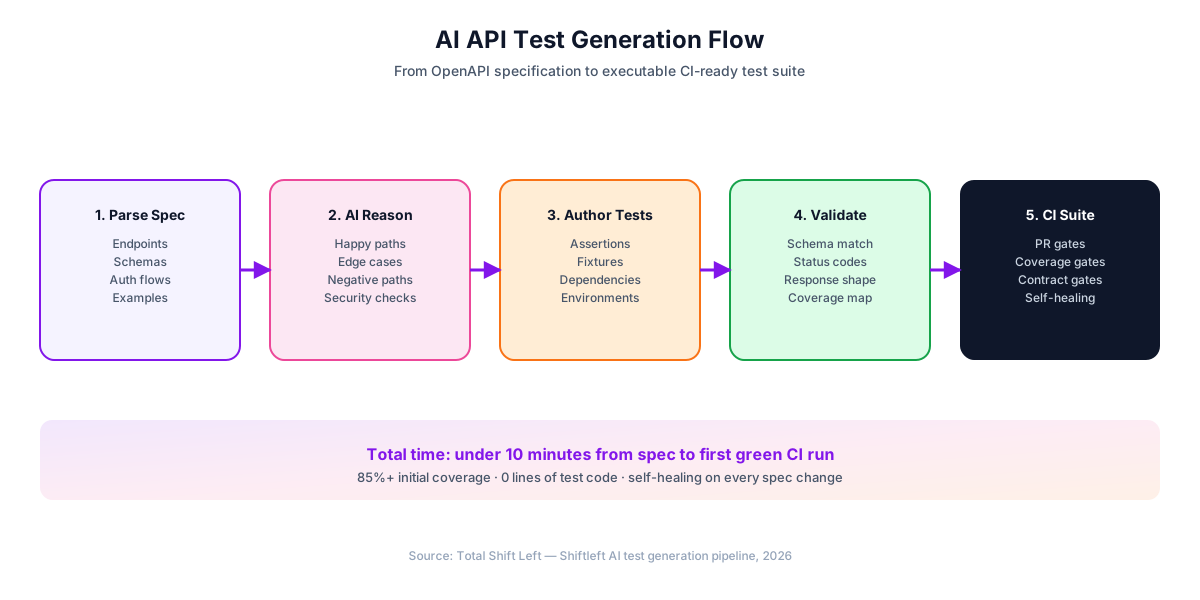
There are two ways to turn a spec into tests. Template and prompt-only generators hand the spec to a template or a language model and keep whatever comes back. A plan-first generator decides deterministically which tests should exist, builds them, and only then lets AI improve the result. The second approach is reproducible: run it twice on the same spec and you get the same suite, which is what a CI quality gate needs.
How Shift-Left API's generation pipeline works
Shift-Left API, our OpenAPI test automation platform, puts the planner first and AI second.
- Import. OpenAPI 3.x or Swagger 2.0 as JSON or YAML (including OpenAPI 3.1 type arrays), WSDL, GraphQL SDL or introspection, a Postman collection, or a pasted cURL command.
- Plan. For each endpoint, a coverage planner lists the test intents that should exist, drawn from 79 scenario classes across 12 dimensions: functional, field validation, boundary, equivalence, HTTP semantics, authentication (13 classes), authorization, idempotency, performance, business rules from imported requirements, and security (33 classes). Techniques can be switched per project; security and performance become opt-in once a project sets its own strategy.
- Build. Each intent becomes one concrete test with its request, assertions, a severity (Critical, High, Medium or Low) and a stable intent key. No language model is involved up to this point, so a team with no AI key still gets the full structured suite.
- Enrich, if AI is configured. Two bounded model calls per endpoint. One polishes names and descriptions and, on positive tests only, swaps synthetic values for realistic ones from requirements and fixtures. The other appends at most 8 extra edge-case tests, each cloned from a validated test. AI cannot remove or weaken a planned test, and a provider error falls back to the deterministic set.
- Report and regenerate. Each run reports what it created, updated or skipped, and the coverage panel shows what is still missing. Running generation again matches tests by intent key, refreshing matches in place and adding missing ones, so run history is kept and duplicates do not pile up.
Score your OpenAPI spec (free)
Free, runs in your browser, no sign-up needed.
The model is chosen by an administrator for the installation: a cloud provider with your own key (19 provider families), or a self-hosted LLM through Ollama, LM Studio or vLLM on Trial and Enterprise. Running generation on your own LLM covers that setup.
Worked example: one endpoint, scenario by scenario
Take the GET /orders/{orderId} operation above: a UUID path parameter, a bearer-token scheme, and documented 200, 401 and 404 responses. With the default techniques, the planner produces tests along these dimensions:
| Dimension | What gets planned for this endpoint |
|---|---|
| Functional | A valid request for an existing order, asserting 200 and a body that matches the Order schema |
| Field validation | An orderId that is not a UUID, expecting an error rather than a 200 |
| HTTP semantics | A wrong method on the path (expecting 405) and a request to a route that does not exist |
| Authentication | No token, an empty bearer token, an expired token, a wrong signature, a JWT with alg: none, a wrong audience and similar bypass attempts, each expecting 401 |
| Authorization | A token for a role that should not read this order, once a second role is configured |
| Security (opt-in) | Injection and path-traversal markers in the string parameter, expecting a rejection rather than a leak |
| Performance (opt-in) | A response-time assertion against the target you set |
Boundary and equivalence rows stay empty, because this operation declares no minLength, maximum or enum. Add enum: [pending, shipped, cancelled] to a status filter and the planner adds an invalid-enum case for it. That is the practical meaning of "spec quality determines test quality": every constraint you declare turns into tests you did not write.
With an AI key, the positive test gets a realistic order ID and a clearer name, and AI may add a few edge cases on top. Without one, the table above is what you get, and it runs the same way in CI.
Contract and schema checks come from the same spec
Schema checks are what teams get wrong first: they generate happy paths, skip response validation, and get paged when a producer silently drops a field a consumer depends on. Once the spec declares response schemas per status code, a generator can assert every field, type and constraint on every response, so an undocumented type change fails the test instead of surfacing as an incident. That covers provider-side, schema-first contracts. Checking the live API against the spec between releases is a separate job, covered in catching schema drift; and when you have a fixed set of internal consumers, consumer-driven contract testing for microservices explains when Pact is still the right tool.
What generation cannot derive, and how to fill it
A spec describes the interface, not the business. Generated tests cover the tedious, mechanical part of a suite well; five things still need a person or another input.
Business rules that are not in the spec. "A refund can only be issued within 30 days of purchase" rarely appears in OpenAPI. A generator will produce a valid refund request but will not test the 30-day boundary unless you tell it. Feed the rules in as requirements (user stories from Jira or Azure DevOps, Gherkin, or plain text) so a generator can plan rule-satisfied and rule-violated cases that trace back to the requirement.
Multi-step flows. "Create user, log in, create order, pay, refund" is a sequence, and a single-endpoint test cannot express it. Build these as end-to-end workflows in which each step's data is wired to the step that produces it, from a use-case requirement or a short description.
Realistic test data. Schema-valid random strings satisfy the spec but not the business: a VAT number, a postcode or a product SKU usually has to exist or follow a real format. This is where an "OpenAPI test data generator" falls short on its own. Use the spec's example values for the shape, and supply real fixtures for the content: a test-data sheet whose rows feed the positive tests, with separate columns of known-bad values for the negative ones and multiple rows run as data-driven iterations.
Security beyond authentication. Object-level access (IDOR), privilege escalation and cross-tenant leaks depend on trust boundaries the spec does not describe. Someone has to say which user may see which object, usually as a second test principal and an access matrix (deny, own data only, or allow per endpoint) from which object-level and privilege checks can be built; API security testing covers the approach.
Performance expectations. The spec says "GET /users returns users"; it does not say "within 200 ms at p95". Response-time targets come from engineering, and a generator can only assert the target you give it.
Two other challenges are worth planning for. Ambiguous types: a string with no format while every example is a UUID forces the generator to guess, so fix the spec rather than the test. Auth configuration: OAuth 2.0, mTLS or multi-step sign-in must be configured per environment before generated tests can run live, typically as a reusable authentication profile per environment.
GraphQL and SOAP follow the same pattern from different inputs. A GraphQL generator reads SDL or introspection and produces queries with tight selection sets and error-array assertions; a SOAP generator reads the WSDL and fills envelopes from the schema types. Expect fewer wrong-type tests on SOAP, because some XML fields cannot express a wrong type at all.
Review and roll out a generated suite
Never ship a generated suite unread. Treat the output like a large pull request from a fast but literal-minded teammate.
A review checklist
- Spot-check five random tests. Do the assertions make sense for that endpoint?
- Prove the suite can fail. Point it at a deliberately broken build or a mock that returns the wrong status, and confirm the right tests go red.
- Check the auth. Is the right scheme used, and is the token scoped the way production tokens are?
- Check business rules. Does any positive test break a domain rule, such as creating a user with
role: adminwithout the privilege that requires? - Prefer codes over messages. Assertions on exact error-message text break on a copy change; assert the status code and the error-body structure instead.
- Delete what does not apply. Some generated cases will be redundant or meaningless for your API. They are not sacred.
- Write the flows by hand. Cross-endpoint scenarios are worth authoring deliberately; generation fills in the single-endpoint coverage around them.
Which oracle checks the AI's work?
When an agent writes the code and a model writes the tests, both can share the same misunderstanding, and the suite passes because it agrees with the implementation rather than the requirement. The question is which artifact is independent of the model that wrote the code.
Free PDF + code examples
OpenAPI to Test Generation Template Pack
Go from OpenAPI spec to full test coverage. Includes sample specs, example generated tests, edge case patterns, and CI/CD integration guides.
Download Free| Oracle | What it is | Independent of the code-writing model? | What a pass proves | Blind spot |
|---|---|---|---|---|
| The specification | An OpenAPI or OpenRPC document, reviewed by people and versioned in git | Yes, when written or reviewed separately from the implementation | The implementation matches what was promised | A spec that is wrong, or one generated from the code |
| Recorded traffic | Captured production requests and responses, replayed against a new build | Yes, it is evidence of real behaviour | The new build behaves like the old one | Encodes existing bugs as expected, and covers only paths that occurred |
| A saved collection | Requests someone saved in an API client, with assertions | Only as independent as the person who saved them | The requests someone remembered still work | Everything nobody thought to save |
They fail in different directions, so mature teams use more than one: a spec-driven suite as the contract gate, replayed traffic for paths the spec under-describes, and a collection for exploration. One trap is specific to spec-driven generation: a specification emitted by the framework that serves the endpoints agrees with the code by construction. It documents what the implementation does, not what was promised. If your spec is produced that way, review it against the requirement before you treat it as an oracle.
A 7-day rollout for one service
- Day 1. Audit the spec against the five preparation checks and lint it. Populate examples for the most-used endpoints.
- Day 2. Import the spec and generate with default techniques.
- Day 3. Review with the engineer who owns the API. Sort every early failure into one of three buckets: a real bug, a spec bug, or a test that does not fit. Fix the spec where the spec is wrong.
- Day 4. Configure auth and environments and run the suite against staging.
- Day 5. Add business-rule tests and the multi-step flows that matter.
- Day 6. Run the suite on a few pull requests against a preview environment.
- Day 7. Wire it into CI as a gate that fails the build on regressions. API test automation with CI/CD has the pipeline recipes.
Once it runs, watch four numbers: coverage against the spec (how to measure API test coverage explains the dimensions), the false-positive rate (failures that are not bugs), real regressions caught before production, and how long a full generation takes. The second service is usually faster, because spec conventions and auth profiles carry over.
Common mistakes
- Treating the spec as complete. If the spec omits half the behaviour, the suite misses half the behaviour.
- Skipping the review. Generated tests are a starting point, not a verdict.
- Using generation as a replacement rather than an amplifier. The teams that get the most out of it hand-write a small number of scenario tests and let the generator produce the rest.
- Regenerating without reading the spec diff. Approve the new spec version first, then regenerate, so a breaking change is seen by a person before any test reflects it.
OpenAPI test generator tools compared
How the common options actually produce tests:
| Tool | Approach | Negative and boundary tests | CI | Code required |
|---|---|---|---|---|
| Shift-Left API | Deterministic plan from the spec (79 scenario classes, 12 dimensions), optional AI enrichment, requirement-driven business rules | Planned from declared constraints, error responses and security schemes | GitHub Actions, Jenkins, Azure DevOps; REST API for any other CI | No |
| Schemathesis | Property-based testing from the spec | Generated inputs, including invalid ones, with stateful sequences | CLI, runs in any CI | Python or CLI configuration |
| Dredd | Validates the implementation against documented examples | Limited to what the spec documents | CLI | Hooks for setup |
| Postman with Postbot | AI-assisted scripts inside the collection editor | Written or prompted per request | Newman or Postman CLI | Partial |
| Code frameworks (REST Assured, Karate, supertest) | Hand-written | Whatever the author writes | Native | Yes |
Schemathesis is strong at finding crashes and schema violations with generated inputs, and it is open source; its tests are produced at run time rather than kept as a reviewable list, which suits fuzzing better than a fixed quality gate. Dredd checks that an implementation matches its documented examples but does not plan negative or boundary cases. Postbot helps one request at a time inside Postman. A plan-first generator is the fit when you want a stable, reviewable suite per endpoint that a CI gate can depend on.
If you want to see the plan for your own spec, start a free trial, import it, and read the generation summary for one endpoint before you generate the rest.
Generate API tests from OpenAPI FAQ
How do I generate API test cases from a Swagger or OpenAPI file?
Lint the file, make sure every operation declares success and error responses with schemas, add constraints (minimum, maximum, pattern, enum, format) and a security scheme, then import it into a spec-driven test generator. The generator plans positive, negative, boundary, authentication and security cases per endpoint. Review a sample, add business-rule tests by hand, and run the suite in CI. How many tests you get depends on how much the spec declares.
What does an OpenAPI test generator actually produce?
Executable tests, one per planned scenario: valid requests that expect success and a schema-conformant body, invalid inputs that expect the documented error, boundary values from declared limits, invalid enum values, wrong-method and unknown-route checks, authentication-bypass attempts such as missing, expired or unsigned tokens, and, if enabled, injection and response-time checks. Each test carries a request, assertions and a severity.
Can I generate API tests from OpenAPI without an AI key?
Yes, if the generator plans tests deterministically. Shift-Left API plans tests from 79 scenario classes across 12 dimensions straight from the spec with no language model involved, so a team that cannot send its spec to an AI provider still gets the full structured suite. With a key configured, AI polishes names and test values and adds up to 8 extra edge-case tests per endpoint.
How do I generate test data from an OpenAPI spec?
Start with the spec itself: example and examples values, enums, formats and min/max limits give a generator valid and invalid values for every field. Schema-valid synthetic data is enough for most negative tests; positive tests usually need realistic values, so feed the generator fixtures or a test-data sheet. In Shift-Left API, an uploaded Excel sheet spreads real rows across positive tests and INVALID_ columns become negative inputs.
If AI writes the code and the tests, what checks the work?
Something independent of the model that wrote the code. Three artifacts are used as that check today: the specification, recorded production traffic, and a saved API-client collection. A reviewed specification proves the implementation matches what was promised; replayed traffic proves the new build behaves like the old one, bugs included; a collection only covers the requests someone remembered to save. A spec generated from the implementation agrees with the code by construction and is no longer independent.
When should I regenerate tests from an updated OpenAPI spec?
After you have reviewed and approved the new spec version, not automatically on import. Approval in Shift-Left API creates new endpoint versions and leaves existing tests as they are. When you then run generation, tests are matched by a stable intent key: matching ones are refreshed in place, missing ones are added, and run history is kept, so nothing quietly hides a breaking change.
Sources and further reading
- OpenAPI Specification: the normative spec for describing HTTP APIs.
- Swagger 2.0 specification: the predecessor format many older APIs still publish.
- JSON Schema 2020-12: the schema dialect OpenAPI 3.1 aligns with.
- Spectral: the open-source OpenAPI linter used in the preparation step.
- Schemathesis documentation: property-based testing driven from an OpenAPI spec.
- RFC 7519: JSON Web Token: the token format behind most of the authentication-bypass cases.
Key takeaways
- Spec quality sets test quality: every response schema, constraint and security scheme you declare turns into tests you did not write.
- Plan first, AI second. A deterministic plan gives a reproducible suite for CI gates; AI adds polish and a bounded number of extra edge cases.
- Business rules, multi-step flows, realistic data, object-level security and performance targets still need human input or other sources.
- Review the first batch with the API owner, prove the suite can fail, and approve spec revisions before you regenerate.
Continue learning
Go deeper in the Learning Center
Hands-on lessons with runnable code against our live sandbox.
Happy paths prove your API works. Negative paths prove it fails safely. Here are the seven categories, a worked example, and where AI generation helps.
Most API bugs live in input validation. Here's how to test it systematically.
Ready to shift left with your API testing?
Import your OpenAPI spec and get a runnable test suite, in our cloud or on your own infrastructure.