
What It Does
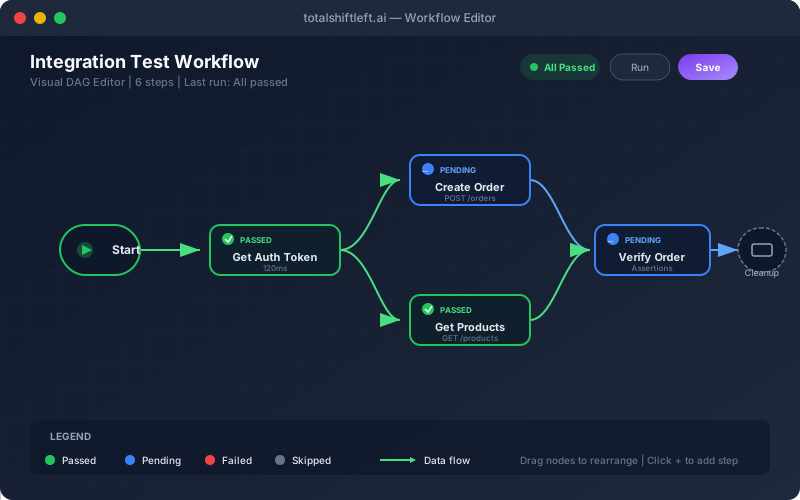
Integration Test Workflows let you build multi-step API testing scenarios using a visual flow editor. Connect API calls in sequence, pass data between them, add conditional logic, and validate the entire workflow end-to-end — perfect for testing business processes that span multiple endpoints. For example: create a user (POST /users) → authenticate (POST /auth/login) → create an order (POST /orders using the user ID and auth token) → verify the order (GET /orders/{id}) → delete the user (DELETE /users/{id}). Each node produces an execution report, and the overall workflow report shows a node distribution chart with pass/fail/skip counts.
Overview
Chain multiple API calls into complex workflows with conditional branching, loops, variable passing, and data flow between steps — all without code. The visual DAG (directed acyclic graph) editor lets you build end-to-end business process tests: create a user, authenticate, place an order, verify the order, then clean up. Each node in the workflow can extract response fields and pass them as variables to subsequent nodes. Add conditional branches (if status 201, continue; else, fail) and loops (repeat until inventory is empty). Workflow execution reports show pass/fail at each node with a clear visual map of what ran and where it failed.
Key Capabilities
How It Works
- 1
Open the flow editor and add API call nodes to the canvas
- 2
Connect nodes to define execution order and data flow
- 3
Map response fields from one step to request fields of the next (e.g., $.id → {userId})
- 4
Add conditions (if/else on status code), loops (repeat N times), and assertions at each step
- 5
Execute the workflow and view the node-by-node report with visual flow map
Available on
All Plans
Included in the free trial — no credit card required.
Go deeper
Guides and playbooks that show this capability in practice.
Related Features
Try Workflows Today
Start your 15-day free trial — no credit card required.