
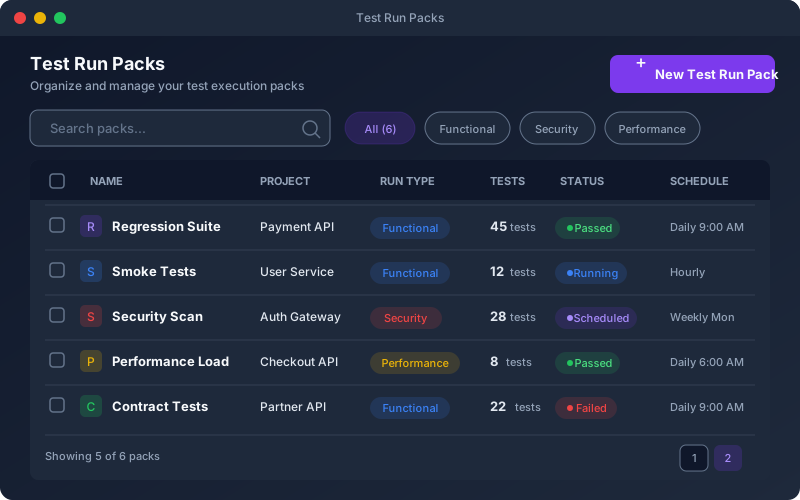
What It Does
Test Packs let you organize your test suite into logical groups for batch execution. Instead of running your entire suite every time, create focused packs for smoke tests, regression, or feature-specific validation. Each pack maintains its own execution history and pass rate trend, making it easy to spot which area of your API is degrading. Packs are the primary unit of execution — they integrate with the scheduler for recurring runs, with CI/CD for automated pipeline testing, and with the Shift-Left Agent for on-premise execution.
Overview
Bundle related tests into packs for batch execution. Create smoke test packs for quick CI checks, full regression packs for nightly runs, or feature-specific packs for sprint validation. Each pack tracks its own pass rate history, so you can see trends at the pack level. Packs can be assigned to schedulers, triggered from CI/CD pipelines, or run on-demand. Toggle individual tests on/off within a pack without removing them, and configure execution settings like target environment and parallelism per pack.
Key Capabilities
How It Works
- 1
Select tests from your project and group them into a named pack
- 2
Configure execution settings: target environment, parallelism, and test ordering
- 3
Run the pack on-demand from the UI, via CI/CD triggers, or on a cron schedule
- 4
View pack-level results with pass/fail breakdown and compare across runs
- 5
Track pack-level trends in the analytics dashboard over time
Available on
All Plans
Included in the free trial — no credit card required.
Go deeper
Guides and playbooks that show this capability in practice.
Try Test Packs Today
Start your 15-day free trial — no credit card required.