
API Test Cases for Login: 40 Cases with Expected Results
Quick answer
Login API test cases check that valid credentials return a token with the right claims and expiry, that every invalid or missing input returns a clear 4xx error, and that the endpoint protects accounts: identical errors for unknown users and wrong passwords, lockout or 429 after repeated failures, HTTPS only, and logout that really ends the session.
Reviewed by Rishi Gaurav
Part of the API Testing hub. Start with the pillar guide: What is API testing? Types, tools and how it works.
Login is the one endpoint every user hits and every attacker tries, so its test suite has to prove two things at once: that real users get in quickly, and that the endpoint gives nothing away to anyone else. This pack gives you 40 login API test cases with inputs and expected results, grouped the way a reviewer will read them. It is part of our API testing fundamentals guide, and if you want more patterns beyond login, the API testing examples post covers 22 more.
The cases assume a typical JSON login endpoint, POST /api/v1/auth/login, that accepts a username (or email) and password and returns an access token, optionally with a refresh token. Adjust paths, field names and status codes to what your API documents: the expected result should always come from your spec or requirements, never from what the API happens to return today.
What a login API test suite must cover
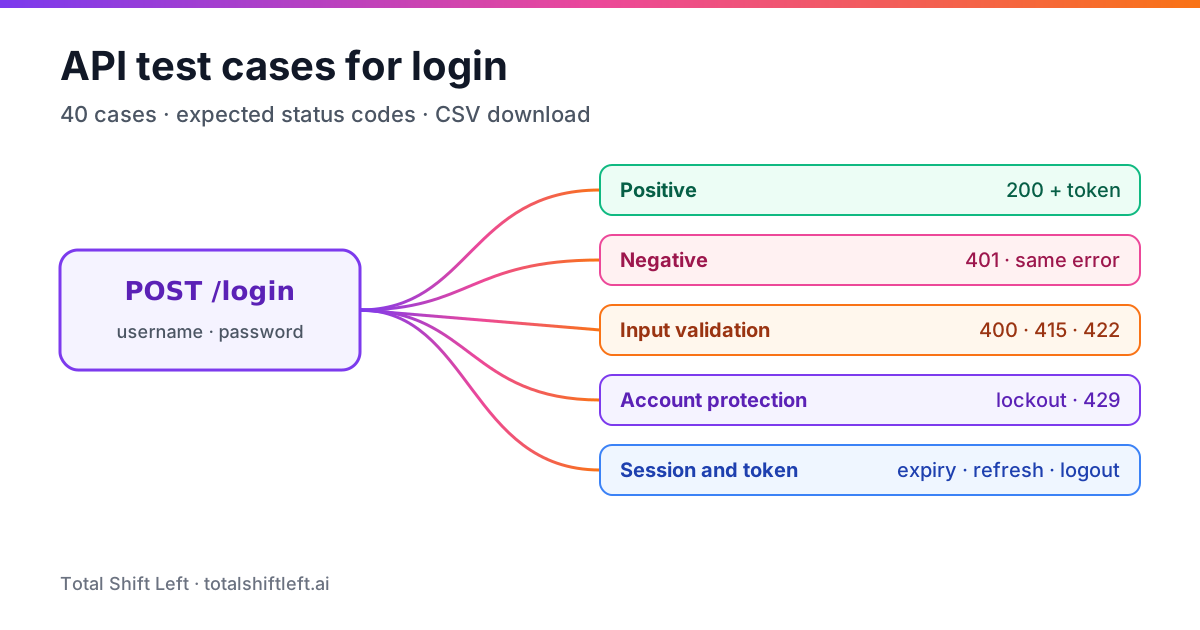
Five groups, each answering a different question:
| Group | Question it answers | Cases |
|---|---|---|
| Positive | Do valid users get a working token? | LGN-001 to LGN-006 |
| Negative | Are wrong credentials and bad account states refused? | LGN-007 to LGN-014 |
| Input validation | Does malformed input get a clean 4xx, never a 500? | LGN-015 to LGN-024 |
| Account protection | Does the endpoint avoid leaking information and resist repeated attempts? | LGN-025 to LGN-033 |
| Session and token | Do tokens expire, refresh and revoke as documented? | LGN-034 to LGN-040 |
Two rules apply to every case. First, a login endpoint must never return 500: any input a client can send should map to a documented 4xx. Second, assert the whole contract, not just the status code: response body shape, headers such as Cache-Control: no-store, and the absence of anything sensitive.
Positive login test cases
| ID | Test case | Input | Expected result |
|---|---|---|---|
| LGN-001 | Valid username and password | Registered user, correct password | 200; body has access_token, token_type: Bearer, expires_in |
| LGN-002 | Valid email as the login identifier | Registered email, correct password | 200; same token shape as LGN-001 |
| LGN-003 | Identifier is case-insensitive where documented | User@Example.com vs user@example.com | 200 for both if the spec says emails are case-insensitive |
| LGN-004 | Token works on a protected endpoint | Token from LGN-001 on GET /me | 200; returns the same user |
| LGN-005 | Token claims are correct | Decode token from LGN-001 | sub is the user id; aud, iss and exp match the spec |
| LGN-006 | Response is not cacheable | Any successful login | Cache-Control: no-store; no token in a Set-Cookie without Secure and HttpOnly |
LGN-004 matters more than it looks: a suite that only checks for a 200 and a token-shaped string will pass even when the token is signed with the wrong key.
Negative login test cases
| ID | Test case | Input | Expected result |
|---|---|---|---|
| LGN-007 | Wrong password | Registered user, wrong password | 401; generic error body |
| LGN-008 | Unknown username | Username that does not exist | 401; same body and similar timing as LGN-007 |
| LGN-009 | Correct password, wrong user | Another user's password | 401 |
| LGN-010 | Disabled or suspended account | Valid credentials of a disabled user | 401 or 403 as documented; no token |
| LGN-011 | Unverified account (if verification is required) | Valid credentials, email not verified | 403 with a documented error code |
| LGN-012 | Password with different case | Correct password, case changed | 401 (passwords are case-sensitive) |
| LGN-013 | Expired password (if the policy exists) | Valid but expired password | Documented response, e.g. 403 with password_expired |
| LGN-014 | Wrong HTTP method | GET /api/v1/auth/login | 405 with an Allow: POST header |
Input validation test cases
| ID | Test case | Input | Expected result |
|---|---|---|---|
| LGN-015 | Missing username | Body without username | 400 or 422; error names the field |
| LGN-016 | Missing password | Body without password | 400 or 422; error names the field |
| LGN-017 | Empty body | {} | 400 or 422 |
| LGN-018 | Empty strings | username: "", password: "" | 400 or 422, not 401 |
| LGN-019 | Wrong types | username: 123, password: true | 400 or 422 |
| LGN-020 | Oversized values | 10,000-character password | 400 or 413; response time stays normal |
| LGN-021 | Malformed JSON | Truncated JSON body | 400 |
| LGN-022 | Wrong content type | Form-encoded body when only JSON is accepted | 415 |
| LGN-023 | Unexpected extra fields | Body with role: "admin" added | Field ignored or 400; never changes the session's privileges |
| LGN-024 | Leading and trailing whitespace | " user@example.com " | Behaves as documented (trimmed or rejected), consistently |
Generate API test cases from your spec (free)
Free, runs in your browser, no sign-up needed.
LGN-020 and LGN-023 are where real defects hide. Oversized passwords can make slow hashing algorithms expensive, and mass-assignment bugs let a client set fields it should never control.
Account protection test cases
These cases verify the protective behaviour your requirements specify. Run them only against your own non-production environment and dedicated test accounts.
| ID | Test case | Input | Expected result |
|---|---|---|---|
| LGN-025 | Generic error message | Compare responses of LGN-007 and LGN-008 | Identical status, body and error code; no "user not found" |
| LGN-026 | Lockout after the configured threshold | N consecutive wrong passwords for one test account | Account locked or challenged as documented; correct password now refused until unlock |
| LGN-027 | Lockout resets after a success | N−1 failures, then a correct login | 200; failure counter resets |
| LGN-028 | Rate limit per client | Requests above the documented rate from one client | 429 with Retry-After |
| LGN-029 | Lockout does not reveal account existence | Repeated failures for an unknown username | Same responses as for a real account |
| LGN-030 | HTTPS only | Call the endpoint over plain HTTP | Refused or redirected; credentials never accepted over HTTP |
| LGN-031 | Credentials not accepted in the URL | Username and password as query parameters | 400; credentials never logged |
| LGN-032 | No secrets in the response | Any login response | No password, hash, salt or internal ids beyond what the spec lists |
| LGN-033 | Login events are audited | Successful and failed logins | Audit log records time, account and outcome, never the password |
If your API uses multi-factor authentication, add cases for a missing second factor, an expired code and a reused code, each returning a documented 4xx without issuing a full session token.
For the wider picture of authentication and authorization testing (roles, object-level access, OAuth flows) see how to test API authentication and authorization and the API security testing checklist.
Generate the spec-derived cases automatically. Paste your OpenAPI spec into the free API test case generator to get missing-field, wrong-type, boundary and missing-or-invalid-auth cases for every operation as a CSV, then add the business-rule cases from this pack.
Session and token test cases
| ID | Test case | Input | Expected result |
|---|---|---|---|
| LGN-034 | Token expires as documented | Call /me after expires_in has passed (use a short-lived test config) | 401 |
| LGN-035 | Refresh returns a new access token | Valid refresh token on POST /auth/refresh | 200; new access token with a later exp |
| LGN-036 | Refresh token rotation (if documented) | Reuse an already-used refresh token | 401; token family revoked as documented |
| LGN-037 | Logout revokes the session | POST /auth/logout, then call /me with the same token | 401 if tokens are revocable; documented behaviour otherwise |
| LGN-038 | Tampered token is rejected | Change one character in the token signature | 401 |
| LGN-039 | Token for another audience is rejected | Token issued for a different service | 401 |
| LGN-040 | Password change ends other sessions (if required) | Change password, then use an old token | 401 |
Automating the pack with pytest
The cases translate directly into parametrised tests. This snippet covers a slice of the negative and validation groups and shows the generic-error check; it uses requests and reads the base URL and test credentials from the environment.
import os
import pytest
import requests

BASE = os.environ["API_BASE_URL"]          # e.g. https://staging.example.com/api/v1
USER = os.environ["LOGIN_TEST_USER"]
PASSWORD = os.environ["LOGIN_TEST_PASSWORD"]
LOGIN = f"{BASE}/auth/login"


def login(body, **kwargs):
    return requests.post(LOGIN, json=body, timeout=10, **kwargs)


def test_lgn_001_valid_login_returns_token():
    r = login({"username": USER, "password": PASSWORD})
    assert r.status_code == 200
    body = r.json()
    assert body["token_type"].lower() == "bearer"
    assert body["expires_in"] > 0
    assert "no-store" in r.headers.get("Cache-Control", "")
    me = requests.get(f"{BASE}/me", headers={"Authorization": f"Bearer {body['access_token']}"}, timeout=10)
    assert me.status_code == 200


@pytest.mark.parametrize(
    "case_id, body, expected",
    [
        ("LGN-015", {"password": "x"}, {400, 422}),
        ("LGN-016", {"username": "someone"}, {400, 422}),
        ("LGN-017", {}, {400, 422}),
        ("LGN-018", {"username": "", "password": ""}, {400, 422}),
        ("LGN-019", {"username": 123, "password": True}, {400, 422}),
    ],
)
def test_validation_cases(case_id, body, expected):
    r = login(body)
    assert r.status_code in expected, case_id
    assert r.status_code != 500, case_id


def test_lgn_025_same_error_for_unknown_user_and_wrong_password():
    wrong_password = login({"username": USER, "password": PASSWORD + "-wrong"})
    unknown_user = login({"username": "no-such-user@example.com", "password": "whatever"})
    assert wrong_password.status_code == unknown_user.status_code == 401
    assert wrong_password.json() == unknown_user.json()
Free ZIP: 5 CSV packs + guide
API Test Case Library
159 ready-made API test cases in five CSV packs: login, pagination, search and filter, auth (API key, JWT, OAuth 2.0) and errors. Copy, adapt, run.
Download FreeKeep lockout cases (LGN-026 to LGN-029) in a separate test module that runs serially, with a fixture that unlocks the test account in teardown, so they never make the rest of the suite flaky.
Common mistakes in login API testing
- Only testing the happy path. One positive case and one wrong-password case is not a login suite; most login defects are validation and session defects.
- Asserting on error text. Assert on status codes and documented error codes; human-readable messages change.
- Hard-coding thresholds. Read lockout and rate-limit values from configuration so the tests follow policy changes.
- Running account-protection cases against shared accounts. Use dedicated test users and reset them in teardown.
- Never calling a protected endpoint. A token-shaped string is not proof that authentication works.
Download the login test case pack
The full pack is available as a CSV with the columns ID, group, test case, input, expected result, type and priority: download api-test-cases-login.csv. Import it into your test management tool or use it as the backlog for automation.
Shift-Left API generates the spec-derived part of this pack (missing and invalid fields, boundaries and auth-missing or auth-invalid cases) from your OpenAPI spec and runs it in CI; the business-rule cases above are the ones your team adds on top. If you want to try that on your own API, the free developer licence covers it.
API test cases for login: FAQ
What are the test cases for a login API?
Cover five groups: positive cases (valid credentials return 200 and a token), negative cases (wrong password, unknown user, disabled account), input validation (missing fields, wrong types, oversized values, wrong content type), account protection (identical error messages, lockout or rate limiting after repeated failures, HTTPS only) and session cases (token expiry, refresh, logout, reuse after logout).
What status code should a failed login return?
401 Unauthorized for wrong credentials, with the same body whether the username exists or not. Use 400 or 422 for malformed requests, 423 or a documented 401 variant for locked accounts, and 429 Too Many Requests with a Retry-After header when a rate limit is hit.
How do you test login lockout without locking real users?
Run lockout cases against dedicated test accounts in a non-production environment, read the threshold from configuration rather than hard-coding it, and reset the account in test teardown through an admin API or a database fixture so the suite stays repeatable.
Should login tests check the token contents?
Yes. Decode the token (without trusting it) and assert the subject, audience, issuer and expiry match what your API documents, and that no sensitive fields such as the password hash appear in it. Then call a protected endpoint with it to prove it actually works.
Can login API test cases be generated automatically?
Partly. A generator can derive missing-field, wrong-type, boundary and missing-or-invalid-auth cases from an OpenAPI spec. Business rules such as lockout thresholds, generic error messages and session revocation still need cases written from your requirements.
Sources and further reading
- RFC 9110: HTTP Semantics — status codes 400, 401, 405, 413, 415
- RFC 6585: Additional HTTP Status Codes — 429 Too Many Requests
- RFC 6749: The OAuth 2.0 Authorization Framework — token responses
- RFC 8725: JSON Web Token Best Current Practices
- OWASP Authentication Cheat Sheet
- OWASP API Security Top 10 (2023): API2 Broken Authentication
- NIST SP 800-63B: Digital Identity Guidelines — Authentication
Ready to shift left with your API testing?
Import your OpenAPI spec and get a runnable test suite, in our cloud or on your own infrastructure.