
GraphQL API Testing
What It Does
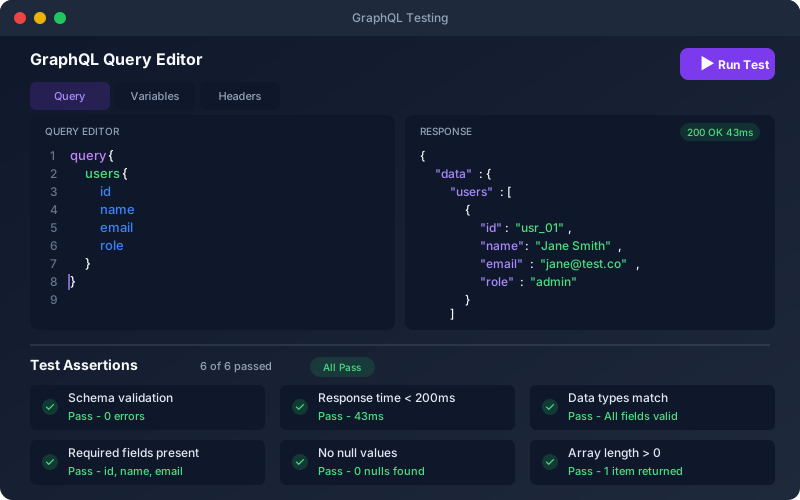
GraphQL API Testing brings the same AI-assisted testing to your GraphQL APIs. The platform introspects your endpoint, or reads your SDL, and turns every query and mutation into a testable endpoint. Generated tests assert that the errors array is empty and that the data you selected exists, because GraphQL often answers 200 even when a call fails. You edit queries and variables in the test editor and run tests in CI/CD just like REST tests, and the security add-on adds GraphQL checks such as introspection exposure and injection through variables.
Overview
Full support for GraphQL APIs over HTTP — test queries and mutations with GraphQL-aware assertions on the errors array and the data you asked for. Configure variables, headers, and authentication per query. Generated tests check that errors is empty and the selected data fields exist, that invalid field selections and wrong variable types are rejected, and that null for a required input is refused. Import your schema from an SDL file, pasted SDL or live introspection (introspection import sends no auth headers, so a protected endpoint needs its SDL). Chain a mutation and a follow-up query in a workflow to verify side effects. All GraphQL tests run on the same execution engine, scheduler, CI/CD pipeline and analytics as REST and SOAP tests.
Key Capabilities
How It Works
- 1
Import your GraphQL endpoint URL (introspected automatically) or upload the SDL
- 2
Edit queries and variables in the test editor
- 3
Tests are generated for typical and edge-case scenarios, including wrong variable types
- 4
Validate responses with assertions on the errors array and data fields
- 5
Run tests in CI/CD, on a schedule, or on-demand alongside REST tests
Available on
All Plans
Included in the free trial — no credit card required.
Documentation
Step-by-step guides for setting up and using GraphQL.
- Import and Discover EndpointsImport endpoints from OpenAPI/Swagger, WSDL, or GraphQL, bring in requirements from your backlog, and detect endpoint changes as your API evolves.
- Endpoint Management: Select and MaintainFind endpoints by method and path, add or edit them by hand, try a request for debugging, and know when to re-import instead of editing the tree manually.
Go deeper
Guides and playbooks that show this capability in practice.