
Connection Settings: Redirects and Certificates
Test a redirect itself, and run against test servers with private certificates, without weakening production.
What It Does
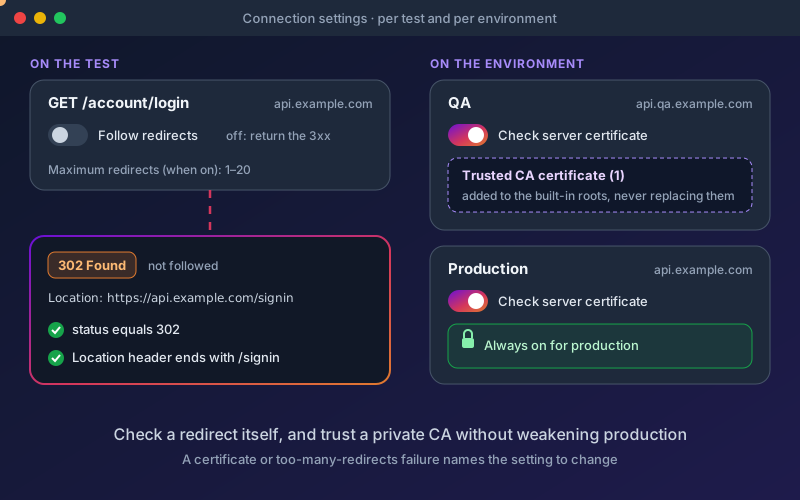
Real APIs redirect, and test environments often use certificates from a private CA. Without these settings a redirect check is impossible, because the response is followed before the test sees it, and a staging server with an internal certificate simply fails to connect. Follow redirects lives on the test, because whether to follow is part of what the test checks. Certificate checking lives on the environment, because it describes the server. A test that keeps the default stores nothing, so existing tests behave exactly as before. The settings travel to every place a test runs: the Run button, schedules, workflow steps, endpoint Try and the local runner. A certificate error or a redirect loop is turned into a sentence that names both ways out, instead of a raw transport error.
Overview
Two connection settings, each at the level it describes. Follow redirects is set per test: follow them (the default) or return the 3xx response as it is, so a test can check a redirect's status and Location header, with a maximum number of redirects to follow. Certificate checking is set per environment: turn it off for a test server, or add a trusted CA certificate that is added to the built-in roots rather than replacing them. Checking can never be turned off for production, whether the environment is marked as production or its name says so. When a run fails on a certificate or on too many redirects, the error names the setting to change.
Key Capabilities
How It Works
- 1
In the test editor, untick Follow redirects to receive the 3xx response, or set Maximum redirects
- 2
Add a check on the redirect status and Location header
- 3
In project settings, open an environment and switch Check server certificate off for a test server, or add a trusted CA certificate
- 4
Run the test anywhere: the Run button, packs, schedules, workflows or the local runner
- 5
If a certificate or redirect problem stops a run, the error names the setting to change
Available on
All Plans
Included in the free trial — no credit card required.
Documentation
Step-by-step guides for setting up and using Redirects & Certificates.
Try Redirects & Certificates Today
Start your 15-day free trial — no credit card required.