
API Quality Gates in CI/CD: What to Measure (2026)
Quick answer
API quality gates are automated CI/CD checkpoints that block deployment when test results fall below a threshold. The four metrics worth gating on are test pass rate (95%+), endpoint coverage (80%+), schema compliance (100%, zero tolerance), and P95 response time (under 500ms for reads). Start in observation mode, set thresholds just below your current baseline, and ratchet up 2-5% each sprint.
Reviewed by Smeet Gohel
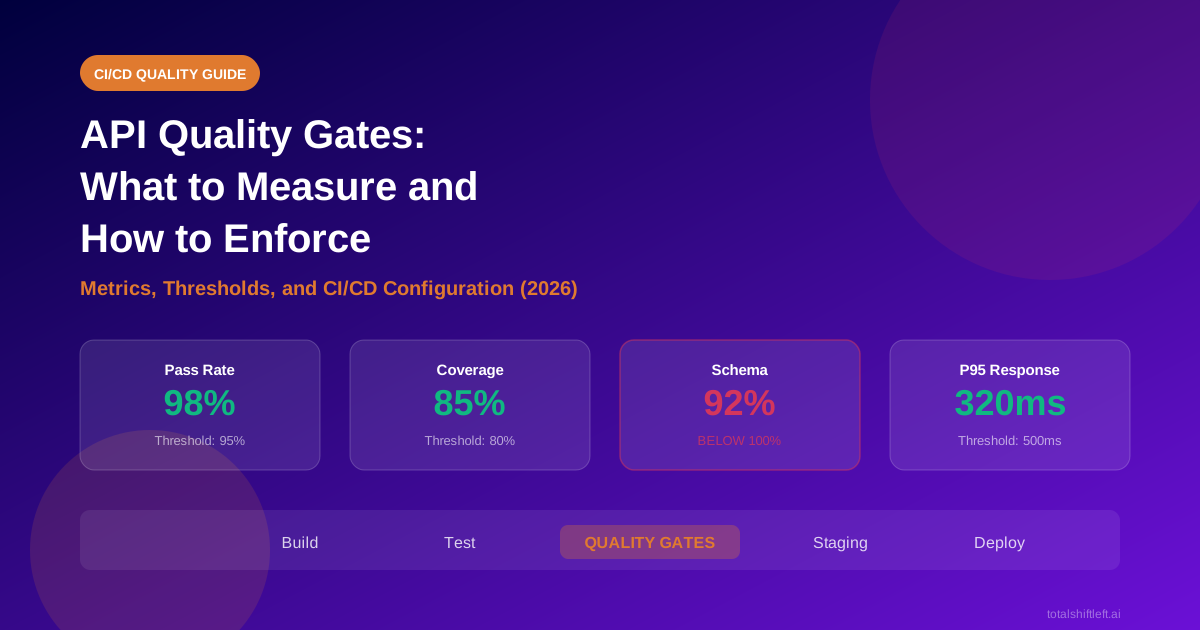
API quality gates are automated checkpoints in a CI/CD pipeline that evaluate test results -- pass rate, endpoint coverage, schema compliance, and response time -- against predefined thresholds. If results fall below the threshold, the pipeline blocks the deployment, preventing broken APIs from reaching production.
In this guide
- What API quality gates are and how they work
- Why quality gates are essential for API-first teams
- The four metrics that matter for quality gates
- Quality gate evaluation workflow
- Tools that support API quality gates
- Real implementation in Azure DevOps and Jenkins
- Common challenges when implementing quality gates
- Best practices for effective quality gates
- Implementation checklist
- Frequently asked questions
A CI/CD pipeline without quality gates is a deployment conveyor belt with no inspector. Code goes in, builds come out, and nobody verifies whether the API actually works until a customer reports a broken integration.
Most teams run API tests in their pipelines. Far fewer teams enforce quality gates that block deployments when those tests reveal problems. The result is a dangerous gap: test results sit in build logs that nobody reads while broken APIs progress toward production. According to industry research, API-related production incidents cost organizations an average of $500,000 per hour in downtime for critical services.
The difference between a team that has tests and a team that has quality is whether test results actually block bad deployments. API quality gates in CI/CD bridge that gap by turning passive test reports into active deployment controls. This guide covers which metrics to gate on, how to set effective thresholds, and how to configure enforcement in Azure DevOps and Jenkins without breaking your delivery flow.
When generation outruns review capacity, the gate has to move from reading diffs to verifying behaviour — testing AI-generated code covers the four checks that hold.
What Are API Quality Gates?
A quality gate is a pass/fail check inserted into your CI/CD pipeline that evaluates a specific metric against a threshold. If the metric meets the threshold, the pipeline continues to the next stage. If it fails, the pipeline stops and the team is notified with the specific failure reason.
For API testing, quality gates evaluate the results of your automated test suite and translate them into deployment decisions. Rather than running tests and hoping someone reads the report, quality gates make the pipeline enforce your quality standards programmatically.
Quality gates operate on a simple principle: define what "good enough to deploy" means in measurable terms, then automate the enforcement. A build where 3 out of 260 API tests fail might seem acceptable when you glance at a report, but a quality gate configured at 95% pass rate will calculate that 98.8% passed, compare it against the threshold, and let the deployment proceed. Change those numbers to 20 failures out of 260 (92.3% pass rate) and the same gate blocks deployment automatically.
This programmatic enforcement removes subjective judgment from deployment decisions. The gate does not care whether the failures look minor or whether a deadline is approaching. It evaluates metrics against thresholds and makes a binary decision.
Why API Quality Gates Matter
Prevent Broken APIs from Reaching Production
Quality gates are the last automated checkpoint before code reaches downstream environments. Without them, a developer's commit that breaks an API contract can flow through the pipeline unchecked. With gates, the pipeline stops the moment test results fall below defined standards, keeping broken APIs out of staging and production.
Reduce Mean Time to Detection
When quality gates catch a regression, the developer who caused it gets feedback within minutes of their commit. Without gates, the same regression might not surface until manual QA testing days later, or worse, until a production incident. This difference in detection time directly affects the cost and complexity of the fix.
Create Accountability Through Measurable Standards
Quality gates transform vague notions of "API quality" into concrete, measurable thresholds that the entire team can see. When the gate is set at 95% pass rate and 80% endpoint coverage, everyone knows exactly what the quality bar is. This shared visibility creates collective ownership -- quality becomes a team responsibility rather than a QA concern.
Scale Quality Enforcement Across Teams
In organizations with multiple API teams and microservices, quality gates provide consistent enforcement without requiring centralized manual review. Each team's pipeline enforces the same standards, and API quality across the organization can be tracked through gate metrics. For teams managing microservices, this scales the shift-left testing approach across all services.
Protect Downstream API Consumers
When your API serves as a dependency for other teams or external clients, a broken contract has cascading effects. Quality gates that include schema compliance checks ensure that your API responses continue to match the documented contract, protecting every consumer from unexpected breaking changes.
Key Metrics for API Quality Gates
Not every metric deserves a gate. Gate on too many things and your pipeline becomes brittle and frustrating. Gate on too few and defects escape to production. These four metrics cover the critical dimensions of API quality without adding unnecessary complexity.
Test Pass Rate
What it measures: The percentage of API tests that pass in a given pipeline run.
Why it matters: A failing test means something is broken. A pass rate below your threshold means too many things are broken to ship safely. This is the most fundamental quality gate metric.
Recommended threshold: Start at 90-95% and increase to 98-100% as your test suite stabilizes and flaky tests are eliminated. Allow a small margin initially to account for test instability while you fix known issues, but never leave it below 90% permanently.
Common mistake: Setting the threshold at 100% on day one. A single flaky test triggers a pipeline failure, which leads teams to disable the gate entirely. Ratchet up gradually, increasing by 2-5% each sprint.
Endpoint Coverage Percentage
What it measures: The percentage of your documented API endpoints that have at least one automated test.
Why it matters: A 100% test pass rate means nothing if you are only testing 30% of your endpoints. Coverage reveals the blind spots -- endpoints that could break without any test catching it.
Recommended threshold: 80% minimum for established APIs. New APIs under active development can start at 60% and increase as endpoints stabilize. Tools like Shift-Left API calculate endpoint coverage automatically from your OpenAPI specification.
How to improve: Use spec-driven test generation to create tests from your OpenAPI spec automatically. This approach generates tests for every documented endpoint, method, and status code, dramatically improving coverage without manual test authoring.
Schema Compliance Rate
What it measures: The percentage of API responses that match their documented schema -- correct field names, data types, required fields, and value formats.
Why it matters: Schema drift is one of the most common causes of integration failures. A response that returns a number where consumers expect a string will break downstream systems silently, often without triggering functional test failures.
Recommended threshold: 100%. Schema compliance is binary -- either the response matches the documented contract or it does not. Any deviation is a potential breaking change for API consumers.
How to enforce: Validate every response against the OpenAPI schema as part of your test execution. This is distinct from functional testing; a test can pass functionally while returning a schema-violating response. For microservices, extend schema validation with contract testing to verify producer-consumer agreements across service boundaries.
Response Time Thresholds
What it measures: Whether API endpoints respond within acceptable time limits, typically measured at the P95 percentile.
Why it matters: A functionally correct response that takes 8 seconds is still a broken experience for users and downstream services. Performance gates catch gradual degradation before it impacts production.
Ready to shift left with your API testing?
Try our no-code API test automation platform free. Generate tests from OpenAPI, run in CI/CD, and scale quality.
Recommended threshold: Set per-endpoint category. Common thresholds: P95 response time under 500ms for read (GET) operations, under 2000ms for write operations (POST/PUT/DELETE). Adjust based on your SLAs and user expectations.
Caveat: CI/CD environments often have different hardware characteristics than production. When possible, gate on relative degradation (this build is 40% slower than baseline) rather than absolute values. Alternatively, establish CI-specific thresholds calibrated to your test environment's performance profile.
Where the threshold should live: a P95 number in a pipeline script is easy to lose track of. In Shift-Left API, response-time limits can be written as performance targets that are judged on ordinary functional runs and again inside load tests, and a target linked to a requirement shows as met or missed in the traceability matrix's "Under load" column. Load-test baselines are compared with a statistical test over P95, so normal run-to-run variation is not reported as a regression — the relative-degradation gate described above, without hand-tuned noise margins. Performance and load testing is a paid add-on to Shift-Left API licences; the Trial includes it.
API Quality Gate Architecture
The diagram below shows the end-to-end quality gate evaluation workflow, from test execution through metric collection, threshold comparison, and the final gate decision.
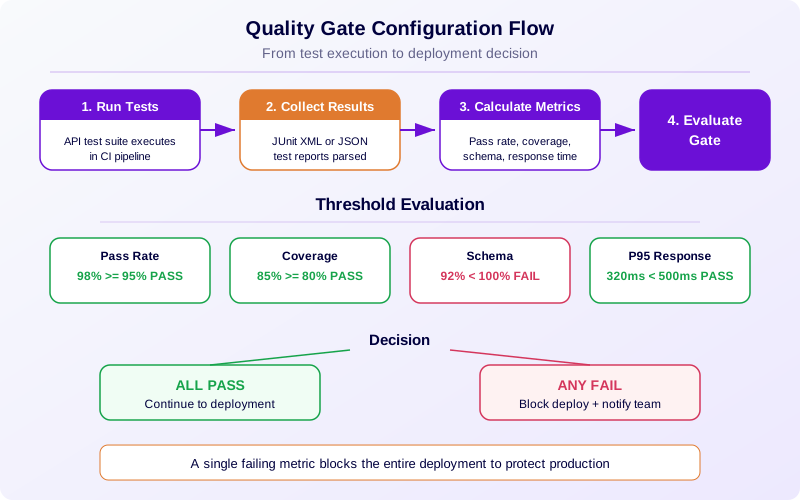
The workflow follows four steps:
Step 1 -- Test Execution. The API test suite runs against the test environment, producing JUnit XML results and coverage reports. The raw output includes individual test pass/fail results, response payloads for schema validation, and timing data for performance evaluation.
Step 2 -- Metric Collection. The pipeline parses test results and calculates the four key metrics: pass rate (passed tests divided by total tests), endpoint coverage (tested endpoints divided by documented endpoints), schema compliance (valid responses divided by total responses), and P95 response time.
Step 3 -- Threshold Comparison. Each collected metric is compared against its configured threshold. The comparison is binary -- each metric either meets the threshold or it does not. All thresholds must be met for the gate to pass.
Step 4 -- Gate Decision. If all thresholds are met, the pipeline continues to deployment, publishes the test report to the dashboard, and notifies the team of the successful gate. If any threshold fails, the pipeline blocks deployment, logs the specific failure reason, and notifies the developer who triggered the build.
Tools for API Quality Gates
| Tool | Built-in Quality Gates | Coverage Tracking | Schema Validation | CI/CD Integration |
|---|---|---|---|---|
| Shift-Left API | Yes -- pass-rate gate in the CI runner; security findings gated by severity (add-on) | Automatic from OpenAPI spec and requirements | Built-in contract validation | First-party GitHub Actions, Azure DevOps, Jenkins; REST API for other CI |
| Postman / Newman | No -- requires custom scripts | No -- manual tracking | Limited -- via test scripts | CLI integration, custom gate scripts |
| REST Assured | No -- requires test framework config | No -- manual tracking | Via JSON Schema validation library | Maven/Gradle build integration |
| Pact | Contract gates only | N/A -- contract-focused | Core feature | CLI and build plugin |
| SonarQube | Code quality gates | Code coverage only | No | Plugin for most CI/CD platforms |
| Custom Scripts | Fully customizable | Requires manual implementation | Requires manual implementation | Any platform via shell/PowerShell |
Platform-native quality gates like those in Shift-Left API provide the fastest path to enforcement because the metrics are calculated by the platform rather than by a parsing script: its CI runner executes a test pack, writes JUnit XML and a JSON summary, and fails the build when the pass rate drops below your threshold. Custom script approaches offer maximum flexibility but require ongoing maintenance as your metrics and thresholds evolve.
API quality gates in practice: a worked example
Azure DevOps Quality Gate Configuration
In Azure DevOps, quality gate enforcement combines the PublishTestResults task with a custom evaluation script that reads results and compares them against thresholds.
The pipeline flow is: deploy to the test environment, run the API test suite (producing JUnit XML), publish test results to the Azure DevOps UI using PublishTestResults, then execute a gate evaluation script. The script parses the JUnit XML to calculate pass rate, reads the coverage report for endpoint percentage, and exits with a non-zero code if any metric falls below the threshold. A non-zero exit code automatically fails the pipeline stage.
For release pipelines with multiple environments, configure the quality gate stage as a dependency between environments. Tests must pass against staging before the production deployment stage is allowed to execute. Azure DevOps stage conditions enforce this dependency automatically.
Teams using Shift-Left API can skip custom gate scripts entirely -- the platform provides built-in quality gate evaluation that integrates directly with Azure DevOps pipeline tasks.
Jenkins Quality Gate Configuration
In Jenkins declarative pipelines, quality gates fit into a post-test evaluation stage. The Jenkinsfile defines a stage that runs after API test execution, parses the JUnit XML results, calculates metrics, and uses the error step to fail the build when any metric breaches its threshold.
An alternative approach uses the Jenkins Quality Gates plugin, which lets you define thresholds in the Jenkins UI rather than in pipeline code. The plugin evaluates published test results against configured thresholds and sets the build status accordingly.
For either approach, the critical requirement is that the gate evaluation happens between test execution and deployment. The gate must have authority to stop the pipeline -- a gate that logs warnings but allows deployment to proceed is not a gate at all.
Phased Rollout: From Observation to Full Enforcement
The most common failure when implementing quality gates is setting aggressive thresholds immediately, watching the pipeline fail repeatedly, and then disabling the gates. The phased rollout strategy avoids this by starting in observation mode and tightening gradually.
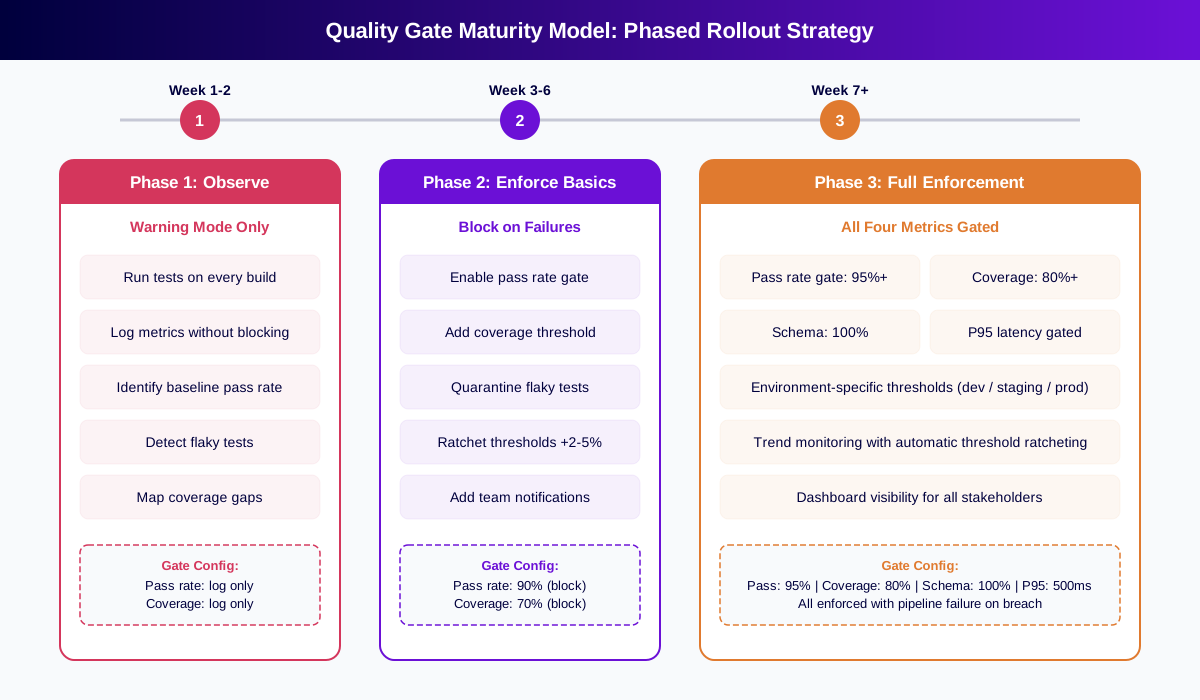
Phase 1 (Weeks 1-2): Observe. Run gates in warning mode. Log all four metrics on every build without blocking deployments. This establishes your baseline -- you discover your actual pass rate, coverage level, and typical response times.
Phase 2 (Weeks 3-6): Enforce basics. Enable blocking gates for pass rate and coverage, set at thresholds just below your observed baselines. If your average pass rate is 93%, set the gate at 90%. Quarantine and fix flaky tests. Ratchet thresholds upward by 2-5% each sprint.
Phase 3 (Week 7+): Full enforcement. Add schema compliance (100%) and response time gates. Configure environment-specific thresholds (looser for development, stricter for production). Implement trend monitoring with automatic threshold ratcheting.
Common Challenges with API Quality Gates
Flaky Tests Triggering False Gate Failures
Flaky tests -- tests that pass and fail inconsistently -- are the number one enemy of quality gates. A single flaky test can block an entire deployment pipeline, eroding team trust in the gate system. The solution is a quarantine process: identify flaky tests through trend analysis, move them to a non-blocking test suite, fix the root cause (usually shared test data, timing issues, or external dependencies), and reintroduce them to the gated suite only after they demonstrate stability. See the API regression testing guide for detailed strategies.
Quarantine works better when the first triage step is not a human reading logs. Shift-Left API's run failure analysis groups a red run into a few causes and labels each one — test defect, data issue, environment problem or suspected product bug — based on what the server actually returned, so a gate failure caused by an expired sign-in or a rate-limited staging gateway is visibly different from a real regression. Proposed fixes are applied to every test sharing a cause only when someone accepts them, and a suspected product bug is never "fixed" by loosening the test.
Free YAML templates + guide
CI/CD Testing Pipeline Templates
Production-ready CI/CD pipeline templates for GitHub Actions and GitLab CI. Includes API testing, contract testing, and performance testing stages.
Download FreeChoosing Between Strict and Lenient Thresholds
Too strict and the pipeline blocks constantly, frustrating developers and leading to gate removal. Too lenient and defects escape to production. The answer is progressive tightening: start below your baseline, ratchet upward each sprint, and differentiate by environment. Development pipelines can be more lenient; production deployment gates should be strict.
The same tension appears when a security gate is added to an existing API. Turning it on usually surfaces a backlog of older findings, and a gate that fails on all of them gets switched off by Friday. Shift-Left API's security testing, a paid add-on that the Trial includes, handles this with two CI flags: --fail-on-severity sets the bar, and --only-new fails the build only on findings this change introduced, so the gate can be enforced on day one while the backlog is worked down separately.
Coverage Calculation Without Proper Tooling
Endpoint coverage requires mapping test results to your API specification -- knowing which endpoints have tests and which do not. Without tooling that performs this mapping automatically, coverage tracking becomes a manual spreadsheet exercise that quickly falls out of date. Use tools that calculate coverage from your OpenAPI spec automatically, or invest in building the mapping into your test framework. For guidance on measuring coverage effectively, see how to measure API test coverage.
Managing Quality Gates Across Microservices
In a microservices architecture, each service has its own API, test suite, and pipeline. Quality gate thresholds may need to vary by service maturity -- a new service in active development might gate at 70% coverage while a stable production service gates at 90%. The key is establishing organization-wide minimums while allowing teams to set stricter thresholds for their services.
Gate Bypass Pressure During Deadlines
Under deadline pressure, teams may push to disable gates temporarily to ship a release. Every "temporary" gate bypass creates a precedent that undermines the entire system. Instead, implement an escalation path: if a gate must be overridden, it requires explicit approval from a designated owner, the override is logged and time-limited, and a follow-up task is created automatically to address the underlying quality issue.
Best Practices for API Quality Gates
-
Start in observation mode before enforcing. Run gates in warning mode for 1-2 weeks to establish baselines. This prevents the common pattern of aggressive thresholds leading to gate removal.
-
Gate on the four metrics that matter -- pass rate, endpoint coverage, schema compliance, and response time. These cover functional correctness, test breadth, contract integrity, and performance. Adding more metrics increases noise without proportional value.
-
Set initial thresholds below current performance and ratchet upward by 2-5% per sprint. If your current pass rate is 92%, start the gate at 90%. This catches regressions without failing on existing known issues.
-
Fix flaky tests immediately rather than raising the failure tolerance. A flaky test that fails randomly erodes trust in your entire gate system. Quarantine it, fix it, and reintroduce it.
-
Differentiate thresholds by environment. Development pipelines might gate only on pass rate. Staging adds coverage. Production deployment gates enforce all four metrics at their strictest thresholds.
-
Automate coverage calculation from your OpenAPI spec rather than tracking it manually. Manual coverage tracking becomes stale within days. Spec-driven tools keep coverage metrics accurate automatically.
-
Make gate results visible to the entire team through a live dashboard tracking pass rate, coverage, and response-time trends. Visibility turns gates from a developer annoyance into a shared quality metric.
-
Never gate on metrics you cannot act on. If your team cannot fix response time issues because they depend on infrastructure changes outside their control, gating on response time will only block deployments without improving quality. Gate only on metrics your team can directly influence.
-
Version your gate configuration alongside your pipeline code. Threshold changes should go through the same review process as application changes.
-
Log every gate evaluation -- both passes and failures -- to build a trend dataset. Gate trends reveal quality trajectory better than any single build result.
API Quality Gate Checklist
Use this checklist when setting up or auditing your API quality gates:
- ✔ Test pass rate gate configured with threshold starting at 90-95%
- ✔ Endpoint coverage gate configured with threshold starting at 70-80%
- ✔ Schema compliance gate set to 100% (zero tolerance for contract violations)
- ✔ Response time P95 gate configured per endpoint category (500ms reads, 2000ms writes)
- ✔ Gates configured to block pipeline progression (not just log warnings)
- ✔ Flaky test quarantine process established to prevent false gate failures
- ✔ Thresholds set below current baseline with documented ratcheting schedule
- ✔ Environment-specific thresholds defined (development, staging, production)
- ✔ Coverage tracking automated from OpenAPI specification
- ✔ Gate results published to team-visible dashboard with trend visualization
- ✔ Override/bypass process documented with required approval and time limits
- ✔ Gate configuration version-controlled and reviewed through pull requests
See also: contract testing in our learn hub for the underlying concept.
A quality gate that actually blocks the deploy
A gate is only a gate if the job fails. This one enforces three thresholds — no breaking spec change, endpoint coverage above the floor, and no failing contract test — and the deploy job depends on it:
# .github/workflows/deploy.yml
jobs:
  gate:
    runs-on: ubuntu-latest
    outputs: { passed: ${{ steps.check.outputs.passed }} }
    steps:
      - uses: actions/checkout@v4
        with: { fetch-depth: 0 }
      - name: Breaking-change check
        run: |
          git show origin/main:openapi.yaml > /tmp/base.yaml
          docker run --rm -v /tmp:/tmp -v "$PWD:/w" tufin/oasdiff \
            breaking /tmp/base.yaml /w/openapi.yaml --fail-on ERR
      - name: Contract tests
        run: schemathesis run openapi.yaml --url "$STAGING" --checks all
      - id: check
        name: Coverage floor
        run: |
          COV=$(jq -r '.endpointCoverage' coverage.json)
          echo "endpoint coverage: ${COV}%"
          awk "BEGIN {exit !($COV >= 80)}" || { echo "::error::coverage $COV% < 80%"; exit 1; }
          echo "passed=true" >> "$GITHUB_OUTPUT"

  deploy:
    needs: gate
    if: needs.gate.outputs.passed == 'true'
    runs-on: ubuntu-latest
    steps: [{ run: ./deploy.sh }]
Frequently asked questions about API quality gates
What are API quality gates in CI/CD?
API quality gates are automated checkpoints that evaluate your API test results against predefined thresholds. If results fall below the threshold -- for example, test pass rate below 95% or endpoint coverage below 80% -- the pipeline fails and deployment is blocked automatically, preventing broken APIs from reaching production.
What metrics should I use for API quality gates?
The four most effective metrics are test pass rate (minimum 95%), endpoint coverage percentage (minimum 80%), schema compliance rate (must be 100%), and response time thresholds (P95 under 500ms for reads). Start with pass rate and coverage, then add schema compliance and performance gates as your testing matures.
How do I add API quality gates to Azure DevOps?
Run your API tests as a pipeline task producing JUnit XML. Use PublishTestResults to display results, then add a script task that parses results and compares metrics against thresholds. Exit with a non-zero code when thresholds are not met. Configure stage dependencies so a gate failure prevents deployment automatically.
How do I add API quality gates to Jenkins?
Add a post-test stage in your Jenkinsfile that parses results and uses the error step to fail the build when metrics breach thresholds. Alternatively, use the Quality Gates plugin to define thresholds in the Jenkins UI. Ensure the gate evaluation sits between test execution and deployment stages.
What is a good starting threshold for API quality gates?
Start just below your current performance. If your pass rate averages 92%, set the gate at 90%. Ratchet upward by 2-5% each sprint. This catches regressions without breaking flow. Jumping directly to 100% causes teams to disable gates entirely.
How do quality gates differ from just running API tests?
Running tests produces reports. Quality gates make the pipeline enforce standards programmatically. If metrics fall below thresholds, deployment stops automatically -- no human needs to read the report. The difference is between having tests and having automated quality enforcement in CI/CD.
Sources and further reading
- DORA State of DevOps research — the multi-year dataset behind the four delivery metrics.
- oasdiff — breaking-change detection between two OpenAPI documents.
- GitHub Actions documentation — workflow syntax, caching and matrix builds.
Key takeaways
- API quality gates transform your CI/CD pipeline from a deployment conveyor belt into an automated quality enforcement system.
- The key is choosing the right four metrics -- pass rate, endpoint coverage, schema compliance, and response time -- and rolling out enforcement gradually rather than jumping to strict thresholds on day one.
- Start in observation mode to establish your baselines, enforce basic gates with conservative thresholds, and ratchet upward as your test suite and processes mature.
- The teams that ship reliable APIs are not the teams with the most tests -- they are the teams whose pipelines enforce quality on every single change.
Ready to add quality gates to your API pipeline? Start a free 15-day trial of Shift-Left API -- import your OpenAPI spec and get built-in quality gate enforcement with zero custom scripting. Solo developer? Get the free Citizen Developer Edition — single-user. See pricing plans for team options.
Ready to shift left with your API testing?
Try our no-code API test automation platform free.