
API Testing in GitHub Actions: Complete Workflow Guide (2026)
Quick answer
Add a workflow YAML in .github/workflows/ that triggers on push and pull_request, runs your API test command, and uploads JUnit results with actions/upload-artifact. Use dorny/test-reporter for PR check annotations, GitHub Environments with scoped secrets for staging/production, matrix strategy with fail-fast: false for parallel per-service runs, and branch protection rules requiring the test job to pass before merge.
Reviewed by Rishi Gaurav
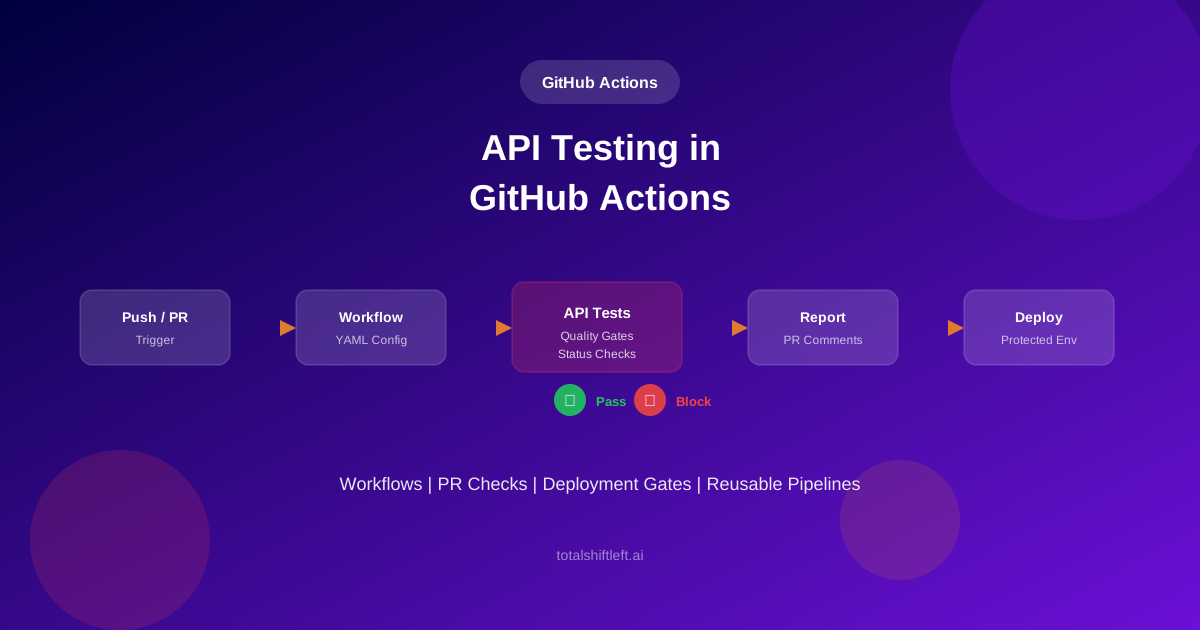
Automating API tests in GitHub Actions means every pull request and every push triggers a workflow that validates your API contracts, enforces quality gates, and reports results before code reaches production.
In this guide
- Why GitHub Actions fits API testing workflows
- How workflow YAML structure works for API tests
- Configuring triggers for push, PR, and schedule
- Running tests in parallel with matrix strategy
- Managing secrets and environments
- PR status checks and branch protection
- Deployment protection rules
- Building reusable workflows
- Test reporting and PR comments
- Caching dependencies for faster runs
- Real-world workflow example
- Common mistakes and how to avoid them
- Best practices for GitHub Actions API testing
- Implementation checklist
- Frequently asked questions
GitHub Actions has become the default CI/CD platform for teams hosting code on GitHub. Yet many teams still run API tests manually or bolt them on as an afterthought -- a separate script that somebody remembers to trigger before a release. The result is predictable: broken API contracts slip through pull requests, reach staging, and cost the team hours of debugging that an automated workflow would have caught in minutes.
This guide walks through building a complete API testing workflow in GitHub Actions from scratch. You will configure workflow YAML files, set up triggers for pull requests and scheduled runs, run tests in parallel with matrix strategies, enforce quality gates through branch protection, and create reusable workflows that standardize testing across your organization. If you are new to CI/CD API testing concepts, start with the complete guide to API testing in CI/CD pipelines for foundational patterns that apply across all platforms.
For the tool landscape underneath this, see continuous integration testing tools — what each one integrates with and where it fits in the pipeline.
Why GitHub Actions Fits API Testing Workflows
GitHub Actions runs directly inside your repository, eliminating the context switch between where code lives and where tests run. Pull request status checks, deployment environments, and branch protection rules are native features -- not third-party integrations you need to maintain separately.
Three characteristics make GitHub Actions particularly effective for API testing. First, workflow-as-code means your test pipeline lives alongside your application code and API specifications in the same repository. Changes to tests, workflow configuration, and application code move through the same review process. Second, the marketplace provides pre-built actions for test reporting, artifact management, and notification that would take custom scripting on other platforms. Third, GitHub Environments provide built-in secret scoping and deployment protection rules that map directly to the staged testing approach described in the API quality gates guide.
For teams already using GitHub for source control, adding API tests to GitHub Actions removes an entire category of integration complexity. There is no external CI server to provision, no webhook configuration to maintain, and no credential synchronization between systems. A testing platform with a first-party GitHub Action drops straight into this workflow as a single step rather than a hand-rolled script — Shift-Left API ships one, alongside first-party Jenkins and Azure DevOps integrations (see CI/CD integrations).
GitHub Actions Workflow Structure for API Tests
Every GitHub Actions workflow lives in a YAML file inside the .github/workflows/ directory. The file defines when the workflow runs (triggers), what infrastructure it uses (runners), and what steps execute (jobs and steps).
A minimal API testing workflow contains three elements: a trigger that starts the workflow, a job that defines the execution environment, and steps within that job that check out code, run tests, and publish results.
name: API Tests
on:
  push:
    branches: [main]
  pull_request:
    branches: [main]

jobs:
  api-tests:
    runs-on: ubuntu-latest
    steps:
      - uses: actions/checkout@v4
      - name: Run API tests
        run: ./scripts/run-api-tests.sh --spec openapi.yaml --output junit
        env:
          API_BASE_URL: ${{ secrets.API_BASE_URL }}
          API_KEY: ${{ secrets.API_KEY }}
      - uses: actions/upload-artifact@v4
        with:
          name: test-results
          path: results/*.xml
This structure scales from a single test job to complex multi-stage pipelines. The key is that every element -- triggers, environments, secrets, and job dependencies -- is declared in the YAML and versioned with your code. (./scripts/run-api-tests.sh in this guide's examples stands in for whatever runs your tests, such as Newman, pytest or a framework CLI; the next section shows the step Shift-Left API actually ships.)
Using the official Shift-Left API action
If your tests live in Shift-Left API, the run step is the official action rather than a CLI call. It authenticates to your deployment, triggers a test pack, waits for the run, applies a pass-rate gate and writes JUnit XML plus a JSON summary into the workspace — one step, no scripting:
      - name: Run API test pack
        id: api-tests
        uses: Total-Shift-Left/Shift-Left-API-Integrations/github-actions@v1
        with:
          server-url: ${{ secrets.SHIFTLEFT_URL }}
          api-email: ${{ secrets.SHIFTLEFT_EMAIL }}
          api-password: ${{ secrets.SHIFTLEFT_PASSWORD }}
          pack-id: ${{ vars.SHIFTLEFT_TEST_PACK_ID }}
          pass-threshold-percent: '95'
The JUnit file (shiftleft-test-pack-results.xml by default) feeds any test-reporter action, and step outputs such as decision, success_rate and execution_id are available to later steps and PR comments. It runs on GitHub-hosted or self-hosted runners — the latter when your deployment sits behind a firewall — and parallelises with a matrix over pack ids like any other step.
Workflow Triggers for API Testing
Choosing the right triggers determines when your API tests run and what events they validate. GitHub Actions supports several trigger types, and most API testing workflows combine two or three.
Push triggers run tests whenever code lands on a specific branch. Use push on your main branch to validate every merge. Pull request triggers run tests on every PR, providing feedback before code merges. This is the primary mechanism for shift-left API validation. Schedule triggers run tests on a cron schedule, useful for detecting environment drift or third-party API changes that happen without code changes. Workflow dispatch enables manual triggering for ad-hoc test runs or debugging.
on:
  push:
    branches: [main]
  pull_request:
    branches: [main]
  schedule:
    - cron: '0 6 * * 1-5'  # Weekdays at 6 AM UTC
  workflow_dispatch:
    inputs:
      environment:
        description: 'Target environment'
        required: true
        default: 'staging'
        type: choice
        options: [staging, production]
For most teams, the combination of pull_request and push to main covers the critical paths. Add schedule when your APIs depend on external services or when you need to detect configuration drift in test environments. The CI/CD pipeline automation guide covers trigger strategy in more depth across platforms.
Matrix Strategy for Parallel API Tests
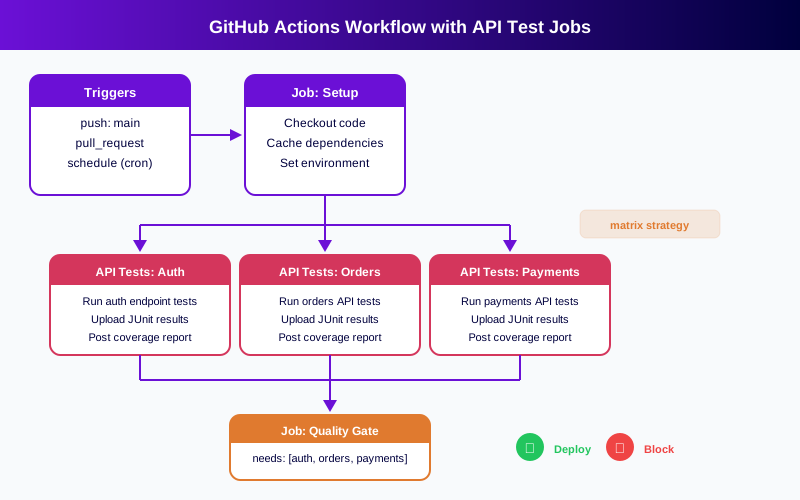
Running all API tests in a single sequential job works for small suites, but execution time grows linearly with test count. GitHub Actions matrix strategy solves this by splitting tests across multiple parallel jobs, each running a different slice of your test suite.
The diagram below shows how a setup job fans out into parallel API test jobs, each handling a different service domain, before converging at a quality gate job.
jobs:
  api-tests:
    runs-on: ubuntu-latest
    strategy:
      matrix:
        service: [auth, orders, payments, inventory]
      fail-fast: false
    steps:
      - uses: actions/checkout@v4
      - name: Run API tests for ${{ matrix.service }}
        run: ./scripts/run-api-tests.sh --spec specs/${{ matrix.service }}.yaml --output junit
        env:
          API_BASE_URL: ${{ secrets.API_BASE_URL }}
      - uses: actions/upload-artifact@v4
        with:
          name: results-${{ matrix.service }}
          path: results/*.xml
Ready to shift left with your API testing?
Try our no-code API test automation platform free. Generate tests from OpenAPI, run in CI/CD, and scale quality.
Setting fail-fast: false is important for API testing -- you want all service tests to complete so the team sees the full picture of what passed and what failed, rather than stopping at the first failure. Each matrix job runs on its own runner, so a four-service matrix runs in roughly the same wall-clock time as a single service.
Secrets and Environments Management
API tests need credentials: base URLs, API keys, authentication tokens. Hardcoding these values in workflow files or test configurations is a security risk and makes environment switching painful.
GitHub provides two scoping levels for secrets. Repository secrets are available to all workflows in the repository. Environment secrets are scoped to a specific named environment and only accessible to jobs that declare that environment.
jobs:
  test-staging:
    runs-on: ubuntu-latest
    environment: staging
    steps:
      - uses: actions/checkout@v4
      - name: Run API tests
        run: ./scripts/run-api-tests.sh --spec openapi.yaml
        env:
          API_BASE_URL: ${{ secrets.STAGING_API_URL }}
          API_KEY: ${{ secrets.STAGING_API_KEY }}
Environment secrets provide an additional benefit: they pair with deployment protection rules. A production environment can require manual approval before any job using its secrets executes, creating a human checkpoint before production-targeted tests or deployments run.
Store API base URLs, authentication tokens, and test configuration values as secrets. Never commit these to your repository, even in encrypted form. A platform that owns target-API authentication shrinks this list: in Shift-Left API, tests authenticate through authentication profiles tied to each environment (OAuth 2.0 with automatic refresh, JWT Bearer signing, NTLM, multi-step sign-in and more), so the workflow only holds the platform URL and API user, not every token the tests send. For teams managing multiple API environments, create a GitHub Environment for each (development, staging, production) with its own set of secrets and protection rules.
PR Status Checks and Branch Protection
Running API tests on pull requests is only half the equation. Without branch protection rules, a developer can merge a PR even when tests fail. Status checks close this gap by making merge conditional on workflow success.
The flow works in two parts. First, your workflow runs on pull_request events and reports a status check (pass or fail) on the PR. Second, branch protection rules require that status check to pass before the merge button becomes available.
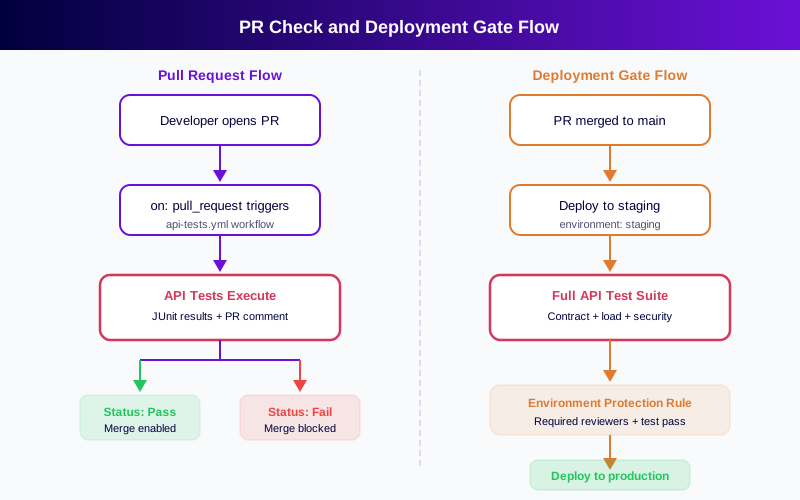
To configure this, go to your repository settings, navigate to Branches, and add a branch protection rule for your main branch. Under "Require status checks to pass before merging," select the API test workflow job name. Now every PR must pass API tests before it can merge -- no exceptions, no manual overrides unless an admin explicitly bypasses.
This is where API testing in GitHub Actions becomes a true quality gate rather than just an informational check. The quality gates guide covers what thresholds to enforce, including pass rate, schema compliance, and response time percentiles.
Deployment Protection Rules
Branch protection gates the merge. Deployment protection gates the release. GitHub Environments support protection rules that control when a deployment job can execute, adding a second layer of validation beyond PR checks.
Protection rules include required reviewers (a named person must approve the deployment), wait timers (a cooldown period before deployment proceeds), and custom deployment protection rules that call external APIs to evaluate readiness.
For API testing, the pattern is: PR tests validate the change in isolation, then post-merge tests run the full suite against a staging environment before the production deployment job can proceed. Configure the production environment to require that the staging test job passes as a deployment protection rule.
jobs:
  deploy-production:
    runs-on: ubuntu-latest
    needs: [test-staging]
    environment:
      name: production
      url: https://api.example.com
    steps:
      - name: Deploy to production
        run: ./deploy.sh production
The needs keyword ensures that the production deployment job only starts after the staging tests complete. Combined with environment protection rules, this creates a two-gate system: tests must pass (automated gate) and a reviewer must approve (human gate) before production deployment proceeds. Teams building Azure DevOps pipelines use a similar staged approach with release gates and approvals.
Reusable Workflows for API Testing
When your organization has multiple repositories with APIs, duplicating workflow YAML across repositories creates maintenance burden. A change to your testing approach requires updating dozens of files. Reusable workflows solve this by letting you define a workflow once and call it from other workflows.
Create a reusable workflow in a central repository:
# .github/workflows/api-test-reusable.yml
name: Reusable API Tests
on:
  workflow_call:
    inputs:
      spec-path:
        required: true
        type: string
      environment:
        required: false
        type: string
        default: staging
    secrets:
      api-key:
        required: true

jobs:
  test:
    runs-on: ubuntu-latest
    environment: ${{ inputs.environment }}
    steps:
      - uses: actions/checkout@v4
      - name: Run API tests
        run: ./scripts/run-api-tests.sh --spec ${{ inputs.spec-path }} --output junit
        env:
          API_KEY: ${{ secrets.api-key }}
      - uses: dorny/test-reporter@v1
        if: always()
        with:
          name: API Test Results
          path: results/*.xml
          reporter: java-junit
Consuming repositories call it with minimal configuration:
jobs:
  api-tests:
    uses: your-org/workflows/.github/workflows/api-test-reusable.yml@main
    with:
      spec-path: openapi.yaml
      environment: staging
    secrets:
      api-key: ${{ secrets.API_KEY }}
This pattern standardizes API testing across your organization. When you upgrade your testing tool, adjust thresholds, or add reporting steps, you update one workflow and every consuming repository picks up the change automatically.
Test Reporting and PR Comments
Raw workflow logs are difficult to parse. Effective API test reporting puts results where developers already look: on the PR itself.
Three reporting mechanisms work together. Artifacts store full JUnit XML and HTML reports for detailed analysis. Check annotations show test failures inline on the PR's Files Changed tab. PR comments post a summary table with pass/fail counts, coverage metrics, and links to detailed reports.
      - uses: dorny/test-reporter@v1
        if: always()
        with:
          name: API Test Results
          path: results/*.xml
          reporter: java-junit
      - uses: marocchino/sticky-pull-request-comment@v2
        if: github.event_name == 'pull_request'
        with:
          header: api-test-results
          message: |
            ## API Test Results
            | Metric | Value |
            |--------|-------|
            | Total Tests | ${{ env.TOTAL_TESTS }} |
            | Passed | ${{ env.PASSED_TESTS }} |
            | Failed | ${{ env.FAILED_TESTS }} |
            | Pass Rate | ${{ env.PASS_RATE }}% |
The sticky comment action updates the same comment on subsequent pushes rather than creating new ones, keeping the PR conversation clean. For teams generating tests from OpenAPI specs, consider linking the comment to the spec-driven test generation workflow so reviewers can trace test coverage back to the API contract. Linking to the run itself is worth more than pass counts when something fails: Shift-Left API's failed-run analysis groups a red run into a few causes with a verdict — test defect, data issue, environment problem or suspected product bug — which is the first thing a reviewer wants to know.
GitHub code scanning is a second reporting channel worth wiring in for security checks. Shift-Left API's API security testing add-on (paid, on Professional, Custom or Enterprise licences; the Trial includes it) has its runner write a SARIF file for code scanning and fail the build with --fail-on-severity, while --only-new restricts the gate to findings first seen in that run.
Caching Dependencies for Speed
API test workflows that install dependencies on every run waste time downloading the same packages repeatedly. GitHub Actions caching stores dependencies between runs, cutting setup time significantly.
      - uses: actions/cache@v4
        with:
          path: ~/.npm
          key: ${{ runner.os }}-npm-${{ hashFiles('**/package-lock.json') }}
          restore-keys: |
            ${{ runner.os }}-npm-
Free YAML templates + guide
CI/CD Testing Pipeline Templates
Production-ready CI/CD pipeline templates for GitHub Actions and GitLab CI. Includes API testing, contract testing, and performance testing stages.
Download FreeCache by the lock file hash so that the cache invalidates when dependencies change but persists across runs with the same dependency tree. For larger test suites, also cache test configuration files, OpenAPI spec compilations, and any generated test artifacts that do not change between runs.
Caching typically reduces workflow setup time by 30 to 60 seconds per job. In a matrix workflow with four parallel jobs, that adds up to two to four minutes saved per workflow run -- meaningful when workflows trigger on every push and PR.
Real-World Workflow Example
Here is a complete workflow that combines the patterns from previous sections into a production-ready API testing pipeline. It triggers on PRs and pushes to main, runs tests in parallel using matrix strategy, publishes results as PR comments, and enforces quality gates.
name: API Quality Gate
on:
  push:
    branches: [main]
  pull_request:
    branches: [main]

jobs:
  api-tests:
    runs-on: ubuntu-latest
    strategy:
      matrix:
        service: [users, orders, payments]
      fail-fast: false
    environment: staging
    steps:
      - uses: actions/checkout@v4
      - uses: actions/cache@v4
        with:
          path: ~/.npm
          key: ${{ runner.os }}-npm-${{ hashFiles('**/package-lock.json') }}
      - run: npm ci
      - name: Run API tests
        run: ./scripts/run-api-tests.sh --spec specs/${{ matrix.service }}.yaml --output junit --threshold 95
        env:
          API_BASE_URL: ${{ secrets.STAGING_API_URL }}
          API_KEY: ${{ secrets.STAGING_API_KEY }}
      - uses: actions/upload-artifact@v4
        if: always()
        with:
          name: results-${{ matrix.service }}
          path: results/*.xml
      - uses: dorny/test-reporter@v1
        if: always()
        with:
          name: API Tests - ${{ matrix.service }}
          path: results/*.xml
          reporter: java-junit

  quality-gate:
    needs: [api-tests]
    runs-on: ubuntu-latest
    if: always()
    steps:
      - name: Check test results
        run: |
          if [ "${{ needs.api-tests.result }}" != "success" ]; then
            echo "API tests failed. Blocking deployment."
            exit 1
          fi
      - uses: marocchino/sticky-pull-request-comment@v2
        if: github.event_name == 'pull_request'
        with:
          header: quality-gate
          message: |
            ## Quality Gate: ${{ needs.api-tests.result == 'success' && 'PASSED' || 'FAILED' }}
            All API test suites completed. See individual check results above.
This workflow enforces a clear contract: no PR merges unless all API tests pass across all services, and the quality gate job provides a single status check that branch protection can require. Integrate this with the Shift-Left API platform to generate tests automatically from your OpenAPI specs and gate each matrix entry on its test pack's pass rate.
Common API testing in GitHub Actions mistakes to avoid
Using fail-fast: true in matrix jobs. The default matrix behavior stops all jobs when one fails. For API testing, you want to see all failures, not just the first one. Always set fail-fast: false.
Hardcoding environment URLs in workflow files. When the staging URL changes, every workflow file needs updating. Use secrets or environment variables so that URL changes happen in one place.
Not using if: always() on reporting steps. Upload and reporting steps run only on success by default. When tests fail -- the exact moment you need reports most -- these steps get skipped. Add if: always() to ensure results are always published.
Skipping artifact uploads. Without artifacts, failed test results disappear when the workflow completes. Always upload JUnit XML files as artifacts so the team can download and analyze failures after the run finishes.
Missing branch protection rules. Running tests without requiring them to pass before merge provides visibility but not enforcement. Tests that developers can ignore will be ignored under deadline pressure.
Storing secrets in workflow files. Even base64-encoded values in YAML are not secret. Use GitHub secrets exclusively for all credentials, tokens, and sensitive configuration.
Teams moving from Jenkins pipelines to GitHub Actions often carry over patterns like storing credentials in pipeline scripts or relying on manual test triggers. GitHub's native secrets and triggers eliminate these anti-patterns.
Best Practices for GitHub Actions API Testing
Version-pin your actions. Use specific version tags (actions/checkout@v4) rather than @main to prevent unexpected workflow changes when action maintainers push updates.
Separate test and deploy jobs. Keep API testing in its own job with clear needs dependencies. This makes the workflow easier to debug and allows branch protection to target the specific test job.
Use environment-scoped secrets. Scope API credentials to their corresponding GitHub Environment rather than making them repository-wide. This prevents staging credentials from accidentally being used in production workflows.
Set explicit timeouts. API tests that hang can consume runner minutes indefinitely. Add timeout-minutes to your job definition to cap execution time.
Tag test results by service. In matrix workflows, name artifacts and check runs by the matrix variable (e.g., "API Tests - orders") so failures are immediately traceable to the affected service.
Implement tiered testing. Run fast smoke tests on every PR and comprehensive suites (including load and security tests) post-merge before production deployment. This balances developer feedback speed with thorough validation. The CI/CD pipeline guide details how to structure test tiers across your pipeline stages.
Automate test generation. Manually maintaining API test suites creates coverage gaps as APIs evolve. Use spec-driven test generation to produce tests directly from OpenAPI specifications, ensuring tests stay synchronized with your API contract.
API testing in GitHub Actions checklist
Use this checklist to verify your GitHub Actions API testing setup is complete:
- Workflow YAML file exists in
.github/workflows/with descriptive name - Triggers configured for
pull_requestandpushto main branch - Scheduled trigger added for environment drift detection (optional)
- API credentials stored as GitHub secrets, not in workflow files
- GitHub Environments created for staging and production with appropriate secrets
- Matrix strategy configured for parallel test execution across services
-
fail-fast: falseset on matrix strategy - JUnit XML results uploaded as workflow artifacts
- Test reporter action configured for PR check annotations
- PR comment action posts summary table on pull requests
- Dependency caching configured to reduce setup time
- Branch protection rule requires API test status check to pass
- Production environment protection rules configured
- Reusable workflow extracted for multi-repository standardization
-
timeout-minutesset on test jobs to prevent runaway executions -
if: always()added to all reporting and upload steps
Ready to automate your API testing pipeline? Start a free trial to generate comprehensive test suites from your OpenAPI specs and integrate them into GitHub Actions in minutes, or compare pricing plans for your team.
See also: contract testing in our learn hub for the underlying concept.
Which GitHub Actions feature to reach for
Most API testing workflows only need six of them:
| Need | Feature | Why it beats the alternative |
|---|---|---|
| A database or broker for integration tests | Service containers | Started and torn down per job; no shared staging to corrupt |
| The same suite across versions or shards | strategy.matrix | Parallel by default, and a failing shard names itself |
| Faster installs | actions/setup-* with caching | Takes the dependency install off the critical path |
| Test reports in the pull request | upload-artifact plus a JUnit reporter | Survives the runner; reviewable without opening logs |
| Secrets without long-lived tokens | OIDC (id-token: write) | Nothing static to leak from repository settings |
| One standard across many repositories | Reusable workflows (workflow_call) | Raise the bar centrally instead of opening 40 pull requests |
The one to avoid is a self-hosted runner added only to reach an internal environment — a preview deployment plus OIDC is usually less operational work than maintaining a runner fleet.
Frequently asked questions about API testing in GitHub Actions
How do I add API tests to a GitHub Actions workflow?
Create a workflow YAML file in .github/workflows/ that triggers on push or pull_request events. Add a job with steps to check out code, set up your test environment, run API tests via CLI or REST API, and upload test results as artifacts. Use the dorny/test-reporter action to display results directly on PRs as check annotations.
Can I use GitHub Actions as a quality gate for API tests?
Yes. Configure branch protection rules that require the API test workflow to pass before merging. The workflow exits with a non-zero code if tests fail or if coverage drops below a defined threshold, which blocks the PR from merging. You can also use GitHub Environments with deployment protection rules to gate production deployments on test results.
How do I run API tests on pull requests in GitHub Actions?
Set the workflow trigger to pull_request. The test job runs automatically on every PR, and results appear as a status check on the PR page. Use PR comment actions like marocchino/sticky-pull-request-comment to post test summaries directly on the pull request conversation tab.
What is the best way to manage API test environments in GitHub Actions?
Use GitHub Environments to manage target URLs, API keys, and credentials as environment-scoped secrets. Define separate environments for staging and production, each with its own secrets and protection rules. Reference them in your workflow YAML with the environment keyword on the job definition.
Can I run API tests in parallel in GitHub Actions?
Yes. Use the matrix strategy to split tests across multiple parallel jobs. Define a matrix variable (like service: [auth, orders, payments]) and reference it in your test command. Each matrix combination runs as a separate job on its own runner. Use the needs keyword to create dependencies between parallel test jobs and sequential gate jobs.
Sources and further reading
- GitHub Actions documentation — workflow syntax, caching and matrix builds.
- Newman — the CLI runner that executes Postman collections in CI.
- Schemathesis documentation — property-based testing driven straight from an OpenAPI spec.
Key takeaways
- Service containers give every job a real database or broker, which removes the shared staging environment that most flaky API suites depend on.
- Publish JUnit results as an artifact — a red build with no visible reason is a build people stop reading.
- Use OIDC instead of a stored token: nothing static in repository settings means nothing static to leak.
- Shard with a matrix rather than serialising; a failing shard names itself and the pull request waits minutes, not tens of minutes.
- Move the shared workflow into a reusable
workflow_callfile so raising the standard is one version bump, not forty pull requests.
Ready to shift left with your API testing?
Try our no-code API test automation platform free.