Dynamic Mock Server
What It Does
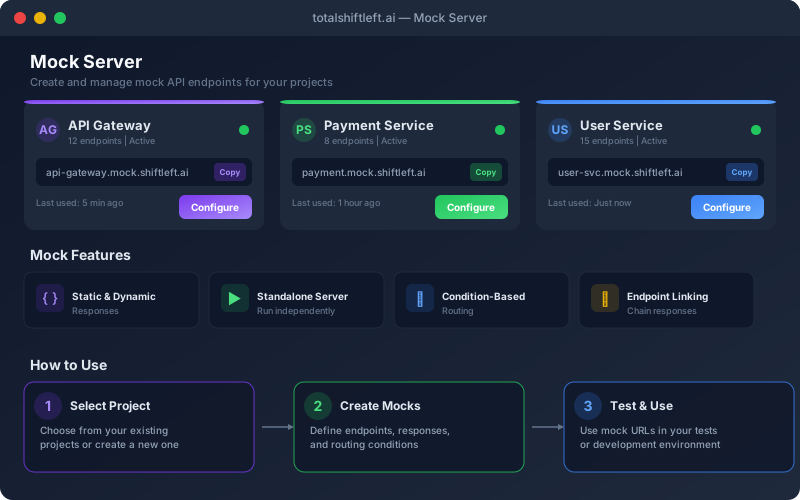
The Dynamic Mock Server creates mocks that follow your specifications, so frontend teams can develop against them while backend work continues. Responses come from the examples and schemas in your spec, without an AI call, and you can edit any of them, add conditional rules that match on query parameters, headers or body fields, use templates that echo the request or generate values, and add latency to see how the client behaves on a slow network. Each project gets an isolated mock host for clean separation. Mocks answer the requests sent to them; they are stateless, they do not inject faults beyond the status and delay you set, and they do not intercept test runs.
Overview
Generate mock servers from your imported OpenAPI, WSDL or GraphQL definitions, up to 500 endpoints at once. Each project gets its own mock host, with responses that follow your spec's examples and schemas, conditional rules, dynamic templates and simulated latency, for frontend development and testing while the backend is still in progress.
Key Capabilities
How It Works
- 1
Open Mocks, select the project and click Start Mock Server
- 2
Mock responses are generated from your API spec’s examples and schemas
- 3
Customize individual responses, add conditions, templates or latency in the mock editor
- 4
Call the mock at the project’s mock host (<workspace>.<project-id>.mock.…) or its path-based URL
Available on
All Plans
Included in the free trial — no credit card required.
Documentation
Step-by-step guides for setting up and using Mock Server.
- Understanding MocksAPI mocks replace real backend calls during test runs or run as a standalone mock server—organized per project with static or dynamic responses across REST, SOAP, and GraphQL.
- Creating and Configuring MocksA step-by-step walkthrough: open API Mocks, pick a project, create or bulk-generate mocks, configure static and dynamic responses with conditions and delays, and start the mock server.
Go deeper
Guides and playbooks that show this capability in practice.
Try Mock Server Today
Start your 15-day free trial — no credit card required.