
Programmatic API Keys
Scoped, rotatable keys for automation and integrations.
What It Does
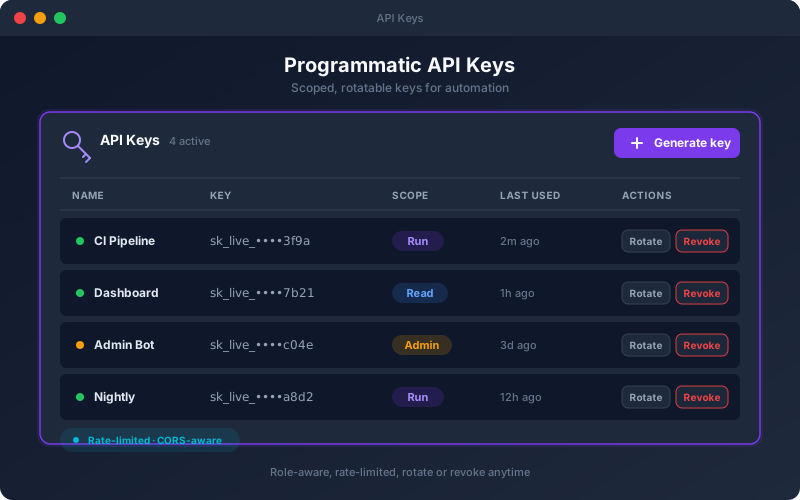
Programmatic API Keys let machines use the platform safely. Instead of embedding a person's login in a script, you issue a dedicated key scoped to what the automation should be allowed to do. Keys respect the same role-based permissions as human users, are protected by rate limiting, and can be rotated on a schedule or revoked instantly if compromised. This is the foundation for integrating the platform into CI/CD, internal dashboards, and any tooling that needs to trigger tests or read results without a browser.
Overview
Generate scoped API keys to drive the platform programmatically — trigger test packs, pull results, and wire the platform into your own tooling. Keys are role-aware, subject to rate limits, and can be rotated or revoked at any time, so automation gets exactly the access it needs and nothing more. Manage the full key lifecycle from a settings screen without exposing user credentials to scripts or pipelines.
Key Capabilities
How It Works
- 1
Create an API key and assign its scope and role
- 2
Store the key securely in your automation or pipeline
- 3
Call the public REST API to trigger runs and read results
- 4
Monitor usage; rotate keys on your preferred schedule
- 5
Revoke a key immediately if it is no longer needed
Available on
professional Plan & Above
Upgrade to the professional plan to unlock this feature.
Go deeper
Guides and playbooks that show this capability in practice.
Try API Keys Today
Start your 15-day free trial — no credit card required.