
Audit Logs & Activity Feed
What It Does
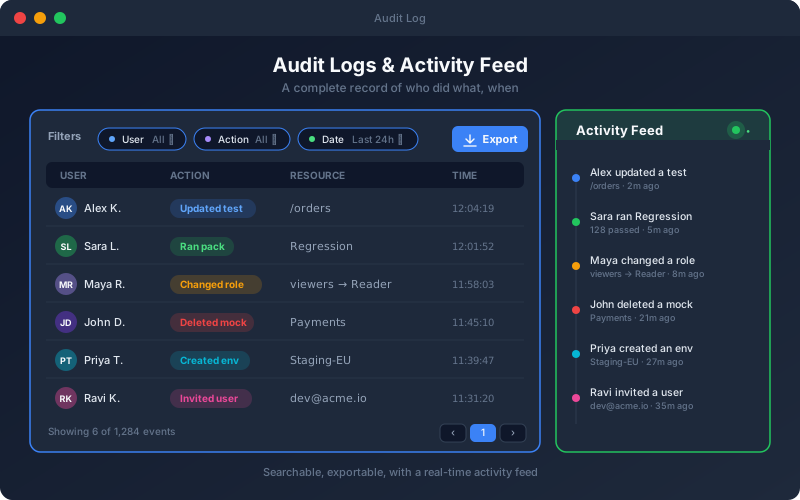
Audit Logs & Activity Feed make the workspace transparent and accountable. The audit log records who performed which action and when, across the areas that matter for security and compliance, and keeps the values before and after each change, with secrets blanked. Administrators filter it in Settings and open entries for a field-by-field diff; a per-user activity summary is available through the API. Export the log as CSV or PDF (it needs the export permission; large logs are cut off and the export says so), read it through the API, or stream activity events to your own systems with outbound webhooks. Every export is recorded in the audit log, and secrets are left out. The activity feed presents team events as a live stream with severity and type filters, so recent changes are visible at a glance. Enterprise and Trial can set how long records are kept.
Overview
Changes across tests, endpoints, projects, users, roles, settings, schedules, mocks and more are captured in an audit log with the user, role, IP address, device and the before and after values. Filter by user, role, action, entity, status and date, or search, and open any entry for a field-by-field diff. Export the log as CSV or PDF. The real-time activity feed and configurable retention are available on Enterprise and in the Trial; other plans keep 90 days. The audit log gives security and compliance teams an accountability trail, and gives everyone visibility into how the workspace is changing.
Key Capabilities
How It Works
- 1
The platform records changes automatically, with before and after values
- 2
Open the activity feed for a real-time view of team events (Enterprise and Trial)
- 3
Filter the audit log by user, role, action, entity, status or date
- 4
Open an entry for a field-by-field diff
- 5
On Enterprise or Trial, set retention to match your compliance policy
Available on
professional Plan & Above
Upgrade to the professional plan to unlock this feature.
Documentation
Step-by-step guides for setting up and using Audit Logs.
- Audit Logs: Who Did What, and WhenMonitor user activity and system events: summary tiles, filters by action, entity, role and status, and per-change field-level before/after detail.
- Activity Feed and One Signed-In Machine per UserTurn on the live Activity Feed for administrators, filter and read events, and understand the one-signed-in-machine-per-user policy that signs an account out when it signs in elsewhere.
Built for regulated teams
Teams in regulated industries rely on this capability to ship API changes with an audit trail.
Go deeper
Guides and playbooks that show this capability in practice.
Try Audit Logs Today
Start your 15-day free trial — no credit card required.