
Single Sign-On (SSO)
Sign in with your identity provider — SAML, OIDC, and Entra ID.
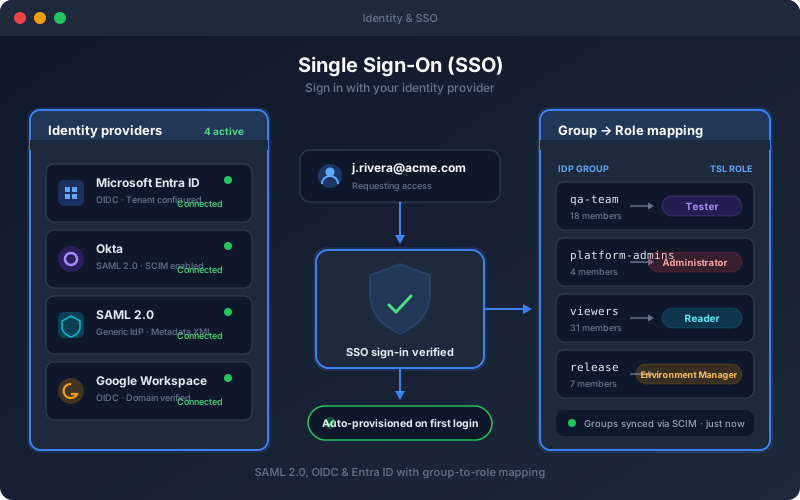
What It Does
Single Sign-On lets your team access the platform through the identity provider you already run. When SSO is configured, users authenticate against your IdP instead of a separate password, and new users are provisioned automatically the first time they sign in. Group-to-role mapping translates the groups your directory already maintains into the right platform permissions, so access stays aligned with your org structure. Removing a user from your directory removes their access here too — no orphaned accounts.
Overview
Connect the platform to your corporate identity provider so users sign in with the credentials they already have. Supports SAML 2.0, OpenID Connect, and Microsoft Entra ID, with automatic user provisioning on first login and group-to-role mapping so access rights follow your directory. Centralizing authentication means faster onboarding, instant offboarding through your IdP, and one less password for every user to manage.
Key Capabilities
How It Works
- 1
An administrator connects your SAML, OIDC, or Entra ID provider
- 2
Map identity-provider groups to platform roles
- 3
Users sign in through your identity provider
- 4
Accounts are provisioned automatically on first login
- 5
Access rights follow directory group membership
Available on
enterprise Plan & Above
Upgrade to the enterprise plan to unlock this feature.
Built for regulated teams
Teams in regulated industries rely on this capability to ship API changes with an audit trail.
Go deeper
Guides and playbooks that show this capability in practice.