
Workspaces & Team Management
Organize projects into teams with per-project roles.
What It Does
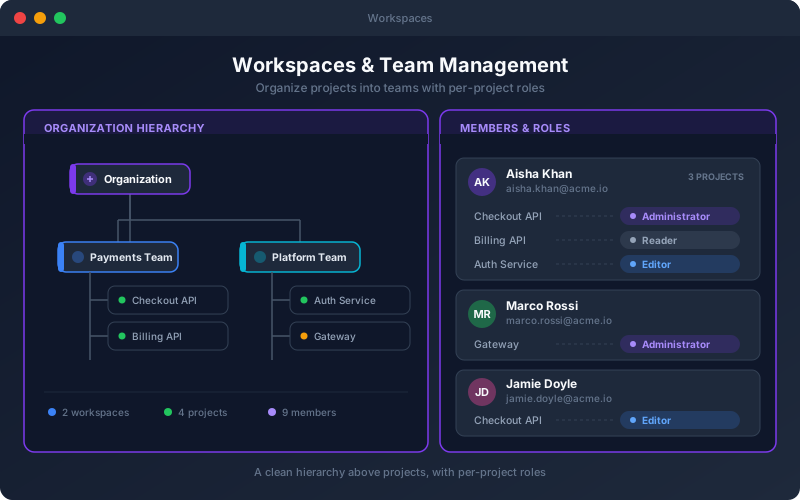
Workspaces & Team Management give big teams the organizational layer they need. Projects are grouped into workspaces that reflect how your company is actually structured, and membership is managed per project so access is precise rather than all-or-nothing. Because roles are assigned per project, the same person can be an editor where they own the work and a reader elsewhere — without juggling multiple logins. Combined with group-based access, this keeps permissions manageable as the number of projects and people grows.
Overview
Group projects under workspaces that mirror your teams and departments, and assign members roles that can vary from one project to the next. A person can lead one project and simply observe another, all under a single account. Workspaces give large organizations a clean hierarchy above individual projects — with per-project membership and group-based access — so structure and permissions scale with the org.
Key Capabilities
How It Works
- 1
Create workspaces that mirror your teams or departments
- 2
Add projects to the appropriate workspace
- 3
Assign members to projects with per-project roles
- 4
Use group-based access to manage teams at scale
- 5
Adjust membership and roles as the organization evolves
Available on
enterprise Plan & Above
Upgrade to the enterprise plan to unlock this feature.
Go deeper
Guides and playbooks that show this capability in practice.
Try Workspaces Today
Start your 15-day free trial — no credit card required.