
Multi-Tenant Architecture
Isolated workspaces for teams, departments, or clients.
What It Does
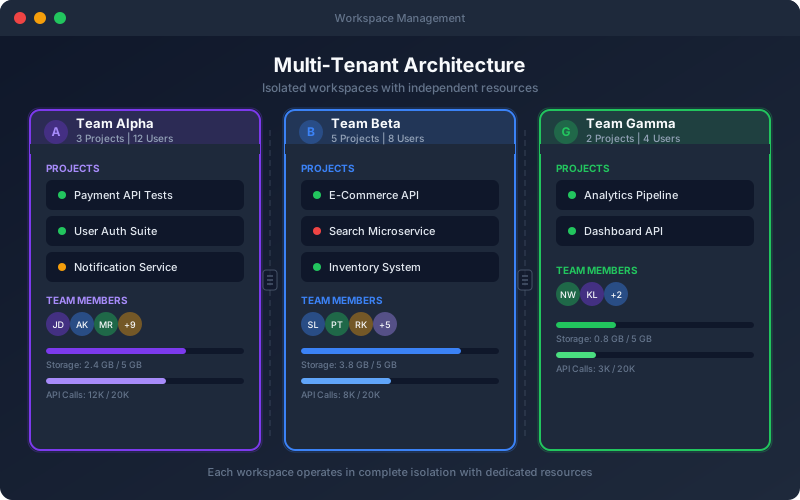
Multi-Tenant Architecture provides isolated workspaces for different teams, departments, or clients within a single platform instance. Each tenant operates independently with its own data, users, and configurations — while enterprise administrators can manage everything centrally. Tenant isolation is enforced at the database level (every query filtered by tenant ID), the API level (middleware validates tenant context), and the UI level (users only see their tenant data). Mock servers get tenant-specific subdomains, and execution environments are isolated per tenant.
Overview
Subdomain-based tenant isolation ensures complete data separation between teams. Each tenant gets its own projects, users, settings, execution environments, and mock servers. Data never leaks between tenants — every database query is scoped to the tenant ID. Enterprise administrators can manage all tenants from a central dashboard without switching accounts. Perfect for SaaS companies managing client test environments, enterprises with multiple departments, or consulting firms running isolated test environments per engagement.
Key Capabilities
How It Works
- 1
Create tenants for each team, department, or client from the admin dashboard
- 2
Each tenant gets a dedicated subdomain (team-name.totalshiftleft.ai) and isolated data
- 3
Users are invited to specific tenants with role assignments
- 4
Enterprise admins manage all tenants from a single central dashboard
- 5
Per-tenant resource limits, billing, and usage analytics
Available on
enterprise Plan & Above
Upgrade to the enterprise plan to unlock this feature.
Go deeper
Guides and playbooks that show this capability in practice.
Try Multi-Tenant Today
Start your 15-day free trial — no credit card required.