
Shadow and Zombie APIs: How to Find Every API You Run
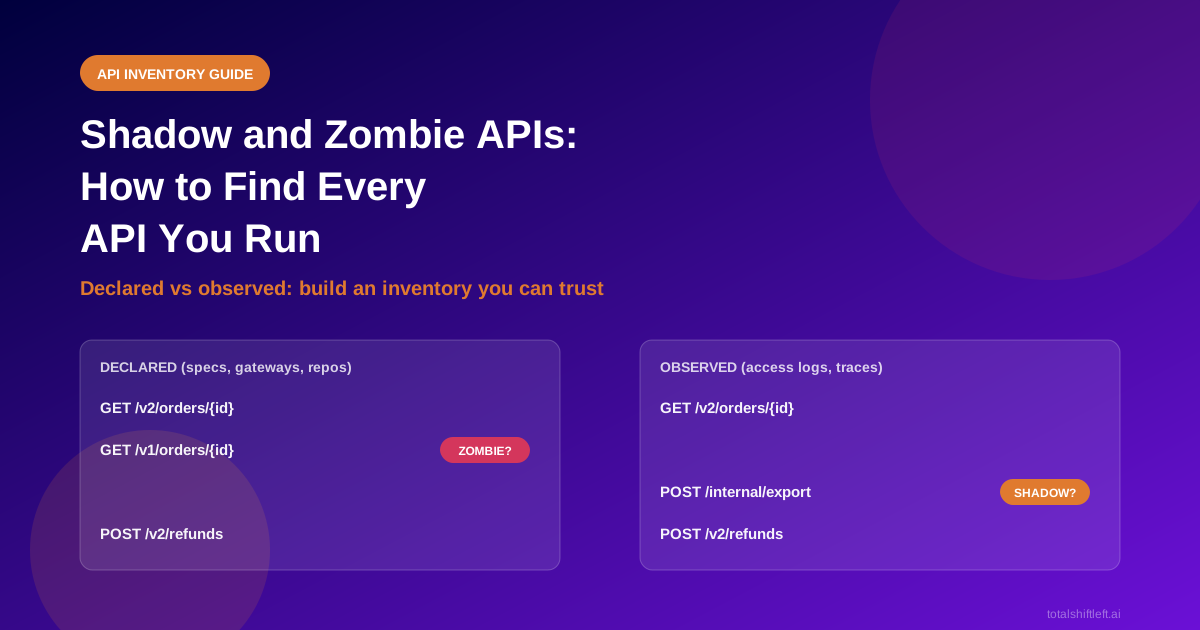
A shadow API is one your organisation runs but has not documented or registered. A zombie API is one that should have been retired but still answers requests. To find both, collect declared APIs (specs, repositories, gateways) and observed APIs (access logs, traces), then compare the two lists. "Seen but never documented" points to shadow APIs. "Documented but never seen" points to zombie candidates. Give every row an owner and a decision.
Reviewed by Smeet Gohel
Part of the API Security & Auth Testing hub. Start with the pillar guide: API security testing: the complete guide.
Shadow APIs are APIs your organisation runs but has not documented or registered. Zombie APIs are APIs that should have been retired but still answer requests. Neither shows up in a spec review, and both tend to escape testing, patching and monitoring. This guide defines each, compares six ways to find them, and gives you a repeatable method for building an API inventory you can trust.
In this guide
- Shadow, zombie and other unmanaged APIs: the definitions
- Why unmanaged APIs matter
- Where they come from
- Six ways to discover APIs, compared
- How to build an API inventory: five steps
- A worked example
- What to do with a zombie API
- How Shift-Left API handles discovery
- Inventory checklist
- Frequently asked questions
Most teams can name the APIs on the architecture diagram. The trouble starts with the ones that are not on it: the endpoint a contractor added for a demo, the v1 that "everyone" migrated away from, the internal service that quietly became public behind a new gateway route. You cannot test, secure or retire an API you do not know exists.
Shadow, zombie and other unmanaged APIs
The terms overlap in casual use, so it helps to separate them. The split that matters is simple: is the problem that nobody knows about the API, or that nobody switched it off?
| Term | What it is | Typical example | The gap it points to |
|---|---|---|---|
| Shadow API | Running, but not documented or registered | A new route added in code, never added to the spec or gateway catalogue | Inventory |
| Zombie API | Meant to be retired, but still answering | /v1/orders still live two years after /v2 launched | Lifecycle |
| Orphan API | Running, but the owning team no longer exists | A service from a team that was reorganised | Ownership |
| Rogue API | Deployed outside agreed standards or review | A proof of concept exposed to the internet | Governance |
| Drifted API | Documented, but the spec no longer matches behaviour | A field renamed in code, not in the contract | Contract accuracy |
A single endpoint can be several of these at once. An old version with no owner and no spec is a zombie, an orphan and a shadow API together. That is exactly why a plain list of "known APIs" is not enough. Every row needs a status, an owner and a last-seen date.
Why unmanaged APIs matter
Unmanaged APIs cost you in three ways.
- Security. OWASP names improper inventory management as one of its API Security Top 10 risks. Old versions and undocumented hosts are less likely to get patches, rate limits or current authentication. Our guide to common API vulnerabilities and how to test for them shows how it fits with the other OWASP risks.
- Quality. An API that is not in any inventory is almost never in a test plan. Your endpoint coverage number is calculated against the endpoints you know about, so unknown endpoints make coverage look better than it is.
- Cost and change risk. Every live version is a thing to run, monitor and keep compatible. When a team changes a shared dependency, it cannot check consumers it does not know about.
Governance programmes rely on the same foundation: you cannot apply standards to an API that is not on the list. See API governance for enterprise programmes for what sits on top of a good inventory.
Where unmanaged APIs come from
Almost none of them are malicious. They come from normal engineering pressure:
- Speed. A route is added to unblock a release, and the spec update is "next sprint".
- Version overlap. A new version launches, the old one is "deprecated", and nobody sets a shutdown date.
- Team change. The owner leaves or the team is reorganised, and the service keeps running.
- Acquisitions and mergers. Another company's gateways and services arrive with their own catalogues, or none.
- Gateway sprawl. Several gateways, cloud accounts or Kubernetes clusters each hold a partial list.
- AI and automation. MCP servers, model gateways and agent interfaces are APIs too, and they often start as experiments.
Six ways to discover APIs, compared
No single method finds everything. Each one sees a different slice, and each has a blind spot. That is the main reason to combine several.
| Method | What it reads | Finds | Blind spot | Sends traffic to the API? |
|---|---|---|---|---|
| Specification files (OpenAPI, WSDL, GraphQL) | Documents in repositories, registries or at a URL | Documented APIs | Anything not documented | No |
| Source code | Route definitions in repositories | Routes that exist in code, including undocumented ones | Routes built at runtime; code you cannot access | No |
| Gateway and cloud configuration | Kong, Azure API Management, AWS API Gateway, Kubernetes ingress | APIs published through that gateway | Anything that bypasses the gateway | No |
| Access logs | Web server, proxy or gateway logs | APIs that receive traffic, including undocumented ones | APIs nobody called in the window | No |
| Traces and APM | OpenTelemetry or APM data | Service-to-service calls and internal APIs | Services without instrumentation | No |
| Active scanning | Open ports and well-known paths | Services nobody reported anywhere | Needs permission; can set off security tools | Yes |
Ready to shift left with your API testing?
Try our no-code API test automation platform free. Generate tests from OpenAPI, run in CI/CD, and scale quality.
Two patterns work well in practice.
- Start with what is declared, because it is cheap and safe: specs, repositories and gateway exports.
- Add what is observed, because only traffic and logs reveal the APIs that exist without paperwork.
Active scanning is useful on networks you control, but treat it as a last resort and tell the people who run security monitoring before you start.
How to build an API inventory
The method below works with any tooling, including a spreadsheet for a small estate.
Step 1: Choose sources by blind spot, not by convenience
Pick at least one declared source and one observed source. If you only read specs, you will only find documented APIs. If you only read logs, you will miss APIs with no traffic, including the zombies you most want to find.
Step 2: Normalise before you compare
Raw lists never match. /orders/123 in a log, /orders/{id} in a spec and /orders/{orderId} in another spec are the same operation. Convert every entry to a method + path template + host + environment key, and treat renamed path parameters as one row. Without this step you will drown in false "unknown" entries.
Step 3: Compare declared against observed
This is the step that turns two lists into findings:
- Observed but not declared = shadow API candidate.
- Declared but not observed = zombie candidate, or simply a quiet API. Check the time window before drawing conclusions.
- Declared and observed, but the shapes differ = drift.
State the window every time. "Not seen in 30 days" and "not seen in 12 months" lead to very different decisions, and an API used only at year end will look dead for most of the year.
Step 4: Record how sure you are
Not every row deserves the same trust. A route found in a spec, confirmed in traffic and owned by a named team is solid. A route inferred from a code pattern and seen nowhere else is a lead, not a fact. Keep a simple confidence label on every row, along with the evidence behind it, such as the file and line or the log source.
Step 5: Give every row an owner and a decision
An inventory without owners is a list. For each row, record who owns it and which decision applies: keep and document, keep and restrict, deprecate with a date, or retire. Review the list on a schedule, because the inventory starts drifting the day you finish it.
A worked example: comparing declared and observed
A team collects three sources for its payments platform: the OpenAPI files in its repositories, the route list exported from its API gateway, and a month of access logs. After normalising, the comparison looks like this:
| Operation | In spec | In gateway | In logs (30 days) | Finding |
|---|---|---|---|---|
GET /v2/orders/{id} | Yes | Yes | 41,200 calls | Healthy |
POST /v2/refunds | Yes | Yes | 1,900 calls | Healthy |
GET /v1/orders/{id} | No | Yes | 310 calls | Zombie: old version, still routed and still used |
POST /internal/export | No | No | 55 calls | Shadow: no spec, no gateway entry, reachable |
GET /v2/invoices/{id} | Yes | Yes | 0 calls | Quiet; check a longer window before judging |
Three rows need action. The v1 route still receives 310 calls a month, so retiring it needs a consumer list first. The /internal/export route needs an owner today. And the quiet invoices route should be checked against a longer window before anyone calls it dead.
What to do with a zombie API
Switching an old API off feels simple, but it is a breaking change for whoever still calls it. A safe sequence:
- Identify the callers. Use the caller labels in your logs or gateway analytics. If none exist, add them first.
- Announce a date. Publish the deprecation and shutdown dates. The Sunset HTTP header (RFC 8594) lets the API tell clients itself.
- Warn in-band. Add a deprecation header or a warning in responses.
- Run a brown-out. Fail the API briefly on a published schedule so silent callers show themselves.
- Retire it. Return
410 Gonefor a while, then remove the route and the gateway entry. - Mark it in the inventory as retired, with the date and the reason.
If you version your APIs, the API versioning testing guide covers how to test old and new versions side by side during the overlap.
How Shift-Left API handles discovery
The rest of this article is vendor-neutral. This section shows how our product approaches the same problem, so you can judge it against the method above.
API Discovery in Shift-Left API keeps one inventory of API operations across your workspace. Plan facts first: it is a paid add-on (Starter, Team and Scale packages, from 10 sources on Starter up to 250 on Scale), and every trial includes it. The Free edition cannot add it; Professional and Enterprise need the add-on.
What it reads. Sources include specification files and addresses, gateway exports and live connections (Kong, Azure API Management, AWS API Gateway), Kubernetes routes, AI model gateways and MCP servers, Postman and SwaggerHub, OpenTelemetry and Datadog traces, Splunk and Elasticsearch access records, uploaded HAR files and access logs, and repositories on GitHub, GitLab, Azure Repos and Bitbucket Cloud. It can also read routes out of Express, Fastify, NestJS, Spring, ASP.NET Core, FastAPI, Flask, Django and Go projects. It reads that code as text. It never runs it.
OWASP API Top 10 Test-Case Pack
60 API security test cases mapped to the OWASP API Security Top 10 (2023): positive and negative cases for BOLA, broken auth, SSRF and misconfiguration.
It shows how sure it is. Every row is labelled Confirmed, Observed or Inferred, with the evidence behind it. A route found only in code stays "Inferred" until a specification or traffic agrees with it. The lifecycle column uses plain words such as "Not seen lately" and "Missing from its sources". Inactivity alone never retires an API: a person decides.
It compares declared and observed. The drift view lists "documented but never seen" and "seen but undocumented", and states the window it looked at, which is the comparison from step 3 above. A source that is stale or has an expired credential is flagged as unhealthy instead of being read as "zero APIs".
You stay in control of what is kept. Evidence is kept for 90 days by default (you can set 7 to 365), and Forget erases what a source read. Suggested names, owners and duplicates are labelled as suggestions and are never applied without a person. Agents that run inside your network only call outward; nothing connects in.
It does not send requests to your APIs. With default settings, Discovery reads sources and sends nothing to the APIs themselves. The one exception is Scan for APIs in the desktop app, which looks at programs on your own computer, asks for consent first, and keeps only names, never page contents.
From inventory to testing. Each testable row can be added to a project with one click. Accepting an API uses the normal importer, so its endpoints appear as in any import. No tests are created and nothing is sent. The inventory's "Quality evidence" column then shows which discovered APIs have tests, security findings, mocks and load results, and each API gets its own evidence page that is available on every plan. That page reads results only; looking at it runs nothing.
What it does not do. Be realistic about the limits:
- It needs sources to read. It cannot find an API that no source reports.
- Streams, messaging and other non-HTTP interfaces appear in the inventory but cannot be accepted into a project for testing.
- It finds APIs and shows which have no tests. It does not generate tests from production traffic.
- The desktop capture and scan tools work only in the desktop app, not in a browser.
Setup details are in the API Discovery guide and the Scan for APIs guide. If you are weighing it up, a trial includes Discovery, so you can point it at a real estate and check the result against your own spreadsheet. Start a trial or compare plans.
API inventory checklist
- ✔ At least one declared source (specs, repositories or gateway exports) is connected
- ✔ At least one observed source (access logs or traces) is connected
- ✔ Every entry is normalised to method, path template, host and environment
- ✔ Declared and observed lists are compared, and the time window is written down
- ✔ Each row has a confidence level and the evidence behind it
- ✔ Each row has an owner and a decision (keep, restrict, deprecate, retire)
- ✔ Zombie candidates have a caller list before anyone switches them off
- ✔ Deprecated APIs have a published sunset date
- ✔ The comparison is repeated on a schedule, not once
- ✔ Discovered APIs are added to test projects, so coverage counts them
Once the inventory is complete, our API security testing guide shows what to test, and microservices testing covers large, changing estates.
Frequently asked questions about shadow and zombie APIs
What is the difference between a shadow API and a zombie API?
A shadow API is running but undocumented or unregistered, so nobody governs it. A zombie API was meant to be retired but still answers requests. Shadow APIs are an inventory gap, and zombie APIs are a lifecycle gap. Both are usually untested.
How do I find shadow APIs?
Compare what you declare with what is called. Collect specs, repositories and gateway configuration for the declared list, and access logs or traces for the observed list. Anything observed that is not declared is a shadow API candidate.
Can a scanner find every API?
No. Every discovery method has a blind spot. Specs miss undocumented routes, logs miss APIs nobody calls, and code reading misses routes built at runtime. Combine at least three sources and treat the gaps between them as the findings.
Why are zombie APIs a security risk?
They are usually unpatched, unmonitored and untested, yet still reachable. OWASP lists improper inventory management, including old API versions left running, as a top-ten API risk.
Does API discovery send requests to my APIs?
It depends on the method. Reading specs, repositories and logs sends nothing to the API. Active probing and port scanning do send requests, so they need agreement from the owner first.
Does Shift-Left API include API discovery?
Yes, as a paid add-on with Starter, Team and Scale packages. Every trial includes it. The API page that gathers each API's test evidence is available on every plan.
Does API discovery generate tests from production traffic?
Not in Shift-Left API. Discovery finds APIs and shows which of them have no tests. Accepting a discovered API into a project imports its endpoints through the normal importer, and no tests are created from traffic.
Sources and further reading
- OWASP API Security Top 10 2023: API9, improper inventory management: the risk this article is built around.
- RFC 8594: The Sunset HTTP Header Field: how an API announces its own retirement.
- OpenAPI Specification: the format most declared inventories use.
- OpenTelemetry traces: background on observed service-to-service calls.
Ready to shift left with your API testing?
Import your OpenAPI spec and get a runnable test suite, in our cloud or on your own infrastructure.