
Run AI Test Generation on Your Own LLM
Quick answer
Running AI test generation on your own LLM means pointing a testing platform at a self-hosted endpoint — Ollama for single-machine evaluation, vLLM for production-grade CI throughput, or LM Studio for local experimentation — so API specs never leave your network. This matters most for regulated teams in banking, healthcare, or government, where sending specs to a cloud model like GPT-4 triggers GDPR, HIPAA, or air-gap compliance reviews that a self-hosted setup avoids entirely.
Reviewed by Parveen Kumari
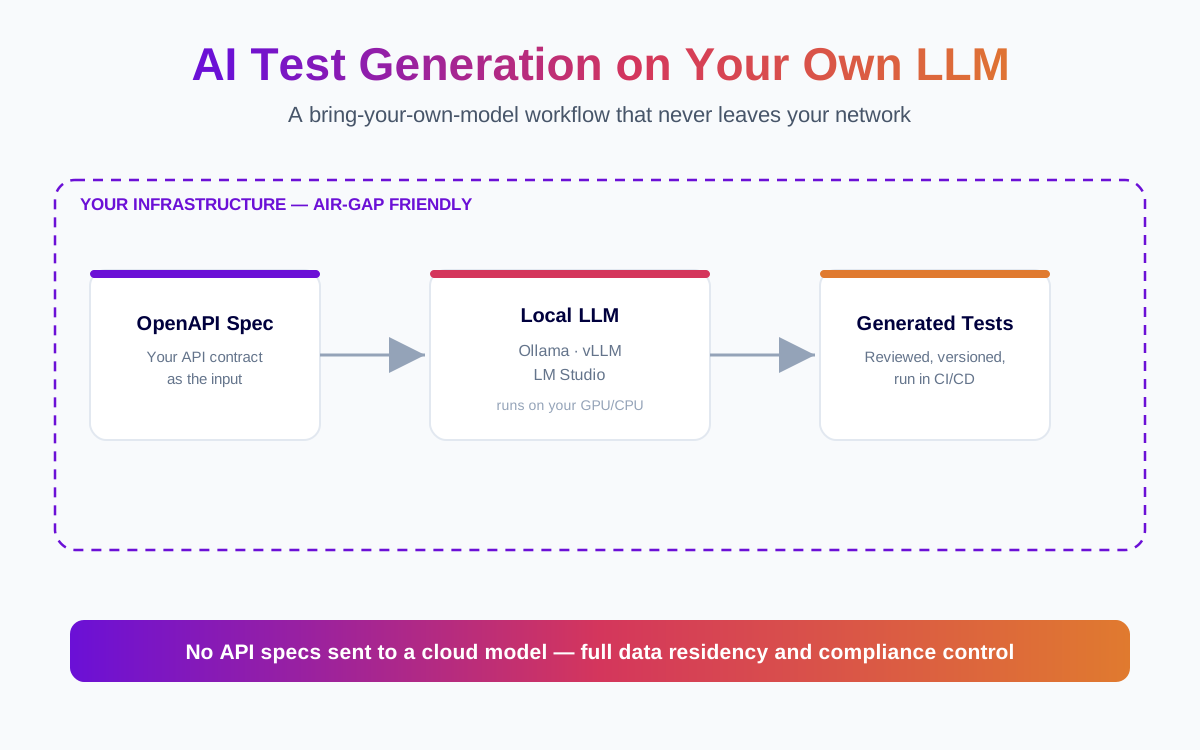
AI-powered test generation can cut hours of manual test authoring down to minutes. But most tools that offer it have a catch: your API specifications — endpoint paths, request schemas, authentication flows, business logic — get sent to a cloud-hosted model like GPT-4 or Claude. For teams in banking, healthcare, insurance, or government, that is a non-starter.
The alternative is running AI test generation on a large language model you host yourself. This article explains how that works, which self-hosted LLM options are practical today, and what to look for in a testing platform that supports them.
In this guide
- Why self-hosted LLMs matter for API testing
- Self-hosted LLM options that work today
- What a BYO-LLM testing workflow looks like
- Choosing the right model
- How Total Shift Left handles BYO-LLM
- Getting started
- Self-hosted model options for test generation
- Common questions about self-hosted AI test generation
- Frequently asked questions about running AI test generation on your own LLM
Why self-hosted LLMs matter for API testing
When an AI testing tool generates test cases from an OpenAPI or WSDL specification, the model needs access to the full spec. That includes endpoint URLs (often internal), request and response schemas, authentication mechanisms, and sometimes example payloads with realistic field names.
For a fintech company or a hospital system, sending that data to an external API — even one with strong privacy commitments — creates a compliance headache. Data residency policies, GDPR processor agreements, SOC 2 controls, HIPAA BAAs, and internal security reviews all come into play. Some organizations have air-gapped networks where external API calls are physically impossible.
Running the LLM on your own infrastructure eliminates the problem at the architecture level. The spec never leaves your network. There is no third-party data processor to evaluate. Your security team can approve the tool without a six-month vendor review.
For features with a model in the request path, how to test LLM applications separates the deterministic shell from the part that needs evals.
Self-hosted LLM options that work today
Three self-hosted LLM runtimes have emerged as practical choices for engineering teams. Each takes a different approach to the trade-off between simplicity and scale.
Ollama
Ollama is the simplest path to running a local LLM. It packages models (Llama 3, Mistral, CodeLlama, Qwen, and others) as single downloads and exposes them through an OpenAI-compatible API on localhost. Installation takes one command on macOS, Linux, or Windows.
For a QA team evaluating self-hosted AI test generation, Ollama is a good starting point. It runs on a single machine — a developer laptop with a recent GPU, or a dedicated server. The hardware bar is modest: an NVIDIA GPU with 8 GB of VRAM handles 7B-parameter models comfortably, and 16 GB of VRAM opens up 13B models that produce noticeably better test logic.
The trade-off is throughput. Ollama is designed for single-user or small-team use. If you need to generate tests across dozens of specs simultaneously, you will hit a bottleneck.
vLLM
vLLM is a production-grade inference engine built for throughput. It uses PagedAttention to serve multiple concurrent requests efficiently, and it supports tensor parallelism across multiple GPUs. If your organization already runs GPU infrastructure for ML workloads, vLLM slots into the existing stack.
The setup is more involved than Ollama — you are deploying a Python service, configuring model paths, and managing GPU allocation. But the payoff is significant: vLLM can handle the kind of batch test generation that enterprise teams need, where hundreds of endpoints across multiple specs are processed in a CI pipeline.
vLLM also exposes an OpenAI-compatible API, so any platform with multi-provider AI and bring-your-own-LLM support can point at a vLLM endpoint without code changes.
LM Studio
LM Studio provides a desktop application with a graphical interface for downloading, running, and testing models locally. It also exposes a local API server. For teams that want a visual way to experiment with different models before committing to one, LM Studio lowers the entry barrier.
In practice, LM Studio is useful during evaluation — picking the right model size and family for your test generation workload — and for individual contributors who want a local model on their development machine. For production CI/CD pipelines, most teams graduate to Ollama or vLLM.
What a BYO-LLM testing workflow looks like
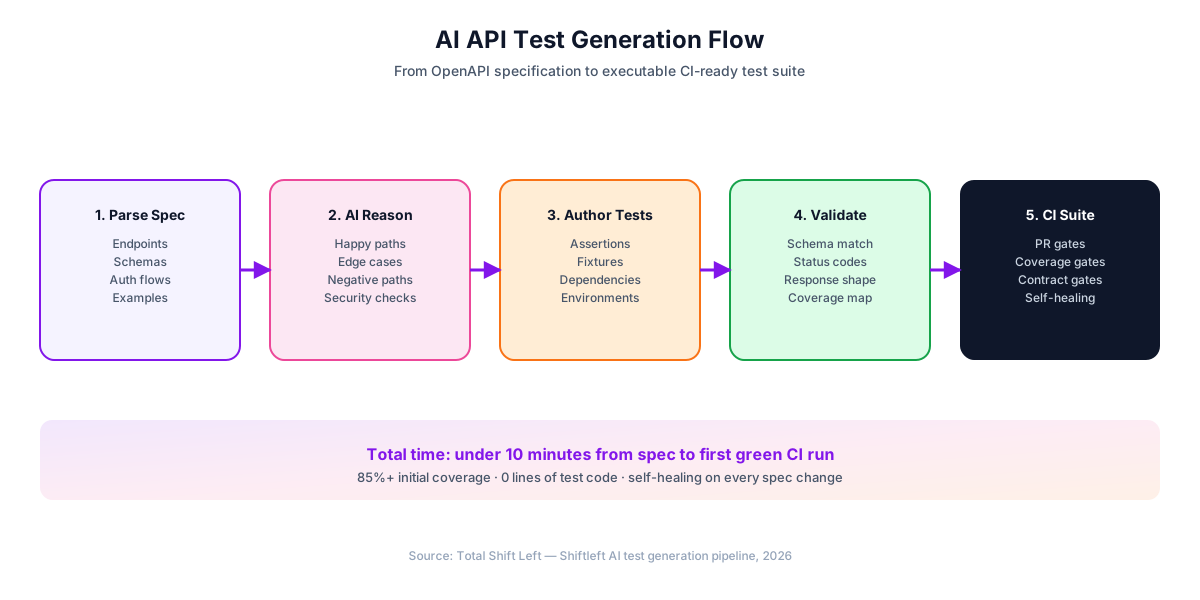
Here is the concrete workflow when you run AI test generation on your own LLM using a platform that supports it:
1. Import your API spec. Upload an OpenAPI 3.x or WSDL file to the testing platform. The spec stays on the platform's server — which, if the platform is also self-hosted, means it stays on your infrastructure entirely.
2. Point the platform at your LLM. Configure the LLM endpoint — typically an HTTP URL like http://gpu-server:11434/v1 for Ollama or http://vllm-cluster:8000/v1 for vLLM. The platform sends prompts to this endpoint and receives generated test cases back. No data leaves your network.
Ready to shift left with your API testing?
Try our no-code API test automation platform free. Generate tests from OpenAPI, run in CI/CD, and scale quality.
3. Generate tests. The platform constructs prompts that include relevant portions of your spec — endpoint definitions, schemas, constraints — and asks the model to produce test cases. A good platform generates positive tests (valid inputs, expected responses), negative tests (invalid inputs, boundary values, missing required fields), and security-focused tests (injection payloads, authentication bypass attempts).
4. Review and run. The generated tests appear in the platform's UI, where you can review, edit, and execute them against your actual API. Tests that pass validation get added to your regression suite.
5. Run in CI/CD. Once tests are in the suite, they run in your pipeline via a CLI or CI plugin. The LLM is only needed during the generation step, not during execution — so your pipeline does not depend on GPU availability for every build.
Choosing the right model
Not every model generates good API tests. The task requires understanding of HTTP semantics, JSON schema structure, authentication patterns, and — for SOAP — XML and WSDL conventions. Here is what works in practice:
Models in the 13B-to-70B parameter range produce the best results for test generation. At 7B parameters, models can handle simple REST endpoints but struggle with complex nested schemas or SOAP envelopes. At 70B, you get test logic that accounts for edge cases a human tester would catch — but you need serious GPU hardware (two or more A100s or equivalent).
The sweet spot for most teams is a 13B-to-34B model running on a single GPU with 24 GB of VRAM. Models like Llama 3 70B (quantized to fit smaller GPUs), Mistral, and CodeLlama variants all work. The testing platform should let you switch models without changing your test suite — so you can upgrade as your hardware or model options improve.
How Total Shift Left handles BYO-LLM
Total Shift Left supports 13+ LLM providers behind a single abstraction layer. That includes cloud providers (OpenAI, Anthropic, Azure OpenAI, Google Vertex AI) and self-hosted runtimes (Ollama, vLLM, LM Studio, and any provider exposing an OpenAI-compatible API).
The configuration is a single endpoint URL and an optional API key. There is no vendor lock-in to a specific model — you can start with Ollama running Llama 3 on a spare workstation, then move to vLLM on your GPU cluster, then switch to a fine-tuned model, all without touching your test suites or CI/CD configuration.
Because Total Shift Left itself is self-hosted, the entire chain is inside your perimeter: the platform, the LLM, and the API specs. Nothing is sent to an external service at any point. This is the architecture that passes security review at regulated enterprises — not because of a privacy policy, but because there is no external data flow to review.
The platform handles REST, SOAP/WSDL, and GraphQL specs natively, so the BYO-LLM workflow applies to all three protocol types. SOAP/WSDL support is particularly relevant here: most AI testing tools that support self-hosted LLMs only handle REST. If your stack includes legacy SOAP services (common in BFSI and healthcare), you need a platform that treats them as first-class.
Getting started
If your team needs AI test generation but cannot send API specs to a third-party cloud, a self-hosted LLM is the practical path. Start with Ollama on a machine with a decent GPU, generate tests for a few endpoints, and evaluate the quality. If the results justify the investment, scale to vLLM on dedicated infrastructure.
Total Shift Left gives you a 15-day free trial — no credit card required — so you can connect your own LLM and test the workflow against your actual specs before committing. For teams that want a hands-on walkthrough, you can book a demo with our architect team (not a sales rep) to see the BYO-LLM workflow on your own specifications.
{
  "@context": "https://schema.org",
  "@type": "Article",
  "headline": "Run AI Test Generation on Your Own LLM",
  "description": "How to run AI-powered API test generation on self-hosted LLMs like Ollama, vLLM, or LM Studio, keeping API specs inside your perimeter.",
  "author": {
    "@type": "Person",
    "name": "Rishi Gaurav"
  },
  "publisher": {
    "@type": "Organization",
    "name": "Total Shift Left",
    "url": "https://totalshiftleft.ai"
  },
  "datePublished": "2026-06-24",
  "dateModified": "2026-06-24"
}
{
  "@context": "https://schema.org",
  "@type": "FAQPage",
  "mainEntity": [
    {
      "@type": "Question",
      "name": "Do I need a GPU to run a local LLM for API test generation?",
      "acceptedAnswer": {
        "@type": "Answer",
        "text": "For useful test generation, yes. CPU-only inference is too slow for practical use. An NVIDIA GPU with at least 8 GB of VRAM is the practical minimum."
      }
    },
    {
      "@type": "Question",
      "name": "How do self-hosted models compare to GPT-4 or Claude for test generation?",
      "acceptedAnswer": {
        "@type": "Answer",
        "text": "Cloud-hosted frontier models currently produce the highest-quality test logic. Self-hosted models in the 13B-70B range produce good functional and security tests but may need more human review for nuanced edge cases. The gap is narrowing with each model release."
      }
    },
    {
      "@type": "Question",
      "name": "Can I use a self-hosted LLM in an air-gapped environment?",
      "acceptedAnswer": {
        "@type": "Answer",
        "text": "Yes. Ollama and vLLM both run fully offline once the model weights are downloaded. You download the model on a connected machine, transfer the files to the air-gapped network, and run the server."
      }
    },
    {
      "@type": "Question",
      "name": "What happens if the LLM produces incorrect tests?",
      "acceptedAnswer": {
        "@type": "Answer",
        "text": "AI-generated tests should always be reviewed before they enter your regression suite. A good testing platform lets you review, edit, and discard generated tests. The goal is to accelerate test authoring, not replace human judgment."
      }
    },
    {
      "@type": "Question",
      "name": "Does the LLM need access to my running API?",
      "acceptedAnswer": {
        "@type": "Answer",
        "text": "No. The LLM generates tests from the API specification (OpenAPI or WSDL), not from the running API. The generated tests are then executed against the API by the testing platform separately."
      }
    }
  ]
}
Free PDF + code examples
OpenAPI to Test Generation Template Pack
Go from OpenAPI spec to full test coverage. Includes sample specs, example generated tests, edge case patterns, and CI/CD integration guides.
Download FreeSelf-hosted model options for test generation
What actually runs on hardware you already have:
| Runtime | Best for | Minimum practical hardware | Concurrency | Notes |
|---|---|---|---|---|
| Ollama | A developer laptop or a single box | 16 GB RAM (7-8B, quantised) | Low | Simplest path; one command to a running model |
| llama.cpp | Constrained or CPU-only hosts | 16 GB RAM | Low | The most control over quantisation and memory |
| LM Studio | Evaluating models before committing | 16 GB RAM | Low | A GUI; useful for comparison, not for CI |
| vLLM | A shared internal endpoint | One GPU, 24 GB VRAM | High | Continuous batching; the right choice for a team |
| TGI (Text Generation Inference) | Kubernetes estates | One GPU, 24 GB VRAM | High | Fits existing Helm and Kubernetes practice |
For generating tests from an OpenAPI document a quantised 8B model on a laptop is usually sufficient — the task is structured transformation, not open-ended reasoning. Move to vLLM when more than one person or pipeline needs the endpoint at once, not because the smaller model was inadequate.
Common questions about self-hosted AI test generation
Do I need a GPU to run a local LLM?
For useful test generation, yes. CPU-only inference works but is too slow for practical use — generating tests for a single endpoint can take minutes instead of seconds. An NVIDIA GPU with at least 8 GB of VRAM is the practical minimum.
How do self-hosted models compare to GPT-4 or Claude for test generation?
Cloud-hosted frontier models (GPT-4, Claude 3.5 Sonnet) currently produce the highest-quality test logic, especially for complex business rules. Self-hosted models in the 13B-70B range produce good functional and security tests but may need more human review for nuanced edge cases. The gap is narrowing with each model release. For many teams, the trade-off is worth it: slightly more review time versus complete data control.
Can I use a self-hosted LLM in an air-gapped environment?
Yes. Ollama and vLLM both run fully offline once the model weights are downloaded. You download the model on a connected machine, transfer the files to the air-gapped network, and run the server. The testing platform connects to the LLM over the internal network. No internet access is required during test generation or execution.
What happens if the LLM produces incorrect tests?
AI-generated tests should always be reviewed before they enter your regression suite. A good testing platform lets you review each generated test, edit assertions, adjust payloads, and discard tests that do not make sense. The goal is to accelerate test authoring, not to replace human judgment.
Does the LLM need access to my running API?
No. The LLM generates tests from the API specification (OpenAPI or WSDL), not from the running API. The generated tests are then executed against the API by the testing platform. The LLM and the API under test are completely separate.
Frequently asked questions about running AI test generation on your own LLM
Do I need a GPU to run a local LLM? For useful test generation, yes. CPU-only inference works but is too slow for practical use — generating tests for a single endpoint can take minutes instead of seconds. An NVIDIA GPU with at least 8 GB of VRAM is the practical minimum.
How do self-hosted models compare to GPT-4 or Claude for test generation? Cloud-hosted frontier models (GPT-4, Claude 3.5 Sonnet) currently produce the highest-quality test logic, especially for complex business rules. Self-hosted models in the 13B-70B range produce good functional and security tests but may need more human review for nuanced edge cases. The gap is narrowing with each model release. For many teams, the trade-off is worth it: slightly more review time versus complete data control.
Can I use a self-hosted LLM in an air-gapped environment? Yes. Ollama and vLLM both run fully offline once the model weights are downloaded. You download the model on a connected machine, transfer the files to the air-gapped network, and run the server. The testing platform connects to the LLM over the internal network. No internet access is required during test generation or execution.
What happens if the LLM produces incorrect tests? AI-generated tests should always be reviewed before they enter your regression suite. A good testing platform lets you review each generated test, edit assertions, adjust payloads, and discard tests that do not make sense. The goal is to accelerate test authoring, not to replace human judgment.
Does the LLM need access to my running API? No. The LLM generates tests from the API specification (OpenAPI or WSDL), not from the running API. The generated tests are then executed against the API by the testing platform. The LLM and the API under test are completely separate.
Sources and further reading
- Ollama — running open-weight models locally.
- vLLM documentation — high-throughput self-hosted model serving.
- OWASP Top 10 for LLM Applications — the risk list for AI-backed features.
Key takeaways
- Generating tests from an OpenAPI document is structured transformation, not open-ended reasoning — a quantised 8B model on a laptop is usually enough.
- Ollama is the fastest path to a working setup; move to vLLM when more than one person or pipeline needs the endpoint at once, not because the smaller model failed.
- Self-hosting is the only option that satisfies a genuine air-gap requirement, because nothing leaves the network boundary, including the spec itself.
- Treat generated tests as a draft under review. The value is the coverage breadth, and the review is what stops a wrong assertion becoming a permanent one.
- Keep the generation step in CI rather than on a developer machine, so the suite and the spec stay in the same commit history.
Ready to shift left with your API testing?
Try our no-code API test automation platform free.