
Testing Strategy for Serverless Architectures: A Complete Guide
Quick answer
A serverless testing strategy validates functions-as-a-service applications across four layers: unit tests with mocked cloud SDKs, integration tests against real services using ephemeral stacks (SAM CLI, LocalStack), end-to-end event-pipeline tests that trace triggers to final state, and production monitoring with synthetic transactions. Because IAM permissions, cold starts, and event source mappings can't be fully replicated locally, integration testing carries more weight than in traditional architectures.
Reviewed by Smeet Gohel

A serverless testing strategy is a structured approach to validating applications built on functions-as-a-service platforms like AWS Lambda, Azure Functions, and Google Cloud Functions. It addresses the unique challenges of event-driven architectures—ephemeral compute, distributed state, cold start latency, and cloud-provider dependencies—through layered testing that spans local unit tests, cloud integration tests, end-to-end event pipeline validation, and production monitoring with synthetic transactions.
Serverless architectures promise freedom from infrastructure management. You write functions, define event triggers, and the cloud provider handles scaling, availability, and patching. But that freedom comes with a testing problem: the infrastructure you no longer manage is still the infrastructure your code depends on. You cannot spin up a production-equivalent environment on your laptop. You cannot step through a distributed event chain in a debugger. You cannot predict when a cold start will add 800 milliseconds to your response time.
The 2025 Datadog Serverless Report found that organizations running more than 100 Lambda functions experience an average of 23 production incidents per quarter directly attributable to event configuration errors, permission mismatches, and integration failures—defects that traditional unit testing never catches. The gap between what developers test and what serverless architectures actually do in production is where reliability breaks down.
This guide provides a comprehensive serverless testing strategy that covers function-level unit testing, cloud service integration testing, event source validation, local emulation, cold start measurement, and production monitoring. Whether you are building your first Lambda function or operating hundreds of serverless microservices, this strategy ensures your testing matches your architecture's complexity. For foundational testing strategy concepts, see Software Testing Strategy for Modern Applications.
In this guide
- What Is Serverless Testing?
- Why Serverless Architectures Need a Different Testing Strategy
- Key Components of a Serverless Testing Strategy
- Serverless Testing Architecture
- Tools for Serverless Testing
- Serverless testing in practice: a worked example
- Serverless testing challenges and how to solve them
- Serverless testing best practices
- Serverless Testing Checklist
- The three layers a function actually needs
- Serverless testing FAQ
What Is Serverless Testing?
Serverless testing is the practice of validating applications where the compute layer is managed entirely by a cloud provider. Unlike traditional applications where you control the server, runtime, and networking, serverless functions execute in an environment you cannot fully replicate outside the cloud.
A complete serverless testing strategy validates three dimensions:
Function Logic: The business logic inside each function—input transformation, data processing, error handling, and output formatting. These tests are portable and run identically in any environment.
Cloud Integration: The interactions between your functions and cloud services—DynamoDB reads, S3 uploads, SQS message publishing, SNS notifications. These tests must run against real (or faithfully emulated) cloud services because SDK behavior, IAM permissions, and service quotas cannot be mocked reliably.
Event Pipeline: The end-to-end flow from event source to final outcome—an API Gateway request that triggers a Lambda function that writes to DynamoDB and publishes to SNS. These tests validate that event mappings, trigger configurations, and service orchestration work correctly as a system.
Serverless testing also intersects with event-driven microservices testing because most serverless applications are fundamentally event-driven systems where functions react to triggers rather than receiving direct calls.
For where each test level starts and stops, see unit vs integration vs system testing.
Why Serverless Architectures Need a Different Testing Strategy
You Cannot Run the Cloud Locally
Traditional applications run on a server you control. You can start that server locally, hit it with requests, and debug it with breakpoints. Serverless functions execute inside a managed runtime with specific memory limits, execution timeouts, IAM roles, and event source mappings that do not exist on your laptop. Local emulators approximate the runtime but cannot replicate IAM policy evaluation, VPC networking, or the exact behavior of event source triggers.
Every Function Is an Integration Point
In a monolithic application, most code calls other code in the same process. In serverless architectures, every function communicates through cloud services—queues, databases, streams, and notification topics. A function that works perfectly in isolation can fail because an IAM policy is missing, a DynamoDB table has the wrong partition key schema, or an SQS queue has a visibility timeout that is too short. Integration testing is not optional—it is the primary testing concern.
Event Sources Introduce Implicit Contracts
When an API Gateway triggers a Lambda function, the event payload has a specific structure that varies by integration type (proxy vs. non-proxy), HTTP method, and stage configuration. When S3 triggers a function, the event contains bucket name, object key, and event type—but the exact structure depends on the event notification configuration. These implicit contracts break silently when configurations change.
Cold Starts Affect User Experience
Serverless functions that have not been invoked recently experience cold starts—initialization delays ranging from 100 milliseconds for Node.js to several seconds for Java or .NET. Cold starts are not bugs, but they affect performance SLAs and must be measured, monitored, and tested as part of the overall testing architecture.
Distributed State Is Hard to Verify
Serverless applications distribute state across DynamoDB tables, S3 buckets, ElastiCache clusters, and Step Functions workflows. Verifying that a multi-step process completed correctly requires querying multiple services and handling eventual consistency. Traditional assertions that check a single return value are insufficient.
Key Components of a Serverless Testing Strategy
Function Unit Testing
Test the business logic of each function in isolation by mocking cloud service SDKs:
- Pure logic extraction: Separate business logic from the Lambda handler. The handler parses the event and calls pure functions that are trivially testable.
- SDK mocking: Use libraries like aws-sdk-client-mock (for AWS SDK v3) to stub DynamoDB, S3, and SQS calls. Verify that your function makes the correct API calls with the correct parameters.
- Event fixture testing: Create fixture files for each event source type (API Gateway, S3, SQS, SNS, EventBridge) and test that your handler correctly parses each format.
- Error path testing: Verify timeout handling, retry behavior, and dead-letter queue routing for every failure scenario.
Unit tests should run in under 10 seconds and execute on every commit.
Integration Testing
Test your functions against real cloud services in a dedicated test environment:
- Ephemeral stacks: Deploy a complete CloudFormation or SAM stack for each test run. Use unique stack names with timestamps or commit hashes to avoid collisions.
- Real service interaction: Invoke functions through the actual Lambda runtime, read and write to real DynamoDB tables, and verify messages arrive in real SQS queues.
- IAM validation: Confirm that function execution roles have exactly the permissions they need—no more, no less. Permission errors are invisible in unit tests.
- API contract testing: Use Shift-Left API to generate and validate API tests from your OpenAPI specifications, ensuring that API Gateway integrations return the correct response formats.
Event Source Testing
Validate that event sources trigger functions correctly:
- Trigger configuration: Verify that S3 event notifications, SQS subscriptions, and EventBridge rules are configured to invoke the correct functions with the correct filtering.
- Payload validation: Confirm that the event payload your function receives matches what you expect. Event source mappings can transform payloads in unexpected ways. For the API Gateway surface specifically, generating tests directly from each endpoint's OpenAPI schema keeps request and response validation in sync as functions and their contracts evolve.
- Batch behavior: For SQS and Kinesis triggers, test batch sizes, partial failure handling, and bisect-on-error configurations.
- Dead-letter queues: Verify that failed events are routed to DLQs with enough context for debugging and reprocessing.
Ready to shift left with your API testing?
Try our no-code API test automation platform free. Generate tests from OpenAPI, run in CI/CD, and scale quality.
Local Emulation
Use local emulators for fast development feedback without deploying to the cloud:
- AWS SAM CLI: Run
sam local invoketo execute functions in a Docker-based Lambda runtime locally. Usesam local start-apifor API Gateway emulation. - Serverless Offline: For Serverless Framework projects, emulate API Gateway and Lambda locally with hot reloading.
- LocalStack: Run a full AWS service emulator locally for DynamoDB, S3, SQS, SNS, and dozens of other services. Useful for integration tests that need multiple services.
- Limitations awareness: Local emulators do not replicate IAM policies, VPC configurations, resource limits, or the exact cold start behavior of cloud environments. Always complement local testing with cloud-deployed integration tests.
Cold Start Testing
Measure and optimize function initialization performance:
- Baseline measurement: Invoke each function after a period of inactivity and measure the total response time including cold start. Compare against warm invocation latency.
- Memory configuration testing: Test functions at different memory allocations (128 MB to 3008 MB) to find the optimal cost-performance balance. Higher memory allocations also provide more CPU.
- Dependency analysis: Identify which
imports and initialization steps contribute most to cold start time. Lazy-load heavy dependencies that are not needed on every invocation.
- Provisioned concurrency validation: If using provisioned concurrency, verify that the configured minimum instances eliminate cold starts during expected traffic patterns.
Production Monitoring
Extend testing into production with continuous validation:
- Synthetic transactions: Run scheduled Lambda functions that exercise critical paths and verify correct outcomes. Alert on failures immediately.
- Distributed tracing: Use AWS X-Ray, Lumigo, or Thundra to trace requests across function-to-function calls and identify latency bottlenecks.
- Custom metrics: Emit CloudWatch metrics for business-critical operations—orders processed, payments completed, notifications sent. Set alarms on unexpected drops.
- Error tracking: Aggregate and classify function errors. Distinguish between transient errors (timeouts, throttling) and persistent defects (logic errors, missing permissions).
For teams integrating these practices into their delivery pipeline, see Automated Testing in CI/CD.
Serverless Testing Architecture
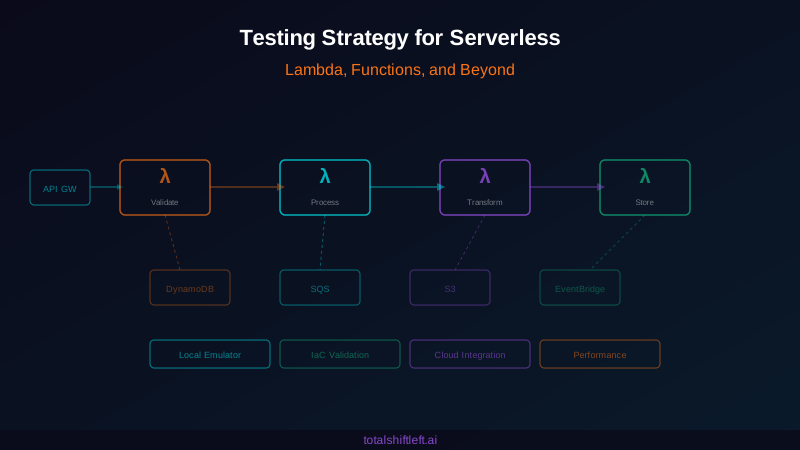
The serverless testing architecture operates across four stages, adapted from the traditional testing pyramid:
Stage 1: Local (Unit + Emulation) — Unit tests with mocked SDKs, event fixture tests, and local emulator smoke tests. Runs on every commit. Target: under 30 seconds. This stage catches logic errors and basic integration mistakes without any cloud deployment.
Stage 2: Cloud Integration — Deploy an ephemeral stack (SAM/CloudFormation) to a test account. Run integration tests against real DynamoDB, S3, SQS, and other services. Validate IAM permissions. Run API contract tests with Shift-Left API. Tear down the stack after tests complete. Runs on every pull request. Target: under 10 minutes.
Stage 3: End-to-End Pipeline — Deploy to a staging environment that mirrors production. Trigger real events through API Gateway, S3 uploads, and SQS messages. Verify the complete event pipeline from trigger to final state change. Test error handling paths including DLQ routing. Runs before production deployment. Target: under 20 minutes.
Stage 4: Production Monitoring — Synthetic transactions run every 5 minutes against production. Distributed tracing validates cross-function communication. Custom metrics and alarms detect degradation before users report it. Canary deployments with automatic rollback based on error rate thresholds.
This architecture inverts the traditional testing pyramid for serverless. Unit tests remain the base, but integration tests carry more weight because the integration surface area in serverless is dramatically larger than in monolithic applications. Teams that under-invest in stages 2 and 3 discover their integration defects in production.
Tools for Serverless Testing
| Tool | Type | Best For | Open Source |
|---|---|---|---|
| Shift-Left API | API Testing | Automated API test generation for serverless APIs | No |
| AWS SAM CLI | Local Emulation | Lambda and API Gateway local development | Yes |
| Serverless Offline | Local Emulation | Serverless Framework local development | Yes |
| LocalStack | Service Emulation | Full AWS service emulation for testing | Yes (Pro tier available) |
| aws-sdk-client-mock | Unit Testing | Mocking AWS SDK v3 clients in unit tests | Yes |
| Artillery | Load Testing | Serverless-aware load testing with Lambda support | Yes |
| Lumigo | Observability | Serverless distributed tracing and debugging | No |
| AWS X-Ray | Distributed Tracing | Native AWS request tracing across services | No (AWS service) |
| Powertools for AWS Lambda | Testing Utilities | Event parsing, validation, and testing helpers | Yes |
| SST (Serverless Stack) | Development Framework | Live Lambda development with instant feedback | Yes |
| Jest / Vitest | Unit Testing | JavaScript/TypeScript function testing | Yes |
| Pytest | Unit Testing | Python Lambda function testing | Yes |
Serverless testing in practice: a worked example
Problem: A fintech startup built its payment processing pipeline entirely on serverless—42 Lambda functions, 8 DynamoDB tables, 5 SQS queues, and 3 SNS topics. Their testing strategy consisted of unit tests with mocked AWS SDKs and manual testing through the AWS Console. Within six months of launching, they experienced 31 production incidents: 14 caused by event mapping misconfigurations (wrong payload formats, missing fields after infrastructure updates), 9 caused by IAM permission errors that unit tests could not detect, 5 caused by DynamoDB throughput throttling under load, and 3 caused by SQS visibility timeout mismatches that caused duplicate payment processing.
Solution: They implemented a layered serverless testing strategy:
- Restructured all Lambda handlers to separate business logic from event parsing. Unit tests covered pure logic with 90% code coverage and ran in 8 seconds.
- Created event fixture files for every trigger type and tested handler parsing against real event payloads captured from CloudWatch Logs.
- Deployed ephemeral CloudFormation stacks for each PR, running integration tests against real DynamoDB tables and SQS queues in an isolated test account.
- Adopted Shift-Left API to auto-generate API contract tests for all 12 API Gateway endpoints, catching response format regressions before deployment.
- Built end-to-end pipeline tests that triggered a payment event through API Gateway and verified the final state in DynamoDB, the confirmation in SNS, and the audit record in S3.
- Implemented synthetic transactions in production that processed a test payment every 5 minutes and alerted on any step failure.
Results: Event mapping incidents dropped from 14 per quarter to zero. IAM permission errors were eliminated entirely by catching them in the integration test stage. DynamoDB throttling incidents were resolved by load testing ephemeral stacks before deployment. Duplicate payment processing was fixed and prevented from recurring by dedicated SQS visibility timeout tests. Mean time to detection improved from 45 minutes (user-reported) to 90 seconds (synthetic monitoring). Deployment confidence increased to the point where the team deployed 12 times per day compared to twice per week previously.
Serverless testing challenges and how to solve them
Challenge: Cannot Replicate Cloud Locally
Local emulators approximate cloud services but cannot faithfully replicate IAM policies, VPC networking, resource quotas, or the exact behavior of event source mappings.
Solution: Use local emulators for fast development feedback, but always run integration tests against real cloud services in a test account. Treat local testing as a speed optimization, not a correctness guarantee. The definitive test is always the cloud-deployed test.
Challenge: Ephemeral Stack Deployment Is Slow
Deploying a full CloudFormation stack for every PR can take 5-10 minutes, creating a bottleneck in the development workflow.
Free Guided worksheet
Build Your Testing Strategy in 30 Minutes
A structured worksheet that walks you through defining your testing strategy in 30 minutes. Cover architecture, tools, layers, and team responsibilities.
Download FreeSolution: Use SAM Accelerate (sam sync) or SST's Live Lambda for development-time testing that deploys function code without full stack updates. Reserve full stack deployments for PR-level integration tests. Pre-provision shared infrastructure (VPCs, KMS keys) and only deploy function-specific resources per PR.
Challenge: Testing Event-Driven Flows End to End
Verifying that an event propagates correctly through multiple functions and services requires waiting for asynchronous processing and checking state across multiple systems.
Solution: Implement correlation IDs that propagate through every function invocation. Build test utilities that poll downstream services for expected state changes with configurable timeouts. Use Step Functions for complex orchestrations—they provide built-in execution history that simplifies end-to-end test assertions. Learn more in Testing Event-Driven Microservices.
Challenge: Cold Start Variability
Cold start latency varies based on runtime, memory allocation, VPC configuration, package size, and even time of day. Tests that pass during warm invocations may violate latency SLAs during cold starts.
Solution: Separate cold start tests from functional tests. Run cold start benchmarks on a schedule (not on every commit) that invoke functions after deliberate inactivity periods. Track cold start latency as a dedicated metric over time. Use provisioned concurrency for functions with strict latency requirements and test that the provisioned configuration is correct.
Challenge: Cost Management for Test Environments
Running integration tests against real AWS services incurs costs—Lambda invocations, DynamoDB read/write units, S3 storage, and data transfer.
Solution: Use on-demand DynamoDB tables (not provisioned) for test environments. Set aggressive TTLs on all test data. Implement automatic stack teardown with CloudFormation stack policies. Use LocalStack for tests that do not require cloud fidelity. Monitor test account spending with AWS Budgets and set alerts.
Serverless testing best practices
- Separate business logic from Lambda handlers into pure, testable functions—the handler should only parse the event and call your logic
- Create and maintain event fixture files for every event source type, captured from real CloudWatch Logs rather than hand-crafted
- Run integration tests against real cloud services in a dedicated test account—local emulators are for speed, not correctness
- Use ephemeral stacks (CloudFormation/SAM) for integration testing to ensure clean baselines and avoid test interference
- Implement correlation IDs that propagate through every function and service for end-to-end traceability
- Test IAM permissions explicitly by verifying functions can perform required operations and cannot perform unauthorized ones
- Measure cold start latency as a first-class metric and set performance budgets for each function
- Deploy synthetic monitoring in production that validates critical paths every few minutes
- Use Shift-Left API to auto-generate API tests for all serverless API endpoints and run them on every deployment
- Implement canary deployments with automatic rollback based on error rate and latency thresholds
- Build your DevOps testing pipeline with serverless-specific stages from the beginning
- Adopt a shift-left testing mindset to catch serverless configuration errors before they reach production
Serverless Testing Checklist
- ✔ Separate business logic from Lambda handlers into pure, testable functions
- ✔ Create event fixture files for every trigger type (API Gateway, S3, SQS, SNS, EventBridge)
- ✔ Implement unit tests with mocked AWS SDKs covering all function logic and error paths
- ✔ Set up local emulation with SAM CLI or Serverless Offline for development feedback
- ✔ Deploy ephemeral stacks for integration testing against real cloud services
- ✔ Validate IAM permissions in integration tests—not just function logic
- ✔ Test event source configurations including batch sizes, filters, and DLQ routing
- ✔ Run end-to-end pipeline tests that trace events from trigger to final state
- ✔ Measure cold start latency for all functions and set performance budgets
- ✔ Generate API contract tests for all API Gateway endpoints
- ✔ Implement synthetic transactions in production for critical paths
- ✔ Set up distributed tracing across all function-to-function communication
- ✔ Configure canary deployments with automatic rollback on error rate spikes
- ✔ Monitor and optimize test environment costs in the cloud test account
The three layers a function actually needs
Serverless testing goes wrong when teams try to test everything through a deployed endpoint. Test the handler logic in process, the integration against emulated services, and only the wiring against a real deployment:
# 1. handler logic — no AWS, no network, milliseconds
from app.handlers import create_order

def test_handler_rejects_invalid_quantity():
    event = {"body": '{"sku":"A-1","qty":0}',
             "requestContext": {"authorizer": {"claims": {"sub": "u1"}}}}
    response = create_order(event, context=None)
    assert response["statusCode"] == 422
    assert "qty" in response["body"]

# 2. integration — real DynamoDB and SQS semantics, via a local emulator
import boto3, pytest
from testcontainers.localstack import LocalStackContainer

@pytest.fixture(scope="session")
def aws():
    with LocalStackContainer(image="localstack/localstack:3") as ls:
        yield boto3.resource("dynamodb", endpoint_url=ls.get_url())

def test_handler_writes_the_item_and_enqueues_the_event(aws, table, queue):
    create_order(VALID_EVENT, context=None)
    assert table.get_item(Key={"pk": "order#1"})["Item"]["status"] == "pending"
    assert len(queue.receive_messages(WaitTimeSeconds=5)) == 1
The third layer is small on purpose — a handful of deployed smoke tests that prove the plumbing (API Gateway mapping, IAM, environment variables) that no emulator can fully reproduce:
# post-deploy smoke: the parts only a real deployment can prove
API=$(aws cloudformation describe-stacks --stack-name orders \
        --query 'Stacks[0].Outputs[?OutputKey==`ApiUrl`].OutputValue' --output text)

[ "$(curl -so /dev/null -w '%{http_code}' "$API/v1/orders")" = 401 ] || exit 1  # authorizer wired
[ "$(curl -so /dev/null -w '%{http_code}' -H "Authorization: Bearer $T" "$API/v1/orders")" = 200 ] || exit 1
aws logs filter-log-events --log-group-name /aws/lambda/create-order \
  --filter-pattern 'AccessDenied' --start-time $(( ($(date +%s) - 300) * 1000 )) \
  --query 'events[0]' --output text | grep -q None || { echo "IAM misconfigured"; exit 1; }
Serverless testing FAQ
How do you test serverless applications?
Test serverless applications at four levels: unit tests for individual function logic (mocking cloud service SDKs), integration tests against real cloud services using temporary stacks, end-to-end tests that trigger actual events through the full pipeline, and production monitoring with synthetic transactions. Use local emulators like SAM CLI or Serverless Offline for fast development cycles.
What are the biggest challenges in serverless testing?
The biggest serverless testing challenges are: inability to run the full cloud environment locally, cold start latency that affects test reliability, event source complexity with multiple trigger types, distributed state across multiple services, IAM permission issues that only manifest in cloud environments, and observability gaps in function-to-function communication.
How do you test AWS Lambda functions locally?
Test AWS Lambda functions locally using AWS SAM CLI (sam local invoke), which emulates the Lambda runtime. For API Gateway triggers, use sam local start-api. For unit tests, use frameworks like Jest with mocked AWS SDK clients. LocalStack provides a full AWS service emulator for integration tests. Always complement local testing with cloud-deployed integration tests.
What tools are best for serverless testing?
The best serverless testing tools include: AWS SAM CLI and Serverless Framework for local emulation, LocalStack for AWS service emulation, Artillery for serverless load testing, Lumigo and Thundra for distributed tracing, Jest/Mocha for unit testing, and Cypress/Playwright for end-to-end testing of serverless APIs.
How do you handle cold starts in serverless testing?
Handle cold starts in testing by: separating cold start tests from functional tests, measuring cold start latency as a dedicated metric, using provisioned concurrency for latency-critical functions, testing with realistic memory configurations, and implementing warm-up strategies that you validate in your test suite.
Sources and further reading
- AWS Lambda testing guidance — AWS's own guidance on unit, integration and E2E for functions.
- Testcontainers — throwaway real dependencies for integration tests.
- Martin Fowler — The Practical Test Pyramid — the reference argument for test-layer proportions.
Key takeaways
- Serverless architectures shift infrastructure responsibility to the cloud provider, but they do not shift testing responsibility.
- The event-driven, distributed, and ephemeral nature of serverless functions creates testing challenges that traditional strategies cannot address.
- Functions that pass every unit test can still fail in production because of IAM misconfigurations, event payload mismatches, cold start latency, or DynamoDB throttling.
- Build your serverless testing strategy across all four stages: local unit tests for fast feedback, cloud integration tests for correctness, end-to-end pipeline tests for system validation, and production monitoring for continuous assurance.
- Invest heavily in integration testing—it is the layer where serverless defects concentrate.
If you are ready to automate API testing for your serverless APIs, start your free trial of Shift-Left API and generate comprehensive API contract tests for all your serverless endpoints from OpenAPI specifications.
Related: DevOps Testing Complete Guide | Testing Strategy for Cloud Native Applications | Testing Event-Driven Microservices | Software Testing Strategy for Modern Applications | What Is Shift Left Testing? | Testing Architecture for Scalable Systems | Automated Testing in CI/CD
Ready to shift left with your API testing?
Try our no-code API test automation platform free.