
Performance Targets (SLOs) and Under-Load Traceability
Say what "fast enough" means once, and see it judged on every run and in your requirements matrix.
What It Does
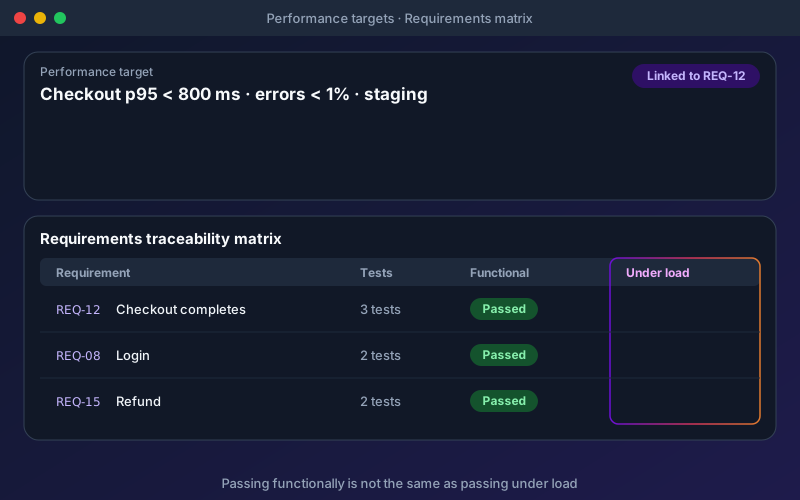
Performance usually lives outside the requirements process: a load report in one tool, a requirement in another, and nobody able to say which requirement was verified under load. Performance targets close that gap. Keep them under Project settings, attach them to load tests, and link them to requirements. Functional runs give you an early signal without running any load, because the target is checked against a window of recent response times for that endpoint. When a load test judges the target, the matrix records the result in its own Under load column. Each run is compared with the scenario's pinned baseline (or the previous run) using a statistical test over every interval's p95, so a change within normal variation is not reported as a regression.
Overview
A performance target states what good looks like, for example "Checkout p95 under 800 ms and errors under 1%, on staging". Targets are judged two ways: continuously, against the response times of your ordinary functional runs of that endpoint, and inside any load test that attaches them. Link a target to a requirement and the traceability matrix gains an Under load column showing met or missed, right beside the functional verdict and never replacing it. A requirement can pass every functional test and still miss its target under load; now you see both.
Key Capabilities
How It Works
- 1
Add a target under Project settings, for example p95 under 800 ms and errors under 1% on staging
- 2
Link it to the requirement it protects
- 3
Functional runs of that endpoint are checked against the target continuously
- 4
Attach the target to a load test; missing it can stop the run early
- 5
Read met or missed in the matrix's Under load column, beside the functional verdict
Available on
Performance & Load Testing add-on (paid add-on)
Added to a Professional, Custom or Enterprise licence. Included in the 15-day free trial — no credit card required.
Documentation
Step-by-step guides for setting up and using Performance Targets.
- Read a Performance Report: Percentiles, Verdicts and SLOsWhen a performance run finishes, Shift-Left Studio builds one report for it. The same report is what you see on screen, what you export as HTML, JSON or JUnit, what a share link shows, and what the project assistant reads.
- Requirements Traceability MatrixTrace each requirement to the tests and endpoints that verify it, run impact analysis when requirements change, and export a requirements traceability matrix for audits.
Go deeper
Guides and playbooks that show this capability in practice.
Related Features
Performance Testing
Turn the API tests you already have into load, stress, spike and soak tests, and get a verdict in words.
Learn moreTraceability (RTM)
Prove coverage from every requirement to the tests that verify it.
Learn moreRegression
Detect test regressions and failure trends over time.
Learn moreTry Performance Targets Today
Start your 15-day free trial — no credit card required.