
Monitoring API Performance in Production: Complete Guide (2026)
Quick answer
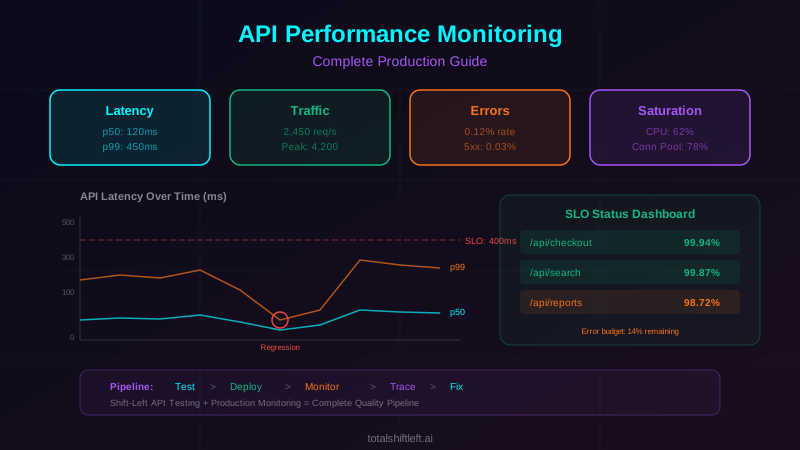
API performance monitoring continuously tracks the four golden signals — latency, traffic, errors, and saturation — using percentile distributions (p50/p95/p99) rather than averages, since averages hide how the slowest 1% of requests actually perform. Effective monitoring replaces static threshold alerts with SLO-based, error-budget burn-rate alerts, which cut alert volume dramatically while catching real degradation that transient spikes would otherwise mask.
Reviewed by Rishi Gaurav

API performance monitoring is the practice of continuously measuring, tracking, and alerting on the latency, throughput, error rate, and resource utilization of production APIs. It uses the four golden signals—latency, traffic, errors, and saturation—combined with SLO-based alerting to maintain reliability and detect performance regressions before they impact users.
According to Akamai's 2025 web performance research, a 100ms increase in API response time reduces conversion rates by 7% for e-commerce platforms and increases user churn by 4% for SaaS applications. API performance is not an abstract engineering concern—it directly drives business outcomes.
Yet most engineering teams monitor API performance reactively. They set static threshold alerts (alert if p99 latency exceeds 2 seconds), investigate after users complain, and optimize only after revenue is affected. This approach misses slow degradation, ignores per-endpoint differences, and fails to account for the relationship between performance and business metrics.
Effective API performance monitoring is proactive, SLO-driven, and integrated with the broader observability strategy. It tracks the right metrics at the right granularity, alerts on error budget consumption rather than raw thresholds, and connects performance data to distributed traces for rapid root cause analysis.
This guide covers the complete practice: which metrics to track, how to set meaningful SLOs, how to build monitoring dashboards, how to detect performance regressions from deployments, and how to integrate monitoring with your testing strategy for a unified quality workflow.
In this guide
- What Is API Performance Monitoring?
- Why API Performance Monitoring Matters
- Key Metrics and Golden Signals
- SLO-Based Monitoring and Error Budgets
- Architecture: Production Monitoring Stack
- Tools for API Performance Monitoring
- Real-World Example: SaaS Platform Performance
- API performance monitoring challenges and how to solve them
- Best Practices for API Performance Monitoring
- API Performance Monitoring Checklist
- The four alerts worth having
- API performance monitoring FAQ
What Is API Performance Monitoring?
API performance monitoring is the continuous measurement and analysis of how production APIs behave under real traffic conditions. It goes beyond simple uptime checks to capture detailed performance characteristics: response time distributions, throughput patterns, error categorization, and resource utilization.
The practice encompasses three layers. Synthetic monitoring sends artificial requests to API endpoints at regular intervals to verify availability and baseline response times. This catches outages and major regressions even during low-traffic periods. Real user monitoring (RUM) captures performance data from actual production traffic, revealing how APIs perform under real load with real data. Infrastructure monitoring tracks the underlying resources—CPU, memory, network, database connections—that support API performance.
Together, these layers answer the critical questions: Are APIs available? Are they fast enough? Are they returning correct results? Are they consuming reasonable resources? And critically: are they getting worse over time?
API performance monitoring differs from API testing in scope and timing. Testing validates behavior before deployment. Monitoring validates behavior continuously in production. The most effective teams use both: testing catches regressions before deployment, monitoring catches issues that testing missed or that emerge under production conditions.
If you are choosing between runners rather than writing one, the best API load testing tools compares k6, JMeter, Gatling, Locust and the hosted options on protocol support, scripting language and CI integration.
The argument for moving these checks off the post-deploy step entirely is in why teams cannot rely on post-deployment tests.
If you are choosing the runner rather than writing the script, k6 vs JMeter vs Gatling compares all three on scripting, efficiency and CI.
Why API Performance Monitoring Matters
Revenue Protection
Slow APIs cost money. Every additional 100ms of latency reduces conversion rates, increases bounce rates, and drives users to competitors. For a SaaS platform processing $10M in annual transactions, a 500ms latency regression on the checkout API can represent hundreds of thousands in lost revenue before anyone notices the trend.
SLA Compliance
Enterprise APIs often have contractual SLAs: 99.9% availability, sub-200ms p95 latency, less than 0.1% error rate. Violating these SLAs triggers financial penalties and damages customer relationships. Monitoring is the only way to know whether you are meeting SLAs continuously, not just during business hours when someone is watching the dashboard.
Performance Regression Detection
Every deployment risks introducing performance regressions. A new feature adds a database query. A library update changes serialization behavior. A configuration change reduces connection pool size. Without per-deployment performance comparison, these regressions accumulate until the API is noticeably slower—often weeks after the offending change was deployed, making root cause identification nearly impossible. Catching these earlier is easier when your test suite runs automated regression analysis that flags a version's degradations before it ships.
Capacity Planning
API performance monitoring data drives capacity planning decisions. Traffic growth trends, resource utilization patterns, and latency-under-load characteristics tell you when you need to scale before the system reaches its breaking point. Without this data, capacity planning is guesswork.
Key Metrics and Golden Signals
Latency (Response Time)
Latency is the time between receiving a request and sending the response. Track it as a distribution, not a single number. The essential percentiles are:
- p50 (median): The typical user experience. Half of requests are faster, half are slower.
- p95: The experience of your slow-request users. 1 in 20 requests is slower than this.
- p99: The experience of your worst-affected users. 1 in 100 requests is slower than this. Often the most business-critical users (complex queries, large accounts).
- p99.9: Extreme tail latency. Important for high-traffic APIs where 0.1% represents thousands of requests.
Track latency per endpoint, not just globally. An aggregate p99 of 300ms might hide that the /api/search endpoint has a p99 of 2 seconds while /api/health has a p99 of 5ms.
Separate successful request latency from error request latency. Failed requests often return quickly (immediate 400/500 responses), which artificially lowers average latency and hides real performance problems.
Traffic (Throughput)
Traffic measures request volume: requests per second (RPS) per endpoint. Traffic patterns reveal normal baselines, peak windows, and anomalies. A sudden traffic drop might indicate a client-side failure. A sudden spike might be a DDoS attack or a misconfigured retry loop.
Track traffic segmented by endpoint, HTTP method, response status code, and client identifier. This segmentation reveals whether traffic changes affect all clients or specific ones, all endpoints or specific ones.
Errors (Error Rate)
Error rate is the percentage of requests that return error responses. Segment errors by type:
- Client errors (4xx): Usually indicate API misuse or invalid input. High 400 rates suggest documentation problems or breaking API changes.
- Server errors (5xx): Indicate service failures. Any 500 error deserves investigation.
- Timeout errors: The caller gave up before receiving a response. These are often the most impactful errors because the user experiences a complete failure.
Track error rates per endpoint and per downstream dependency. A spike in errors from the payment endpoint that correlates with errors from the payment gateway downstream pinpoints the cause immediately.
Saturation (Resource Utilization)
Saturation measures how close the system is to its capacity limits. Key saturation metrics for APIs include: CPU utilization, memory usage, database connection pool utilization, thread pool utilization, queue depth, and network bandwidth.
Ready to shift left with your API testing?
Try our no-code API test automation platform free. Generate tests from OpenAPI, run in CI/CD, and scale quality.
Saturation metrics are leading indicators. Latency often stays flat until a resource approaches saturation, then degrades rapidly. Monitoring saturation lets you scale proactively—before latency spikes affect users.
SLO-Based Monitoring and Error Budgets
Traditional monitoring alerts on raw thresholds: "alert if p99 latency exceeds 2 seconds." This approach generates alert fatigue because it fires on every transient spike, even if the overall performance is excellent.
SLO-based monitoring uses a fundamentally different approach. An SLO defines a performance target over a time window: "99.9% of requests to the checkout API will complete in under 500ms over a rolling 30-day window." The complementary concept is the error budget: if your SLO is 99.9%, your error budget is 0.1%—you can tolerate 0.1% of requests being slower than 500ms before violating the SLO.
Alerts fire based on error budget consumption rate, not raw metric values. If you are consuming your 30-day error budget at a rate that would exhaust it in 3 days, that is an actionable alert. If a 5-minute latency spike consumed 0.001% of your monthly budget, that is noise.
This approach has three advantages. First, it reduces alert volume dramatically—transient spikes that do not threaten the SLO do not generate alerts. Second, it provides business context—an alert saying "error budget will be exhausted in 6 hours" is more actionable than "p99 latency is 2.1 seconds." Third, it enables tradeoff decisions—if the error budget is healthy, teams can prioritize feature development over performance optimization.
To implement SLO-based monitoring, define SLOs for each user-facing API endpoint. Use a tool like Grafana with SLO dashboards or Datadog SLO monitoring. Configure multi-window, multi-burn-rate alerts following Google's SRE methodology: fast-burn alerts (consuming budget rapidly, likely outage) and slow-burn alerts (gradual degradation, likely regression).
Architecture: Production Monitoring Stack
A production API performance monitoring architecture consists of four components: instrumentation, collection, storage, and visualization.
The instrumentation layer lives within each API service. OpenTelemetry metrics SDK or Prometheus client libraries expose metrics at an HTTP endpoint (/metrics). Standard metrics include request duration histog
rams (for latency percentiles), request counters (for throughput and error rates), and gauge metrics (for saturation). Histograms should use appropriate bucket boundaries for your latency profile—default Prometheus buckets are too coarse for low-latency APIs.
The collection layer scrapes or receives metrics from services. Prometheus is the standard for pull-based collection: it scrapes each service's /metrics endpoint at a configured interval (typically 15-30 seconds). For push-based architectures, the OpenTelemetry Collector receives metrics via OTLP and exports them to the storage backend. In Kubernetes, Prometheus auto-discovers services via service monitors or pod annotations.
The storage layer retains metrics data for querying. Prometheus stores recent data locally (typically 15-30 days). For longer retention, Thanos or Grafana Mimir provide scalable long-term storage backed by object storage (S3, GCS). Commercial alternatives like Datadog handle storage transparently.
The visualization layer provides dashboards and alerting. Grafana is the standard for open-source stacks, providing rich dashboarding capabilities with Prometheus as a data source. Configure dashboards at three levels: a high-level service overview (golden signals for all endpoints), per-endpoint detail views (latency distributions, error breakdowns), and SLO dashboards (error budget status, burn rate).
The monitoring stack should integrate seamlessly with distributed tracing and logging infrastructure. When a monitoring alert fires, the engineer should be able to click through to traces from the anomaly window and then to relevant logs. This metric-to-trace-to-log flow is the foundation of effective incident response.
Tools for API Performance Monitoring
| Tool | Type | Best For | Open Source |
|---|---|---|---|
| Prometheus | Metrics Collection | Time-series metrics with pull-based scraping | Yes |
| Grafana | Visualization | Dashboards, alerting, and SLO tracking | Yes |
| OpenTelemetry | Instrumentation | Vendor-neutral metrics and trace collection | Yes |
| Datadog | Full Platform | Unified APM, metrics, logs, and synthetics | No |
| New Relic | Full Platform | Full-stack performance monitoring | No |
| Grafana Mimir | Metrics Storage | Scalable long-term Prometheus storage | Yes |
| Thanos | Metrics Storage | High-availability Prometheus with long-term storage | Yes |
| Checkly | Synthetic Monitoring | API endpoint health checks and assertions | No |
| Postman Monitors | Synthetic Monitoring | Scheduled API test execution and alerting | No |
| PagerDuty | Incident Management | Alert routing and on-call management | No |
| Grafana OnCall | Incident Management | Open-source on-call management for Grafana | Yes |
| k6 | Load Testing | API performance benchmarking and regression testing | Yes |
Combine these monitoring tools with API testing tools to create a complete performance quality pipeline: test before deployment, monitor after deployment, and trace when issues arise.
Real-World Example: SaaS Platform Performance
Problem: A B2B SaaS platform with 2,000 enterprise customers experienced a gradual API performance degradation over 3 months. The /api/reports/generate endpoint p99 latency increased from 1.2 seconds to 4.8 seconds. No single deployment caused the regression—it accumulated across 45 deployments. Customers began escalating through support, and three enterprise clients threatened contract cancellation.
Solution: The team implemented comprehensive API performance monitoring. They instrumented all API endpoints with Prometheus client libraries, deployed Grafana dashboards showing per-endpoint latency percentiles segmented by deployment version, and configured SLO-based alerting with a 99% target for the report generation endpoint (complete within 3 seconds).
They also integrated per-deployment performance comparison into their CI/CD pipeline. After each deployment, an automated job compared the new version's p50/p95/p99 latency against the previous version for every endpoint. Any regression exceeding 15% triggered a warning; exceeding 30% blocked the deployment.
To diagnose the existing regression, they used deployment-version-tagged metrics to identify that 6 of the 45 deployments each added 400-600ms of latency to the report endpoint. Distributed tracing of slow report requests revealed the pattern: each regression was a new database join added to the report query without a corresponding index.
Results: After adding the missing indexes, report generation p99 dropped from 4.8 seconds to 900ms. The per-deployment performance comparison caught 3 additional regressions in the following month before they reached production. SLO-based alerting replaced 47 static threshold alerts with 8 SLO burn-rate alerts, reducing alert volume by 83% while improving detection of meaningful degradation.
API performance monitoring challenges and how to solve them
Alert Fatigue from Threshold-Based Alerting
Challenge: Static threshold alerts fire on every transient spike. A 30-second latency blip during a garbage collection pause triggers the same alert as a sustained 2-hour degradation. Teams learn to ignore alerts, and real incidents get lost in the noise.
Solution: Replace threshold alerts with SLO-based burn-rate alerts. A transient spike that consumes 0.001% of the monthly error budget does not fire an alert. A sustained degradation that will exhaust the budget in hours does. Use multi-window burn rates: a 5-minute window for fast burns (likely outage) and a 6-hour window for slow burns (likely regression).
Monitoring High-Cardinality Endpoints
Challenge: APIs with dynamic path parameters (e.g., /api/users/{userId}/orders/{orderId}) create high-cardinality metric labels. Each unique userId generates a separate time series, causing Prometheus to consume excessive memory and storage.
Solution: Normalize endpoint paths in your instrumentation. Replace dynamic segments with placeholders: /api/users/{id}/orders/{id}. All requests to this endpoint pattern share a single time series. Store the specific IDs as trace attributes or log fields, not as metric labels. Most HTTP instrumentation libraries (OpenTelemetry, Prometheus client) support route-aware normalization.
Free Visual blueprint + guide
Microservices Testing Strategy Blueprint
A visual testing strategy for microservices architectures. Covers testing layers, contract testing, service mesh validation, and tool selection.
Download FreeBaseline Drift Makes Regressions Invisible
Challenge: Performance degrades gradually—1-2% per deployment over months. No single deployment triggers an alert, but cumulative degradation is significant. By the time anyone notices, dozens of deployments have contributed to the problem.
Solution: Implement automated per-deployment performance comparison. After each deployment, compare the new version's latency percentiles against the previous version for every endpoint. Store historical baselines (the performance characteristics of the initial "good" version) and periodically compare current performance against that baseline, not just the previous deployment.
Missing Client-Side Perspective
Challenge: Server-side metrics show how long the API took to process the request, but not how long the client waited. Network latency, DNS resolution, TLS handshake, and response download time are invisible to server-side monitoring.
Solution: Implement synthetic monitoring from client locations. Tools like Checkly and Postman Monitors send requests from multiple geographic regions and measure total response time including network. Compare synthetic monitoring results against server-side metrics to quantify network overhead and identify geographic performance disparities.
Monitoring Costs at Scale
Challenge: High-traffic APIs generate enormous metric volumes. Storing high-resolution metrics (15-second scrape interval) for hundreds of endpoints across months becomes expensive.
Solution: Implement metric downsampling for long-term storage. Store high-resolution data (15-second intervals) for 7-14 days. Downsample to 5-minute intervals for 30-90 day retention. Downsample to 1-hour intervals for 1-year retention. Thanos and Grafana Mimir support automatic downsampling. Also limit histogram bucket counts—10-15 well-chosen buckets provide sufficient percentile accuracy without excessive cardinality.
Disconnected Monitoring and Testing
Challenge: Performance monitoring and performance testing operate as separate practices. The monitoring team tracks production metrics. The testing team runs load tests. Neither uses the other's data. Performance regressions caught in monitoring are not traced back to specific test gaps.
Solution: Unify the performance quality pipeline. Use the same metrics (golden signals) and the same SLO definitions in both testing and monitoring. Run k6 load tests in the CI/CD pipeline that validate SLOs before deployment. When production monitoring detects a regression, create a test case that reproduces it. Feed production traffic patterns back into load test scenarios for realistic testing.
Best Practices for API Performance Monitoring
- Track all four golden signals (latency, traffic, errors, saturation) for every API endpoint
- Use percentiles (p50, p95, p99) for latency instead of averages—averages hide tail latency
- Define SLOs for every user-facing API endpoint with specific latency and availability targets
- Implement error budget-based alerting instead of static threshold alerts
- Segment metrics by endpoint, HTTP method, response status, and deployment version
- Separate successful request latency from error request latency in your metrics
- Deploy synthetic monitoring from multiple geographic locations for client-perspective visibility
- Automate per-deployment performance comparison in your CI/CD pipeline
- Build three-level dashboards: service overview, per-endpoint detail, and SLO status
- Connect monitoring alerts to distributed traces for immediate root cause investigation
- Implement metric downsampling for cost-effective long-term retention
- Review SLO definitions quarterly and adjust based on business requirements and system evolution
API Performance Monitoring Checklist
- ✔ All API endpoints emit latency histograms, request counters, and error counters
- ✔ Metrics are segmented by endpoint, method, status code, and deployment version
- ✔ Latency is tracked as percentile distributions (p50, p95, p99), not averages
- ✔ SLOs are defined for every user-facing endpoint with latency and availability targets
- ✔ Error budget burn-rate alerts replace static threshold alerts
- ✔ Grafana dashboards exist at service, endpoint, and SLO levels
- ✔ Synthetic monitoring checks API availability from multiple geographic locations
- ✔ Per-deployment performance comparison runs automatically in CI/CD
- ✔ Monitoring alerts link to distributed traces for root cause investigation
- ✔ Saturation metrics track resource utilization (CPU, memory, connections, threads)
- ✔ Metric downsampling is configured for cost-effective long-term retention
- ✔ Performance monitoring is integrated with API testing strategy
- ✔ On-call runbooks include monitoring-to-trace investigation workflows
The four alerts worth having
Most API monitoring setups alert on too much and catch too little. These four rules cover availability, latency, saturation and error-budget burn — and nothing else needs to page anyone:
# prometheus/api-alerts.yml
groups:
  - name: api
    rules:
      - alert: ApiErrorRateHigh
        expr: |
          sum by (route) (rate(http_requests_total{status=~"5.."}[5m]))
            / sum by (route) (rate(http_requests_total[5m])) > 0.01
        for: 5m
        labels: { severity: page }
        annotations:
          summary: "{{ $labels.route }} is returning >1% 5xx for 5 minutes"

      - alert: ApiLatencyP99AboveSlo
        expr: |
          histogram_quantile(0.99,
            sum by (route, le) (rate(http_request_duration_seconds_bucket[5m]))) > 0.5
        for: 10m
        labels: { severity: page }

      - alert: ApiSaturation
        expr: sum by (service) (rate(http_requests_in_flight[1m])) > 0.8 * on(service) max_concurrency
        for: 5m
        labels: { severity: ticket }

      - alert: ErrorBudgetBurnFast
        expr: |
          (1 - sum(rate(http_requests_total{status!~"5.."}[1h]))
             / sum(rate(http_requests_total[1h]))) > 14.4 * (1 - 0.999)
        for: 2m
        labels: { severity: page }
        annotations:
          summary: "Burning the 30-day error budget 14x faster than sustainable"
The last one is the important one: it fires on the rate the budget is being consumed, not on a threshold, so it pages for a real outage and stays quiet during a brief blip.
API performance monitoring FAQ
What are the golden signals for API performance monitoring?
The four golden signals are latency (how long requests take), traffic (how many requests per second), errors (the percentage of requests that fail), and saturation (how close the system is to capacity). These four metrics provide a comprehensive view of API health. Google's SRE team established these signals as the minimum viable monitoring for any production service.
Why should I use percentiles instead of averages for API latency?
Averages hide the experience of your worst-affected users. An average latency of 200ms could mean 95% of requests complete in 100ms while 5% take 2 seconds. Percentiles (p50, p95, p99) show the distribution. p99 latency tells you how the slowest 1% of requests perform—these are often your most valuable users (large queries, premium accounts) and the ones most likely to churn.
What is an SLO and how does it apply to API monitoring?
A Service Level Objective (SLO) is a target for how well a service should perform, expressed as a percentage over a time window. For example: "99.9% of API requests will complete in under 500ms over a 30-day rolling window." SLOs transform API monitoring from reactive alerting (alert when latency spikes) to budget-based alerting (alert when you are consuming your error budget too fast).
How do I detect API performance regressions in production?
Compare current performance metrics against baseline metrics from the previous deployment version. Track p50, p95, and p99 latency per endpoint per deployment version. Alert when a new deployment increases any latency percentile by more than 20% compared to the previous version. Automate this comparison in your CI/CD pipeline to catch regressions before they affect users at scale.
What tools are best for API performance monitoring?
Prometheus with Grafana is the leading open-source stack for API metrics and dashboards. Datadog and New Relic provide commercial all-in-one platforms. For API-specific monitoring, tools like Postman Monitors and Checkly provide synthetic monitoring. OpenTelemetry provides vendor-neutral instrumentation. The best choice depends on scale, budget, and whether you need unified observability across metrics, logs, and traces.
Sources and further reading
- Google SRE Book — Monitoring Distributed Systems — the four golden signals and alerting philosophy.
- Prometheus documentation — the metrics model most alerting is built on.
- Grafana documentation — dashboards and alerting over metrics, logs and traces.
Key takeaways
- API performance monitoring is not optional for production systems—it is the feedback loop that keeps your APIs fast, reliable, and meeting the expectations of your users and your business.
- The shift from threshold-based alerting to SLO-based monitoring is the most impactful change you can make.
- It reduces alert fatigue, provides business context for engineering decisions, and enables the error budget tradeoffs that let teams balance reliability with development velocity.
- Start with the golden signals for your most critical API endpoints. Define SLOs based on business requirements, not arbitrary thresholds.
- Build dashboards that answer questions at every level—from "is the system healthy?" to "why is this specific endpoint slow?" Connect your monitoring to distributed tracing so alerts lead directly to root causes.
- Combined with comprehensive API testing before deployment and effective logging strategies, production monitoring completes the quality lifecycle: test to prevent issues, monitor to detect what testing missed, and trace to diagnose what monitoring detects.
Ready to build a complete API quality pipeline? Start your free trial of Total Shift Left and discover how automated API testing integrates with production monitoring to catch performance issues before your users do.
Related Articles: Observability vs Monitoring in DevOps | Distributed Tracing Explained for Microservices | Debugging Microservices with Distributed Tracing | Logging Strategies for Microservices Testing | API Testing Strategy for Microservices | DevOps Testing Best Practices
Ready to shift left with your API testing?
Try our no-code API test automation platform free.