
Requirements Traceability Matrix (RTM)
What It Does
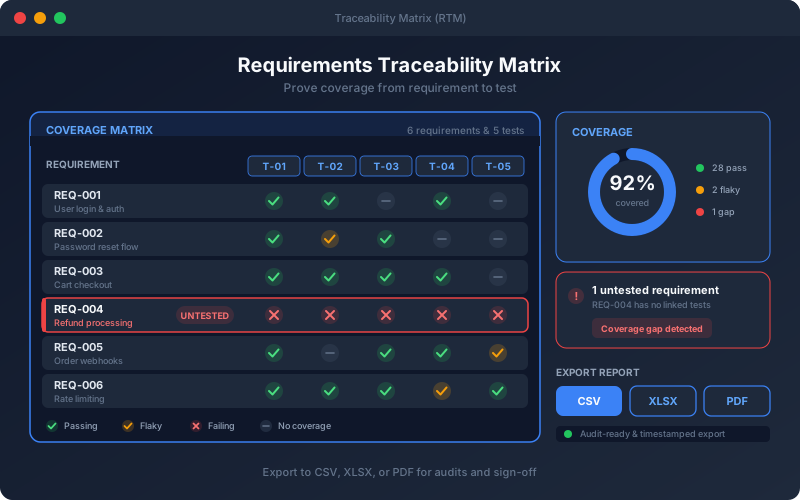
The Requirements Traceability Matrix answers the question every auditor and release manager asks: is every requirement tested, and did the tests really prove it? The platform keeps the links between requirements and tests up to date as you generate tests, then shows the latest run of each test and workflow against the requirement it covers. A green test is not always proof, so the Verified column reads a requirement verdict instead of counting passes: a requirement is verified only when a check grounded in it was evaluated in a run. Requirements with no tests stand out with a red zero, and one covered only by an end-to-end workflow still counts as covered. If you run load tests judged against performance targets, the Under load column records met or missed beside the functional verdict, and the Security column lists open findings with the worst severity. Hover any count to see each test or workflow and its last run, or jump to a single requirement from the assistant or the coverage views. The matrix exports as CSV or PDF, and the rows carry the ticket keys when requirements were imported from a tracker.
Overview
A live Requirements Traceability Matrix links each requirement to the tests and workflows that validate it and to their latest runs, so you can see at any moment which requirements are covered and passing. It goes further than a pass count: the Verified column shows whether a requirement was actually verified, is failing, passed without its tests checking what it asks for ("not really"), or has not run. Every row cites the document and the section, page or row the requirement came from. With the add-ons, the same row shows whether the requirement met its performance target under load and any open security findings. Export the matrix as CSV or PDF, and on Professional, Trial and Enterprise group it by tracker ticket. The matrix is included on every plan, Free included.
Key Capabilities
How It Works
- 1
Open Requirements and select the Traceability tab
- 2
Read each requirement’s source, tests, workflows and their latest runs
- 3
Check the Verified column for the verdict, and hover it for the evidence
- 4
Spot untested requirements, shown with a red zero, and generate tests for them
- 5
With the add-ons, read Under load and Security on the same row
Available on
All Plans
Included in the free trial — no credit card required.
Documentation
Step-by-step guides for setting up and using Traceability (RTM).
- Requirements Traceability MatrixTrace each requirement to the tests and endpoints that verify it, run impact analysis when requirements change, and export a requirements traceability matrix for audits.
- Test Validity: What a Green Run Leaves OpenA green run is good news, but it does not always mean what it seems to. A test that only checks "the status was 200" stays green even if the endpoint starts returning an empty body.
Built for regulated teams
Teams in regulated industries rely on this capability to ship API changes with an audit trail.
Go deeper
Guides and playbooks that show this capability in practice.
Related Features
Requirements
Turn specs and business documents into testable requirements.
Learn moreRequirements From Trackers
Import epics and user stories from your tracker, turn them into reviewable requirements, and trace each ticket to its tests and results.
Learn moreTest Strategy
Generate a full test strategy across proven design techniques.
Learn moreTry Traceability (RTM) Today
Start your 15-day free trial — no credit card required.