
What It Does
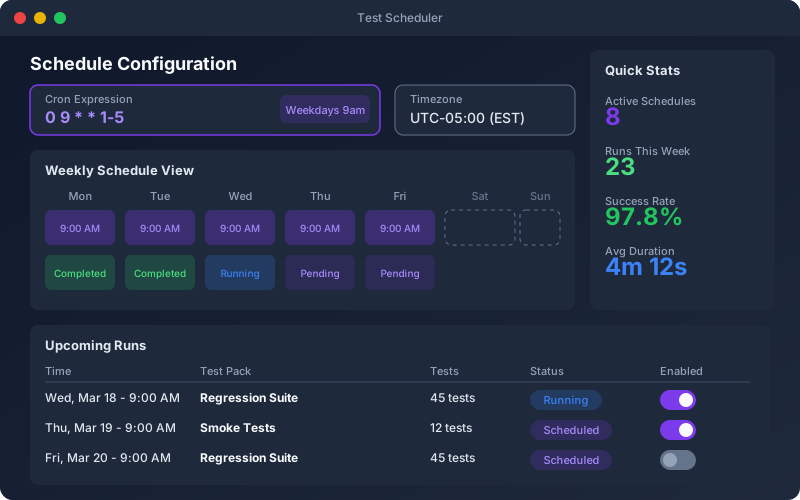
The Test Scheduler automates your API regression testing by running test packs on a recurring schedule. Configure cron expressions for fine-grained control and monitor your APIs around the clock without manual intervention. Each scheduled run produces a full execution report with pass/fail breakdown, response times, and assertions results — all visible in the Reporting section. When a scheduled run detects failures, the team is notified immediately via email with a direct link to the report. Over time, the analytics engine compares scheduled runs to detect regressions, flaky tests, and performance degradation.
Overview
Schedule test packs to run hourly, daily, or weekly against any environment. The scheduler supports standard cron expressions for fine-grained timing control and runs tests on the Shift-Left Engine (cloud) or Shift-Left Agent (local). Get email notifications when tests fail, view scheduled run history in the reporting dashboard, and compare results across scheduled executions to catch intermittent failures. Perfect for continuous API health monitoring in production, nightly regression suites in staging, and periodic compliance checks.
Key Capabilities
How It Works
- 1
Create a test pack containing the tests you want to schedule
- 2
Set a cron expression (e.g., every hour, daily at 6 AM, weekdays at midnight)
- 3
Choose the target environment and execution engine (cloud or local agent)
- 4
Results appear on the dashboard and failures trigger email alerts instantly
- 5
View scheduled run history and compare pass rates across executions
Available on
business Plan & Above
Upgrade to the business plan to unlock this feature.
Go deeper
Guides and playbooks that show this capability in practice.
Try Scheduler Today
Start your 15-day free trial — no credit card required.