
API Security Testing in Enterprise SDL & CI/CD Pipelines (2026)
Quick answer
API security testing in CI/CD automates OWASP API Top 10 vulnerability scanning as a pipeline stage, blocking insecure deployments via quality gates instead of waiting for quarterly penetration tests. A three-tier architecture works best: a 5-10 minute focused scan on every PR, a 15-30 minute comprehensive scan on merge, and a 30-60 minute full scan nightly — catching vulnerabilities within minutes rather than the months it takes most teams relying only on pre-release or post-deployment testing.
Reviewed by Parveen Kumari

API security testing in CI/CD pipelines is the practice of automating security vulnerability detection as an integrated stage of your continuous integration and delivery workflow. It enables teams to catch OWASP API Top 10 vulnerabilities on every code change, enforce security quality gates that block insecure deployments, and provide developers with immediate security feedback — shifting security from a post-deployment activity to a pre-merge requirement.
Most API security testing happens too late. A 2025 industry survey found that 72% of organizations discover API security vulnerabilities only during pre-release penetration testing or, worse, after production deployment. By that point, the vulnerable code has been in development for weeks, other code has been built on top of it, and fixing the vulnerability requires rework that delays the entire release.
The solution is straightforward in concept but challenging in execution: integrate API security testing directly into your CI/CD pipeline so that every code change is automatically tested for security vulnerabilities before it can be merged or deployed. This is the core of the shift-left security approach — catching vulnerabilities at the moment they are introduced, when they are cheapest and easiest to fix.
The challenge is making security testing fast enough, accurate enough, and actionable enough to fit into a development workflow that expects build-and-test feedback in minutes, not days. This guide provides a practical architecture for integrating API security testing into CI/CD pipelines, covering tool selection, pipeline design, quality gates, and the organizational practices that make automated security testing succeed. You will learn how to build a pipeline that catches common API vulnerabilities automatically, without slowing down your release cadence.
In this guide
- What Is API Security Testing in CI/CD?
- Why CI/CD Security Integration Matters
- Key Components of Pipeline Security Testing
- Pipeline Architecture for API Security
- API security testing in CI/CD tools compared
- API security testing in CI/CD in practice: a worked example
- API security testing in CI/CD challenges and how to solve them
- API security testing in CI/CD best practices
- API security testing in CI/CD checklist
- Shift API security scanning left into the pull request
- API security testing in CI/CD FAQ
What Is API Security Testing in CI/CD?
API security testing in CI/CD is the automated execution of security vulnerability scans as a defined stage within your continuous integration and continuous delivery pipeline. Instead of running security tests manually or periodically, they execute automatically on triggers like pull request creation, merge to main branch, or pre-deployment to staging.
The core concept is embedding DAST (Dynamic Application Security Testing) tools — along with specification auditing and authorization testing — into the same pipeline that runs your unit tests, integration tests, and deployment scripts. When a developer pushes code, the pipeline deploys the API to a test environment, runs security scans against the live endpoints, evaluates results against quality gate thresholds, and either passes the build or blocks the deployment with actionable security findings.
This approach transforms security from a separate, manual process performed by a dedicated team into an automated, continuous practice owned by the development team. It aligns with DevSecOps principles by making security testing as routine and non-negotiable as compilation and unit testing. Developers receive security feedback within their normal workflow — in the same pull request where they review code and test results — rather than in a separate security report delivered weeks after the code was written.
The scope of CI/CD security testing covers OWASP API Top 10 vulnerability categories, authentication and authorization validation, rate limit verification, input validation testing, response schema compliance, and security header verification. The depth of testing varies based on the pipeline stage — lightweight scans on pull requests, comprehensive scans on main branch merges, and full regression suites on nightly schedules.
Getting test credentials without leaving a static token in the pipeline is its own problem — SSO and secret management for API testing covers the OIDC-to-vault pattern.
Test fixtures are where tokens go to be forgotten — JWT secret leakage in test files covers finding the ones already committed.
Why CI/CD Security Integration Matters
Speed of Vulnerability Detection
Vulnerabilities detected in CI/CD are found within minutes of introduction — when the developer still has the relevant code in their working memory. Compare this to vulnerabilities found during quarterly penetration tests, which may be months old. The cost of fixing a vulnerability increases by 10x for each stage it advances through the development lifecycle. CI/CD detection is the earliest possible automated intervention.
Consistent Coverage
Manual security testing is inconsistent. It depends on tester availability, expertise, and thoroughness. Automated CI/CD testing runs the same comprehensive test suite on every change, every time, without exception. It does not skip endpoints because of time pressure, forget to test a new parameter, or miss an authentication edge case because a tester was fatigued.
Developer Ownership of Security
When security findings appear in the same pull request alongside code review comments and test results, developers naturally take ownership of fixing them. This is fundamentally different from receiving a PDF security report weeks later. CI/CD integration makes security a development concern, not a separate security team concern — the core principle of DevSecOps.
Preventing Vulnerability Accumulation
Without CI/CD security testing, vulnerabilities accumulate silently. Each sprint introduces a few new security issues that go undetected until the next manual assessment. By then, dozens of vulnerabilities exist across multiple services. CI/CD testing prevents accumulation by catching each vulnerability individually, when it is a single-issue fix rather than a backlog of dozens.
Key Components of Pipeline Security Testing
API Specification Ingestion
The pipeline must have access to your current OpenAPI specification — either from the repository (spec-as-code) or generated from the deployed API. Specification-aware security testing generates more accurate tests with fewer false positives than generic scanning. Keep your spec in the repository alongside your code so that spec and implementation are always in sync.
Test Environment Provisioning
DAST tools need a running API to test against. Your pipeline must provision a test environment with your API deployed and configured with test data. This can be a dedicated staging environment, an ephemeral environment spun up per PR, or a shared test environment with namespace isolation. The environment must mirror production security configuration — the same authentication mechanisms, the same rate limits, the same CORS policies.
Security Scan Execution
The pipeline invokes the security testing tool(s) with the appropriate configuration: target URL, OpenAPI spec path, authentication credentials, scan policy (quick vs. comprehensive), and timeout limits. Tools with first-party plugins for GitHub Actions, GitLab CI, Jenkins, and Azure DevOps make this a single pipeline step rather than a brittle shell wrapper. Multiple tools can run in parallel if they test different vulnerability categories. The scan execution stage must handle timeouts gracefully — a hung scanner should not block the entire pipeline indefinitely.
Ready to shift left with your API testing?
Try our no-code API test automation platform free. Generate tests from OpenAPI, run in CI/CD, and scale quality.
Quality Gate Evaluation
After scans complete, the pipeline evaluates results against defined thresholds. A typical quality gate policy: block on any critical severity finding, block on high severity findings in authentication or authorization categories, warn on medium findings, and log low findings. Quality gates must be configurable per team or service to accommodate different risk profiles.
Result Reporting
Security findings must be reported in the developer's context — as pull request comments, pipeline annotations, or dashboard entries linked to the specific change. Raw DAST output is insufficient. Results should map findings to specific endpoints, provide remediation guidance, and distinguish new findings from pre-existing baseline issues. Integration with issue trackers (JIRA, GitHub Issues, Linear) enables workflow-native tracking.
Baseline Management
Not every security finding can be fixed immediately. Baseline management tracks known, accepted vulnerabilities and excludes them from quality gate evaluation. New findings that are not in the baseline trigger quality gates; baselined findings are tracked separately with planned remediation dates. This prevents existing technical debt from blocking all deployments while maintaining accountability for remediation.
Pipeline Architecture for API Security
A well-designed API security testing pipeline operates at multiple speeds for different triggers, balancing thoroughness with developer velocity. The architecture has three tiers.
Tier 1 — PR-Level Scan (5-10 minutes): Triggered on every pull request. Deploys the API to a test environment (or reuses a shared staging). Runs a focused security scan covering only the endpoints modified in the PR, plus a baseline scan of authentication and authorization controls. Quality gate blocks the PR if critical findings are detected. This tier provides immediate feedback withou
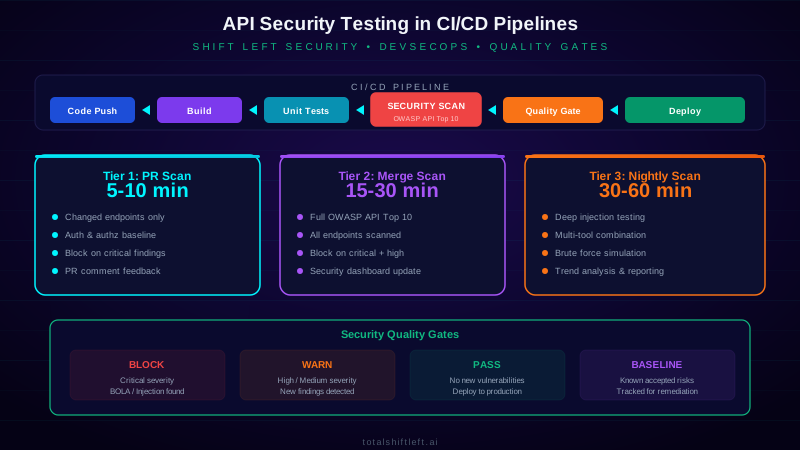
t significantly slowing the PR review process.
Tier 2 — Merge-Level Scan (15-30 minutes): Triggered when code merges to the main branch. Runs a comprehensive security scan covering all endpoints with full OWASP API Top 10 test coverage. Includes rate limit testing, response schema validation, and deep injection testing across all parameters. Quality gate blocks the deployment pipeline if critical or high findings are detected. Results feed into the security dashboard for trend tracking.
Tier 3 — Scheduled Full Scan (30-60 minutes): Runs nightly or weekly. Executes the most comprehensive security test suite including time-intensive tests like brute-force simulation, complex injection payloads, and cross-service authorization testing. Uses multiple security testing tools in combination for maximum coverage. Results are compared against previous scans to identify new vulnerabilities, regressions, and trends. This tier catches issues that time-constrained PR and merge scans might miss.
This tiered approach ensures that developers get fast feedback on PRs, deployments are protected by thorough scans, and the full security posture is validated regularly — without any single tier creating an unacceptable bottleneck.
API security testing in CI/CD tools compared
| Tool | Type | CI/CD Integration | Scan Speed | Best For | Open Source |
|---|---|---|---|---|---|
| OWASP ZAP | DAST | Docker + CLI | Medium | Free DAST baseline scanning | Yes |
| StackHawk | DAST | Native (GH Actions, GitLab, Jenkins) | Fast | Developer-first CI/CD security | No |
| Total Shift Left | AI Test Gen | Native (GH Actions, GitLab, Jenkins) | Fast | AI-generated security tests from specs | No |
| 42Crunch | Spec Audit + DAST | Native | Fast | Spec-first security in CI/CD | No |
| Snyk API | SAST + DAST | Native | Medium | Multi-language security scanning | No |
| Nuclei | Template Scanner | CLI | Fast | Custom security check automation | Yes |
| Trivy | Container + Config | Native | Fast | Infrastructure security scanning | Yes |
| Semgrep | SAST | Native (GH Actions) | Fast | Code-level API security patterns | Partial |
| GitLab SAST/DAST | Integrated | Native (GitLab) | Medium | GitLab-native security scanning | Partial |
| GitHub Advanced Security | SAST | Native (GitHub) | Fast | GitHub-native code scanning | No |
For PR-level scans where speed is critical, StackHawk, Total Shift Left, and 42Crunch deliver results fastest. For comprehensive nightly scans, OWASP ZAP and Nuclei provide deep coverage at no licensing cost. Most mature pipelines use a fast commercial tool for PR gates and a comprehensive open-source tool for scheduled deep scans.
API security testing in CI/CD in practice: a worked example
Problem: A B2B SaaS company with 80 developers and 400+ API endpoints had no security testing in their CI/CD pipeline. Security was handled by a two-person security team that ran quarterly penetration tests. Each pen test found 30-50 vulnerabilities, most of which were regressions of previously fixed issues. The security team spent more time re-finding old vulnerabilities than discovering new ones. Developers viewed security as a quarterly disruption rather than a continuous practice.
Solution: The team implemented a three-tier CI/CD security testing architecture. Tier 1 used Total Shift Left to generate security tests from their OpenAPI specs, running in GitHub Actions on every PR with a 7-minute timeout. Tier 2 ran StackHawk DAST scans on merge to main, completing in 20 minutes. Tier 3 ran OWASP ZAP full scans nightly. Quality gates were configured to block PRs on critical findings and block deployments on critical or high findings. They established a baseline of existing vulnerabilities and committed to remediating them over three sprints while preventing new ones.
Results: In the first month, the CI/CD pipeline caught 23 new vulnerabilities that would have previously reached production. Regression rate dropped from 60% (the same vulnerabilities reappearing pen test after pen test) to 3% because every fix now had an automated regression test. Developer remediation time averaged 2 hours per finding (same-day fix) compared to 2 weeks under the old quarterly model. The security team redirected their pen testing focus from known vulnerability categories (now covered by automation) to business logic and complex attack scenarios, finding four critical business logic flaws that no automated tool would have detected. The next quarterly pen test found only 8 issues total, down from 30-50.
API security testing in CI/CD challenges and how to solve them
Challenge: Pipeline Speed Impact
Adding security scanning to CI/CD pipelines increases build times. Developers resist changes that slow their feedback loop from 5 minutes to 30 minutes. Solution: Implement the tiered architecture. Run quick, focused scans (5-10 minutes) on PRs and comprehensive scans only on merge or schedule. Only scan changed endpoints on PRs rather than the full API surface. Parallelize security scans with other test stages rather than running them sequentially.
Challenge: Test Environment Availability
DAST tools require a running API to scan. Spinning up isolated test environments per PR is expensive, and shared environments create conflicts when multiple PRs run security scans simultaneously. Solution: Use lightweight, containerized API deployments for PR-level scans. Consider shared staging with namespace isolation for merge-level scans. Pre-provision test data and authentication tokens as pipeline secrets rather than generating them during each scan.
Challenge: Managing False Positives Without Suppressing Real Findings
Security scan results include false positives that, if not managed, cause developers to ignore all findings. But overly aggressive false positive suppression risks hiding real vulnerabilities. Solution: Implement a structured baseline management process. New findings require explicit triage — mark as real (fix required), false positive (suppressed with justification), or accepted risk (tracked with remediation timeline). Review suppressed findings quarterly to catch mistakes. Use tools with low false positive rates (specification-aware tools perform better than generic scanners).
Free PDF guide (12 pages)
Top 50 API Testing Mistakes
50 real-world API testing mistakes organized by category — from authentication to performance — each with a concrete fix strategy.
Download FreeChallenge: Authentication in Automated Pipelines
Security scans need valid authentication tokens, but token generation often requires interactive login flows that cannot run in a headless CI/CD environment. Token expiration creates flaky tests when cached tokens expire mid-scan. Solution: Create dedicated service accounts with long-lived API keys for CI/CD security testing. Use OAuth 2.0 client credentials flow for machine-to-machine authentication. Store credentials as pipeline secrets. Implement token refresh logic in your pipeline configuration.
Challenge: Organizational Resistance
Developers may view security quality gates as unnecessary blockers, especially when false positives cause legitimate PRs to be blocked. Security teams may resist giving developers the ability to suppress findings. Solution: Start with warning-only quality gates — report findings without blocking. Build trust by demonstrating accurate findings and quick triage. Transition to blocking gates gradually, starting with critical-only and expanding as false positive rates decrease and developer confidence grows.
API security testing in CI/CD best practices
- Start with non-blocking gates — Begin by reporting security findings without blocking pipelines. Build trust in the accuracy of findings before enabling blocking quality gates. Transition to blocking over 2-4 weeks.
- Use specification-driven testing — Generate security tests from your OpenAPI specifications for targeted, accurate testing with fewer false positives than generic scanning. Keep specs in the repo alongside code.
- Implement tiered scanning — Quick scans on PRs, comprehensive scans on merge, full scans nightly. Match scan depth to the speed requirement of each trigger point.
- Scan only changed endpoints on PRs — Use API spec diffing to identify which endpoints changed in a PR and scan only those. This keeps PR-level scans fast while maintaining coverage.
- Parallelize security with other tests — Run security scans in parallel with functional tests and integration tests, not sequentially after them. Security should not add to the critical path unless necessary.
- Automate token management — Use service accounts, client credentials flow, and pipeline secrets for authentication. Never hardcode credentials in pipeline configuration files.
- Track security metrics over time — Monitor vulnerability introduction rate, mean time to remediate, regression rate, and false positive rate. Use these metrics to tune your pipeline and demonstrate improvement.
- Make findings actionable — Every security finding in a PR should include the affected endpoint, a description of the vulnerability, and specific remediation guidance. Developers should be able to fix issues without security expertise.
- Baseline and remediate existing debt — Do not let existing vulnerabilities prevent you from deploying the pipeline. Baseline current issues, set remediation timelines, and focus quality gates on preventing new vulnerabilities.
- Integrate with developer tools — Push findings to PR comments, IDE plugins, and Slack channels. Meet developers where they work rather than requiring them to check a separate security dashboard.
- Review and update scan policies quarterly — As your API evolves, scan policies may need updating to cover new endpoint patterns, authentication mechanisms, or technology stacks.
API security testing in CI/CD checklist
- ✔ Security testing stage defined in CI/CD pipeline configuration
- ✔ DAST tool integrated and running on every PR
- ✔ OpenAPI specification accessible to security scanning tools
- ✔ Test environment provisioned with production-equivalent security config
- ✔ Authentication tokens managed via pipeline secrets
- ✔ Quality gates configured with appropriate severity thresholds
- ✔ PR-level scan completes within 10 minutes
- ✔ Merge-level scan covers full OWASP API Top 10
- ✔ Nightly full scan scheduled with comprehensive test coverage
- ✔ Baseline management process established for existing vulnerabilities
- ✔ Findings reported as PR comments with remediation guidance
- ✔ Issue tracker integration configured for vulnerability tracking
- ✔ Security metrics dashboard operational (introduction rate, MTTR, regression rate)
- ✔ Developer training completed on security finding interpretation and remediation
See also: jwt authentication in our learn hub for the underlying concept.
Shift API security scanning left into the pull request
A nightly scan finds the vulnerability a day after it merged. Running a spec-driven scan on the pull request finds it before it merges, and costs about two minutes:
# .github/workflows/api-security.yml
name: API security
on:
  pull_request:
    paths: ['openapi.yaml', 'src/**']
jobs:
  dast:
    runs-on: ubuntu-latest
    permissions: { security-events: write }
    steps:
      - uses: actions/checkout@v4
      - name: Deploy PR preview
        run: ./scripts/deploy-preview.sh   # sets PREVIEW_URL
      - name: OWASP ZAP API scan
        uses: zaproxy/action-api-scan@v0.9.0
        with:
          target: '${{ env.PREVIEW_URL }}/openapi.yaml'
          format: openapi
          fail_action: true
      - name: Auth and schema abuse cases
        run: |
          pip install schemathesis
          schemathesis run openapi.yaml --url "$PREVIEW_URL" \
            --checks all --auth-type bearer --header "Authorization: Bearer $TEST_TOKEN"
        env:
          TEST_TOKEN: ${{ secrets.TEST_TOKEN }}
API security testing in CI/CD FAQ
How do you integrate API security testing into a CI/CD pipeline?
Integrate API security testing into CI/CD by adding security scanning stages after your API is deployed to a staging environment. Use DAST tools (OWASP ZAP, StackHawk, Total Shift Left) that accept OpenAPI specifications and run against live APIs. Configure quality gates that block deployments when critical or high severity vulnerabilities are detected. Run lightweight scans on every PR and comprehensive scans nightly.
What is shift-left security testing?
Shift-left security testing means moving security testing earlier in the development lifecycle — from post-deployment penetration tests to pre-merge automated security scans in your CI/CD pipeline. Instead of finding vulnerabilities after release, developers receive security feedback on every pull request, catching and fixing vulnerabilities before code reaches production.
What is a security quality gate in CI/CD?
A security quality gate is an automated checkpoint in your CI/CD pipeline that evaluates security scan results against defined thresholds. If the scan finds vulnerabilities exceeding the threshold (e.g., any critical severity findings), the pipeline is blocked and the deployment is prevented. Quality gates enforce minimum security standards and prevent known vulnerabilities from reaching production.
How long should API security tests take in a CI/CD pipeline?
API security tests in CI/CD should complete within 5-15 minutes for PR-level scans to avoid blocking developer workflow. Comprehensive security scans can take 30-60 minutes and are typically run nightly or on merge to main. Optimize scan time by testing only changed endpoints on PRs and running full scans on scheduled triggers.
What is DevSecOps and how does it relate to API security testing in CI/CD?
DevSecOps integrates security practices into DevOps workflows, making security a shared responsibility across development, security, and operations teams. API security testing in CI/CD is a core DevSecOps practice — it automates security validation as part of the delivery pipeline rather than treating it as a separate, manual gate. DevSecOps shifts security from a blocker to an enabler of fast, safe releases.
Sources and further reading
- OWASP API Security Top 10 (2023) — the reference list of API risk categories.
- StackHawk documentation — CI-native DAST scanning against a running API.
- NIST SP 800-218 (SSDF) — the secure software development practices auditors map to.
Key takeaways
- API security testing in CI/CD pipelines is the operational foundation of shift-left security.
- It transforms security from a quarterly assessment that finds problems too late into a continuous practice that prevents problems from reaching production.
- The tiered scanning architecture — fast PR checks, thorough merge scans, comprehensive nightly sweeps — provides the right balance of speed and depth for every stage of your development workflow.
- Combined with actionable reporting, quality gates, and baseline management, CI/CD security testing makes your APIs more secure with every deployment rather than less secure with every change.
Ready to integrate AI-powered API security testing into your CI/CD pipeline? Start your free trial of Total Shift Left and automate security test generation from your API specifications in minutes.
Related: API Testing: The Complete Guide | Automated Testing in CI/CD | How to Build a CI/CD Testing Pipeline | API Penetration Testing vs Security Testing | API Security Testing Tools Comparison | What Is Shift Left Testing | API Testing in CI/CD | API Regression Testing
For regulated teams: see API testing for SOC 2 controls, API testing for FedRAMP, the enterprise SDL guide, and the platform security & trust center.
Ready to shift left with your API testing?
Try our no-code API test automation platform free.