
10 Best API Security Testing Tools for Enterprise (2026)
Quick answer
The best API security testing tool depends on whether you need shift-left scanning in CI (StackHawk, or Shift-Left API's security testing add-on, which builds OWASP-mapped checks beside your functional tests), expert-driven penetration testing (Burp Suite Professional) or specification auditing (42Crunch). Mature programs layer OWASP ZAP for free baseline DAST, a commercial CI tool and periodic manual pen testing.
Reviewed by Sushant Joshi

Part of the API Security & Auth Testing hub. Start with the pillar guide: API security testing: the complete guide.
API security testing tools are software platforms that automatically detect security vulnerabilities in APIs through dynamic scanning, specification auditing, and automated test generation. The best tools for 2026 combine OWASP API Top 10 coverage, CI/CD integration, OpenAPI specification awareness, and low false-positive rates to enable continuous API security validation throughout the development lifecycle.
The API security testing tools market has exploded. In 2025, over 40 tools claimed API security testing capabilities, ranging from open-source scanners to enterprise platforms costing six figures annually. For engineering and security teams, this abundance creates a paradox of choice — more options, but less clarity about which tools actually deliver results for their specific needs.
The stakes of choosing poorly are real. A tool that generates excessive false positives wastes developer time and erodes trust in the security process. A tool that misses critical vulnerability categories gives a false sense of security. A tool that cannot integrate into your CI/CD pipeline becomes shelfware that gets run quarterly instead of continuously. According to industry research, 60% of organizations report that their API security tools fail to detect the vulnerabilities that actually cause breaches.
This comparison guide evaluates the leading API security testing tools for 2026 across the criteria that matter: vulnerability detection accuracy, OWASP API Top 10 coverage, CI/CD integration depth, false positive rates, and total cost of ownership. Whether you are building your first API security program or replacing underperforming tools, this guide provides the data to make an informed decision — aligned with the shift-left testing philosophy of integrating security into the development workflow, not bolting it on afterward.
In this guide
- What Are API Security Testing Tools?
- Why Choosing the Right Tool Matters
- Key Evaluation Criteria
- How API Security Testing Tools Work
- The API Security Testing Tool Market
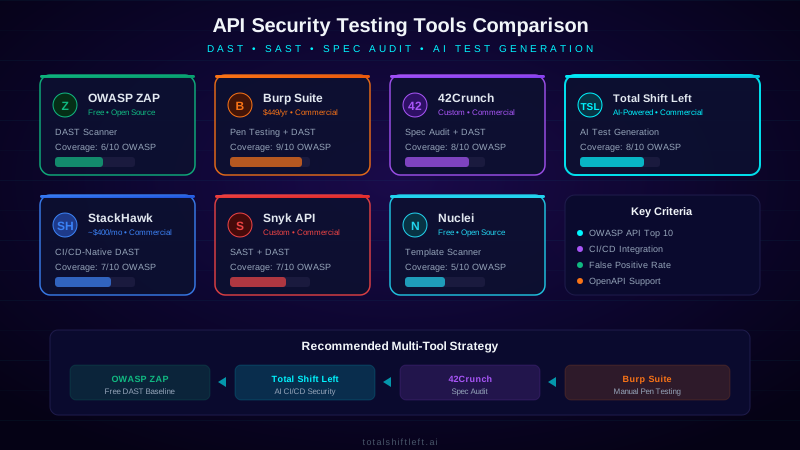
- API security testing tools compared
- Shift-Left API security testing add-on: what it checks and how it works
- API security testing tools in practice: a worked example
- API security testing tools challenges and how to solve them
- API security testing tools best practices
- API security testing tools checklist
- How to evaluate API security testing tools
- What each tool looks like on the command line
- API security testing tools FAQ
What Are API Security Testing Tools?
API security testing tools are software platforms designed to identify security vulnerabilities in APIs through automated analysis. They fall into several categories based on their testing methodology:
DAST (Dynamic Application Security Testing) tools test running APIs by sending HTTP requests with malicious payloads and analyzing responses. They simulate attacker behavior by injecting SQL, XSS, and other payloads into API parameters, testing authentication bypass techniques, and probing for data exposure. OWASP ZAP and Burp Suite are the most well-known DAST tools.
API Specification Auditing tools analyze OpenAPI, Swagger, or GraphQL schemas for security misconfigurations without sending any requests. They detect overly permissive schemas, missing authentication requirements, excessive data exposure in response definitions, and insecure default configurations. 42Crunch pioneered this approach with their API Firewall and Audit capabilities.
AI-Powered Test Generation tools use machine learning to automatically generate test cases from API specifications. They create suites covering positive, negative, boundary and security-sensitive scenarios based on the API's specific endpoints, parameters, and data types. Generation alone, though, is not a security programme: a generated negative test asks whether bad input is rejected, not whether one user can read another user's data.
Platform-native security checks are the newest category: security checks generated inside the API testing platform you already use, beside your functional tests, reusing their endpoints, environments and credentials instead of keeping a second copy in a separate scanner. Shift-Left API's API security testing add-on works this way. It generates OWASP-mapped checks for authentication, object-level authorization (BOLA) with a second test user, mass assignment, injection, server-side request forgery, configuration and old API versions, and runs them in the same packs and CI gate as everything else. How the add-on works is covered in detail below.
Composite Tools combine multiple approaches. Modern platforms increasingly merge DAST scanning with specification analysis, adding CI/CD pipeline integration and developer-friendly reporting. The trend is toward all-in-one platforms that cover the complete API security testing lifecycle.
For the token-level cases, see JWT testing.
Why Choosing the Right Tool Matters
Detection Accuracy Varies Dramatically
Independent benchmarks show that API security testing tools detect between 25% and 85% of OWASP API Top 10 vulnerabilities. A tool that misses Broken Object Level Authorization (the #1 API vulnerability) provides incomplete protection regardless of how well it detects injection attacks. Your tool choice directly determines your vulnerability coverage.
Developer Adoption Depends on Integration
The most accurate security tool is worthless if developers do not use it. Tools that require separate logins, manual configuration, or context-switching away from the development workflow see adoption rates below 30%. Tools that integrate natively into CI/CD pipelines and provide results within pull requests achieve adoption rates above 80%.
False Positive Rates Impact Productivity
A tool with a 40% false positive rate on an API with 100 endpoints generates dozens of invalid alerts per scan. Development teams quickly learn to ignore security findings, creating alert fatigue that causes real vulnerabilities to be dismissed. The best tools maintain false positive rates below 10% through specification-aware analysis.
Total Cost of Ownership Includes Hidden Costs
The sticker price of a security tool is only part of the cost. Factor in setup and configuration time, ongoing maintenance, training for developers and security teams, time spent triaging false positives, and integration engineering for your specific CI/CD pipeline. A $5,000/year tool that requires 200 hours of annual maintenance costs more than a $15,000/year tool that is self-configuring.
Key Evaluation Criteria
OWASP API Top 10 Coverage
The OWASP API Security Top 10 is the industry-standard framework for API vulnerabilities. Evaluate each tool against all ten categories: Broken Object Level Authorization (BOLA), Broken Authentication, Broken Object Property Level Authorization, Unrestricted Resource Consumption, Broken Function Level Authorization, Unrestricted Access to Sensitive Business Flows, Server Side Request Forgery, Security Misconfiguration, Improper Inventory Management, and Unsafe Consumption of APIs.
CI/CD Integration Depth
Surface-level CI/CD integration (running a CLI command) is different from deep integration (blocking pull requests, annotating code, tracking vulnerability trends). Evaluate how the tool reports findings, whether it supports quality gates that block deployments, and how it handles false positive management within the developer workflow.
API Specification Support
Tools that understand your OpenAPI specification generate more targeted tests with fewer false positives. Evaluate support for OpenAPI 3.0/3.1, Swagger 2.0, GraphQL schemas, gRPC proto files, and the ability to discover undocumented endpoints that are not in the specification.
Authentication Support
APIs use diverse authentication mechanisms: API keys, OAuth 2.0, JWT, mTLS, custom headers, and multi-factor authentication. Evaluate whether the tool can handle your specific authentication flow, including token refresh, multi-step authentication, and testing across different authorization roles.
As a reference point for what "handles your flow" can mean, Shift-Left API's authentication profiles cover OAuth 2.0 with five grant types (provider pre-fill for Entra ID, Okta, Auth0, Keycloak and Google, automatic refresh), JWT Bearer signing with HS, RS, PS or ES keys, NTLM, Hawk, OAuth 1.0a, mTLS and a "sign in with steps" chain for a login, one-time code and token exchange. Its security checks reuse those profiles, and a credentialed check that cannot sign in is reported as not evaluated rather than quietly passing — which is exactly the failure mode the challenge below describes.
Reporting and Remediation Guidance
Raw vulnerability findings without remediation guidance create work without direction. Evaluate the quality of remediation recommendations, whether reports include code-level fix suggestions, compliance mapping (PCI DSS, SOC 2, HIPAA), and executive summary capabilities for non-technical stakeholders. Check how the vendor words that mapping, too: Shift-Left API's compliance view rolls findings up to PCI DSS 4.0, SOC 2, ISO 27001:2022, NIST SSDF, GDPR and HIPAA and is explicit that it is evidence of testing, not a certification.
Scalability
An API portfolio grows over time. Evaluate how the tool handles 10 APIs vs. 500 APIs, whether pricing scales linearly or offers volume discounts, and whether scan times remain reasonable as the number of endpoints increases.
How API Security Testing Tools Work
API security testing tools follow a common workflow with variations based on their testing methodology. The process begins with API discovery — the tool ingests your OpenAPI specification, crawls a running API, or imports a Postman collection to build a map of all endpoints, parameters, and authentication requirements.
Next, the tool generates test cases based on its vulnerability database. A DAST tool creates requests with injection payloads (SQL injection, command injection, XSS), authentication bypass attempts (missing tokens, expired tokens, tokens from other users), and authorization testing (accessing resources belonging to other users). A specification auditing tool analyzes the schema for security anti-patterns without generating runtime requests.
The test execution phase sends these requests to the target API and analyzes responses. The tool looks for indicators of vulnerability: SQL error messages in responses (indicating injection), successful access to other users' resources (indicating BOLA), sensitive data i
n responses that should be filtered, and missing security headers.
Results are classified by severity, deduplicated, and filtered against false positive rules. The most advanced tools correlate findings across multiple test cases — for example, confirming that a suspected injection vulnerability is actually exploitable rather than just triggering an error message. Results are then reported through the configured channels: CI/CD pipeline results, dashboard, JIRA tickets, or Slack notifications.
The key differentiator between tools is the sophistication of each step. Basic tools generate generic payloads and rely on simple pattern matching. Advanced tools generate context-aware payloads based on the specific parameter type and use multi-step verification to confirm exploitability before reporting a finding.
The API Security Testing Tool Market
The market splits into five categories, and most enterprise buyers end up owning tools from at least two of them rather than picking a single winner:
- DAST scanners (OWASP ZAP, StackHawk, Qualys API Security) — probe a running API with live requests, the closest analog to how an attacker actually operates.
- Spec/design-time auditors (42Crunch, Spectral) — analyze the OpenAPI spec itself before a single request is sent, catching missing auth schemes or overly permissive schemas at design time.
- Manual/expert-driven platforms (Burp Suite Professional) — the deepest coverage, bounded by analyst hours rather than automation, and still the standard for pre-release penetration tests in regulated industries.
- API-testing-platform-native security (Shift-Left API, Snyk API) — security checks generated alongside functional tests from the same OpenAPI spec, trading some scanner-specific depth for zero extra tooling and native CI gating.
- Penetration testing as a service (PTaaS) — scheduled or on-demand human testing delivered through a portal, with findings tracked like tickets rather than delivered as a PDF at the end of an engagement. This is the expert-driven category bought as a service instead of as a tool, and it is usually what a regulated buyer means when the control says "annual penetration test".
If you are buying the first tool rather than the fourth, the order that holds up in practice is: a spec or design-time auditor first if you maintain OpenAPI documents, because it produces the cheapest findings at the earliest point; then DAST against a running build in CI; then PTaaS or expert-led testing for the depth no automated scanner reaches. Buying in the reverse order — a penetration test first and tooling afterwards — is how teams end up paying analyst rates to find the missing auth scheme a linter would have caught in a second.
Ready to shift left with your API testing?
Try our no-code API test automation platform free. Generate tests from OpenAPI, run in CI/CD, and scale quality.
The trend shaping purchasing in 2026 is consolidation: teams that ran a DAST scanner, a separate spec linter, and a separate functional-testing platform are increasingly collapsing two of the three into one tool, because the maintenance and false-positive-triage overhead of three disconnected security surfaces outweighs any single tool's marginal coverage advantage.
API security testing tools compared
| Tool | Type | OWASP API Top 10 Coverage | CI/CD Integration | False Positive Rate | Open Source | Pricing |
|---|---|---|---|---|---|---|
| OWASP ZAP | DAST | 6/10 | CLI + Docker | Medium-High | Yes | Free |
| Burp Suite Pro | DAST + Manual | 9/10 | Limited | Low | No | ~$449/user/yr |
| 42Crunch | Spec Audit + DAST | 8/10 | Native | Low | No | Custom |
| StackHawk | DAST | 7/10 | Native (excellent) | Medium | No | ~$400/mo |
| Snyk API | SAST + DAST | 7/10 | Native | Medium | No | Custom |
| Shift-Left API | Platform-native security checks (beside functional tests) | 8/10 | First-party (GitHub Actions, Jenkins, Azure DevOps); REST API elsewhere | Low | No | Paid add-on (Trial includes it) |
| Nuclei | Template Scanner | 5/10 | CLI | Medium | Yes | Free |
| Postman | API Testing | 4/10 | Newman CLI | Low | Partial | Free-$49/mo |
| Qualys API Security | DAST | 7/10 | API-based | Medium | No | Custom |
| Akto | API Discovery + DAST | 7/10 | Native | Medium | Partial | Free-Custom |
Best for manual penetration testing: Burp Suite Professional offers the deepest manual testing capabilities with its Intruder, Repeater, and Scanner modules specifically tuned for API testing.
Best free option: OWASP ZAP provides solid DAST capabilities at zero cost, making it ideal for teams starting their API security testing journey.
Best for CI/CD-native testing: StackHawk and Shift-Left API are purpose-built for developer workflows with pipeline integration and pull request annotations (in Shift-Left API's case, via a SARIF file for GitHub code scanning or Azure DevOps).
Best for specification-first security: 42Crunch excels at auditing OpenAPI specifications and enforcing security standards before any code is written.
Best for teams that already run functional API tests: Shift-Left API's security testing add-on generates its checks from the tests, environments and credentials you already have, so there is no second copy of your API to keep in step with every release.
Shift-Left API security testing add-on: what it checks and how it works
Most tools in the table above are scanners that sit beside your test suite. Shift-Left API's API security testing takes the other route: it generates security checks inside the project where your functional tests already live. They are ordinary tests, marked with a Security check chip, using the same endpoints, environments and authentication profiles, and they run in the same packs, schedules and CI gate. Because nothing is copied, nothing drifts.
What the checks cover
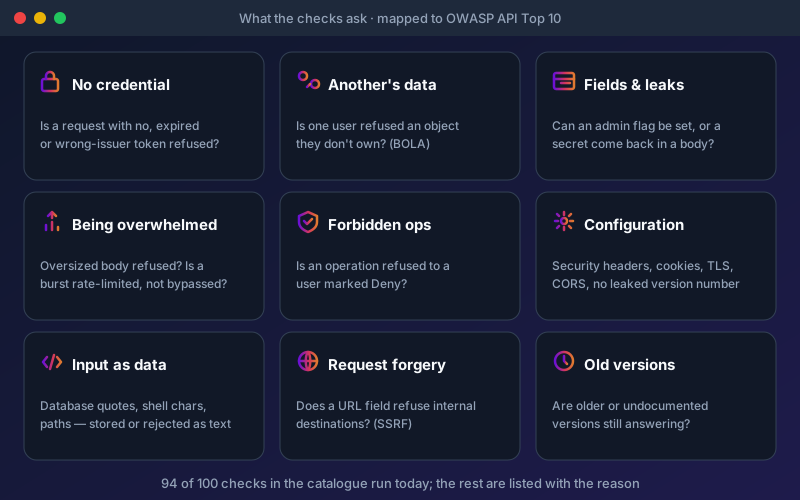
94 of the 100 checks in the catalogue run today. The other six are listed on every report with the reason: they are intrusive bursts that stay off until an Administrator switches them on, or they need a collector that only the cloud service hosts. Each check carries its own mapping to the OWASP API Security Top 10 (2023), OWASP ASVS and CWE; the right-hand column below shows the closest Top 10 category for each area.
| Area | The question it asks | Closest OWASP API Top 10 (2023) category |
|---|---|---|
| Getting in without a credential | Is a request with no token, or a malformed, expired, wrong-issuer or another user's token, refused? A credential in the URL or over plain HTTP? | API2 Broken Authentication |
| One user reading another's data | Is a second test user refused an object it does not own, or one belonging to another tenant? | API1 Broken Object Level Authorization |
| Fields the caller should not set | Can a role or admin flag be set from the body? Do responses carry secrets or undocumented fields? | API3 Broken Object Property Level Authorization |
| Being overwhelmed | Is an oversized body refused without a server error? Is a burst rate-limited, and can the limit be bypassed with a spoofed forwarding header? | API4 Unrestricted Resource Consumption |
| Operations the caller should not reach | Does an operation refuse a user marked Deny? Are management paths closed and undocumented methods refused? | API5 Broken Function Level Authorization |
| Requests your API makes | Does a URL field refuse internal destinations such as the cloud metadata address or a loopback? | API7 Server Side Request Forgery |
| Configuration | Security headers, cookie attributes, server version leaks, TLS version and certificate, plain HTTP refused, CORS not echoing an untrusted origin | API8 Security Misconfiguration |
| Old and undocumented versions | Are older or undocumented versions of a path still answering? | API9 Improper Inventory Management |
| Input treated as data | Are database quotes, shell characters, path sequences and template expressions stored or rejected as text, with no database error or stack trace? | No standalone 2023 category; CWE injection weaknesses such as CWE-89 and CWE-78 |
| What your sign-in server says about itself | Does the authorization server's discovery document advertise PKCE, drop the unsafe grant types and refuse unsigned tokens? | API2 Broken Authentication |
| Sign-in strength | Are repeated wrong passwords slowed or locked out? Is the session identifier replaced at sign-in? Does a token stop working after sign-out? | API2 Broken Authentication |
Some of the worst flaws break no schema at all: an API that lets the client set the amount charged answers 200 every time. For those, Shift-Left API asks a model to propose business-rule invariants from your specification ("the total equals the sum of its lines") and you confirm them. Nothing proposed is checked until you do, and a confirmed invariant is a comparison in a small fixed grammar that reads responses your tests already produced, never model-written code.
The checks apply across REST, SOAP and GraphQL, and across JSON-RPC 2.0 / MCP and WebSocket-RPC where those protocols are licensed (Trial and Enterprise). A few are protocol-specific: GraphQL introspection, a SOAP operation under the wrong SOAPAction, a destructive MCP tool offered to a lesser user, and a WebSocket type-confusion probe.
The BOLA question a single-identity scanner cannot ask
Object-level authorization is the commonest serious API flaw, and a scanner that knows only one identity cannot see it. In Shift-Left API you add a second test user as a principal, then fill an access matrix: for each endpoint, Deny (must be refused), Own data only (may call it, but only on objects it owns) or Allow (a shared resource, never probed). Deny builds the privilege checks; Own data only builds the object-level checks, including cross-tenant ones when the principal belongs to another tenant. Where you have not answered, Shift-Left API infers a likely rule, marks it inferred, and flags any finding that rests on it as Suspected. It never infers Deny. By-id probes use real objects: the check copies your project's own passing create test to make one, and your delete test to remove it afterwards.
Findings you can act on, and an honest report
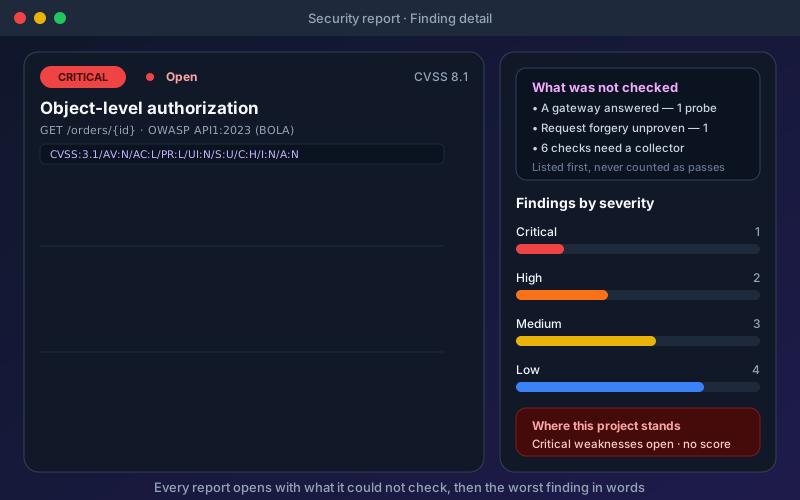
- What was not checked comes first. A gateway that answered instead of your API, or a probe that hit an id that does not exist, is reported not evaluated, never counted as a pass.
- No single score. The posture is the worst open finding, in words, so a critical authorization hole is never averaged in with cosmetic header warnings.
- One finding per endpoint, check and field, with a severity, a CVSS v3.1 base score and vector computed from fixed values per check (never guessed by a model), the standards it maps to, the evidence and how to fix it.
- Only a person changes a finding. Accepting a risk or marking a false positive needs a reason that stays with the decision, and a later run never overwrites it. AI fix tools refuse to edit a security check into accepting what it exists to detect.
- Evidence is redacted before it is stored. Credentials, cookies and response bodies are never saved; a leaked card number is shown by its last four digits.
Safe by default
Checks send benign, inert markers, never a working exploit. They are refused on production unless an Administrator allows a specific environment, and the intrusive (request bursts, oversized bodies) and data-changing checks never run against production at all. Passive checks send nothing extra: they read responses your other tests already received for missing headers, unprotected cookies or a card number in a body.
In the pipeline
Security checks live in your packs, so they run wherever your packs run. The headless runner writes a SARIF file for GitHub code scanning or Azure DevOps and fails the build by severity; --only-new limits the gate to findings first seen in that run, so a team can switch the gate on without first clearing its backlog:
node backend/scripts/run-pack-cli.js \
  --pack <packId> --project <projectId> \
  --sarif security.sarif \
  --fail-on-severity high --only-new
Reports also export as HTML, CSV, JUnit XML and JSON. A compliance view rolls the OWASP, ASVS and CWE mappings up against PCI DSS 4.0, SOC 2, ISO 27001:2022, NIST SSDF, GDPR and HIPAA. That is evidence of testing, not a certification.
Licensing, and what it is not
API security testing is a paid add-on to a Professional, Custom or Enterprise licence, sold in Starter, Team, Scale and Custom packages that set the endpoints per scan, the number of test principals and the burst size. No edition includes it on its own. The 15-day Trial includes it so you can evaluate it end to end, and the free Citizen Developer edition shows a locked preview.
It is not a penetration test and no substitute for one: it detects known classes of weakness every time your tests run, but it does not exploit or chain weaknesses and has none of the business judgment an expert tester brings. In a layered programme it takes the continuous, every-commit slot, alongside a spec auditor at design time and periodic manual penetration testing. Setup steps are in the security testing documentation.
API security testing tools in practice: a worked example
Illustrative scenario: a composite of a typical rollout, not a named customer's measured results.
Problem: A mid-sized healthcare company with 150 API endpoints used only OWASP ZAP for security testing, running manual scans quarterly. The scans produced 300+ findings per run, with an estimated 45% false positive rate. The security team spent two weeks per quarter triaging results, and developers had lost confidence in the findings. Meanwhile, a compliance audit revealed that their API security testing did not adequately cover BOLA vulnerabilities — the top OWASP API risk — because ZAP's automated mode struggled with their complex OAuth 2.0 authentication flow.
Solution: The company implemented a multi-tool strategy. They kept OWASP ZAP for broad DAST coverage but added Shift-Left API's security testing add-on beside the functional tests they were already generating from their OpenAPI specifications. It reused the OAuth 2.0 flow already set up as an authentication profile and generated BOLA checks from a second test user and an access matrix, and its reports listed what could not be evaluated instead of scoring it as a pass. They integrated both tools into their GitHub Actions CI/CD pipeline, with Shift-Left API running on every PR and ZAP running nightly. They also engaged Burp Suite Professional for quarterly manual penetration testing focused on business logic.
What changes: Fewer false positives reach developers, because the authenticated, spec-aware checks run on every PR while ZAP's broad scan is triaged separately. BOLA coverage comes from the second test user and the access matrix. More findings are fixed within the sprint, and the audit has layered testing evidence to review. Weigh the added tool cost against the triage time it saves using your own numbers.
API security testing tools challenges and how to solve them
Challenge: Tool Sprawl
Teams accumulate multiple security tools over time, each covering partial functionality. The result is overlapping coverage in some areas, gaps in others, and no single source of truth for API security posture. Solution: Map your tools against the OWASP API Top 10 to identify overlaps and gaps. Consolidate where possible, keeping tools that are best-in-class for their specific category rather than maintaining mediocre tools that partially overlap.
Challenge: Authentication Configuration
Free ZIP: CSV pack + guide
OWASP API Top 10 Test-Case Pack
60 API security test cases mapped to the OWASP API Security Top 10 (2023): positive and negative cases for BOLA, broken auth, SSRF and misconfiguration.
Download FreeMost API security tools struggle with complex authentication — multi-step OAuth 2.0 flows, JWT with rotating keys, mTLS, and custom authentication headers. Misconfigured authentication causes the tool to test unauthenticated access rather than authenticated API behavior. Solution: Choose tools that natively support your authentication mechanism. Test the authentication configuration separately before running full security scans. Use tools that accept pre-configured authentication tokens if dynamic authentication setup is too complex.
Challenge: GraphQL and gRPC Support
Many API security tools were built for REST APIs and have limited support for GraphQL and gRPC. GraphQL's single-endpoint architecture and introspection system require different testing approaches than REST. Solution: Evaluate GraphQL and gRPC support specifically if your API portfolio includes these technologies. Tools like Burp Suite and 42Crunch have improved their GraphQL support significantly. For gRPC, consider tools that support proto file ingestion. Shift-Left API's security checks, for example, cover GraphQL (including an introspection check), SOAP and REST, plus JSON-RPC 2.0 / MCP and WebSocket-RPC on Trial and Enterprise; gRPC is not supported, so a gRPC estate needs a separate tool.
Challenge: Keeping Up with New Vulnerability Types
The threat landscape evolves faster than most tools update their vulnerability databases. New attack techniques like Server-Side Request Forgery (SSRF) via API parameters and GraphQL query complexity attacks emerged recently and are not covered by all tools. Solution: Supplement automated scanning with periodic manual testing using updated penetration testing techniques. Evaluate how frequently each tool updates its vulnerability rules and whether it covers the latest API vulnerabilities.
Challenge: Developer-Friendly Reporting
Security tools traditionally report findings in security terminology that developers do not understand or act on. A finding titled "CWE-89: SQL Injection" without context does not help a developer fix the issue. Solution: Prioritize tools that provide code-level remediation guidance, map findings to specific API endpoints and parameters, and integrate into developer workflows (IDE plugins, PR comments, JIRA integration).
API security testing tools best practices
- Use a multi-tool strategy — No single tool covers all API security testing needs. Combine a DAST scanner, a specification auditing tool, and periodic manual penetration testing for complete coverage.
- Prioritize CI/CD integration — Choose tools that integrate natively into your development pipeline over tools with better features but manual-only workflows. Continuous testing beats quarterly scanning.
- Evaluate with your actual APIs — Run proof-of-concept evaluations against your real API specifications and endpoints. Detection rates vary significantly based on API complexity and authentication mechanisms.
- Measure false positive rates — Track the percentage of findings that are false positives for each tool. A tool generating 50% false positives costs more in triage time than it saves in vulnerability detection.
- Map coverage to OWASP API Top 10 — Document which tools cover which OWASP categories. Ensure every category has at least one tool providing coverage, especially BOLA (#1) and Broken Authentication (#2).
- Automate triage workflows — Configure tools to auto-close known false positives, auto-assign findings to the right team based on the affected API, and integrate with your issue tracker.
- Budget for training — Allocate time for developers and security engineers to learn each tool. An underutilized tool provides less value than a simpler tool used consistently.
- Review tool effectiveness quarterly — Track vulnerability escape rate (vulns found in production that tools should have caught) to measure whether your tool stack is actually effective.
- Start with free tools, then upgrade — Begin with OWASP ZAP and Nuclei to establish baselines, then invest in commercial tools to close specific coverage gaps.
- Keep specifications up to date — Tools that rely on OpenAPI specifications produce the best results when specs are accurate and complete. Invest in spec hygiene to improve tool effectiveness.
API security testing tools checklist
- ✔ API security testing tools mapped against OWASP API Top 10 categories
- ✔ At least one DAST tool integrated into CI/CD pipeline
- ✔ Authentication configuration tested and verified for each tool
- ✔ False positive rate measured and tracked for each tool
- ✔ Specification auditing tool validates OpenAPI specs before deployment
- ✔ Manual penetration testing tool available for periodic deep assessments
- ✔ Tool findings integrated with issue tracker (JIRA, Linear, GitHub Issues)
- ✔ Quality gates configured to block deployments on critical findings
- ✔ Coverage gap analysis documented across tool portfolio
- ✔ Developer training completed for all security testing tools
- ✔ Tool evaluation criteria documented for future tool procurement
- ✔ Quarterly tool effectiveness review scheduled
See also: jwt authentication in our learn hub for the underlying concept.
How to evaluate API security testing tools
Picking from the matrix above is the easy half. The harder half is running an evaluation that survives procurement — which needs explicit dimensions, explicit weights, and disqualifiers applied before anyone books a demo.
The twelve evaluation dimensions
A complete API security testing evaluation in 2026 covers twelve dimensions. Not every dimension is critical for every buyer, but every dimension should be deliberately scored — including the ones you decide to weight at zero.
| # | Dimension | Why it matters |
|---|---|---|
| 1 | OWASP API Top 10 coverage depth | The minimum bar for credible security testing |
| 2 | Authentication & authorization testing | Most production breaches start here |
| 3 | AI test generation quality | Productivity multiplier; depth varies hugely between vendors |
| 4 | Multi-protocol coverage (REST/SOAP/GraphQL) | Realistic enterprise integration surface |
| 5 | CI/CD integration depth | Tests that don't run in CI don't test anything |
| 6 | Deployment posture (SaaS / on-prem / air-gapped) | Often the disqualifier for regulated buyers |
| 7 | AI inference path (cloud / self-hosted) | Most common AI-policy review issue |
| 8 | Data residency control | GDPR / Schrems II / sovereign-cloud fit |
| 9 | RBAC and audit logging | Required for any in-scope authorization |
| 10 | Evidence retention and export | Audit-readiness; Type II SOC 2; FedRAMP CA-7 |
| 11 | Vendor support model | Time-to-resolution on production-impacting issues |
| 12 | Total cost of ownership | License + ops + integration + procurement |
A buyer's guide isn't a ranking. It's a framework that produces your ranking based on your weights.
Weighted scoring framework
A practical weighting pattern for regulated enterprise buyers in 2026:
| Dimension | Weight (regulated) | Weight (non-regulated) |
|---|---|---|
| Deployment posture | 15% | 5% |
| AI inference path | 12% | 4% |
| OWASP API Top 10 coverage | 10% | 12% |
| Authentication / authorization testing | 10% | 10% |
| CI/CD integration | 9% | 14% |
| AI test generation quality | 8% | 12% |
| Multi-protocol coverage | 8% | 6% |
| RBAC + audit logging | 7% | 8% |
| Data residency control | 7% | 4% |
| Evidence retention / export | 6% | 8% |
| Vendor support | 4% | 8% |
| TCO | 4% | 9% |
Weights vary substantially by industry. A bank weights deployment posture differently than a B2B SaaS startup. The point is to make the weights explicit and reviewed by stakeholders before scoring vendors — not to argue about scoring after the fact.
Disqualifier dimensions
Three dimensions can disqualify a vendor regardless of how strong they score elsewhere:
Deployment posture for regulated buyers. A SaaS-only tool with no on-prem or self-hosted option is almost always disqualified by procurement at regulated organizations — look for a tool that can run tests entirely behind your firewall. Don't waste deep evaluation cycles on tools that fail this gate.
AI inference path for AI-policy-reviewed buyers. A tool that can only generate tests via a cloud LLM API will fail AI policy review. The fallback question is whether the tool supports self-hosted LLM as a first-class option or as a workaround.
Audit evidence for regulated buyers. A tool that doesn't produce queryable, exportable, retainable run reports cannot demonstrate the controls required for SOC 2 Type II, FedRAMP CA-7, HIPAA evaluation, or PCI-DSS Requirement 11. Ask for the access side as well: who ran what, and who accepted which risk. In Shift-Left API, per-project and custom roles and audit logs cover that half, with SSO configuration (OIDC, SAML 2.0, Microsoft Entra ID) with group-to-role mapping on Trial and Enterprise.
If a vendor fails any of the three for your specific posture, score them out before deep evaluation. It saves weeks.
Vendor questions worth asking
Five questions that separate marketing from operational reality:
"Can we run this without any outbound network connections from your platform?" Answers vary from "yes, fully air-gapped" to "the platform itself is on-prem but it phones home for license and updates." Map the answer against your air-gap requirement.
"What happens if your hosted LLM endpoint is unreachable?" The right answer is "we fail closed and surface an error." Wrong answers include "we fall back to OpenAI" or "we cache and retry with telemetry." This is the AI-policy review answer.
"Show me the network connections during a test run." Vendors that can produce this clearly are usually clean. Vendors that struggle have undocumented data flows.
"What's your roadmap for SOC 2 / FedRAMP / your compliance need?" Get a year-honest answer. Soft commitments slip; written ones less often.
"Who is on the support escalation path and where are they located?" Material for data-residency requirements (Schrems II), SLA evaluation, and time-zone fit.
Common evaluation pitfalls
Three patterns that lead to bad enterprise buys:
Listicle anchoring. Starting evaluation from a third-party "best tools" list usually skips the disqualifiers. The list-author's weights aren't yours.
Demo-driven decisions. Vendor demos optimize for visual impact. Six months of operation, integration with your CI, and sustainable test maintenance look very different.
Underweighting the AI inference path. In 2024 this was a footnote. In 2026 it's often the #1 procurement-blocking dimension. Score it explicitly.
For complementary content see the API security testing tools comparison and on-prem API testing platforms buyer checklist.
What each tool looks like on the command line
The categories are easier to tell apart from their invocations than from their marketing. A DAST scanner crawls a running target:
# DAST — scans a deployed API, spec-guided
docker run --rm -t ghcr.io/zaproxy/zaproxy:stable zap-api-scan.py \
  -t https://staging.example.com/openapi.yaml -f openapi -r zap-report.html

# spec-conformance / fuzzing — derives cases from the contract itself
schemathesis run openapi.yaml --url https://staging.example.com --checks all

# static API audit — scores the spec before anything is deployed
docker run --rm -v "$PWD:/w" 42crunch/scan:latest audit /w/openapi.yaml
Only the first needs a running environment, only the second needs an accurate spec, and only the third runs on a pull request that has not been deployed yet — which is why most mature programmes run all three at different pipeline stages.
API security testing tools FAQ
What is the best API security testing tool in 2026?
The best API security testing tool depends on your use case. OWASP ZAP is the best free option with solid DAST capabilities. Burp Suite Professional is the gold standard for manual penetration testing. For CI/CD integration, StackHawk and Shift-Left API are built for pipelines; Shift-Left API's security testing add-on generates OWASP-mapped checks, including second-user BOLA checks, beside the functional tests a team already runs. 42Crunch excels at OpenAPI specification auditing. Most mature teams use a combination of tools for complete coverage.
Is OWASP ZAP good enough for API security testing?
OWASP ZAP is excellent for basic DAST scanning and is free, making it a strong starting point. However, it has limitations for API-specific testing: it requires manual configuration for API endpoints, has limited support for complex authentication flows, and produces more false positives than commercial alternatives. For comprehensive API security testing, complement ZAP with tools that understand OpenAPI specifications natively.
What is the difference between DAST and SAST for API security?
DAST (Dynamic Application Security Testing) tests running APIs by sending real HTTP requests and analyzing responses for vulnerabilities. SAST (Static Application Security Testing) analyzes source code or API specifications without running the application. DAST finds runtime vulnerabilities like injection and broken authentication. SAST finds code-level issues like hardcoded secrets and insecure patterns. Both are needed for complete API security.
How much do API security testing tools cost?
API security testing tools range from free (OWASP ZAP, Nuclei) to $50,000+ per year for enterprise platforms. Burp Suite Professional costs approximately $449/user/year. StackHawk starts around $400/month. 42Crunch and Snyk API pricing varies by API count and features. Shift-Left API sells security testing as a paid add-on to Professional, Custom or Enterprise licences, and its 15-day Trial includes it. Most commercial tools offer free tiers or trials for evaluation.
Can API security testing tools replace manual penetration testing?
No. Automated API security testing tools excel at finding known vulnerability patterns (OWASP Top 10, injection, broken auth) consistently and at scale. However, they cannot discover business logic flaws, complex chained attacks, or novel vulnerability types that require human creativity. Use automated tools for continuous scanning and manual penetration testing for periodic deep analysis.
Which API security testing tools integrate with CI/CD pipelines?
StackHawk, Shift-Left API, 42Crunch, OWASP ZAP (via Docker/CLI), Snyk API, and Nuclei all offer CI/CD integration. StackHawk and Shift-Left API are purpose-built for CI/CD; Shift-Left API has first-party GitHub Actions, Jenkins and Azure DevOps integrations and runs in GitLab CI, CircleCI or Bitbucket Pipelines through its public REST API. OWASP ZAP requires more configuration but works in any pipeline via its Docker image and CLI.
Sources and further reading
- OWASP API Security Top 10 (2023) — the reference list of API risk categories.
- OWASP ZAP documentation — the open-source DAST scanner.
- 42Crunch documentation — OpenAPI-driven API security auditing and conformance scanning.
Key takeaways
- Choosing the right API security testing tools is not about finding a single perfect solution — it is about assembling a tool portfolio that provides complete OWASP API Top 10 coverage, integrates into your development workflow, and maintains developer trust through low false positive rates.
- The best API security programs combine automated CI/CD-integrated scanning for continuous coverage with periodic manual penetration testing for deep adversarial analysis, all guided by accurate OpenAPI specifications.
- A scanner that keeps its own copy of your endpoints drifts with every release; platform-native checks such as Shift-Left API's security testing add-on reuse the functional tests, environments and credentials you already maintain, and a second test user is what lets any tool find BOLA.
- Read a security report from "what was not checked" first: a probe that could not reach what it tests is not a pass.
Ready to add OWASP-mapped security checks to the API tests you already run? Start a free trial of Shift-Left API — the security testing add-on is included in the 15-day Trial — and see how checks generated beside your functional tests compare with your current tooling.
Related: API Testing: The Complete Guide | API Penetration Testing vs Security Testing | Common API Security Vulnerabilities | API Security Testing in CI/CD | Top API Testing Tools 2026 | REST API Testing Best Practices
For regulated teams: see the enterprise API security testing buyer's guide, the platform security & trust center, and how procurement evaluates self-hosted vs SaaS deployment.
Ready to shift left with your API testing?
Import your OpenAPI spec and get a runnable test suite, in our cloud or on your own infrastructure.