
How to Test API Rate Limiting and Throttling (2026)
Quick answer
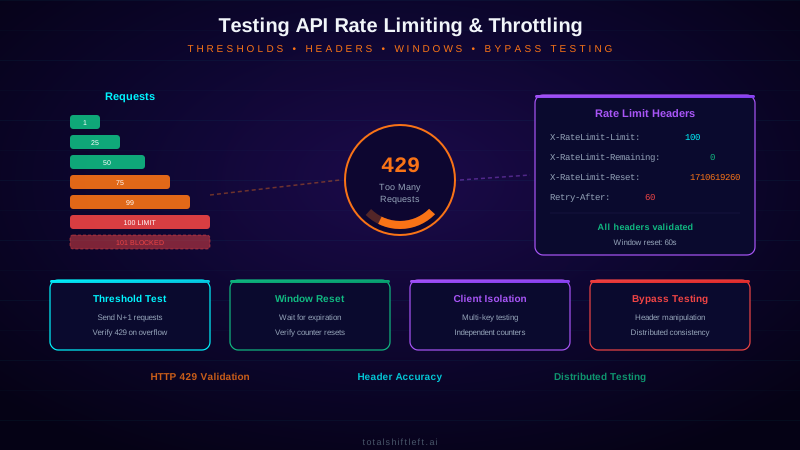
Test API rate limiting by sending requests at and just past the documented threshold and asserting on the response: a 429 status code, a Retry-After header, and correct X-RateLimit-Limit/Remaining/Reset values. Test the window reset, verify one client's limit doesn't affect another (critical for multi-tenant SaaS), and always test through the load balancer, not a single instance — distributed rate limiters commonly under-enforce.
Reviewed by Smeet Gohel

API rate limiting testing is the practice of validating that your API correctly enforces request rate limits and throttling policies. It involves sending controlled bursts of requests to verify that limits trigger at the right thresholds, return correct HTTP 429 responses with proper headers, reset appropriately, and protect backend services from abuse — all critical for API security and reliability.
APIs without properly tested rate limits are open invitations for abuse. In 2025, 41% of API security incidents involved some form of resource abuse — brute force attacks, credential stuffing, data scraping, or denial-of-service attacks that exploited missing or misconfigured rate limits. The average cost of an API availability incident caused by rate limit failures exceeded $180,000 per hour for enterprise organizations.
Rate limiting is one of those features that seems simple until you test it properly. The configuration says "100 requests per minute per API key" — but does that limit actually work across all endpoints? Does it reset correctly? Does it apply to distributed API gateway instances? Does it return the right HTTP status codes and headers? Does it protect against burst patterns that stay just under the limit?
This guide provides a comprehensive approach to testing API rate limiting and throttling. You will learn how to validate every aspect of rate limit behavior, automate those tests in your CI/CD pipeline, and catch misconfigurations before attackers exploit them. This aligns with the shift-left security approach of validating security controls continuously rather than hoping they work in production.
In this guide
- What Is API Rate Limiting Testing?
- Why Rate Limiting Testing Matters
- Key Components of Rate Limit Testing
- How Rate Limiting Works
- API rate limit testing tools compared
- API rate limit testing in practice: a worked example
- API rate limit testing challenges and how to solve them
- API rate limit testing best practices
- API rate limit testing checklist
- API rate limit testing FAQ
What Is API Rate Limiting Testing?
API rate limiting testing is the systematic validation of rate limiting and throttling mechanisms in your APIs. It verifies that APIs correctly enforce request quotas, return appropriate error responses when limits are exceeded, include proper rate limit headers, and reset counters at the expected intervals.
Rate limiting and throttling are related but distinct concepts. Rate limiting enforces a hard cap — once a client exceeds the allowed number of requests in a time window, subsequent requests are rejected with HTTP 429 (Too Many Requests). Throttling applies a softer control — requests are slowed down through artificial delays or queuing rather than being outright rejected.
Testing rate limits goes beyond confirming that HTTP 429 is returned. Comprehensive rate limit testing validates the complete behavior: correct threshold enforcement, proper header values (X-RateLimit-Limit, X-RateLimit-Remaining, X-RateLimit-Reset), appropriate Retry-After values, per-client isolation (one client hitting their limit should not affect another), consistent behavior across distributed gateway instances, and graceful degradation under extreme load.
Organizations that skip rate limit testing discover the gaps in the worst way — during a production incident where an attacker or a misbehaving client overwhelms their API infrastructure.
If you are choosing between runners rather than writing one, the best API load testing tools compares k6, JMeter, Gatling, Locust and the hosted options on protocol support, scripting language and CI integration.
Why Rate Limiting Testing Matters
Security Protection
Rate limits are the first line of defense against multiple attack categories. Without tested rate limits, attackers can brute-force authentication endpoints to crack credentials, perform credential stuffing with stolen password databases, scrape sensitive data by enumerating API resources, and launch application-layer DoS attacks that exhaust backend resources. Each of these attacks exploits the same gap: the ability to make unlimited requests without being blocked.
Service Reliability
Rate limits protect your API infrastructure from accidental overload. A single misbehaving client — a buggy integration, a runaway script, or a misconfigured cron job — can generate enough traffic to degrade service for all users. Testing rate limits ensures that your API architecture isolates the impact of traffic spikes to the offending client rather than allowing cascading failures.
Cost Control
Cloud-hosted APIs incur costs per request. Without rate limits, a single compromised API key can generate millions of requests and thousands of dollars in compute charges before anyone notices. Rate limit testing validates that cost protection mechanisms actually work and trigger at the configured thresholds.
Compliance Requirements
Many API partner agreements and compliance frameworks require documented and enforced rate limits. Financial services APIs must demonstrate rate limiting for PCI DSS compliance. Healthcare APIs must enforce throttling to prevent excessive PHI access. Testing provides the evidence that these controls function as documented.
Key Components of Rate Limit Testing
Threshold Validation
The most fundamental test: send exactly the rate limit number of requests and verify they all succeed, then send one more and verify it is rejected with HTTP 429. This sounds simple, but timing precision matters. If your limit is 100 requests per minute, you need to send all 101 requests within a single rate limit window to get a valid test result.
k6 (precise constant-arrival-rate load, the right tool when timing matters):
import http from 'k6/http';
import { check } from 'k6';

export const options = {
  scenarios: {
    burst: {
      executor: 'constant-arrival-rate',
      rate: 101,          // one over the documented 100/minute limit
      timeUnit: '1m',
      duration: '1m',
      preAllocatedVUs: 20,
    },
  },
};

export default function () {
  const res = http.get('https://api.example.com/v1/orders', {
    headers: { Authorization: `Bearer ${__ENV.API_KEY}` },
  });
  check(res, {
    'not a 5xx (limiter did not crash)': (r) => r.status < 500,
    'has rate limit headers': (r) => r.headers['X-Ratelimit-Remaining'] !== undefined,
  });
}
// After the run: exactly 1 request in the window should be 429; the other 100 should be 200.
Python (simpler burst script for a quick manual check or a pytest fixture):
import requests, time

def test_rate_limit_returns_429_and_headers():
    responses = [requests.get(URL, headers=AUTH) for _ in range(101)]
    statuses = [r.status_code for r in responses]

    assert statuses.count(429) == 1, f"expected exactly 1 rejection, got {statuses.count(429)}"
    limited = next(r for r in responses if r.status_code == 429)
    assert "Retry-After" in limited.headers
    assert int(limited.headers["X-RateLimit-Remaining"]) == 0

    time.sleep(int(limited.headers["Retry-After"]))
    assert requests.get(URL, headers=AUTH).status_code == 200  # window reset
Header Verification
Modern APIs communicate rate limit status through response headers. Test that every response includes correct X-RateLimit-Limit (the maximum allowed), X-RateLimit-Remaining (requests left in the window), and X-RateLimit-Reset (when the window resets). Verify that X-RateLimit-Remaining decrements correctly with each request and that the Retry-After header appears on 429 responses. Capturing these checks as reusable status-code and header assertions keeps every rate-limit test consistent as you add endpoints.
Ready to shift left with your API testing?
Try our no-code API test automation platform free. Generate tests from OpenAPI, run in CI/CD, and scale quality.
How Total Shift Left does this: Status-code assertions (equals, range, not-equals) and header assertions (exists, contains, regex) are two of the platform's 40+ built-in assertion types, so you can check for a 429 response and validate the Retry-After or X-RateLimit-Remaining header value on the same test without writing custom scripting.
Window Reset Testing
Rate limit windows must reset correctly. After a client is rate-limited, wait for the reset window to expire, then send another request and verify it succeeds. Test both fixed-window and sliding-window implementations — they behave differently at window boundaries. A fixed-window rate limit of 100/minute allows a burst of 200 requests if 100 are sent at the end of one window and 100 at the start of the next.
Client Isolation (Multi-Tenant Rate Limiting)
Verify that rate limits apply independently per client (API key, IP address, or user token). When Client A hits their rate limit, Client B should be completely unaffected. Test this by rate-limiting one API key while simultaneously making requests with a different key and verifying they succeed normally.
This test matters most in multi-tenant SaaS, where a "noisy neighbor" — one tenant running a burst import or a buggy integration — must never degrade throughput for other tenants sharing the same infrastructure. If your rate limiter uses a shared bucket instead of a per-tenant one, this is exactly the test that catches it: run a sustained burst on Tenant A's key while polling Tenant B's key at a normal rate, and assert Tenant B's latency and success rate stay flat throughout.
Endpoint-Specific Limits
Different endpoints often have different rate limits. A login endpoint might allow 10 requests per minute while a data query endpoint allows 1,000. Test each endpoint's specific limit independently, and verify that consuming the quota on one endpoint does not affect the quota for other endpoints (unless they share a global limit).
Distributed Consistency
If your API runs behind multiple gateway instances or load balancers, rate limits must be consistent regardless of which instance handles the request. Test by sending requests rapidly and verifying that the total allowed across all instances matches the configured limit, not the limit multiplied by the number of instances.
AI Agent and MCP Traffic Patterns
Autonomous agents call APIs differently than human-driven clients: they issue rapid, parallel tool calls with retry loops, and a poorly written agent will hammer an endpoint on every 429 instead of backing off. Two rate-limiting tests matter specifically for agent traffic: verify the API returns a machine-parseable Retry-After value the agent's retry logic can actually consume (not just a bare 429), and load-test with concurrent, bursty request patterns rather than the steady drip a human user produces. For APIs exposed to agents through an MCP server, apply the same threshold and header tests to every tool call path — see how to test MCP servers and securing MCP endpoints for the protocol-specific detail.
How Rate Limiting Works
Rate limiting operates at the API gateway or application layer, tracking request counts per client within defined time windows. The most common algorithms are fixed window, sliding window, token bucket, and leaky bucket — each with different behavior characteristics that affect how you test them.
Fixed Window divides time into discrete intervals (e.g., one-minute windows starting on the minute). Each client gets a counter that
resets at the window boundary. This is simple but has a burst problem: a client can send double the limit by timing requests at the boundary of two windows.
Sliding Window tracks requests over a rolling time period. Instead of resetting at fixed boundaries, it considers the timestamp of each request and counts how many occurred in the trailing window. This eliminates the burst problem but is computationally more expensive. When testing sliding window limits, you cannot predict exact reset times — you need to track when your earliest requests age out of the window.
Token Bucket gives each client a bucket that fills with tokens at a constant rate. Each request consumes a token. If the bucket is empty, the request is rejected. Bursts are allowed up to the bucket size, but sustained throughput is limited by the refill rate. Testing token bucket limits requires validating both the burst capacity and the sustained rate.
The architecture matters for testing because the algorithm determines edge-case behavior. Your rate limit tests should be designed around the specific algorithm your API uses. If you do not know which algorithm is implemented, your tests should cover the edge cases for all common algorithms to detect unexpected behavior.
API rate limit testing tools compared
| Tool | Type | Best For | Open Source |
|---|---|---|---|
| k6 | Load Testing | Scripted rate limit test scenarios with precise timing | Yes |
| Artillery | Load Testing | YAML-defined rate limit test scenarios | Yes |
| Apache JMeter | Load Testing | Complex rate limit scenarios with GUI | Yes |
| Vegeta | Load Testing | Constant-rate request generation for threshold testing | Yes |
| Locust | Load Testing | Python-scripted rate limit testing | Yes |
| Postman/Newman | API Testing | Simple sequential rate limit verification | Partial |
| Total Shift Left | API Testing | AI-generated rate limit tests from OpenAPI specs | No |
| OWASP ZAP | Security Testing | Rate limit bypass detection | Yes |
| Burp Suite | Pen Testing | Manual rate limit bypass testing | No |
| wrk | Load Testing | High-throughput rate limit boundary testing | Yes |
For automated rate limit testing in CI/CD pipelines, k6 and Artillery are the strongest options due to their scriptability and CI/CD integration. For manual investigation and bypass testing during penetration tests, Burp Suite's Intruder module excels at precise request timing.
API rate limit testing in practice: a worked example
Problem: A SaaS company offered a public API with a documented rate limit of 500 requests per minute per API key. During a security review, they discovered that the rate limit was only enforced by a single NGINX instance. Their Kubernetes deployment had three NGINX ingress replicas behind a load balancer, meaning the actual effective limit was 1,500 requests per minute — three times the intended limit. A competitor had been scraping their entire product catalog using this gap.
Solution: The team implemented centralized rate limiting using Redis as a shared counter across all gateway instances. They then built comprehensive rate limit tests using k6, integrated into their CI/CD pipeline. The test script sent requests at the exact rate limit threshold, validated 429 responses on the 501st request, checked all rate limit headers, and verified that limits were consistent regardless of which gateway instance handled the request. They also added security-focused tests to detect rate limit bypass attempts.
Results: Rate limit tests caught three additional misconfigurations during the next sprint: a new endpoint missing rate limit configuration entirely, an admin endpoint with limits ten times higher than intended, and a WebSocket endpoint with no connection rate limiting. Mean time to detect rate limit issues dropped from "discovered during incident" to "caught in PR review pipeline." The data scraping stopped immediately after deploying the centralized rate limiter.
Free PDF guide (12 pages)
Top 50 API Testing Mistakes
50 real-world API testing mistakes organized by category — from authentication to performance — each with a concrete fix strategy.
Download FreeAPI rate limit testing challenges and how to solve them
Challenge: Timing Precision in Tests
Rate limit tests are inherently timing-sensitive. If your test sends 100 requests but network latency causes them to span two rate limit windows, the test produces a false pass. Solution: Use tools that support precise request timing (k6's rate option, Vegeta's constant rate mode). Add buffer to your test — if the limit is 100/minute, send 120 requests within 30 seconds to eliminate window-boundary ambiguity.
Challenge: Testing in Shared Environments
Rate limits in shared staging environments are often configured differently than production, or other test suites consume part of the quota during your test run. Solution: Use dedicated test API keys with known rate limits. Run rate limit tests in isolation, not in parallel with other test suites. If shared environments are unavoidable, account for potential quota consumption by other processes in your assertions.
Challenge: Distributed Rate Limit Consistency
As demonstrated in the real-world example, rate limits that work correctly on a single instance often fail in distributed deployments. Solution: Always test rate limits against the load-balanced endpoint, not against individual instances. Include a specific test that sends requests from multiple source IPs simultaneously to verify that global limits hold across the distributed infrastructure.
Challenge: Testing Sliding Window Edge Cases
Sliding window rate limits have more complex edge-case behavior than fixed windows. A request might be allowed or rejected depending on the exact timestamps of previous requests. Solution: Design tests that account for sliding behavior. Send a burst at time T, wait for half the window, send another burst, and verify that the combined count is tracked correctly. Use precise timestamp logging to debug failures.
Challenge: Rate Limit Bypass Through Parameter Manipulation
Attackers attempt to bypass rate limits by varying request parameters — different query strings, different paths that resolve to the same resource, or different HTTP methods. Solution: Test rate limit bypass techniques as part of your security testing. Verify that rate limits apply consistently regardless of query parameter variations, path aliases, and HTTP method changes for the same logical operation.
API rate limit testing best practices
- Test at the exact threshold — Send exactly N requests (where N is the limit), verify they pass, then send request N+1 and verify HTTP 429. Do not just test well above the limit.
- Validate all rate limit headers — Check X-RateLimit-Limit, X-RateLimit-Remaining, X-RateLimit-Reset, and Retry-After on every response, not just on 429 responses.
- Test window resets — After being rate-limited, wait for the reset period and verify that requests succeed again. Incorrect reset behavior is a common implementation bug.
- Verify client isolation — Confirm that one client hitting their rate limit does not affect other clients. This is critical for multi-tenant APIs.
- Test against the load balancer — Never test rate limits against individual application instances. Always test through the same path production traffic follows.
- Automate rate limit tests in CI/CD — Include rate limit tests in your pipeline to catch misconfigurations when new endpoints are added or gateway config changes.
- Test endpoint-specific limits — Verify that each endpoint enforces its own configured limit, especially authentication endpoints which should have stricter limits.
- Include bypass testing — Attempt to circumvent rate limits through header manipulation (X-Forwarded-For spoofing), parameter variation, and HTTP method changes.
- Monitor rate limit metrics — Track how often rate limits fire in production. If they never fire, your limits may be too generous. If they fire constantly, legitimate clients may be affected.
- Document your rate limits — Publish rate limits in your API documentation and test that documentation matches actual behavior. Discrepancies confuse clients and indicate configuration drift.
API rate limit testing checklist
- ✔ Rate limit threshold tested for every API endpoint
- ✔ HTTP 429 status code returned when limit is exceeded
- ✔ Retry-After header present and accurate on 429 responses
- ✔ X-RateLimit-Limit header matches documented limit
- ✔ X-RateLimit-Remaining decrements correctly per request
- ✔ X-RateLimit-Reset contains valid future timestamp
- ✔ Rate limit window resets correctly after expiration
- ✔ Client-level isolation verified (one client's limit does not affect another)
- ✔ Distributed consistency verified across all gateway instances
- ✔ Authentication endpoints have stricter rate limits
- ✔ Rate limit bypass techniques tested and blocked
- ✔ Rate limit tests automated in CI/CD pipeline
- ✔ Production rate limits match staging test configuration
- ✔ API documentation matches actual rate limit behavior
API rate limit testing FAQ
How do you test API rate limiting?
Test API rate limiting by sending requests at or above the documented rate limit threshold and validating that the API returns HTTP 429 (Too Many Requests) with appropriate Retry-After headers. Verify that the rate limit resets correctly after the window expires, that different API keys have independent counters, and that rate limits apply correctly across distributed API gateway instances.
What HTTP status code indicates rate limiting?
HTTP 429 Too Many Requests is the standard status code for rate limiting. The response should include a Retry-After header indicating when the client can retry. Some APIs also return X-RateLimit-Limit, X-RateLimit-Remaining, and X-RateLimit-Reset headers to help clients track their usage against the limit.
What is the difference between rate limiting and throttling?
Rate limiting rejects requests that exceed a defined threshold, returning HTTP 429. Throttling slows down request processing by adding artificial delays or queuing requests instead of rejecting them outright. Rate limiting is a hard stop — requests are denied. Throttling is a soft control — requests are delayed but eventually processed.
Why is testing API rate limiting important for security?
Untested rate limits leave APIs vulnerable to brute force attacks, credential stuffing, denial of service, resource exhaustion, and data scraping. An attacker can exploit missing or misconfigured rate limits to overwhelm your API, extract large datasets, or systematically guess credentials without being blocked.
How do you automate API rate limiting tests in CI/CD?
Automate rate limiting tests by writing test scripts that send burst requests to each endpoint and assert on 429 responses and correct headers. Use tools like k6, Artillery, or custom scripts integrated into your CI/CD pipeline. Run these tests against staging environments with production-equivalent rate limit configurations.
Do rate limits need different tests for AI agent traffic?
Yes. Agents issue rapid, parallel tool calls and retry loops rather than the steady request pattern a human client produces, and a poorly written agent will hammer an endpoint on every 429 instead of backing off. Test that the API returns a machine-parseable Retry-After value the agent's retry logic can consume, and load-test with concurrent, bursty patterns rather than a steady drip. Apply the same checks to every tool call path when the API is exposed through an MCP server.
Sources and further reading
- RFC 6585 — Additional HTTP Status Codes — defines 429 Too Many Requests and Retry-After semantics.
- Grafana k6 documentation — scripted load testing with thresholds you can gate on.
- RFC 9110 — HTTP Semantics — the normative definition of methods, status codes and headers.
Key takeaways
- API rate limiting is only as reliable as the testing behind it. Untested rate limits create a dangerous illusion of security — the configuration exists, but the enforcement may be broken, bypassed, or inconsistent across your distributed infrastructure.
- Comprehensive rate limit testing validates every aspect of your throttling implementation, from threshold accuracy to header correctness to distributed consistency, and catches misconfigurations before they become production incidents or security breaches.
Ready to automate API rate limiting and security testing across your entire API surface? Start your free trial of Total Shift Left and generate comprehensive rate limit tests from your API specifications.
Related: API Testing: The Complete Guide | API Penetration Testing vs Security Testing | Common API Security Vulnerabilities | API Security Testing in CI/CD | REST API Testing Best Practices | API Testing Strategy for Microservices
For multi-tenant SaaS and regulated teams: see the enterprise API governance program, API CD pipeline testing for enterprise teams, and the platform security & trust center.
Ready to shift left with your API testing?
Try our no-code API test automation platform free.