
CI/CD Testing: What to Automate at Every Stage (2026)
Quick answer
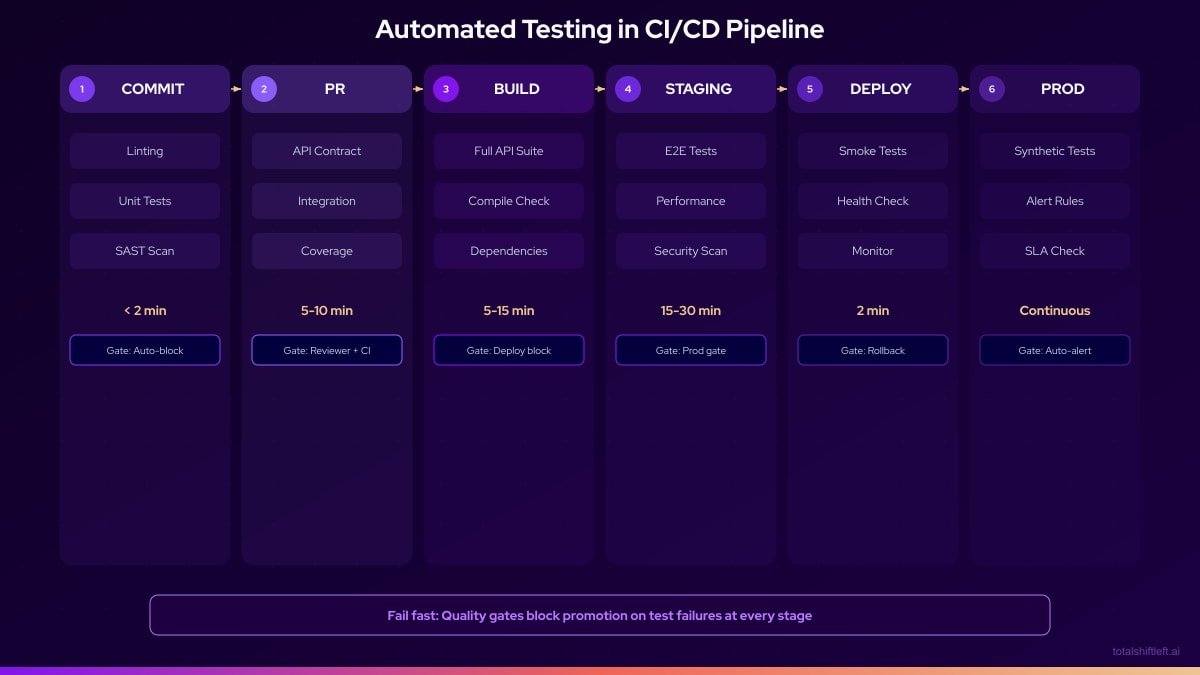
CI/CD testing means every code change triggers a deterministic test run that produces a pass/fail outcome the team trusts enough to gate merges and deploys. Run unit tests on every commit, API tests on every PR, integration tests on merge to main, and smoke/regression tests before production — each layer gated so a failure blocks the deploy, not just warns about it.
Reviewed by Sushant Joshi

CI/CD testing — running programmatic tests automatically at every stage of a continuous integration and delivery pipeline — is what separates a pipeline that ships code fast from one that ships code fast and working. It catches defects early, enforces quality gates without manual intervention, and enables confident, frequent releases without manual testing bottlenecks.
CI/CD testing transforms continuous integration from a build system into a quality system. Without it, CI simply packages code faster—it does not tell you whether that code works. With well-implemented testing at every pipeline stage, teams can release multiple times per day with the confidence that each deployment has been validated against hundreds or thousands of automated checks before a single user sees it. This guide covers what to automate at each stage, how to configure the quality gates that actually block bad deploys, and the architectures elite DevOps teams use in 2026.
In 2016, it was considered ambitious to deploy to production once a day. In 2026, leading technology teams deploy to production hundreds of times per day. The gap between these two realities is automated testing in CI/CD pipelines. Without automation, quality assurance becomes the bottleneck that limits delivery velocity. With it, quality assurance becomes the mechanism that enables velocity.
The distinction matters because the two failure modes look very different. Teams that under-invest in CI/CD test automation release slowly and reactively, catching defects in production where they are most expensive. Teams that invest heavily but design poorly end up with slow, brittle pipelines that frustrate developers and get bypassed. Getting automated testing in CI/CD right requires understanding which tests belong at which stage, how quality gates work, and how to keep feedback loops tight enough to be useful. This aligns directly with the shift-left testing philosophy of catching defects as early as possible.
This guide covers the full picture: the lifecycle from commit to production monitoring, the tools that serve each stage, the quality gate patterns that enforce standards without blocking productivity, and how Shift-Left API integrates native API automation into any CI/CD pipeline without requiring test code to be written.
In this guide
- What Is Automated Testing in CI/CD?
- Why Automated Testing in CI/CD Is Essential
- Key Components of CI/CD Test Automation
- CI/CD Quality Gates: How to Block a Deploy on Failed Tests
- The CI/CD Testing Pipeline Architecture
- Tools by Pipeline Stage
- CI/CD testing in practice: a worked example
- CI/CD testing challenges and how to solve them
- Best Practices for Automated Testing in CI/CD
- CI/CD Test Automation Checklist
- Frequently asked questions about CI/CD testing
Performance checks belong in the same pipeline and behave differently from functional ones: k6 vs JMeter vs Gatling compares the runners, and the k6 and JMeter walkthroughs cover thresholds, correlation and the CI wiring each one needs.
What Is Automated Testing in CI/CD?
Automated testing in CI/CD is the practice of running programmatic test suites automatically at defined stages of the continuous integration and continuous delivery pipeline. The core idea is that every code change triggers an automated validation process—tests run, results are evaluated, and the pipeline either proceeds to the next stage or fails with actionable feedback.
CI (Continuous Integration) refers to the practice of integrating code changes frequently and validating them automatically. CD (Continuous Delivery or Deployment) refers to the automated process of taking validated code through staging to production. Automated testing is the quality mechanism that makes both trustworthy.
Key characteristics of mature CI/CD test automation:
- Triggered automatically: Tests run on code events (push, PR, merge), not on manual schedule
- Stage-appropriate: Different test types run at different pipeline stages based on speed and scope
- Gate-enforcing: Failures stop the pipeline—they do not just produce warnings
- Results-visible: Test outcomes are visible in PR interfaces, dashboards, and notifications
- Maintained actively: Test suites are treated as production assets with defined ownership
The goal is a system where a developer receives comprehensive quality feedback within 5–10 minutes of submitting a change, enabling a tight loop between writing code and knowing whether that code works.
For the GitHub-specific detail — service containers, matrix sharding, OIDC and reusable workflows — see API testing in GitHub Actions.
On Microsoft tooling the equivalent is the Azure DevOps API testing pipeline guide, including the publish-test-results task most teams miss.
On Jenkins the equivalent setup is in the Jenkins API testing plugin guide, including the Jenkinsfile and JUnit publishing.
If the gap is tooling rather than process, start with continuous integration testing tools and its comparison matrix.
Why Automated Testing in CI/CD Is Essential
The Business Case
IBM Systems Sciences Institute research established that the cost of fixing a defect increases by roughly 100x between the development stage and production. Every stage of automated validation in CI/CD reduces the average defect escape distance—catching more defects closer to their introduction, where they cost the least to fix.
For organizations deploying frequently, the math is compelling:
- A team deploying 10x/day with no CI/CD automation might find 3–5 production defects per week
- The same team with comprehensive CI/CD automation might find 0–1 production defects per week
- At an average incident response cost of $15,000 per production defect, that is $120,000–$180,000 per month in avoidable costs
Developer Productivity
Automated testing in CI/CD does not just reduce defects—it accelerates developer productivity. When a developer can get definitive quality feedback within 5 minutes of submitting a PR, they stay in the flow state. When feedback takes hours or days (the pre-CI/CD reality), context-switching and task-switching erode productivity by 40–60% according to research by Gloria Mark at UC Irvine.
Regulatory and Compliance Requirements
In regulated industries (fintech, healthcare, aerospace, government), automated testing records in CI/CD pipelines serve as audit evidence. Demonstrating that every production deployment was preceded by automated validation of specific compliance-critical controls is increasingly a regulatory requirement, not just a best practice.
Key Components of CI/CD Test Automation
Component 1: Quality Gates
Quality gates are automated checkpoints that evaluate whether the pipeline should proceed or stop. Effective quality gates are:
- Objective: Defined by measurable thresholds (95% test pass rate, 80% code coverage)
- Enforced: Failure stops the pipeline, not just generates a warning
- Calibrated: Set at levels that catch real problems without generating excessive false positives
- Documented: Every gate has a stated rationale so engineers understand why it exists
Ready to shift left with your API testing?
Try our no-code API test automation platform free. Generate tests from OpenAPI, run in CI/CD, and scale quality.
Common quality gates by stage:
- Pre-commit: Linting pass, unit tests pass
- PR gate: All unit tests pass, all API tests pass, no new security vulnerabilities
- Build gate: Code coverage above threshold, integration tests pass
- Staging gate: Smoke tests pass, performance baseline within 10% of previous
- Release gate: Full regression pass, zero critical security findings
Component 2: Test Categorization by Speed
Categorizing tests by execution speed is essential for CI/CD efficiency:
- Fast tests (under 100ms each): Unit tests, isolated component tests
- Medium tests (100ms–2s each): API tests, integration tests with mocked dependencies
- Slow tests (2s+): E2E browser tests, load tests, tests requiring external services
Fast tests run on every commit. Medium tests run on every build. Slow tests run on a schedule. This categorization keeps feedback loops tight where they matter most—at the commit and PR stages where developers can act on feedback immediately.
Component 3: Parallel Execution Infrastructure
Sequential test execution cannot scale to modern delivery cadences. Parallel execution distributes test load across multiple runners, reducing wall-clock time proportionally to the number of runners. A test suite that takes 20 minutes sequentially can run in 4 minutes across 5 parallel runners.
Requirements for effective parallel execution:
- Tests must be completely independent (no shared state)
- Test data must be created and cleaned up per test
- Configuration must support multiple simultaneous instances
- Reporting must aggregate results from all parallel runners
Component 4: Feedback and Notification
Test results need to reach the right people at the right time:
- PR interface annotations: Show test status directly in the GitHub/GitLab PR view
- Slack/Teams notifications: Alert the responsible engineer on failure
- Dashboard: Aggregate test health metrics for team review
- Trend alerts: Notify when execution time or failure rates change significantly
Component 5: API Testing Integration
API testing at the build stage is the highest-value CI/CD testing investment for most teams. APIs are the interface between services, the implementation of business logic, and the contract that UI components depend on. Continuous validation of APIs in CI prevents the class of defects that slip through unit tests (which test in isolation) and only surface during integration.
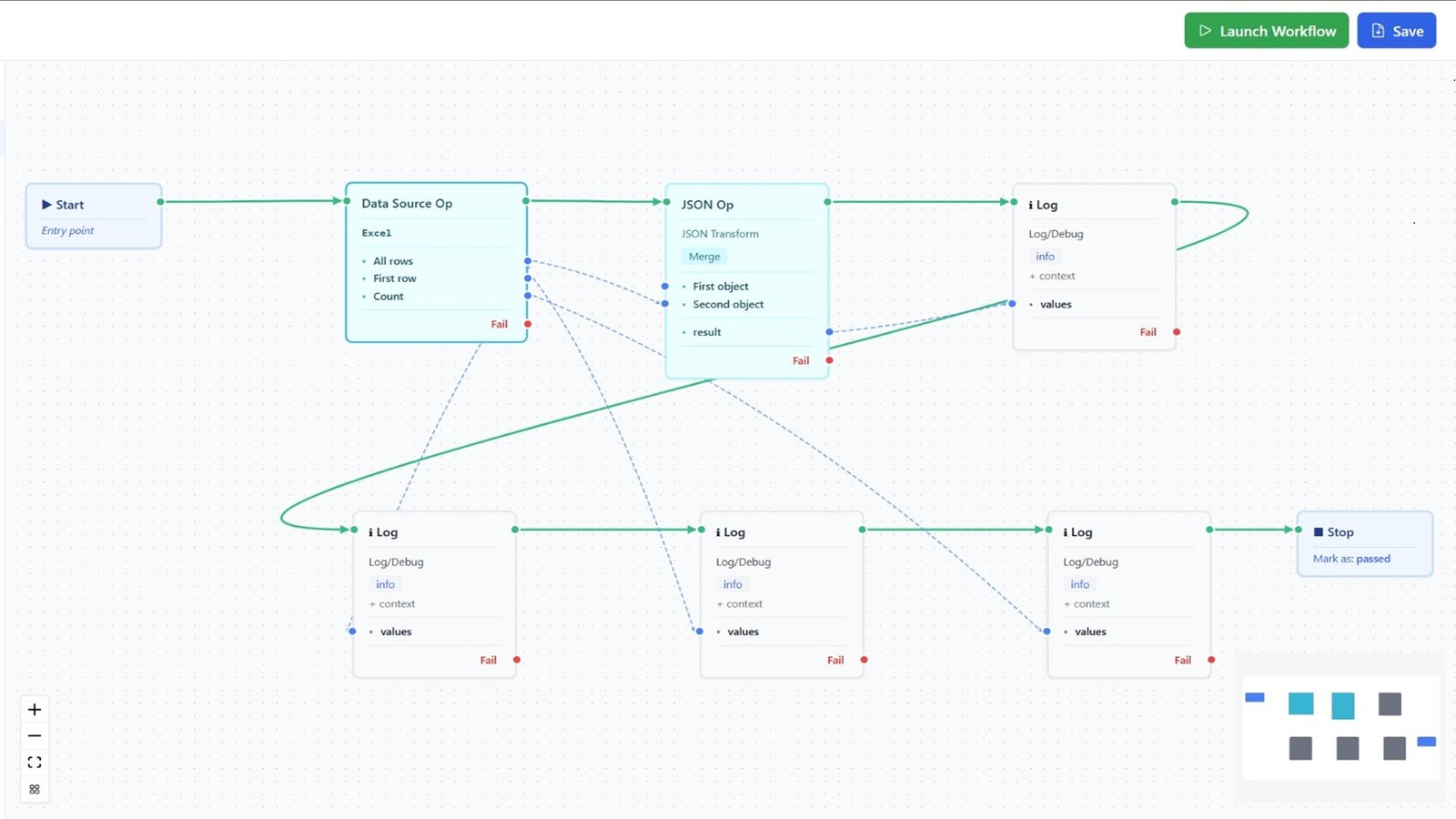
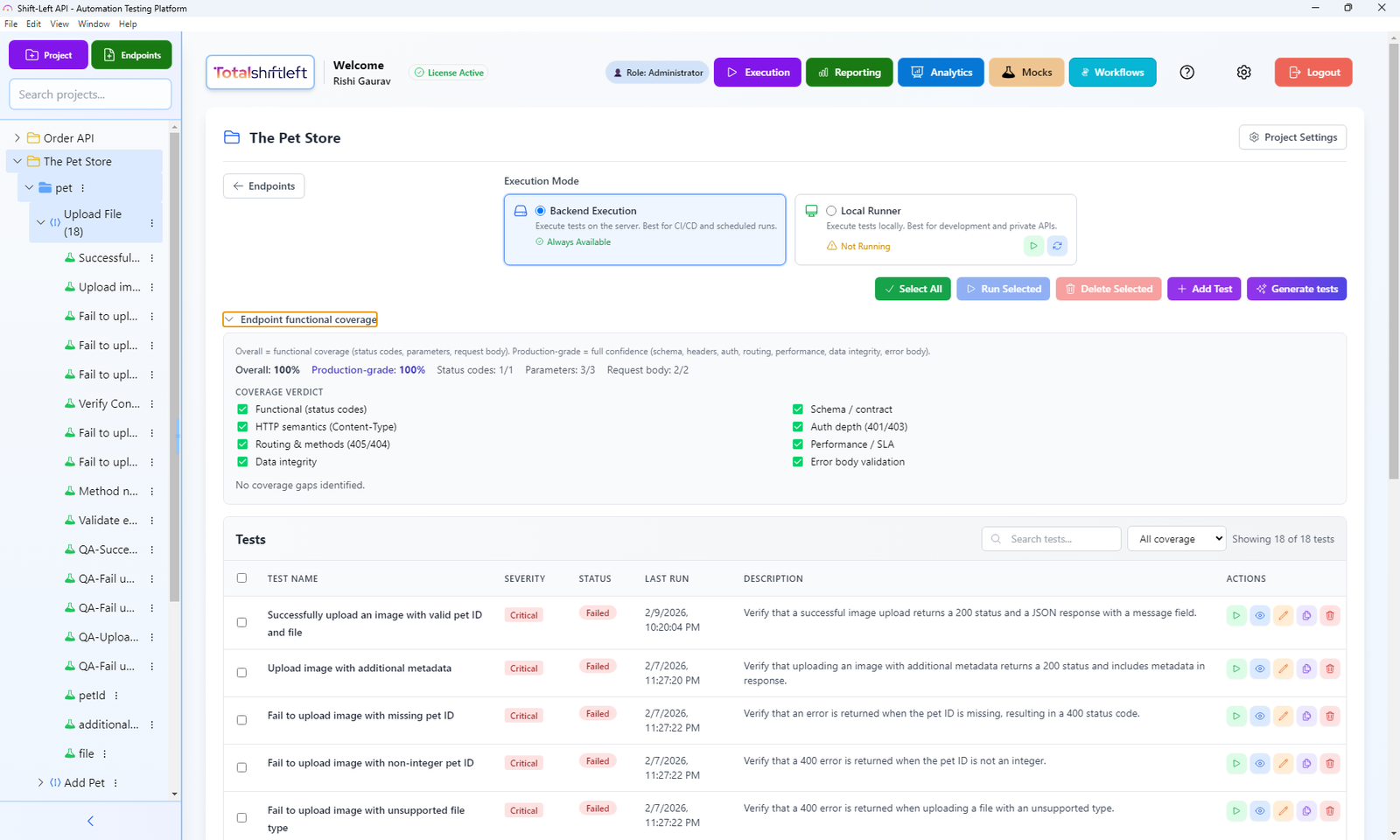
Shift-Left API integrates directly into CI/CD pipelines by importing OpenAPI/Swagger specifications and generating complete API test suites that run automatically on every build through native GitHub Actions, GitLab CI, and Jenkins integrations. See also: API test automation with CI/CD step-by-step guide.
How Total Shift Left does this: Total Shift Left generates the API test suite directly from an imported OpenAPI or Swagger spec, then runs it as a pipeline gate through first-party Jenkins and Azure DevOps plugins, or a public REST API and CLI for GitHub Actions, GitLab CI, and any other CI/CD tool — with a configurable pass-rate threshold so the build fails only when it should.
CI/CD Quality Gates: How to Block a Deploy on Failed Tests
A quality gate is only real if it can actually stop a merge or a deploy — a check that reports red but doesn't block anything trains the team to ignore it within weeks. Blocking works differently depending on where the gate sits:
At the PR gate, use required status checks. In GitHub, that means every job in your workflow that should be able to block a merge needs a name, and that name gets added to branch protection:
# .github/workflows/ci.yml
name: CI

on:
  pull_request:
    branches: [main]

jobs:
  unit-tests:
    runs-on: ubuntu-latest
    steps:
      - uses: actions/checkout@v4
      - run: npm ci && npm test -- --coverage

  api-tests:
    runs-on: ubuntu-latest
    needs: unit-tests
    steps:
      - uses: actions/checkout@v4
      - name: Run API test suite
        env:
          TSL_API_KEY: ${{ secrets.TSL_API_KEY }}
        run: |
          npx @totalshiftleft/cli test run \
            --project $TSL_PROJECT_ID \
            --base-url $API_BASE_URL \
            --format junit \
            --output api-results.xml \
            --fail-on-error
Then in the repository's Settings → Branches → Branch protection rules, enable "Require status checks to pass before merging" and select unit-tests and api-tests explicitly. Without this step, the jobs run and report status but a PR can still be merged with them red.
In GitLab CI, gating is implicit: any job that exits non-zero fails the pipeline, and merge request approval rules can require the pipeline to succeed:
# .gitlab-ci.yml
stages: [test]

api-tests:
  stage: test
  image: node:20
  script:
    - npx @totalshiftleft/cli test run --project $TSL_PROJECT_ID --format junit --output api-results.xml --fail-on-error
  artifacts:
    reports:
      junit: api-results.xml
    when: always
Set Settings → Merge requests → "Pipelines must succeed" to make this binding rather than advisory.
At the pre-production gate, the pattern is the same but the target environment and threshold usually change — a PR gate might require 100% pass on a smoke subset, while a pre-production gate requires the full regression suite above a pass-rate threshold rather than 100% (flaky third-party dependencies make 100% unrealistic at that stage for most teams). Configure the threshold explicitly rather than defaulting to "no failures," and document why that threshold was chosen — an undocumented gate gets disputed the first time it blocks someone.
The CI/CD Testing Pipeline Architecture
Tools by Pipeline Stage
| Stage | Tool Category | Leading Options | Notes |
|---|---|---|---|
| Pre-commit | Linting | ESLint, Pylint, RuboCop | Hooks via Husky, pre-commit |
| Pre-commit | Unit tests (fast) | Jest --onlyChanged, PyTest -x | Run only changed files |
| PR gate | Full unit tests | Jest, PyTest, JUnit | Parallel sharding recommended |
| PR gate | API tests | Shift-Left API | Auto-generated from OpenAPI spec |
| PR gate | Security (SAST) | SonarQube, Semgrep, CodeQL | Free tiers available |
| Build | Integration tests | TestContainers, Docker Compose | Containerized dependencies |
| Build | Contract tests | Pact, Spring Cloud Contract | Consumer-driven contracts |
| Build | Coverage | Istanbul/nyc, JaCoCo, Coverage.py | Gate on threshold |
| Staging | Smoke tests | Playwright (subset), k6 | Critical paths only |
| Staging | API validation | Shift-Left API | Re-run against staging env |
| Regression | E2E | Playwright, Cypress | Parallel sharding |
| Regression | Performance | k6, Gatling | Baseline comparison |
| Production | Synthetic monitoring | Datadog Synthetics, Checkly | API and URL probes |
| Production | Observability | Datadog, New Relic, Prometheus | Metrics and alerting |
CI/CD testing in practice: a worked example
Problem
A B2B SaaS company with 18 engineers had a working CI/CD pipeline for build and deployment, but no automated testing integrated into it. Testing happened manually, post-build, by two QA engineers. Release cadence was every three weeks. Each release took two days of manual QA effort. The team's DORA metrics placed them firmly in the low-performer category: deployment frequency of once per three weeks, change failure rate of 22%, mean time to restore of 6 hours.
Free YAML templates + guide
CI/CD Testing Pipeline Templates
Production-ready CI/CD pipeline templates for GitHub Actions and GitLab CI. Includes API testing, contract testing, and performance testing stages.
Download FreeSolution
The team implemented automated testing across all pipeline stages over 10 weeks.
Phase 1: Commit and PR gates (weeks 1–3)
- Installed Husky for pre-commit hooks: linting + fast unit test runs
- Configured GitHub Actions with three parallel runners on every PR:
- Runner 1: Full Jest unit test suite with coverage report
- Runner 2: Shift-Left API API tests against the development environment
- Runner 3: SonarQube static analysis
- Configured required status checks: all three runners must pass before merge
Phase 2: Build stage validation (weeks 4–6)
- Added TestContainers to run integration tests with real PostgreSQL and Redis
- Implemented Pact for contract testing between frontend and API
- Set coverage gate: PRs reducing coverage below 75% are blocked
Phase 3: Staging validation (weeks 7–8)
- Smoke test suite using Playwright (15 critical user paths)
- Shift-Left API re-runs API tests against the staging environment post-deployment
- Performance baseline with k6: any endpoint exceeding P95 > 500ms is flagged
Phase 4: Production monitoring (weeks 9–10)
- Configured Datadog Synthetics to probe 12 critical API endpoints every minute
- Set up PagerDuty alerting on error rate spikes above 1%
- Weekly DORA metrics review added to engineering retrospective
Results After 90 Days
| Metric | Before | After |
|---|---|---|
| Deployment frequency | Every 3 weeks | Multiple times per week |
| Change failure rate | 22% | 4% |
| Mean time to restore | 6 hours | 45 minutes |
| Manual QA time per release | 16 hours | 2 hours (exploratory only) |
| PR feedback time | 2 days | 6 minutes |
| API endpoints in CI | 0 | 94 (all endpoints) |
The team moved from low-performer to high-performer DORA category within one quarter, primarily by integrating automated testing at every pipeline stage.
CI/CD testing challenges and how to solve them
Challenge: CI pipeline takes 45+ minutes Solution: Audit each stage for unnecessary sequential dependencies. Parallelize wherever possible. Move slow tests to scheduled nightly runs rather than every-commit gates. Use caching aggressively (npm cache, Docker layer cache, dependency cache).
Challenge: Tests pass in CI but fail in staging Solution: This indicates environment-dependent tests. Audit for hardcoded URLs, environment-specific data assumptions, and untested configuration differences. Use environment variables consistently and ensure CI and staging environments are configured from the same source.
Challenge: API tests require manual setup every time Solution: Use Shift-Left API, which maintains API test suites automatically from your OpenAPI specification. When endpoints change, re-import the spec and tests update automatically.
Challenge: Developers disable failing tests to unblock deploys Solution: Establish a policy that only quarantined tests (tracked in a dedicated backlog) can be bypassed. Disabling tests without quarantine tracking is treated as a process violation. Make quarantined test count a visible metric.
Challenge: No one knows what the CI failures mean Solution: Invest in failure reporting. Every CI failure should link directly to the failing test, the error message, and a reproduction command. Good reporting reduces MTTD (Mean Time to Diagnose) from hours to minutes.
Challenge: Security scans block every build with false positives Solution: Configure your SAST tool to suppress known false positives with documented rationale. Establish a triage process for new findings. Block only on critical and high severity findings with high confidence scores.
Best Practices for Automated Testing in CI/CD
- Run tests at every pipeline stage. Every stage without automated tests is a blind spot in your quality coverage.
- Fail fast and specifically. The error message from a failed quality gate must tell a developer exactly what broke and why.
- Keep PR feedback under 10 minutes. Developers cannot maintain context on PRs that take longer to validate. Use parallelism to enforce this SLO. For pipeline-specific guidance, see how shift left testing works in CI/CD pipelines.
- Use Shift-Left API for API coverage in CI. Auto-generation from OpenAPI specs eliminates the gap between API documentation and API validation.
- Never allow failed tests to deploy. Quality gates must gate, not advise.
- Track DORA metrics and connect them to test automation maturity. Deployment frequency, change failure rate, and MTTR all improve directly as CI/CD test automation matures. A comprehensive DevOps testing strategy connects these metrics to your overall quality approach.
- Make test results visible to everyone. Test dashboards, Slack notifications, and PR annotations keep quality front-of-mind for the whole team.
- Treat CI configuration as code. Pipeline definitions belong in version control, reviewed like application code.
- Follow established test automation best practices for DevOps. Deterministic tests, proper test data management, and parallel execution are foundational to reliable CI/CD test automation.
- Test your CI pipeline. Pipeline failures should trigger alerts just like test failures. A broken CI system is worse than no CI system.
- Continuously prune slow and irrelevant tests. Every quarter, review the test suite for tests that have not caught a defect in 6+ months. Delete or refactor them.
CI/CD Test Automation Checklist
- ✔ Pre-commit hook runs linting and fast unit tests (under 60 seconds)
- ✔ PR gate runs full unit and API tests in parallel (under 10 minutes)
- ✔ Build stage runs integration tests and enforces coverage threshold
- ✔ Staging deployment triggers smoke tests and API validation automatically
- ✔ Quality gates block deployment on failure—no exceptions without documented quarantine
- ✔ API endpoints are continuously tested via TSL integration (all endpoints covered)
- ✔ Test results are posted to PR interface and team notification channel
- ✔ DORA metrics (deployment frequency, CFR, MTTR) are reviewed monthly
See also: contract testing in our learn hub for the underlying concept.
Frequently asked questions about CI/CD testing
What is automated testing in CI/CD?
Automated testing in CI/CD is the practice of running programmatic tests automatically at every stage of the continuous integration and delivery pipeline—from commit to deployment—to catch defects early, enforce quality gates, and enable confident, frequent releases.
What tests should run in a CI/CD pipeline?
Unit tests run on every commit. API and integration tests run on every build. Smoke tests run after each deployment. Full regression and E2E tests run pre-release or on a scheduled nightly basis. Each layer provides stage-appropriate feedback.
Why are quality gates important in CI/CD?
Quality gates are automated checkpoints in the CI/CD pipeline that stop the delivery process if predefined quality thresholds are not met. Common quality gates include test pass rate thresholds, code coverage minimums, and security scan clean bills of health. They prevent substandard code from reaching production.
How do you automate API testing in CI/CD without writing code?
Shift-Left API imports your OpenAPI/Swagger specification and auto-generates API tests that connect directly to your CI/CD pipeline via native GitHub Actions, GitLab CI, or Jenkins integrations. No custom test code is required.
Sources and further reading
- GitHub Actions documentation — workflow syntax, caching and matrix builds.
- GitLab CI/CD documentation — .gitlab-ci.yml stages, rules and artifacts.
- DORA State of DevOps research — the multi-year dataset behind the four delivery metrics.
Key takeaways
Automated testing in CI/CD is the mechanism that separates teams that ship with confidence from teams that ship and hope. By implementing stage-appropriate testing—from pre-commit unit tests through production synthetic monitoring—and enforcing quality gates at every stage, teams can achieve the deployment frequencies and change failure rates that define elite software delivery performance. The API layer is your most valuable CI/CD testing investment, and Shift-Left API makes it accessible without writing a line of test code. Start your free trial and bring automated API testing to your CI/CD pipeline today.
Related: What Is Shift Left Testing: Complete Guide | Shift Left Testing Strategy | API Test Automation with CI/CD | DevOps Testing Strategy | Best Shift Left Testing Tools | Shift Left Testing in CI/CD Pipelines | No-code API testing platform | Total Shift Left home | Start Free Trial
Ready to shift left with your API testing?
Try our no-code API test automation platform free.