
How to Debug Failed API Tests in CI/CD: Step-by-Step Guide (2026)
Quick answer
Debugging failed API tests in CI/CD requires a systematic methodology built on three capabilities — visibility into logs and traces, reproducibility of failure conditions, and isolation of the failing layer — because ephemeral runners destroy evidence the moment a pipeline ends. The workflow categorizes failures (assertion, connection, timeout, authentication, data), correlates them to service logs via trace IDs, and preserves artifacts before teardown; engineers spend an average 8.2 hours weekly on this per a 2025 Gradle report.
Reviewed by Rishi Gaurav
Debugging failed API tests in CI/CD requires a systematic approach that accounts for the unique challenges of pipeline environments: limited interactive access, ephemeral infrastructure, environment differences from local development, and distributed service dependencies. This guide provides a step-by-step methodology for diagnosing and resolving API test failures in any CI/CD pipeline.
A 2025 Gradle Developer Productivity report found that engineers spend an average of 8.2 hours per week debugging CI/CD test failures, with API tests accounting for 40% of those failures. The cost is staggering — not just in engineering hours but in deployment velocity. Every failed pipeline blocks the delivery of working code, and when the failure is an environment issue rather than a real bug, that blocked deployment is pure waste.
The core problem is that CI/CD environments are fundamentally different from local development environments. Tests run on ephemeral runners with different networking, different environment variables, different service availability, and different timing characteristics. A test that passes on your laptop in 200ms might timeout on a CI runner because the dependent service takes 2 seconds to become healthy after container startup.
This guide provides a systematic, step-by-step approach to debugging failed API tests in CI/CD. It covers the diagnostic workflow, the specific failure categories you will encounter, the tools that accelerate diagnosis, and the practices that prevent failures from recurring. Whether you run tests in GitHub Actions, GitLab CI, Jenkins, or CircleCI, the methodology is the same. If you are building out your pipeline, see our guide on how to build a CI/CD testing pipeline for the foundational architecture.
In this guide
- What Is CI/CD API Test Debugging?
- Why CI/CD Test Failures Are Hard to Debug
- Key Components of a Debugging Workflow
- Step-by-Step Debugging Architecture
- Debugging Tools Comparison
- Real-World Debugging Example
- Debugging failed API tests challenges and how to solve them
- Debugging failed API tests best practices
- Debugging Checklist
- Make the failure debuggable before you try to debug it
- Debugging failed API tests FAQ
What Is CI/CD API Test Debugging?
CI/CD API test debugging is the practice of systematically diagnosing why API tests fail in automated pipeline environments. It goes beyond reading assertion error messages — it encompasses analyzing the full context of a failure: the environment state, service health, network conditions, test data availability, and timing characteristics at the moment the test executed.
Unlike unit test debugging, where the scope is a single function, API test debugging in CI/CD requires understanding the interactions between multiple systems: the test runner, the API under test, its dependent services, databases, message queues, authentication providers, and the CI infrastructure itself. A failure at any layer in this stack can cause a test to fail, and the error message at the test level rarely points directly to the root cause.
Effective CI/CD API test debugging requires three capabilities: visibility (access to logs, traces, and environment state from the failed run), reproducibility (the ability to recreate the failure conditions), and isolation (the ability to narrow down whether the failure is in the test code, the application code, the environment, or the infrastructure).
For the GitHub-specific detail — service containers, matrix sharding, OIDC and reusable workflows — see API testing in GitHub Actions.
When the full suite no longer fits in a pull request, risk-based test selection covers choosing the subset a change can actually break.
If the gap is tooling rather than process, start with continuous integration testing tools and its comparison matrix.
For the command-line half of the same job — reproducible one-liners, CI smoke checks and TLS debugging — see curl vs Postman.
Why CI/CD Test Failures Are Hard to Debug
Ephemeral Environments Destroy Evidence
CI/CD runners are typically ephemeral — they spin up for a pipeline run and are destroyed afterward. When a test fails, the environment state that caused the failure is gone. You cannot SSH into the runner to inspect logs, query the database, or check service health. Everything you need for diagnosis must be captured in artifacts, logs, and reports before the environment is torn down.
Environment Divergence from Local Development
Local development environments are rarely identical to CI/CD environments. Developers run tests against locally-running services with ample resources and no network restrictions. CI/CD environments have constrained resources, network policies, ephemeral databases, and services that may still be initializing when tests start. This divergence causes an entire category of failures — tests that pass locally but fail in CI — that are among the most frustrating to debug.
Limited Interactive Debugging
You cannot attach a debugger to a CI/CD pipeline. You cannot add a breakpoint, inspect variable state, or step through execution. Every debugging iteration requires a new pipeline run — commit a change, push, wait for the pipeline to reach the failing test, and read the output. This feedback loop can take 10-30 minutes per iteration, making trial-and-error debugging extremely expensive.
Flaky Tests Mask Real Failures
Flaky tests — tests that pass and fail intermittently without code changes — are pervasive in API testing. When a test fails in CI/CD, the first question is always: is this a real failure or a flake? If the team has a history of flaky tests, there is a temptation to retry and move on, which means real regressions get dismissed as flakes and reach production. This erosion of trust in the test suite is one of the most damaging consequences of poor test reliability, and it directly impacts your automated testing in CI/CD effectiveness.
Key Components of a Debugging Workflow
Structured Test Output
The foundation of debuggable API tests is structured output that captures everything needed for diagnosis without requiring interactive access. Every API test should log: the full request (method, URL, headers, body), the full response (status code, headers, body), the assertion that failed and why, timestamps for each step, and any correlation IDs (trace IDs, request IDs) that link to observability systems.
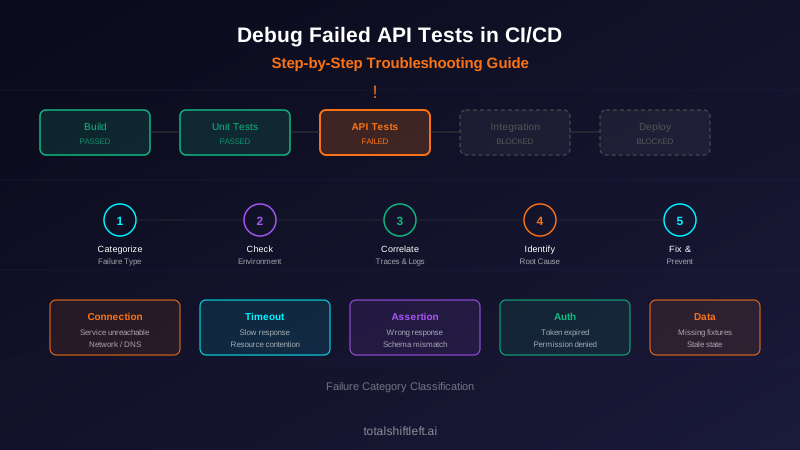
Failure Categorization
Not all failures are created equal. A structured debugging workflow categorizes failures immediately:
- Assertion failures: The API returned a response but it did not match expectations. This indicates either a code regression or a test expectation that needs updating.
- Connection failures: The test could not reach the API. This indicates environment, networking, or service health issues.
- Timeout failures: The API did not respond within the expected time. This indicates performance regressions or resource contention.
- Authentication failures: The test received a 401 or 403. This indicates expired tokens, missing credentials, or permission changes.
- Data failures: The API returned unexpected data. This indicates test data setup issues or database state problems.
Log Correlation
When an API test fails, you need to see what happened inside the API service during that specific request. This requires correlating the test's request with the service's internal logs. The most effective mechanism is injecting a unique trace ID or correlation ID into each test request and searching for that ID in service logs. If your services are instrumented with OpenTelemetry, this correlation is built in.
Ready to shift left with your API testing?
Try our no-code API test automation platform free. Generate tests from OpenAPI, run in CI/CD, and scale quality.
Environment State Capture
Before tests run, capture and log the environment state: which services are running, their versions, database migration status, configuration values (redacted), and network connectivity checks. When a test fails, this captured state is the first thing you check — it often reveals the root cause immediately.
Artifact Preservation
CI/CD systems support artifact uploads — files that persist after the runner is destroyed. Configure your pipeline to upload test reports (JUnit XML, HTML reports), request/response logs, service logs, environment state snapshots, and any diagnostic data collected during the run. These artifacts are your only evidence when debugging after the fact.
Retry and Quarantine Logic
Implement intelligent retry logic that distinguishes between retryable failures (timeouts, connection resets) and non-retryable failures (assertion failures, 4xx responses). Quarantine known flaky tests into a separate suite that runs but does not block the pipeline. Track quarantined tests and require resolution within a defined SLA (e.g., 5 business days).
Step-by-Step Debugging Architecture
A robust debugging architecture for API tests in CI/CD has four layers:
Layer 1 — Test Execution: The test runner executes API tests with enhanced logging enabled. Each test injects a unique request ID, captures full request/response data, and produces structured output (JUnit XML with custom properties). Failed tests generate detailed diagnostic reports.
Layer 2 — Pipeline Infrastructure: The CI/CD pipeline collects test output, captures environment state, aggregates service logs for the test window, and uploads everything as ar
tifacts. Pipeline configuration includes health checks before tests run, timeout safeguards, and conditional retry logic.
Layer 3 — Observability Integration: Test requests include trace context headers. The observability stack (Jaeger, Grafana, Datadog) captures the server-side trace for each test request. When a test fails, the debugging workflow includes pulling the distributed trace for that specific request to see exactly what happened inside the service chain.
Layer 4 — Analysis and Reporting: A test reporting tool (Allure, ReportPortal, or a custom dashboard) aggregates results across pipeline runs, identifies flaky tests, tracks failure trends, and provides drill-down from a failed test to its logs, traces, and environment state. This layer transforms raw debugging data into actionable intelligence, supporting effective root cause analysis for distributed systems.
Debugging Tools Comparison
| Tool | Type | Best For | Open Source |
|---|---|---|---|
| GitHub Actions | CI/CD Platform | Integrated debugging with step logs and artifacts | Yes (runners) |
| GitLab CI | CI/CD Platform | Built-in test reporting and artifact management | Yes |
| Jenkins Blue Ocean | CI/CD Platform | Visual pipeline debugging and log analysis | Yes |
| Allure Report | Test Reporting | Rich HTML reports with request/response details | Yes |
| ReportPortal | Test Analytics | AI-assisted failure analysis and trend tracking | Yes |
| Jaeger | Trace Analysis | Distributed trace visualization for API requests | Yes |
| Grafana Loki | Log Aggregation | Correlating test and service logs by trace ID | Yes |
| Postman/Newman | API Testing | CLI-based API test execution with detailed output | Partial |
| Total Shift Left | API Testing Platform | AI-driven test generation with built-in debugging | No |
| Datadog CI Visibility | CI Analytics | End-to-end CI pipeline and test analytics | No |
Real-World Debugging Example
Problem: An e-commerce team's API test suite started failing intermittently in their GitHub Actions pipeline. The POST /orders endpoint test failed with a 500 error approximately 30% of the time. The test always passed locally. The team spent two weeks retrying failures and could not identify the root cause from test output alone.
Solution — Step-by-Step Debugging:
Step 1 — Categorize the failure: The test received a 500 status code, indicating a server-side error. This ruled out test-side issues (wrong URL, bad request body) and pointed to a problem in the application or its dependencies.
Step 2 — Check environment state: The team added a pre-test health check step to the pipeline that logged the status of all dependent services. This revealed that the inventory service was intermittently reporting "unhealthy" when the order tests ran.
Step 3 — Correlate with traces: The team added a X-Test-Trace-ID header to each test request and searched for it in their Jaeger instance. The distributed trace for failing requests showed the order service calling the inventory service and receiving a connection refused error.
Step 4 — Examine pipeline timing: The team discovered that the order tests started 5 seconds after the Docker Compose stack launched, but the inventory service needed 12 seconds to complete database migrations and become healthy. The 30% failure rate correlated exactly with the migration timing.
Step 5 — Fix: They added a readiness polling loop to the pipeline that waited for all services to report healthy before starting tests. They also added a 30-second timeout to the readiness check so the pipeline would fail fast with a clear message if a service did not start.
Results: Flaky test rate dropped from 30% to 0%. The debugging approach — categorize, check environment, correlate traces, examine timing — became the team's standard playbook for all CI/CD test failures.
Debugging failed API tests challenges and how to solve them
Tests Pass Locally, Fail in CI
Challenge: The most common debugging scenario. The test works perfectly on the developer's machine but fails consistently or intermittently in the pipeline.
Solution: Create a checklist of divergence points: base URLs, ports, environment variables, authentication tokens, database state, service versions, network configuration, and timing. Use containerized test environments (Docker Compose) both locally and in CI to minimize divergence. Log the complete environment configuration at the start of every test run.
Flaky Tests Erode Team Confidence
Challenge: When 10% of pipeline runs fail due to flaky tests, teams stop trusting the test suite. Engineers start ignoring failures, retrying without investigating, and skipping failing tests. Real regressions slip through.
Solution: Implement a zero-tolerance flaky test policy. Track flakiness rate per test. Quarantine any test that fails more than once without a code change. Assign flaky test resolution as engineering work with SLAs. Use test retry with reporting — allow retries but flag tests that needed retries as flaky candidates. The goal is a test suite where a failure always means a real problem.
Insufficient Test Output for Diagnosis
Challenge: The test report says "Expected status 200, got 500" with no additional context. The engineer cannot determine what went wrong without reproducing the failure locally.
Solution: Configure API tests to log complete request and response data on failure. Include timestamps, environment variables (redacted), service versions, and database state. Use test frameworks that support custom failure messages with diagnostic data. Ensure that CI artifacts include full test logs, not just the summary.
Authentication Token Expiry
Challenge: API tests use tokens that expire. Tests pass when the token is fresh but fail when the token expires between pipeline runs. This creates intermittent failures that are difficult to diagnose because the error message (401 Unauthorized) does not indicate that token refresh is needed.
Solution: Generate fresh tokens at the start of every pipeline run. Never cache tokens between runs. Add a pre-test step that authenticates and stores the token as a pipeline variable. Log the token expiry time so that long-running test suites can detect and handle token refresh mid-run.
Free Visual blueprint + guide
Microservices Testing Strategy Blueprint
A visual testing strategy for microservices architectures. Covers testing layers, contract testing, service mesh validation, and tool selection.
Download FreeShared Test Data Causes Ordering Dependencies
Challenge: Tests modify shared database state. Test A creates a record, Test B reads it. If Test B runs before Test A (due to parallel execution or ordering changes), it fails. These ordering dependencies are invisible until they cause failures.
Solution: Every test should create its own data and clean it up afterward. Use unique identifiers (UUIDs) for test-created records to prevent collision. Run tests in random order locally to flush out ordering dependencies before they reach CI. Use database transactions or test containers for complete isolation.
Debugging failed API tests best practices
- Add a unique trace ID or correlation ID to every API test request and include it in failure output so you can find the server-side trace
- Implement pre-test health checks that verify all dependent services are healthy before tests start — fail fast with a clear message if they are not
- Log the full HTTP request and response (method, URL, headers, status, body) for every failed test — truncate large bodies but always include them
- Use containerized test environments (Docker Compose, Testcontainers) to minimize environment divergence between local and CI
- Categorize failures automatically: connection errors, timeouts, 4xx, 5xx, assertion mismatches — each category has a different diagnostic path
- Upload test artifacts (reports, logs, environment state) from every pipeline run, not just failed runs — you need passing run data for comparison
- Track flaky test rate as a team metric and enforce a quarantine policy with resolution SLAs, using automated regression and flaky-test analysis to surface which tests are unstable across runs
- Route failure events straight to your chat and incident tools with signed outbound webhooks so a red build reaches the right people the moment it happens, without anyone polling the dashboard
- Configure pipeline timeouts at both the step level and the test level — a hanging test should not block the entire pipeline for hours
- Use test parallelization with data isolation — parallel tests must not share mutable state
- Include service versions in test output so you can correlate failures with specific deployments
- Implement a structured debugging runbook that your team follows for every CI/CD test failure — this prevents ad-hoc debugging and builds institutional knowledge
- Review your DevOps testing best practices quarterly to ensure your debugging workflow keeps pace with your architecture
Debugging Checklist
- ✔ Read the full test failure output including assertion messages, stack traces, and any captured request/response data
- ✔ Check the failure category: connection error, timeout, authentication, assertion mismatch, or data issue
- ✔ Verify the CI environment state: are all dependent services healthy and reachable?
- ✔ Compare the failing test's environment variables and configuration with a known-good local setup
- ✔ Search for the request's trace ID or correlation ID in your observability system to see the server-side flow
- ✔ Check if the test is a known flaky test by reviewing its pass/fail history across recent pipeline runs
- ✔ Examine pipeline timing: did the test start before services were fully initialized?
- ✔ Verify test data: does the required seed data exist in the CI database?
- ✔ Check for resource contention: is the CI runner under memory or CPU pressure?
- ✔ Review recent code changes: did a deployment change the API contract, response format, or behavior?
- ✔ Attempt to reproduce the failure locally using the same container versions and configuration as CI
- ✔ Document the root cause and fix in the pipeline's failure log for future reference
- ✔ Add a regression test or guardrail to prevent the same failure mode from recurring
See also: contract testing in our learn hub for the underlying concept.
Make the failure debuggable before you try to debug it
Most CI test failures are hard to debug because the evidence was thrown away with the runner. Capture the request, the response and the correlation id on failure, and upload them as artifacts:
# conftest.py — attach the full exchange to any failing test
import json, pathlib, pytest, requests

ARTIFACTS = pathlib.Path("artifacts"); ARTIFACTS.mkdir(exist_ok=True)

@pytest.hookimpl(hookwrapper=True, tryfirst=True)
def pytest_runtest_makereport(item, call):
    outcome = yield
    report = outcome.get_result()
    if report.when == "call" and report.failed:
        exchange = getattr(item, "_last_exchange", None)
        if exchange:
            (ARTIFACTS / f"{item.name}.json").write_text(json.dumps(exchange, indent=2))

@pytest.fixture
def client(request):
    s = requests.Session()
    def record(r, *a, **kw):
        request.node._last_exchange = {
            "request":  {"method": r.request.method, "url": r.request.url,
                         "headers": dict(r.request.headers), "body": r.request.body},
            "response": {"status": r.status_code, "headers": dict(r.headers),
                         "body": r.text[:4000]},
            "traceparent": r.request.headers.get("traceparent"),
        }
    s.hooks["response"].append(record)
    return s
Then keep the artifacts on failure only, so a green pipeline stays fast and a red one comes with the evidence attached:
# .github/workflows/api-tests.yml
- run: pytest --junitxml=results.xml
- if: failure()
  uses: actions/upload-artifact@v4
  with: { name: failure-evidence-${{ github.run_id }}, path: artifacts/, retention-days: 14 }
Debugging failed API tests FAQ
Why do API tests pass locally but fail in CI/CD?
API tests commonly pass locally but fail in CI/CD due to environment differences: missing environment variables, different base URLs or ports, network policies blocking service-to-service calls, timing issues caused by slower CI runners, missing test data or database state, and dependency services not being available in the pipeline environment. The most reliable fix is to ensure environment parity between local and CI using containerized test environments.
How do I debug flaky API tests in CI/CD pipelines?
Debug flaky API tests by first identifying the flaky tests using your CI system's test history and rerun data. Then categorize the root cause: timing-dependent tests (add explicit waits or polling), shared state between tests (isolate test data), external dependency issues (use mocks or stubs), or resource contention on CI runners (parallelize carefully). Add detailed logging around the flaky assertion and run the test in a loop locally to reproduce the intermittent failure.
What tools help debug failed API tests in CI/CD?
Key tools include: CI-native log viewers (GitHub Actions, GitLab CI, Jenkins Blue Ocean) for pipeline output, distributed tracing tools (Jaeger, Grafana Tempo) for request flow analysis, API testing platforms (Postman, Total Shift Left) with built-in reporting, log aggregation tools (Grafana Loki, ELK Stack) for correlating test and service logs, and diff tools for comparing expected vs. actual API responses.
How do I reduce API test debugging time in CI/CD?
Reduce debugging time by: structuring test output with clear assertion messages and request/response logging, adding trace IDs to test requests so you can find them in your observability stack, categorizing failures by type (environment, data, timing, code) with automated triage, implementing test quarantine for flaky tests, and using parallel test execution with isolated environments to get faster feedback.
What are the most common causes of API test failures in CI/CD?
The most common causes are: environment configuration issues (wrong URLs, missing secrets, expired tokens), test data problems (missing fixtures, stale database state, shared mutable state), timing and race conditions (services not ready, async operations not complete), dependency failures (external APIs down, mock servers misconfigured), and actual code regressions that the tests correctly caught.
Sources and further reading
- GitHub Actions documentation — workflow syntax, caching and matrix builds.
- Google Testing Blog — Google's engineering write-ups on test sizing and flakiness.
- OpenTelemetry documentation — the vendor-neutral tracing, metrics and logs standard.
Key takeaways
- Debugging failed API tests in CI/CD does not have to be a time sink. The teams that debug efficiently are the teams that invest in the infrastructure of debugging: structured test output, environment state capture, trace correlation, artifact preservation, and failure categorization.
- When a test fails, the question is not "what happened?" — the answer should already be in the logs and artifacts.
- The question is "why did this condition arise, and how do we prevent it?"
- The step-by-step methodology in this guide — categorize the failure, check the environment, correlate with traces, examine timing, and document the fix — works for any CI/CD platform and any API testing framework.
- The key is discipline: follow the process every time, even when the temptation is to just retry and move on.
Ready to reduce your API test debugging time with AI-powered test generation and built-in diagnostics? Start your free trial of Total Shift Left and experience API testing that gives you the debugging context you need from the start.
Related reading: Microservices Testing Complete Guide | OpenTelemetry for Microservices Observability | Root Cause Analysis for Distributed Systems | Automated Testing in CI/CD | How to Build a CI/CD Testing Pipeline | DevOps Testing Best Practices
Ready to shift left with your API testing?
Try our no-code API test automation platform free.