
OpenTelemetry for Microservices: Tracing & Testing (2026)
Quick answer
Implement OpenTelemetry for microservices by adding the SDK to each service (auto-instrumentation for HTTP/gRPC/DB calls, manual spans for business logic), exporting via OTLP to a Collector, and letting the Collector route data to your backends (Jaeger/Tempo for traces, Prometheus for metrics, Loki/ELK for logs). The part teams get wrong is context propagation across async boundaries — message queues and event buses don't propagate the traceparent header automatically the way HTTP does, so you have to inject it into message headers on publish and extract it on consume.
Reviewed by Sushant Joshi
OpenTelemetry for microservices provides a vendor-neutral, open-source framework for collecting distributed traces, metrics, and logs across service boundaries. It standardizes observability instrumentation so teams can gain full visibility into request flows, latency bottlenecks, and error propagation without locking into a single APM vendor.
A 2025 CNCF survey found that 78% of organizations running microservices in production identified observability gaps as their top operational challenge. When a user-facing request traverses 15 services, traditional monitoring approaches — isolated metrics dashboards, siloed logging — cannot answer the fundamental question: where did this request fail, and why?
OpenTelemetry has emerged as the industry standard for solving this problem. Backed by the CNCF and supported by every major cloud provider and APM vendor, OpenTelemetry provides a single, vendor-neutral instrumentation layer that captures traces, metrics, and logs across polyglot microservices. Instead of instrumenting each service with a different vendor SDK, teams instrument once with OpenTelemetry and route telemetry data wherever they need it.
This guide walks through implementing OpenTelemetry for microservices observability in production — from core concepts and architecture to instrumentation patterns, the Collector pipeline, and the challenges teams face at scale. Whether you are starting with basic distributed tracing or building a full observability pipeline, this is the implementation reference you need for 2026. For teams also building out their API testing strategy for microservices, OpenTelemetry instrumentation provides the telemetry foundation that makes test failures actionable.
In this guide
- What Is OpenTelemetry?
- Why OpenTelemetry Matters for Microservices
- Key Components of OpenTelemetry
- SDK Setup and Context Propagation: Code Examples
- OpenTelemetry Architecture for Microservices
- Observability Tools Comparison
- OpenTelemetry in practice: a worked example
- OpenTelemetry challenges and how to solve them
- OpenTelemetry best practices
- OpenTelemetry checklist
- OpenTelemetry FAQ
What Is OpenTelemetry?
OpenTelemetry (OTel) is an open-source observability framework that provides standardized APIs, SDKs, and tooling for generating, collecting, and exporting telemetry data — traces, metrics, and logs — from cloud-native applications. It is a CNCF incubating project formed by the merger of OpenTracing and OpenCensus in 2019, and it has since become the second most active CNCF project after Kubernetes.
OpenTelemetry is not a backend or visualization tool. It is the instrumentation and collection layer. You use OTel to generate telemetry inside your application and export it to a backend of your choice — Jaeger, Grafana Tempo, Datadog, Honeycomb, Splunk, or any OTLP-compatible system.
The framework consists of three pillars:
- Traces: End-to-end request flows across services, represented as directed acyclic graphs of spans. Each span records the work done by a single service for a single operation.
- Metrics: Numerical measurements collected over time — counters, histograms, gauges — that describe system behavior (request rates, error counts, latency distributions).
- Logs: Structured event records correlated with trace context, enabling teams to link log entries to the specific trace and span that produced them.
The unification of these three signals under a single framework is what makes OpenTelemetry transformative for microservices. Instead of managing separate instrumentation libraries for tracing, metrics, and logging, teams use one SDK that produces correlated telemetry across all three.
The distinction this depends on is covered in observability in DevOps — what monitoring answers and what it cannot.
Why OpenTelemetry Matters for Microservices
Vendor-Neutral Instrumentation Eliminates Lock-In
Before OpenTelemetry, instrumenting a microservices application meant choosing a vendor — Datadog, New Relic, Dynatrace — and embedding their proprietary SDK into every service. Switching vendors required re-instrumenting every service. OpenTelemetry decouples instrumentation from the backend. You instrument once, and you can send data to any OTLP-compatible backend or switch backends without changing application code.
End-to-End Visibility Across Service Boundaries
In a microservices architecture, a single user request might flow through an API gateway, an authentication service, an order service, a payment processor, an inventory service, and a notification service. Without distributed tracing, understanding what happened to a specific request requires correlating logs from each service manually. OpenTelemetry propagates trace context automatically across HTTP, gRPC, and messaging boundaries, giving teams a complete picture of every request path.
Standardized Context Propagation
OpenTelemetry standardizes how trace context is propagated between services using the W3C Trace Context specification. This means a Java service, a Python service, and a Go service in the same request chain all understand the same trace headers. Context propagation is the mechanism that links spans from different services into a single trace, and standardization ensures interoperability across languages and frameworks.
Reduced Instrumentation Overhead
OpenTelemetry auto-instrumentation libraries exist for most popular frameworks and libraries — Express.js, Spring Boot, Django, Flask, gRPC, and database drivers. Teams can get basic distributed tracing running with near-zero code changes by loading the auto-instrumentation agent. Custom spans and attributes can then be added incrementally where more detail is needed. This dramatically lowers the barrier to entry for observability in complex distributed systems.
Key Components of OpenTelemetry
API Layer
The OTel API defines the interfaces for creating spans, recording metrics, and emitting logs. It is intentionally separated from the implementation so that library authors can instrument their code against the API without taking a dependency on the full SDK. If no SDK is configured, API calls become no-ops, ensuring zero overhead for uninstrumented deployments.
SDK Layer
The SDK implements the API interfaces and handles span processing, metric aggregation, and log record creation. It manages the lifecycle of telemetry data — from creation to batching to export. The SDK is where you configure sampling strategies (head-based, tail-based, or probability sampling), resource attributes (service name, version, environment), and export destinations.
Exporters
Exporters are the bridge between the SDK and your observability backend. The OTLP exporter is the recommended default — it speaks the native OpenTelemetry protocol and is supported by virtually all backends. Other exporters exist for Jaeger, Zipkin, Prometheus, and vendor-specific formats. Exporters handle serialization, batching, retry logic, and connection management.
OpenTelemetry Collector
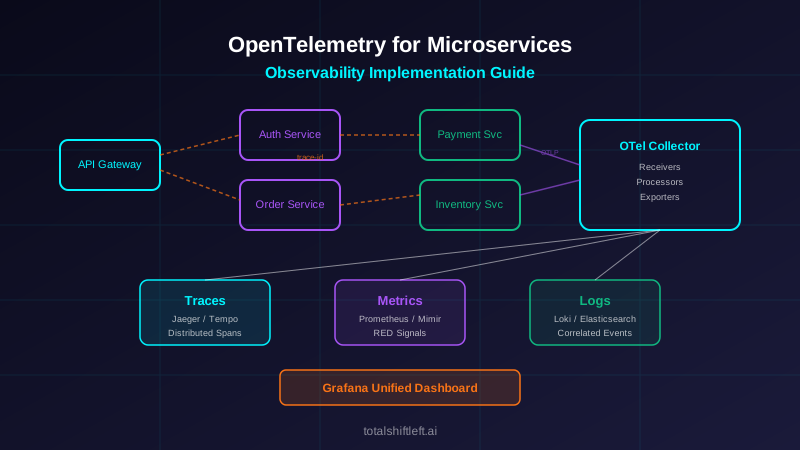
The Collector is a standalone service that receives, processes, and exports telemetry data. It acts as a proxy between your applications and your backends, providing capabilities that the SDK alone cannot offer: tail-based sampling, attribute enrichment, data transformation, multi-destination routing, and buffering. In production microservices deployments, the Collector is almost always deployed as a sidecar or daemonset.
Auto-Instrumentation
Auto-instrumentation libraries hook into popular frameworks at runtime to create spans and propagate context automatically. For Java, this is a javaagent JAR. For Node.js, it is a require hook. For Python, it is a site-packages wrapper. Auto-instrumentation covers HTTP clients, HTTP servers, database drivers, message queue clients, and gRPC — the entry and exit points that define the service boundary.
Resource and Semantic Conventions
Resources describe the entity producing telemetry — service name, namespace, version, host, container ID, cloud region. Semantic conventions standardize attribute names so that all services in a fleet use the same keys for the same concepts (http.method, http.status_code, db.system, rpc.method). This standardization is critical for querying and alerting across heterogeneous services.
Ready to shift left with your API testing?
Try our no-code API test automation platform free. Generate tests from OpenAPI, run in CI/CD, and scale quality.
SDK Setup and Context Propagation: Code Examples
Node.js — initialize the SDK with auto-instrumentation and an OTLP exporter:
// tracing.js — required before your app code (node -r ./tracing.js server.js)
const { NodeSDK } = require('@opentelemetry/sdk-node');
const { getNodeAutoInstrumentations } = require('@opentelemetry/auto-instrumentations-node');
const { OTLPTraceExporter } = require('@opentelemetry/exporter-trace-otlp-grpc');
const { resourceFromAttributes } = require('@opentelemetry/resources');

const sdk = new NodeSDK({
  resource: resourceFromAttributes({
    'service.name': 'orders-service',
    'service.version': '1.4.2',
    'deployment.environment': 'production',
  }),
  traceExporter: new OTLPTraceExporter({ url: 'http://otel-collector:4317' }),
  instrumentations: [getNodeAutoInstrumentations()],
});

sdk.start();
Python — same pattern with the OTel Python SDK:
# tracing.py
from opentelemetry import trace
from opentelemetry.sdk.trace import TracerProvider
from opentelemetry.sdk.trace.export import BatchSpanProcessor
from opentelemetry.exporter.otlp.proto.grpc.trace_exporter import OTLPSpanExporter
from opentelemetry.sdk.resources import Resource

resource = Resource.create({
    "service.name": "fraud-scoring-service",
    "service.version": "2.1.0",
    "deployment.environment": "production",
})
provider = TracerProvider(resource=resource)
provider.add_span_processor(
    BatchSpanProcessor(OTLPSpanExporter(endpoint="otel-collector:4317", insecure=True))
)
trace.set_tracer_provider(provider)
# Then: opentelemetry-instrument python server.py  (auto-instruments Flask/Django/requests/etc.)
Java — javaagent, no code changes required:
java -javaagent:opentelemetry-javaagent.jar \
  -Dotel.service.name=payment-service \
  -Dotel.resource.attributes=service.version=3.0.1,deployment.environment=production \
  -Dotel.exporter.otlp.endpoint=http://otel-collector:4317 \
  -jar payment-service.jar
Context propagation across a Kafka message boundary — HTTP and gRPC propagate traceparent automatically, but message queues need explicit injection and extraction:
const { propagation, context, trace } = require('@opentelemetry/api');

// Producer: inject the current trace context into message headers
function publishOrderCreated(order) {
  const headers = {};
  propagation.inject(context.active(), headers); // writes traceparent, tracestate
  kafkaProducer.send({
    topic: 'order-events',
    messages: [{ value: JSON.stringify(order), headers }],
  });
}

// Consumer: extract the context and run the handler inside it
async function handleOrderCreated(message) {
  const parentContext = propagation.extract(context.active(), message.headers);
  await context.with(parentContext, async () => {
    const span = trace.getTracer('order-consumer').startSpan('process-order-created');
    try {
      await processOrder(JSON.parse(message.value));
    } finally {
      span.end();
    }
  });
}
Without this explicit inject/extract pair, every message-driven span starts a brand-new trace instead of continuing the one from the producing service — the most common reason teams see "broken" traces that stop at the edge of a queue.
OpenTelemetry Architecture for Microservices
A production OpenTelemetry deployment for microservices typically follows a layered architecture:
Application Layer: Each microservice is instrumented with the OpenTelemetry SDK. Auto-instrumentation covers framework-level spans (HTTP handlers, database calls, outbound HTTP requests). Manual instrumentation adds custom spans for business logic and domain-specific attributes. The SDK batches telemetry and exports it via OTLP.
Collection Layer: The OpenTelemetry Collector runs as a sidecar (one per pod) or a daemonset (one per node). It receives OTLP data from application SDKs, applies processing (sampling, filtering, attribute manipulation), and exports to one or more backends. Running the Collector as a separate process decouples the application from the backend and provides a central point for policy enforcement.
Backend Layer: Storage and query backends receive processed telemetry. Common combinations include Grafana Tempo or Jaeger for traces, Prometheus or Grafana Mimir for metrics, and Grafana Loki or Elasticsearch for logs. Grafana provides the unified visualization layer. Teams using managed services often send data to Datadog, Honeycomb, or Splunk Observability Cloud.
Visualization Layer: Dashboards, trace explorers, and alerting systems consume the stored telemetry. The key capability here is correlation — jumping from a metric anomaly to the traces that contributed to it, and from a trace span to the logs emitted during that span. This correlation is what transforms raw telemetry into actionable observability, and it directly supports debugging failed API tests in CI/CD pipelines. Pairing trace-level visibility with automated API change detection means a contract shift in an upstream service is flagged before it silently reshapes the spans you rely on downstream.
Observability Tools Comparison
| Tool | Type | Best For | Open Source |
|---|---|---|---|
| OpenTelemetry | Instrumentation & Collection | Vendor-neutral telemetry generation | Yes (CNCF) |
| Jaeger | Trace Backend | Distributed trace storage & visualization | Yes (CNCF) |
| Grafana Tempo | Trace Backend | High-volume trace storage with Grafana integration | Yes |
| Prometheus | Metrics Backend | Time-series metrics collection & alerting | Yes (CNCF) |
| Grafana Loki | Log Backend | Log aggregation with label-based indexing | Yes |
| Grafana | Visualization | Unified dashboards for traces, metrics, logs | Yes |
| Datadog | Full-Stack APM | All-in-one managed observability platform | No |
| Honeycomb | Trace Analysis | High-cardinality trace exploration & debugging | No |
| Splunk Observability | Full-Stack APM | Enterprise observability with log correlation | No |
| Zipkin | Trace Backend | Lightweight distributed tracing | Yes |
OpenTelemetry in practice: a worked example
Problem: A fintech company running 45 microservices on Kubernetes experienced intermittent latency spikes on their payment processing flow. Their existing monitoring stack — Prometheus metrics and ELK-based logging — could detect that latency was high but could not identify which service in the 8-service payment chain was responsible. Mean time to resolution (MTTR) for latency incidents averaged 4.2 hours.
Solution: The team implemented OpenTelemetry across all 45 services in three phases:
Phase 1 — Auto-instrumentation: They deployed the OTel Java agent and Node.js auto-instrumentation across all services. This required no code changes and immediately provided distributed traces for every request. Traces were exported via OTLP to an OpenTelemetry Collector daemonset, which forwarded them to Grafana Tempo.
Phase 2 — Custom instrumentation: Engineers added custom spans for critical business logic — payment validation, fraud scoring, and ledger writes. They attached domain attributes (payment.amount, payment.currency, fraud.score) to spans, enabling filtering by business context.
Phase 3 — Metrics and log correlation: The team added OTel metrics instrumentation alongside their existing Prometheus setup and configured log correlation so that every log entry included trace_id and span_id. Grafana dashboards linked metrics panels to Tempo traces and Loki logs.
Results: Within six weeks, the team identified that the latency spikes originated from a connection pool exhaustion issue in the fraud-scoring service's database driver. The distributed trace showed the fraud-scoring span expanding from 50ms to 3,200ms during spikes, with the database span inside it showing connection wait times. MTTR for latency incidents dropped from 4.2 hours to 25 minutes — a 90% reduction.
OpenTelemetry challenges and how to solve them
High Cardinality Attribute Explosion
Challenge: Adding high-cardinality attributes (user IDs, request IDs, session tokens) to every span can overwhelm backend storage and increase costs dramatically. A service handling 10,000 requests per second with 20 unique attributes per span generates enormous data volumes.
Free Visual blueprint + guide
Microservices Testing Strategy Blueprint
A visual testing strategy for microservices architectures. Covers testing layers, contract testing, service mesh validation, and tool selection.
Download FreeSolution: Use the Collector's attribute processor to strip high-cardinality attributes before export. Reserve high-cardinality attributes for manual spans on critical paths only. Use exemplars to link metric data points to sample traces instead of storing every trace.
Sampling Strategy Complexity
Challenge: Head-based sampling (deciding at the start of a trace whether to sample it) is simple but can miss rare errors. Tail-based sampling (deciding after the trace is complete) captures errors but requires buffering complete traces in memory.
Solution: Deploy a tiered strategy: use head-based probability sampling (e.g., 10%) for normal traffic and tail-based sampling in the Collector to capture all traces with errors, high latency, or specific attributes. The Collector's tail-sampling processor supports rule-based policies that combine latency thresholds, status codes, and attribute matches.
Context Propagation Across Async Boundaries
Challenge: OpenTelemetry context propagation works automatically for synchronous HTTP and gRPC calls. But message queues (Kafka, RabbitMQ, SQS), event buses, and async job processors require explicit context injection and extraction.
Solution: Inject trace context into message headers when producing messages, and extract it when consuming. OpenTelemetry provides messaging-specific semantic conventions and instrumentation libraries for Kafka, RabbitMQ, and SQS. For custom async patterns, use the Context.with() API to explicitly pass context across thread boundaries.
SDK Performance Overhead
Challenge: Instrumentation adds CPU and memory overhead. In latency-sensitive services handling tens of thousands of requests per second, even small per-request overhead accumulates.
Solution: The OTel SDK is designed for minimal overhead — typically less than 3% CPU increase with default batch export settings. Use the BatchSpanProcessor (not SimpleSpanProcessor) in production. Configure appropriate maxQueueSize and scheduledDelayMillis values. Measure overhead in your specific environment using benchmarks before and after instrumentation.
Multi-Language Consistency
Challenge: Microservices architectures often use multiple languages. The maturity and feature parity of OpenTelemetry SDKs varies across languages — Java and Go are the most mature, while Ruby and PHP lag behind.
Solution: Start with auto-instrumentation for languages with mature support (Java, Go, Python, Node.js, .NET). For less mature SDKs, use HTTP header propagation as the minimum — even if a service does not generate its own spans, it should propagate the traceparent header. Check the OpenTelemetry language status page for current maturity levels.
OpenTelemetry best practices
- Deploy the OpenTelemetry Collector in production rather than exporting directly from SDKs to backends — it provides sampling, buffering, and routing flexibility
- Use auto-instrumentation as a starting point, then add manual spans for business-critical operations and domain-specific attributes
- Standardize resource attributes across all services:
service.name,service.version,deployment.environment, andservice.namespaceshould be consistent and accurate - Implement W3C Trace Context propagation (the default in OTel) to ensure interoperability across all services regardless of language
- Configure tail-based sampling in the Collector to guarantee that all error traces and high-latency traces are captured, even at low overall sampling rates
- Add
trace_idandspan_idto all structured log entries so that logs can be correlated with traces in your visualization layer - Set explicit span status codes — mark spans as
ERRORwhen operations fail so that backend UIs can surface errors immediately - Use semantic conventions for attribute naming —
http.method,http.status_code,db.system— instead of inventing custom names - Monitor the Collector itself with Prometheus metrics — track dropped spans, export failures, and queue saturation to prevent silent data loss
- Use resource detectors to automatically populate cloud-specific attributes (AWS, GCP, Azure) and container attributes (Kubernetes pod name, namespace, node)
- Test your observability pipeline as part of your observability testing strategy to ensure telemetry flows correctly through every layer
- Start with traces, add metrics second, and integrate logs last — this order delivers the highest value at each step
OpenTelemetry checklist
- ✔ Define resource attributes (service.name, service.version, deployment.environment) for every microservice
- ✔ Deploy OpenTelemetry Collector as a daemonset or sidecar in your Kubernetes cluster
- ✔ Configure OTLP exporters in the Collector to route data to your chosen backends (Tempo, Jaeger, Prometheus, Loki)
- ✔ Add auto-instrumentation to all services using the appropriate language agent or SDK
- ✔ Verify end-to-end trace propagation by sending a test request through your full service chain and confirming all spans appear in your backend
- ✔ Add custom spans for business-critical operations (payment processing, order fulfillment, user authentication)
- ✔ Configure head-based sampling rate for production traffic volume (start with 10%, adjust based on storage costs)
- ✔ Set up tail-based sampling rules in the Collector to capture all error and high-latency traces
- ✔ Add trace_id and span_id to structured log output in every service
- ✔ Create Grafana dashboards with RED metrics (Rate, Errors, Duration) linked to trace exemplars
- ✔ Configure alerting on error rate spikes and latency percentile thresholds (p95, p99)
- ✔ Document instrumentation standards and semantic conventions for your engineering team
- ✔ Run a load test and verify that instrumentation overhead stays below 5% CPU and 3% memory increase
- ✔ Set up Collector health monitoring with Prometheus metrics and alerts for dropped telemetry
OpenTelemetry FAQ
What is OpenTelemetry and why is it important for microservices?
OpenTelemetry is an open-source observability framework that provides a unified set of APIs, SDKs, and tools for collecting traces, metrics, and logs from distributed systems. It is important for microservices because it standardizes telemetry collection across polyglot services, eliminates vendor lock-in, and provides end-to-end visibility into request flows across service boundaries.
How does OpenTelemetry distributed tracing work in microservices?
OpenTelemetry distributed tracing works by propagating a trace context (trace ID and span ID) across service boundaries through HTTP headers or gRPC metadata. Each service creates spans representing its work, and these spans are linked by the shared trace ID. The collected spans are exported via OTLP to a backend like Jaeger or Tempo, where the complete request flow is reconstructed as a trace.
What is OTLP and how does it fit into the OpenTelemetry architecture?
OTLP (OpenTelemetry Protocol) is the native wire protocol for transmitting telemetry data from applications to observability backends. It supports gRPC and HTTP transports, handles traces, metrics, and logs in a single protocol, and is the recommended export format for OpenTelemetry. OTLP connects the SDK in your application to the Collector and then to your storage and visualization backends.
Can OpenTelemetry replace proprietary APM tools like Datadog or New Relic?
OpenTelemetry can replace the instrumentation layer of proprietary APM tools, giving you vendor-neutral telemetry collection. However, you still need a backend for storage, querying, and visualization. Many teams use OpenTelemetry for collection and send data to Grafana Tempo, Jaeger, or even Datadog and New Relic as backends — gaining flexibility without losing analysis capabilities.
What is the OpenTelemetry Collector and when should I use it?
The OpenTelemetry Collector is a vendor-agnostic proxy that receives, processes, and exports telemetry data. You should use it when you need to decouple your application instrumentation from your backend, apply transformations like sampling or attribute enrichment, or fan out telemetry to multiple destinations. It sits between your application SDKs and your observability backend.
Sources and further reading
- OpenTelemetry documentation — the vendor-neutral tracing, metrics and logs standard.
- W3C Trace Context — the header format that propagates a trace across services.
- Jaeger documentation — the open-source distributed tracing backend.
Key takeaways
- OpenTelemetry has become the standard for microservices observability, and for good reason.
- It solves the fundamental challenge of distributed systems monitoring — gaining end-to-end visibility across heterogeneous services — without locking teams into a single vendor.
- The framework's three pillars (traces, metrics, logs), combined with the Collector's processing capabilities, provide everything teams need to understand how their systems behave in production.
- The implementation path is incremental: start with auto-instrumentation for distributed tracing, add the Collector for sampling and routing, layer in custom spans for business context, and finally correlate metrics and logs with trace context.
- Each step delivers immediate value. For teams building modern microservices, observability is not optional — it is the foundation that makes every other practice possible.
- Debugging, performance optimization, capacity planning, and incident response all depend on having accurate, correlated telemetry from every service.
Ready to complement your OpenTelemetry observability with automated API testing? Start your free trial of Total Shift Left and see how AI-driven test generation works alongside your observability pipeline to catch issues before they reach production.
Related reading: Microservices Testing Complete Guide | Jaeger for Microservices Debugging | Root Cause Analysis for Distributed Systems | Observability Testing Strategy | API Testing Strategy for Microservices | DevOps Testing Best Practices
Ready to shift left with your API testing?
Try our no-code API test automation platform free.