
Continuous Integration Testing Tools: 9 Best for 2026
Quick answer
The best continuous integration testing tools in 2026 combine an orchestrator (GitHub Actions, Jenkins or GitLab CI), API testing (Shift-Left API or REST Assured), unit testing (Jest or JUnit) and UI testing (Playwright or Cypress). Prioritize API testing first, since it catches the most regressions per minute of pipeline time, and choose tools with native CI/CD plugins.
Reviewed by Sushant Joshi
Part of the API Testing in CI/CD hub. Start with the pillar guide: API testing in CI/CD: step-by-step.
Continuous integration testing tools — also called CI/CD testing tools — are platforms that integrate into continuous delivery workflows to execute tests automatically on every code change. They support unit, API, integration, and end-to-end testing with parallel execution, native pipeline integration, and automated quality gates that block defective builds.
Building an effective CI/CD pipeline is not just about automating deployments — it is about embedding quality gates that catch real defects at every stage, from the moment a developer pushes code to the moment a release reaches production. The continuous integration testing tools you select determine whether those quality gates are genuinely protective or just ceremonial boxes that teams learn to ignore. This guide compares 9 tools across three layers — orchestration, API/unit testing, and UI testing — that the most effective DevOps teams are using in 2026 to build CI/CD pipelines with real quality assurance built in.
In this guide
- Why CI/CD testing tools decide whether quality gates work
- What to Look for in CI/CD Test Automation Tools
- Why CI/CD Testing Strategy Matters More Than Ever
- 9 Best Continuous Integration Testing Tools
- Open-Source CI/CD Testing Tools
- CI/CD Testing Tools for API Teams
- CI/CD testing tools comparison table
- Real-World Implementation: A Complete CI/CD Testing Pipeline with Total Shift Left
- AI-assisted test maintenance in CI/CD
- How to Choose the Right CI/CD Test Automation Stack
- Best Practices for CI/CD Test Automation
- CI/CD Test Tool Selection Checklist
- Frequently asked questions about CI/CD testing tools
Performance belongs in the same pipeline conversation — k6 vs JMeter vs Gatling compares the three runners on scripting and CI fit, and the load testing tools roundup covers the wider field including the managed platforms.
Why CI/CD testing tools decide whether quality gates work
Ask most DevOps teams whether they have quality gates in their CI/CD pipeline and the answer is almost universally yes. Ask whether those gates are actually catching real defects before they reach production, and the answer gets much more complicated.
The problem is that CI/CD quality gates are only as valuable as the tests behind them. A pipeline gate that runs 50 unit tests and calls it "done" is not protecting against API contract violations, integration regressions, or behavioral changes that individual unit tests cannot see. A gate that takes 45 minutes to run trains developers to push through failures rather than fix them. A gate configured to warn but not block teaches the team that test failures are acceptable, not actionable.
In 2026, the most effective DevOps teams have moved beyond checkbox CI/CD testing toward genuinely protective quality pipelines. They test at multiple layers — unit, API, integration, and selective UI — with each layer running as fast as possible and blocking as close to the source of the defect as possible. This multi-layered approach is central to a mature shift-left testing strategy. They use AI-powered test generation to achieve coverage depth without prohibitive manual effort. And they have tuned their pipeline stages so that developer feedback arrives within minutes, not hours.
This guide is for the DevOps team that wants to build that kind of pipeline — or upgrade from a fragile collection of slow, insufficient quality gates to something that actually protects software quality at the speed of continuous delivery.
What to Look for in CI/CD Test Automation Tools
Evaluating test automation tools for CI/CD pipelines requires thinking about the pipeline as a whole system, not individual tools in isolation. Here are the criteria that matter most:
Execution Speed. Every minute of CI/CD pipeline execution time is a minute of developer waiting time. Tools that run in seconds are ideal; tools that run in minutes are acceptable; tools that run in tens of minutes belong later in the pipeline (post-merge or pre-release) rather than on every pull request. Evaluate execution speed with realistic test suite sizes — a tool that runs fast for 50 tests may be unacceptably slow for 500.
Pipeline Integration Depth. "Integration with CI/CD" means different things for different tools. Some tools require complex configuration scripts to integrate. Others provide native CI/CD integrations or pre-built plugins that work out of the box. The less friction in pipeline integration, the more likely teams are to actually configure and maintain quality gates properly.
How Total Shift Left does this: Shift-Left API ships an official GitHub Action and first-party integrations for Jenkins and Azure DevOps. A GitLab CI component, CircleCI orb and Bitbucket pipe are public in source but not yet published to their registries, so those platforms — and any other CI/CD tool — use the public REST API today. Every route runs the same CI runner: it executes a test pack, writes JUnit XML and a JSON summary, and fails the build only when the pass rate misses the threshold you set.
Failure Signal Quality. When a CI/CD quality gate fails, what information does the developer get? A pass/fail result with no context trains developers to ignore failures because they cannot diagnose them quickly. Tools that provide request/response diffs, stack traces, failure attribution, and actionable debugging information in the pipeline output make developers more likely to act on failures immediately.
Parallelization Support. The fastest CI/CD pipelines run tests in parallel across multiple compute instances. Tools that support test sharding, parallel execution, and distributed test running enable large test suites to complete in the time that sequential execution would take for a fraction of the tests.
Maintenance Requirements. A test suite that requires constant maintenance breaks CI/CD workflows repeatedly and trains developers to treat failures as noise rather than signal. Tools that minimize maintenance through auto-healing, schema-driven generation, or AI-assisted test updates are significantly more valuable in CI/CD contexts than tools that produce brittle tests.
Environment Management. CI/CD pipelines need to test against specific environments — often ephemeral environments spun up for a specific PR branch. Tools that require complex environment configuration or depend on shared, persistent environments create bottlenecks. Tools with built-in mocking or environment isolation capabilities reduce this problem significantly.
Cost at Scale. CI/CD testing runs on every commit, across every developer, throughout every working day. Pricing models that charge per test execution can become expensive at scale. Evaluate total annual cost assuming your team's commit frequency and test suite size.
Why CI/CD Testing Strategy Matters More Than Ever
Continuous delivery velocity has reached a point in 2026 where the window for catching defects in manual QA phases has essentially closed for leading software teams. Companies shipping multiple times per day — or per hour — cannot insert a two-day manual QA cycle before each release. The only viable quality assurance mechanism at that velocity is automated testing embedded in the CI/CD pipeline itself.
But beyond velocity, the stakes of inadequate CI/CD testing are higher than ever. Modern software systems are more interconnected: a single API change can break mobile apps, web frontends, partner integrations, and downstream microservices simultaneously. API versioning strategies help, but they do not prevent the subtle behavioral regressions — changed error codes, different response field formats, altered pagination behavior — that automated tests catch and human reviewers miss.
The economics are equally compelling. Research consistently shows that defects caught in CI/CD pipelines cost 10–100x less to fix than defects discovered in production. In terms of developer time, user impact, and incident response cost, a CI/CD quality gate that catches one production-bound regression per week pays for itself many times over within months.
Teams that have invested in comprehensive CI/CD testing report not just fewer production incidents but faster development velocity. Counter-intuitively, quality gates that developers trust actually speed up development — they reduce the mental overhead of worrying whether a change might break something unexpected, and they reduce the interruptions caused by production incidents that require hotfix response.
9 Best Continuous Integration Testing Tools
Total Shift Left — CI/CD-Native API Test Automation
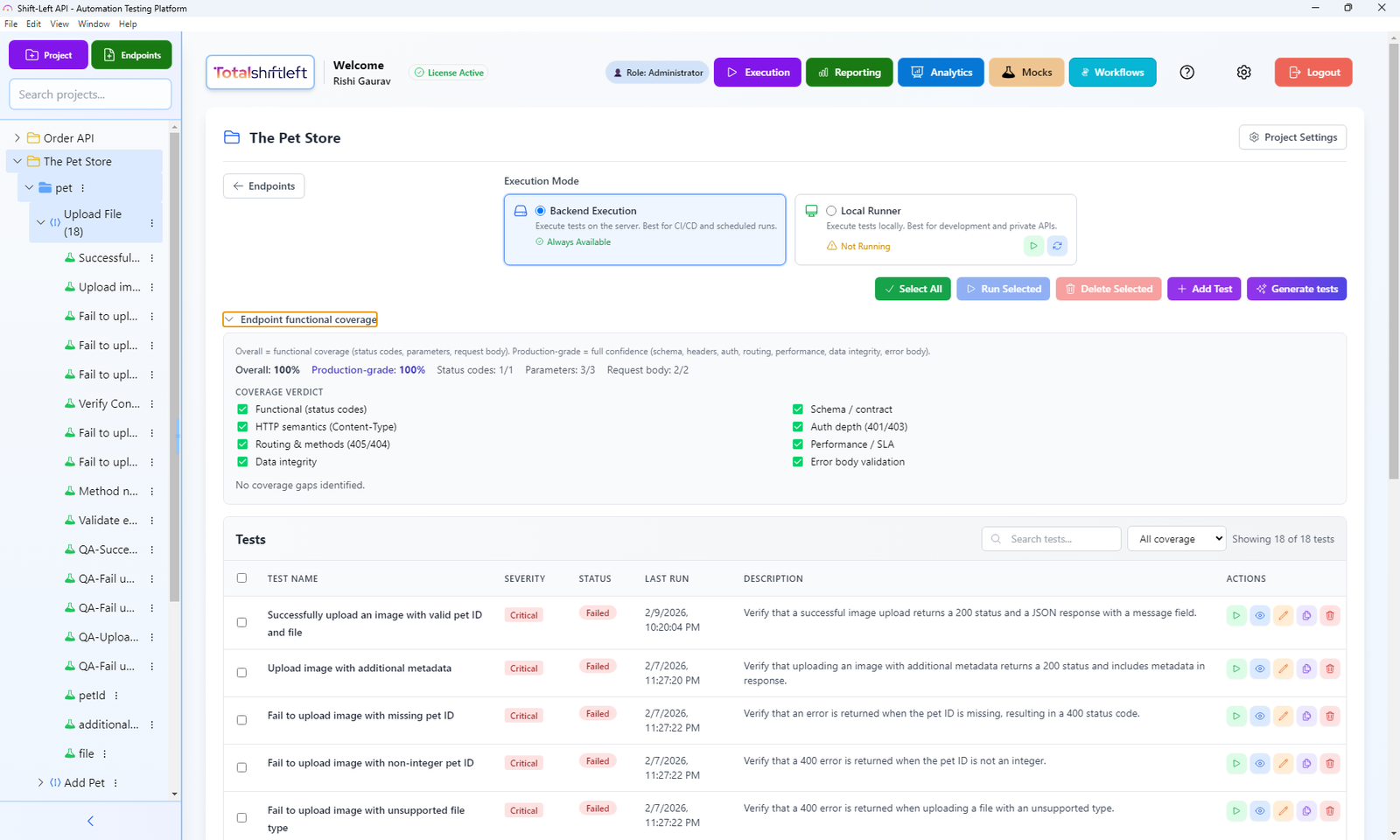
What it is: Total Shift Left is an AI-powered no-code API test automation platform built with CI/CD integration as a core capability, not an afterthought. Every design decision in Total Shift Left — from how tests are generated to how results are reported — is optimized for the CI/CD workflow that DevOps teams depend on.
CI/CD integration depth: Shift-Left API has installable, first-party integrations for GitHub Actions (an official action), Jenkins (a plugin) and Azure DevOps. For GitLab CI, CircleCI and Bitbucket Pipelines, the component, orb and pipe are public in the Shift-Left-API-Integrations repository but awaiting registry publication, so today those pipelines call the public REST API with a short script — the same pattern works for any other CI system. In every case you point the step at a test pack (packs can be built from tags, such as smoke or payments) and configure gate behavior — the minimum pass rate, whether any ERROR result fails the gate, and whether a failed gate blocks or only warns.
The integration behavior in pipelines is precisely what DevOps teams need: tests run in parallel for fast execution, results appear in the pipeline output with clear pass/fail indication and request/response context for failures, JUnit XML and a JSON summary are written for your test reporter, and the pipeline exit code reflects the test outcome so merge gates work correctly with no custom logic.
Shift left API workflow in CI/CD:
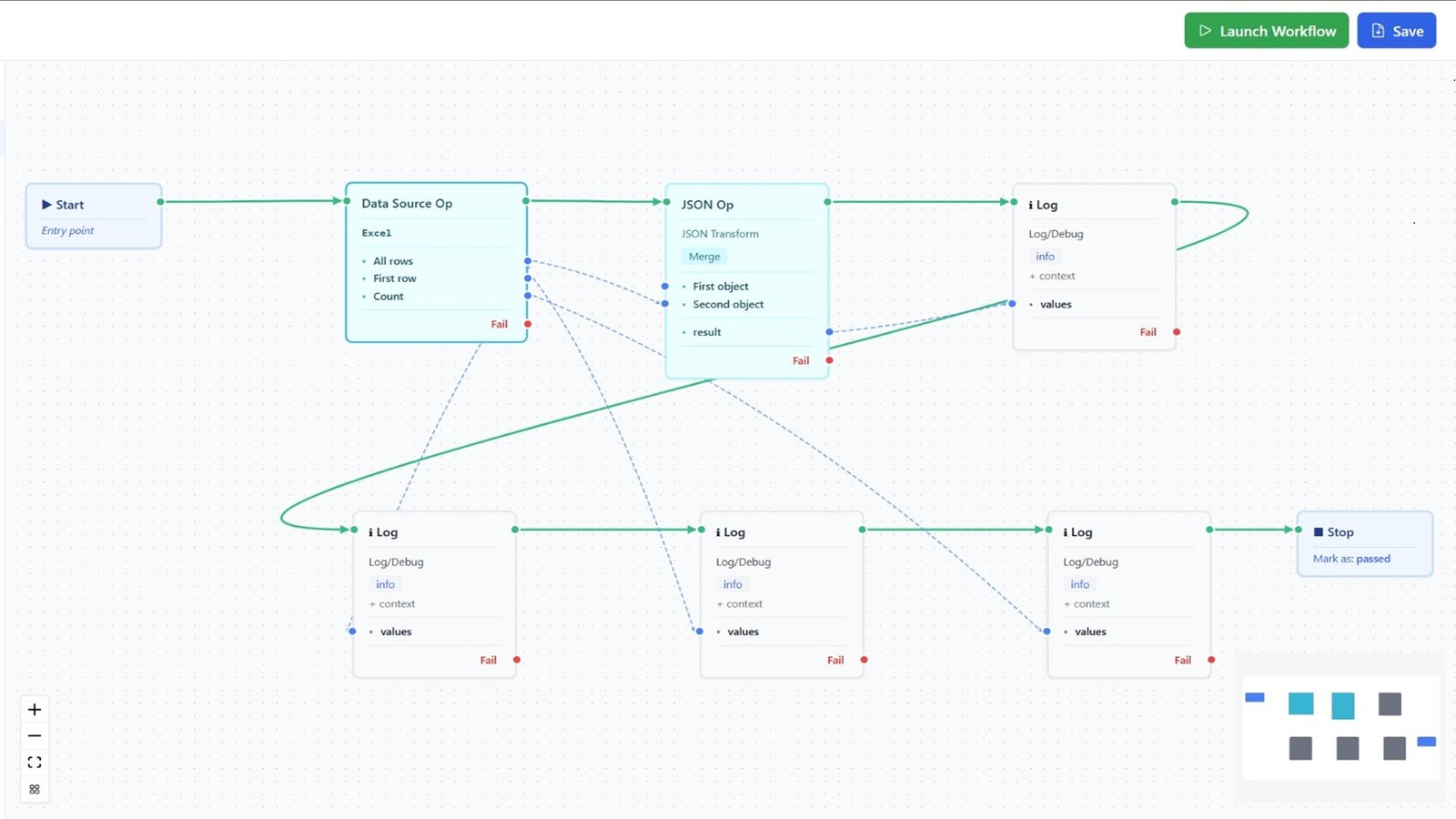
The shift-left API workflow Total Shift Left enables is distinct from adding tests to a pipeline retroactively. Because Total Shift Left generates tests from OpenAPI specifications at the start of API development, teams have CI/CD quality gates running before their API implementation is even complete — tests run against the built-in mock server during development and switch automatically to the live implementation as it becomes available. This is true shift left: quality validation running throughout development, not just at the end.
Execution performance: Total Shift Left's parallel test execution engine runs API test suites at a speed that fits within the PR-gate time budget most teams target. A suite of 200 API tests typically completes in under 3 minutes. A suite covering 500 endpoints across multiple services completes in under 6 minutes with parallel execution enabled.
Reporting for CI/CD context: Failed test results in Total Shift Left include the complete HTTP request, the expected response, the actual response, and a diff highlighting where the responses diverge. This information appears directly in the CI/CD pipeline log, meaning developers can diagnose failures without leaving the pipeline interface or navigating to a separate testing dashboard.
Rather than leaving a red build as a list of failing rows, failed-run analysis groups the run into a handful of causes, each with a verdict — test defect, data issue, environment problem or suspected product bug — based on what the server actually returned (a gateway page, a sign-in redirect and rate limiting are told apart from a real permission refusal). Every test that shares a cause can be fixed in one step, with the fix proposed for review.
Beyond functional gates: Two paid add-ons, both included in the Trial, extend the same pipeline. API security testing adds OWASP-mapped checks beside your functional tests and emits SARIF and JUnit, with --fail-on-severity for the gate and --only-new to adopt it without first clearing the backlog. API load testing reuses functional tests as load scenarios that a pipeline can start with an API key, and reports a Pass / Fail / Inconclusive verdict against a statistical baseline.
Pros:
- AI generates comprehensive API tests from OpenAPI/Swagger specs — no manual test authoring
- Official GitHub Action plus Jenkins and Azure DevOps integrations; GitLab CI, CircleCI and Bitbucket Pipelines via the REST API
- Failed runs grouped into causes with verdicts, not just red rows
- Fast parallel execution — large API suites in under 5 minutes
- Detailed failure reporting with request/response diffs directly in pipeline output
- Built-in mock server enables testing from day one of development
- Supports REST, GraphQL, and SOAP, plus JSON-RPC/MCP and WebSocket-RPC on Trial and Enterprise
- Security and load testing available as add-ons that reuse the same tests
- Free Citizen Developer Edition (single user, BYO AI key) plus a 15-day trial — no credit card required
Cons:
- Specialized for API testing — does not replace unit testing or UI testing tools in your pipeline
- Best value for teams with OpenAPI/Swagger documentation
- Security and load testing are paid add-ons rather than part of the base licence
Best for: Any DevOps team that wants CI/CD-integrated API test automation without the overhead of building and maintaining custom test scripts. The default choice for API quality gates in CI/CD pipelines.
Website: totalshiftleft.ai | Start Free Trial | View Platform
GitHub Actions — CI/CD Pipeline Orchestration
What it is: GitHub Actions is GitHub's built-in CI/CD automation platform, enabling teams to define workflows as YAML files that run on repository events — code pushes, pull requests, scheduled triggers, and manual dispatches.
Ready to shift left with your API testing?
Try our no-code API test automation platform free. Generate tests from OpenAPI, run in CI/CD, and scale quality.
CI/CD testing role: GitHub Actions is the orchestration layer through which test automation tools run in GitHub-hosted repositories. It provides the compute environment, trigger logic, parallelization, and reporting integration that makes other testing tools effective in CI/CD contexts. GitHub Actions does not test code itself — it runs other tools that do.
Key features for CI/CD testing:
- Massive marketplace of pre-built Actions for integrating testing tools (Total Shift Left, Jest, Cypress, SonarQube, and hundreds more)
- Matrix strategy for running tests across multiple OS/language version combinations simultaneously
- Reusable workflows for sharing test pipeline logic across repositories
- Built-in test result visualization (with compatible test report formats)
- Free tier generous enough for most small to mid-size teams
Pros:
- Native integration with GitHub repositories — zero additional CI/CD infrastructure
- Enormous ecosystem of testing tool integrations via the Actions marketplace
- Free for public repositories; generous free tier for private repos
- Status checks integrate directly with GitHub pull request review workflows
- Excellent documentation and community resources
Cons:
- Requires YAML configuration expertise to build complex pipelines
- Hosted runner resource limits can constrain large parallel test runs
- Only useful for GitHub-hosted source code
- Does not provide testing capabilities itself
Best for: Teams using GitHub for source control who want integrated CI/CD without managing separate CI infrastructure. The default CI/CD platform for most modern development teams.
Website: github.com/features/actions
Jenkins — Enterprise CI/CD Automation
What it is: Jenkins is the most widely deployed open-source CI/CD automation server, providing an extensible platform with over 1,800 plugins for integrating virtually any tool or service into an automated pipeline.
CI/CD testing role: Jenkins orchestrates test execution in organizations that self-host their CI/CD infrastructure — typically enterprise teams with security requirements that prevent use of cloud-hosted CI/CD platforms, or teams with workloads that require more compute than cloud-hosted runners provide.
Pros:
- Unmatched extensibility — plugins for every testing tool, notification system, and deployment target
- Full control over pipeline compute and infrastructure
- Active community with decades of ecosystem development
- Jenkins Pipeline (Groovy DSL) enables sophisticated pipeline logic
- Strong support for parallel test execution across agent pools
Cons:
- Significant infrastructure management overhead — requires dedicated Jenkins server administration
- Configuration can be complex and brittle for large, multi-team organizations
- UI feels dated compared to cloud-native CI/CD platforms
- Plugin maintenance burden — plugins from different vendors may conflict or fall out of date
Best for: Enterprise organizations with on-premises infrastructure requirements, specific security or compliance constraints that prevent cloud-hosted CI/CD, or existing deep investment in Jenkins infrastructure.
Website: jenkins.io
GitLab CI — Integrated Source and CI/CD Platform
What it is: GitLab CI is the integrated CI/CD component of the GitLab DevOps platform, providing native pipeline automation for GitLab-hosted repositories with a fully integrated source control, CI/CD, container registry, and security scanning experience.
CI/CD testing role: For teams using GitLab for source control, GitLab CI provides the same orchestration role as GitHub Actions — running test automation tools automatically on code changes and surfacing results in merge request workflows.
Pros:
- Native integration with GitLab source control — no external CI/CD service needed
- GitLab AutoDevOps provides opinionated pipeline configuration for common stacks
- Built-in security scanning (SAST, DAST, container scanning) as pipeline components
- GitLab Runners can be self-hosted for enterprise requirements
- Strong merge request (MR) integration — test results surface directly in MR UI
Cons:
- Best value only for teams already using GitLab (not GitHub or Bitbucket)
- Smaller plugin/integration ecosystem than Jenkins
- Resource-heavy for self-hosted GitLab instances
- Pricing for GitLab Ultimate (with advanced security features) is substantial
Best for: Teams using GitLab for source control who want fully integrated CI/CD without managing separate infrastructure. Particularly strong for teams that value built-in security scanning in their pipeline.
Website: gitlab.com/ci
Jest — JavaScript Unit and Integration Testing
What it is: Jest is the leading JavaScript test framework for unit and integration testing, providing test running, assertion libraries, mocking capabilities, and code coverage reporting in a single, zero-config package.
CI/CD testing role: Jest is the standard choice for JavaScript/TypeScript unit and component testing in CI/CD pipelines. It produces JUnit-compatible XML output for pipeline reporting, supports parallel test execution, and provides coverage reports that integrate with code quality platforms like SonarQube.
Pros:
- Zero configuration for most JavaScript/TypeScript projects
- Built-in mocking eliminates external dependency management for unit tests
- Watch mode provides instant feedback during development
- Coverage reporting integrates with SonarQube, Codecov, and similar platforms
- Fast execution even for large test suites via parallel worker processes
- Free and open source with enormous community
Cons:
- Unit and component tests only — does not cover API integration or UI behavior
- JavaScript/TypeScript ecosystem only (JUnit serves the same role for Java)
- Test suite maintenance requires ongoing developer investment
- 100% coverage does not guarantee absence of integration bugs
Best for: All JavaScript/TypeScript teams as the foundational unit testing layer of their CI/CD pipeline. Essential for catching logic errors at the function level before they reach API or UI testing stages.
Website: jestjs.io
Cypress — Modern Web UI Testing
What it is: Cypress is a modern end-to-end web testing framework that runs tests directly in the browser, providing real-time reloading, automatic waiting, and a rich debugging experience for web UI test automation.
CI/CD testing role: Cypress provides UI-layer quality gates for web applications, validating user-facing functionality against real browser environments in CI/CD pipelines. It runs in headless mode for pipeline execution and produces video recordings and screenshots for failure debugging.
Pros:
- Tests run in the browser — sees exactly what users see, including network requests
- Automatic waiting eliminates the flaky timing issues that plague Selenium-based tests
- Excellent developer experience — fast feedback, real-time test runner, time-travel debugging
- Strong CI/CD integration with GitHub Actions, Jenkins, GitLab CI, and CircleCI
- Cypress Cloud provides parallel execution, test analytics, and flakiness detection
- Free and open source core with paid Cypress Cloud for advanced features
Cons:
- Tests can be slow — full end-to-end UI suites often take 20+ minutes for large applications
- Limited to web UI testing — no API testing capability without additional plugins
- Significant ongoing maintenance as UI changes break test selectors
- Cypress Cloud (required for full parallelism) has per-run pricing that scales with usage
Best for: Web application teams that need reliable UI-layer quality gates for critical user flows. Best used for selective coverage of the highest-risk user journeys rather than exhaustive UI automation — and always paired with API testing (Total Shift Left) for the layer that covers most regressions more efficiently.
Website: cypress.io
Playwright — Cross-Browser End-to-End Testing
What it is: Playwright is Microsoft's open-source browser automation framework, testing Chromium, Firefox, and WebKit from a single API. It has become the default choice for teams starting a new UI test suite in 2026, overtaking Selenium and challenging Cypress on execution speed and multi-browser support.
CI/CD testing role: Playwright runs headless in CI by default, ships an official GitHub Action, and produces JUnit/HTML reports out of the box. Its built-in test runner supports parallel workers and sharding across CI machines without a paid cloud add-on.
Pros:
- True cross-browser testing (Chromium, Firefox, WebKit) from one test file — Cypress is Chromium-first
- Auto-waiting and network interception reduce flaky tests without extra configuration
- Parallel sharding is built into the free, open-source test runner
- Trace viewer records a full timeline (DOM snapshots, network, console) for every CI failure
- Free and open source, with first-class TypeScript support
Cons:
- Younger ecosystem than Cypress for plugins and community troubleshooting content
- No hosted analytics/flakiness dashboard in the free tier (Cypress Cloud has a more mature paid equivalent)
- UI-only — pair with an API testing tool for the layer that catches most backend regressions
Best for: Teams that need real cross-browser coverage (not just Chromium) or are starting a UI suite from scratch in 2026.
Website: playwright.dev
REST Assured — Java API Testing in Pipelines
What it is: REST Assured is the leading Java library for API test automation, providing a fluent DSL for writing HTTP request/response assertions within JUnit or TestNG test suites that run in Maven or Gradle build pipelines.
CI/CD testing role: For Java-based development teams, REST Assured API tests run as part of the Maven/Gradle build lifecycle — triggered by mvn test or gradle test commands in CI/CD pipelines. Tests integrate naturally with existing Java project structures and reporting infrastructure.
Pros:
- Native Java integration — fits Maven/Gradle build pipelines without additional tooling
- Fluent, expressive assertion syntax that reads clearly
- Strong JSON path and XML assertion capabilities
- Integrates with Spring Boot Test Context for integration testing
- Free and open source with large community
Cons:
- All tests written manually — no auto-generation from OpenAPI specifications
- Requires Java expertise to author and maintain test suites
- High initial investment to build meaningful coverage from scratch
- Maintenance burden grows proportionally with API surface area
- No built-in dashboard or analytics — results through JUnit XML reports only
Best for: Java development teams with test automation engineering resources who want API tests embedded in their Maven/Gradle build process. Consider using Total Shift Left alongside REST Assured for auto-generated coverage that complements manually authored integration scenarios.
Website: rest-assured.io
Postman + Newman — CLI-Driven API Testing in CI
What it is: Postman is the most widely used API client for manual and exploratory testing; Newman is its companion CLI runner that executes exported Postman collections headlessly, which is what makes Postman usable as a CI/CD testing tool rather than just a desktop app.
CI/CD testing role: Teams that already design and explore APIs in Postman export their collections and run them via newman run collection.json as a pipeline step, producing JUnit or HTML reports for the build.
Pros:
- Reuses collections your team already built for manual/exploratory testing — no separate test authoring
- Newman is free, open source, and works in any CI system that can run Node.js
- Postman's environments and variables carry over cleanly into CI configuration
- Large existing user base means test authoring doesn't require new tooling adoption
Cons:
- No AI or spec-driven generation — every test is manually built in the Postman UI first
- Newman adds an export/sync step between the Postman workspace and the CI pipeline that teams often forget to automate
- Weaker parallelization and reporting than purpose-built CI-native API testing platforms
- Postman Cloud's CI features (monitors, mock servers at scale) sit behind paid tiers
Best for: Teams with an existing Postman collection library who want the fastest path to a CI check, without yet moving to spec-driven generation.
Website: postman.com | github.com/postmanlabs/newman
Open-Source CI/CD Testing Tools
If budget or self-hosting requirements rule out paid tools, five of the nine above are free and open source with no paid tier required to use them fully in CI:
- Jenkins — the orchestrator itself, self-hosted, free
- Jest — unit testing, free, zero-config
- Cypress (core) — UI testing, free; only the optional Cypress Cloud dashboard is paid
- Playwright — UI testing, free, including parallel sharding
- REST Assured — Java API testing, free
- Newman — the Postman CLI runner is free (Postman's cloud features are separate)
Total Shift Left is not open source, but ships a free Citizen Developer Edition (single user, bring your own AI key) alongside the 15-day trial — worth evaluating even on a zero-license-cost mandate.
CI/CD Testing Tools for API Teams
Of the nine tools above, three are API-specific and worth comparing directly against each other rather than against UI or unit-testing tools:
| Total Shift Left | REST Assured | Postman + Newman | |
|---|---|---|---|
| Test authoring | AI-generated from OpenAPI/Swagger | Hand-written Java | Hand-built in Postman UI |
| CI/CD setup | Official GitHub Action, Jenkins plugin or Azure DevOps step; REST API elsewhere | Runs via mvn test/gradle test | newman run CLI step |
| Best fit | Teams with an OpenAPI spec who want coverage without manual authoring | Java shops with test-engineering capacity | Teams migrating existing Postman collections into CI |
| Repair after API change | Yes — AI-proposed fixes for failing tests, applied after review | No — manual updates | No — manual updates |
A GitHub Actions job running all three side by side (for teams migrating from Postman toward spec-driven testing) looks like this:
jobs:
  api-tests:
    runs-on: ubuntu-latest
    steps:
      - uses: actions/checkout@v4

      # Existing Postman/Newman suite
      - run: npx newman run postman/collection.json --reporters cli,junit --reporter-junit-export newman-results.xml

      # Java REST Assured suite
      - run: mvn -f api-tests/pom.xml test

      # Spec-driven suite, no scripting required
      - uses: Total-Shift-Left/Shift-Left-API-Integrations/github-actions@v1
        with:
          server-url: ${{ secrets.SHIFTLEFT_URL }}
          api-email: ${{ secrets.SHIFTLEFT_EMAIL }}
          api-password: ${{ secrets.SHIFTLEFT_PASSWORD }}
          pack-id: ${{ vars.SHIFTLEFT_TEST_PACK_ID }}
          pass-threshold-percent: '95'
Free YAML templates + guide
CI/CD Testing Pipeline Templates
Production-ready CI/CD pipeline templates for GitHub Actions and GitLab CI. Includes API testing, contract testing, and performance testing stages.
Download FreeCI/CD testing tools comparison table
| Tool | Type | Pricing | CI/CD Native | No-Code | Execution Speed | Best For |
|---|---|---|---|---|---|---|
| Total Shift Left | API test automation | Free Citizen Developer Edition + 15-day trial; team plans custom | Yes — GitHub Actions, Jenkins, Azure DevOps; REST API for others | Yes | Fast (2-5 min for 200+ tests) | CI/CD-native API quality gates |
| GitHub Actions | CI/CD orchestration | Free tier; pay-per-minute | Is the platform | No (YAML) | N/A (orchestrator) | GitHub repository CI/CD orchestration |
| Jenkins | CI/CD orchestration | Free (OSS) + infra | Yes (plugins) | No (Groovy) | N/A (orchestrator) | Enterprise self-hosted CI/CD |
| GitLab CI | CI/CD orchestration | Free tier; paid tiers | Yes (native) | No (YAML) | N/A (orchestrator) | GitLab-hosted CI/CD |
| Jest | Unit testing | Free (OSS) | Yes (universal) | No (code) | Very fast (<2 min) | JavaScript/TypeScript unit tests |
| Cypress | UI/E2E testing | Free + paid Cloud | Yes | No (JS) | Moderate-slow (5-30 min) | Web UI end-to-end testing |
| Playwright | UI/E2E testing | Free (OSS) | Yes (official Action) | No (JS/TS) | Fast, sharded | Cross-browser end-to-end testing |
| REST Assured | API testing (Java) | Free (OSS) | Yes (Maven/Gradle) | No (Java) | Fast | Java team API integration tests |
| Postman + Newman | API testing | Free (Newman); Postman Cloud paid tiers | Yes (CLI) | No (Postman UI) | Fast | Teams with existing Postman collections |
Real-World Implementation: A Complete CI/CD Testing Pipeline with Total Shift Left
Illustrative scenario: a composite of a typical rollout, not a named customer's measured results.
Here is how a well-architected CI/CD testing pipeline looks in practice, using Total Shift Left as the API testing layer alongside complementary tools for unit and UI testing.
Architecture overview: A Node.js backend with REST APIs (OpenAPI documented), a React frontend, deployed via GitHub Actions to AWS. The team has 8 developers, 2 QA engineers, and ships multiple times per day.
Pipeline stage 1 — On every commit to feature branch:
- Jest unit tests (target: under 90 seconds)
- Total Shift Left API tests against built-in mock server (target: under 2 minutes for new endpoints)
- SonarQube static analysis (runs in parallel)
Pipeline stage 2 — On pull request creation/update:
- Full Jest unit test suite with coverage reporting
- Total Shift Left full API test suite against deployed PR environment (target: under 4 minutes)
- Cypress smoke tests — 15 critical user flow tests (target: under 8 minutes)
- All three stages run in parallel — total PR gate time: under 8 minutes
Pipeline stage 3 — After merge to main:
- Total Shift Left regression suite against staging environment
- Full Cypress end-to-end suite (200 tests, parallel across 4 Cypress Cloud runners)
- Performance baseline check
Pipeline stage 4 — Pre-production:
- Total Shift Left smoke suite against production-like environment
- Manual exploratory testing session (30 min, QA engineer-led)
- Go/no-go decision
What changes after implementing this pipeline:
- PR-to-merge time shrinks, because automated gates replace the manual QA bottleneck
- Fewer API incidents reach production
- Developers stop manually testing their own API changes because they trust the CI/CD gates
- QA engineers move from regression testing to exploratory and strategy work
The key point: the API testing layer tends to catch a large share of the defects found in the pipeline, yet it is one of the fastest-running layers and has the best coverage-to-maintenance ratio.
AI-assisted test maintenance in CI/CD
Test maintenance, not test creation, is what kills CI/CD test suites. A suite that took a quarter to build fails in week three of the next quarter because an endpoint gained a required field, a response nested an object one level deeper, or a date format changed. The tests are not wrong about the system being broken — they are wrong about what the system now is. Teams respond by marking tests as skipped, and a quality gate that skips half its assertions has stopped being a gate.
This is why AI-assisted maintenance has become the most contested capability in the CI/CD testing tool market during 2026, and it is worth understanding what the term actually covers, because vendors use it for three quite different things.
Three levels of AI test maintenance
Level 1 — failure triage. The tool classifies a failure as a genuine regression, an environment problem, or a test that has drifted from the API. This alone removes most of the manual work, because the expensive part of maintenance is usually diagnosis rather than the edit.
Level 2 — suggested repair with human review. The tool analyses the failure and proposes a specific fix — updated assertions, a corrected path, a refreshed request body — and presents it as a diff for a human to approve before anything changes. This is where most credible products sit today.
Level 3 — autonomous repair. The tool fixes the test and merges without human approval. Several vendors now ship this. It is genuinely useful for high-volume UI suites where failures are dominated by selector drift, and genuinely dangerous for API contract tests, where a "broken" test is frequently the only thing standing between a breaking change and production. A test that rewrites itself to match whatever the API now returns cannot, by construction, detect a breaking change.
That last point is the one to weigh when evaluating vendor claims. Self-healing is a maintenance feature at the UI layer and a correctness risk at the contract layer, and the distinction is rarely made in marketing copy.
What to require in a CI/CD context
- Diff-before-apply. Any change to a test's assertions should be reviewable as a diff before it lands, the same as any other change to your codebase.
- Version-controlled test definitions. If repairs happen inside a vendor's UI with no audit trail, you cannot review what changed or why a gate stopped catching something.
- A distinction between "spec changed" and "implementation changed." When tests are generated from an OpenAPI specification, a spec revision is an intentional contract change and regeneration is correct. An implementation that drifts from an unchanged spec is a defect and the test should fail loudly. Tools that cannot tell these apart will quietly repair away the second case.
- Failure output that is diagnosable from the pipeline log. The complete request, expected response, actual response, and a diff — without opening a separate dashboard.
Total Shift Left covers level 1 through failed-run analysis, which gives each cause a verdict (test defect, data issue, environment problem or suspected product bug), and stops at level 2 by design: when a test fails because an endpoint, schema, or response shape changed, the platform analyses the failure and proposes updated assertions, parameters, headers, auth or request bodies as a before/after diff for review before anything is applied. Because the tests are generated from the OpenAPI specification rather than recorded from traffic, a spec change is caught when the spec is re-imported, classified as breaking or non-breaking and becomes a new endpoint version once approved, while an implementation that diverges from an unchanged spec fails the gate — which is the behaviour you want from a contract-layer suite.
For a fuller treatment of the category, see the AI API testing guide and how to automate API regression with AI.
How to Choose the Right CI/CD Test Automation Stack
Building a CI/CD test automation stack is a systems design problem, not a tool selection problem. Here is a framework for making the right choices:
Start with your source control platform. If you use GitHub, GitHub Actions is the natural CI/CD orchestrator. If you use GitLab, GitLab CI is the natural choice. Jenkins is the right choice only if you have specific self-hosting requirements. Get your orchestration layer right before selecting testing tools.
Map your testing pyramid. Identify what you need at each layer: unit tests (Jest, JUnit), API tests (Total Shift Left, REST Assured), UI tests (Cypress, Playwright). The pyramid should be wide at the base (many unit tests), substantial in the middle (API tests), and narrow at the top (selective UI tests for critical flows).
Prioritize API testing first. If you can only add one testing tool to your CI/CD pipeline this quarter, it should be API testing. API tests catch the class of bugs most likely to cause production incidents in modern software systems, run faster than UI tests, and require less maintenance than either unit tests or UI tests when using an AI-powered platform like Total Shift Left. Review our DevOps testing strategy guide for a complete framework on where API testing fits in your overall approach.
Set pipeline time budgets. Define how long each pipeline stage is allowed to take before you select tools. PR-gate pipelines should complete in under 10 minutes. Post-merge pipelines can take longer. These time budgets will constrain which tests belong in which stage and whether you need parallelization.
Integrate automated testing into your CI/CD pipeline from day one. The biggest mistake teams make is adding test automation as an afterthought. Build quality gates into the pipeline architecture from the start to avoid retrofitting later.
Evaluate tool combinations, not individual tools. A CI/CD testing pipeline is only as good as how well the tools in it work together. Verify that your selected tools produce compatible reporting formats, integrate cleanly with your CI/CD orchestrator, and do not create pipeline stage dependencies that serialize what should run in parallel.
Best Practices for CI/CD Test Automation
Fail fast, fail loud. Configure CI/CD quality gates to fail loudly — with clear, actionable error messages — rather than softly. Soft failures (warnings rather than blocking errors) train developers to ignore test results. Hard failures (blocked merges) create the urgency that sustains quality culture.
Parallelize aggressively. The fastest CI/CD testing pipelines run everything in parallel that can be parallelized: unit tests, API tests, and static analysis should all run simultaneously, not sequentially. Total Shift Left, Jest, and SonarQube can all run in parallel in the same pipeline stage with no dependencies between them.
Separate fast and slow tests by pipeline stage. Fast tests (unit, API, quick integration) belong in the PR gate that blocks merge. Slow tests (full Cypress E2E suite, performance tests) belong in post-merge pipelines. Never block developer workflow with slow tests that could run asynchronously. Tagging makes the split easy to maintain: a smoke pack for the PR gate and a full regression pack — plus, with the load testing add-on, a performance scenario started via POST /api/performance/scenarios/{scenarioId}/run — for post-merge.
Apply test automation best practices for DevOps consistently. Deterministic test design, proper test data management, and reliable assertions are the foundation that prevents pipeline rot as test suites grow.
Monitor and remediate test flakiness immediately. A flaky test — one that sometimes passes and sometimes fails without code changes — is worse than no test. It trains the team to re-run pipelines instead of fixing failures, and eventually to disable quality gates entirely. Track test flakiness metrics and treat flaky tests as P1 bugs.
Maintain test data isolation. Tests that share state — using the same database records, the same user accounts, or the same API resources — create dependencies that produce intermittent failures in parallel execution. Design tests to create and clean up their own test data, or use Total Shift Left's mock server to eliminate shared state dependencies entirely.
Review CI/CD metrics monthly. Track mean time to detect (MTTD) for defects, the percentage of defects caught in CI/CD versus found in production, and pipeline execution time trends. These metrics tell you whether your CI/CD testing investment is delivering returns and whether your pipeline is slowing down as test suites grow.
CI/CD Test Tool Selection Checklist
Before finalizing your CI/CD test automation toolset, verify:
- Pipeline integration: Does each tool integrate natively with your CI/CD orchestrator (GitHub Actions, Jenkins, GitLab CI) without requiring custom scripting?
- Execution speed: Does each tool complete within your target time budget for its pipeline stage?
- Failure reporting: Do failed tests provide enough context (request/response diffs, stack traces) for developers to diagnose failures without leaving the pipeline interface?
- Parallelization: Do your tools support parallel execution for faster pipeline runs as test suites grow?
- Test maintenance model: How much ongoing maintenance will each tool's test suite require as code evolves?
- Coverage layer alignment: Does each tool in your stack cover a distinct layer of the testing pyramid without redundancy?
- Total cost at scale: What is the annual cost of your full toolset at your current team size and commit frequency?
- Flakiness management: Does each tool provide mechanisms for identifying and managing test flakiness?
See also: contract testing in our learn hub for the underlying concept.
Frequently asked questions about CI/CD testing tools
What are the best test automation tools for CI/CD pipelines?
The best CI/CD test automation stacks combine: API testing (Total Shift Left for AI-powered no-code automation), unit testing (Jest for JavaScript, JUnit for Java), UI testing (Cypress or Playwright for critical flows), and a CI/CD orchestrator (GitHub Actions, Jenkins, or GitLab CI). Total Shift Left stands out for its first-party GitHub Actions, Jenkins and Azure DevOps integrations and its ability to auto-generate API tests from OpenAPI specs.
How do you integrate API testing into a CI/CD pipeline?
Total Shift Left makes API CI/CD integration straightforward: add its official GitHub Action, Jenkins plugin or Azure DevOps task (or a short REST API call in GitLab CI, CircleCI or Bitbucket Pipelines) to run on pull request events, and it executes the selected test pack, writes JUnit XML and a JSON summary, and fails the check when the pass rate misses your threshold. Setup takes under 30 minutes and requires no test code.
How fast should CI/CD test automation runs be?
PR-level test runs should complete within 5-10 minutes to maintain developer flow. API tests with Total Shift Left typically complete in 2-4 minutes for even large API surfaces. Unit tests should complete in under 2 minutes. Full end-to-end UI test suites can take longer and are often reserved for post-merge or pre-release pipeline stages.
Can AI fix failing tests automatically in a CI/CD pipeline?
Partly, and the level matters. Failure triage (classifying a failure as a real regression, an environment problem, or test drift) removes most of the manual effort safely. Suggested repair with human review — where the tool proposes updated assertions as a diff you approve — is where most credible products sit. Fully autonomous repair that merges without review is useful for UI suites dominated by selector drift, but risky for API contract tests: a test that rewrites itself to match whatever the API now returns cannot detect a breaking change by construction. Require diff-before-apply and version-controlled test definitions in any CI/CD context.
What is the difference between CI testing and CD testing?
CI (Continuous Integration) testing runs on every code change — unit tests, API tests, and fast integration tests that validate code before it merges. CD (Continuous Delivery/Deployment) testing runs after merge, before release — including full regression suites, performance tests, and smoke tests against staging or production-like environments. Different tools and test types are appropriate for each stage.
Sources and further reading
- GitHub Actions documentation — workflow syntax, caching and matrix builds.
- GitLab CI/CD documentation — .gitlab-ci.yml stages, rules and artifacts.
- DORA State of DevOps research — the multi-year dataset behind the four delivery metrics.
Key takeaways
- Building CI/CD quality gates that actually protect software quality in 2026 requires the right combination of tools at the right pipeline stages.
- The orchestration layer — GitHub Actions, Jenkins, or GitLab CI — provides the automation framework.
- Unit testing frameworks like Jest and JUnit catch logic errors at the function level.
- UI testing tools like Cypress validate critical user journeys. But the highest-impact layer for most modern software teams is API testing — and for API testing in CI/CD pipelines, Total Shift Left is built specifically for that job.
- Its AI-powered test generation eliminates the weeks of manual effort that previously blocked teams from implementing comprehensive API coverage.
- Its native CI/CD integration means quality gates are running in under 30 minutes of setup time, not after weeks of custom pipeline scripting.
And its fast parallel execution ensures that API quality gates fit within the 10-minute PR gate budget that keeps developers in their workflow. If your CI/CD pipeline does not yet have comprehensive API testing, the fastest path to fixing that gap is Total Shift Left. Upload your OpenAPI spec, generate your first test suite, and configure your GitHub Actions integration — all in a single afternoon.
Start your free 15-day trial today — no credit card required. Working solo? Grab the free Citizen Developer Edition instead — single-user.
Related: What Is Shift Left Testing: Complete Guide | Shift Left Testing Strategy | DevOps Testing Strategy | How to Build a CI/CD Testing Pipeline | Best Shift Left Testing Tools | Automated Testing in CI/CD | Shift Left Testing in CI/CD Pipelines | No-code API testing platform | Total Shift Left home | Start Free Trial
Ready to shift left with your API testing?
Import your OpenAPI spec and get a runnable test suite, in our cloud or on your own infrastructure.