
How to Test GraphQL APIs: Techniques & Tools (2026)
Quick answer
Testing a GraphQL API means sending a POST with a JSON query and variables to a single endpoint (typically /graphql), then checking the response in two places: the data field for correct results, and the errors array for resolver-level failures — GraphQL almost always returns HTTP 200 even when a query fails, so a status-code-only assertion misses real errors entirely. Because it's just a POST with JSON, every framework already covered here (pytest, REST Assured, Playwright, k6, Postman) tests GraphQL with no new library.
Reviewed by Smeet Gohel
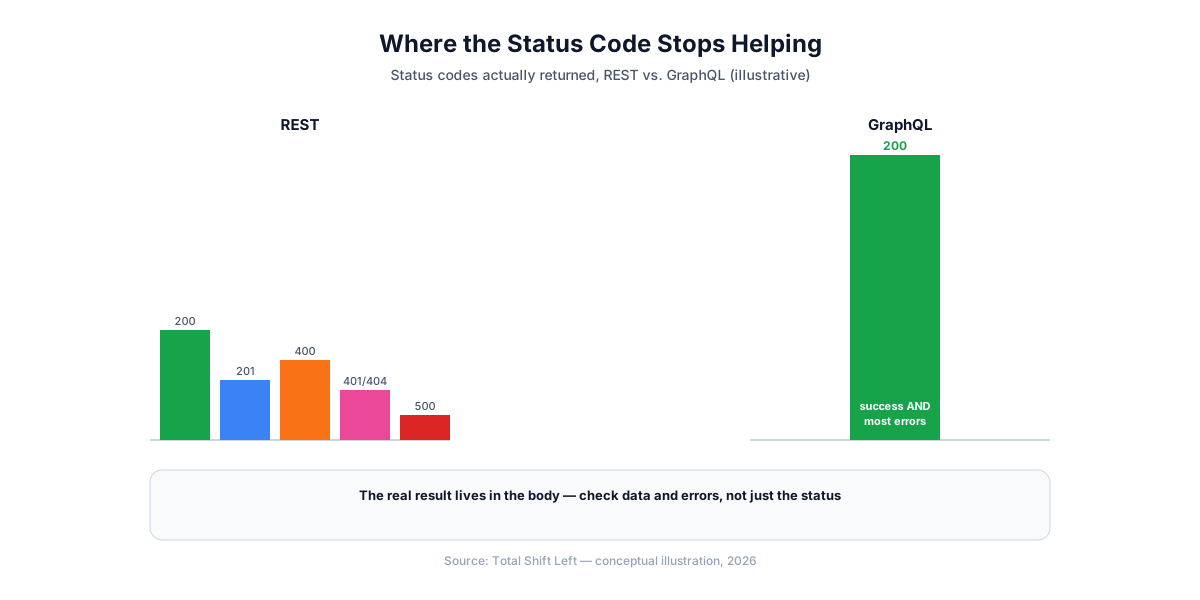
Testing a GraphQL API means sending a POST request with a JSON body — a query string and variables object — to a single endpoint, then checking the response in two places instead of one: the data field for correct results, and the errors array for resolver-level failures. That second part is the detail most REST-testing habits miss, since GraphQL returns HTTP 200 for almost every syntactically valid request, error or not.
This guide covers what's actually different about GraphQL testing, working code in the frameworks already covered in this series, and the tools built specifically for GraphQL.
In this guide
- What's Different About Testing GraphQL
- Testing GraphQL with the Frameworks You Already Have
- Testing Mutations
- The errors Array: Testing Failure Cases
- Query Depth and Complexity Limiting
- Dedicated GraphQL Tools
- Common Pitfalls in GraphQL Testing
- GraphQL testing tools compared
- Test the schema, not just the resolvers
- Authorization is per-field, not per-endpoint
- Query depth, complexity and the N+1 problem
- Common mistakes when testing GraphQL
- Frequently asked questions about GraphQL API testing
What's Different About Testing GraphQL
Three structural differences from REST drive everything else in this guide:
- One endpoint, not many. Every operation — queries, mutations, subscriptions — goes to the same URL (commonly
/graphql), differentiated by the request body, not the path. - The status code doesn't tell you what happened. A GraphQL server typically returns
200for any syntactically valid request, whether the operation succeeded, partially succeeded, or failed at the resolver level. The real result lives in the body. - Clients choose exactly which fields to fetch. This solves REST's over-fetching/under-fetching problem by design, but means the same endpoint can return meaningfully different response shapes depending on what the client asked for — your tests need to match the query's actual field selection, not a fixed expected shape.
The assertions change when the protocol does — REST vs GraphQL vs gRPC testing covers what transfers and what does not.
Testing GraphQL with the Frameworks You Already Have
Because a GraphQL request is just a POST with a JSON body, every framework already covered in this series works with no new library:
# pytest + requests
def test_graphql_get_user(api_session, base_url):
    query = """
    query GetUser($id: ID!) {
      user(id: $id) {
        id
        name
        email
      }
    }
    """
    response = api_session.post(
        f"{base_url}/graphql",
        json={"query": query, "variables": {"id": "1"}},
        timeout=10,
    )
    body = response.json()
    assert response.status_code == 200
    assert "errors" not in body
    assert body["data"]["user"]["id"] == "1"
// k6
const query = `
  query GetUser($id: ID!) {
    user(id: $id) { id name email }
  }
`;

export default function () {
  const res = http.post(
    'https://api.example.com/graphql',
    JSON.stringify({ query, variables: { id: '1' } }),
    { headers: { 'Content-Type': 'application/json' } }
  );
  check(res, {
    'status is 200': (r) => r.status === 200,
    'no errors': (r) => !JSON.parse(r.body).errors,
  });
}
// REST Assured
@Test
void getUserViaGraphQL() {
    String body = """
        {"query": "query GetUser($id: ID!) { user(id: $id) { id name email } }", "variables": {"id": "1"}}
        """;

    given()
        .contentType("application/json")
        .body(body)
    .when()
        .post("/graphql")
    .then()
        .statusCode(200)
        .body("errors", nullValue())
        .body("data.user.id", equalTo("1"));
}
In Postman, select GraphQL as the request body type instead of raw JSON — Postman renders a dedicated query editor and, when introspection is enabled on the target server, autocompletes fields directly from the live schema.
Testing Mutations
Mutations follow the identical request shape — a query field in the body actually contains a mutation operation:
def test_create_post_mutation(api_session, base_url):
    mutation = """
    mutation CreatePost($title: String!, $body: String!) {
      createPost(title: $title, body: $body) {
        id
        title
      }
    }
    """
    response = api_session.post(
        f"{base_url}/graphql",
        json={"query": mutation, "variables": {"title": "foo", "body": "bar"}},
        timeout=10,
    )
    body = response.json()
    assert response.status_code == 200
    assert "errors" not in body
    assert body["data"]["createPost"]["title"] == "foo"
The errors Array: Testing Failure Cases
A negative test case in GraphQL asserts on the errors array's presence and content, not a 4xx status code:
def test_get_nonexistent_user_returns_error(api_session, base_url):
    query = """
    query GetUser($id: ID!) {
      user(id: $id) { id name }
    }
    """
    response = api_session.post(
        f"{base_url}/graphql",
        json={"query": query, "variables": {"id": "999999"}},
        timeout=10,
    )
    body = response.json()
    assert response.status_code == 200  # still 200
    assert len(body["errors"]) > 0
    assert body["errors"][0]["path"] == ["user"]
Ready to shift left with your API testing?
Try our no-code API test automation platform free. Generate tests from OpenAPI, run in CI/CD, and scale quality.
Each error object typically includes a message, a path identifying which field in the query failed, and an extensions object many servers use for a machine-readable error code — check what your specific GraphQL server populates there and assert on it, since message text alone is a brittle thing to assert against.
Query Depth and Complexity Limiting
GraphQL's ability to nest queries arbitrarily deep is also a denial-of-service vector unique to it — a client can construct a single query requesting deeply nested, expensive-to-resolve data in one call. Test that your server actually rejects queries past its configured depth or complexity limit:
def test_excessively_deep_query_is_rejected(api_session, base_url):
    deep_query = "query { user(id: \"1\") { posts { comments { author { posts { comments { author { id } } } } } } } }"
    response = api_session.post(
        f"{base_url}/graphql",
        json={"query": deep_query},
        timeout=10,
    )
    body = response.json()
    assert len(body.get("errors", [])) > 0
This is a genuinely GraphQL-specific check — nothing in a REST API's design creates an equivalent single-request amplification risk this large.
Dedicated GraphQL Tools
- GraphiQL / Apollo Sandbox — in-browser query explorers, typically bundled with a GraphQL server for manual, ad-hoc exploration with schema-aware autocomplete via introspection.
- Postman — native GraphQL request body type with schema-aware autocomplete, usable for both manual exploration and, via Newman, CI-integrated automated tests.
- Insomnia — also has first-class GraphQL support with a dedicated query editor, similar to Postman's.
- Apollo Studio — a schema registry and monitoring platform for Apollo-based GraphQL APIs, useful for tracking schema changes and query performance over time rather than per-request assertions.
Common Pitfalls in GraphQL Testing
- Asserting only the status code. It's almost always
200— check theerrorsarray explicitly for both positive and negative cases. - Writing a query that requests more fields than the test actually asserts on. Match the query's field selection to what the test checks — an over-broad query makes the test slower and the intent less clear.
- Forgetting to test query depth/complexity limits. This is the GraphQL-specific security check that has no REST equivalent.
- Leaving introspection enabled in production without deciding to. Confirm whether it's intentionally on (useful for API-consuming partners) or should be restricted — don't leave it as an accidental default.
- Treating a partial-success response as a full failure or full success. GraphQL can return both
data(for the fields that resolved) anderrors(for the ones that didn't) in the same response — test that your client and assertions handle that correctly, not just the all-or-nothing case.
GraphQL testing tools compared
The schema is the contract, so most of the tooling is schema-driven:
| Tool | What it does | Schema-driven | Security checks | CI-native |
|---|---|---|---|---|
| GraphQL Inspector | Detects breaking schema changes between versions | Yes | No | Yes |
| Schemathesis | Generates queries from the schema and checks responses | Yes | Partial (fuzzing) | Yes |
| graphql-cop | Scans for common GraphQL misconfigurations | Yes | Yes | Yes |
| InQL (Burp extension) | Introspects and builds attack queries | Yes | Yes | No — interactive |
| k6 | Load-tests queries and mutations under concurrency | No | No | Yes |
| Jest or pytest with a GraphQL client | Assertions on business behaviour | No | No | Yes |
| Apollo Rover | Schema linting and composition checks for federated graphs | Yes | No | Yes |
The two checks unique to GraphQL and easiest to forget are query depth and complexity limiting, and introspection being disabled in production. Neither appears in a REST checklist, and both are trivially exploitable when missing.
Test the schema, not just the resolvers
The schema is GraphQL's contract, and most of what breaks consumers is a schema change rather than a resolver bug. Two checks belong in CI before any query-level test runs.
Detect breaking changes on every pull request. Removing a field, making a nullable field non-null, or changing a type are the changes that break clients silently, because the query that used them simply stops working at run time rather than at build time:
# compare the branch schema against the one currently in production
npx graphql-inspector diff \
  'https://api.example.com/graphql' \
  './schema.graphql' \
  --rule considerUsage

# exits non-zero on a breaking change, which is the whole point
Keep the schema artifact in the repository. A schema fetched live at test time cannot tell you what changed, because there is nothing to compare against. Committing schema.graphql and regenerating it on build turns every schema change into a reviewable diff — which is the cheapest possible review for the artifact most likely to break someone.
Authorization is per-field, not per-endpoint
This is the difference that catches teams migrating from REST, and it is a security issue rather than a testing inconvenience.
In REST, authorization is usually enforced at the route. One check per endpoint, and a test per endpoint covers it. In GraphQL there is one route, and authorization has to be enforced at each field a resolver exposes. A single over-permissive resolver leaks data through any query that can reach it — including through a nested path nobody considered:
Free Guided worksheet
Build Your Testing Strategy in 30 Minutes
A structured worksheet that walks you through defining your testing strategy in 30 minutes. Cover architecture, tools, layers, and team responsibilities.
Download Free# the intended query: a user reading their own order
query { me { orders { id total } } }
# the same schema, reached differently — is `email` protected here too?
query { order(id: "42") { customer { email phone } } }
The test that matters is not "can an unauthenticated user call the API". It is "can an authenticated low-privilege user reach a protected field through some path". Write those tests per sensitive field, and traverse to each field by more than one route, because the schema usually allows more than one.
Query depth, complexity and the N+1 problem
A REST endpoint's cost is roughly fixed. A GraphQL query's cost is chosen by the caller, which makes two failure modes worth explicit tests.
Depth and complexity limits. A deeply nested query on a schema with cyclic relationships can be expensive enough to act as a denial of service. If your server enforces a limit, assert that it does — a limit that was configured but is not active is indistinguishable from no limit until someone finds it.
N+1 resolution. A query for 50 orders that resolves each order's customer individually issues 51 database queries. This is invisible in a functional test, which passes, and shows up as latency under load. The assertion to write is on query count rather than on the response:
// count downstream calls, not milliseconds — the threshold stays stable
test('order list does not N+1 on customer', async () => {
  const spy = instrumentDatabase();
  await graphql(`{ orders(first: 50) { id customer { name } } }`);
  expect(spy.queryCount).toBeLessThan(5);   // batched, not 51
});
Counting queries rather than timing them gives a test that fails for the right reason and does not flake on a slow CI runner.
Common mistakes when testing GraphQL
Asserting only on HTTP 200. GraphQL returns 200 for most errors, with the failure in the errors array. A test that checks the status code and nothing else passes on almost every failure. Assert on errors being absent, and on the shape of data.
Testing only the queries the frontend sends today. The schema permits every valid query, not just the ones currently in use. A field is reachable whether or not anyone reaches it yet, and that includes by an attacker.
Ignoring partial success. GraphQL can return data and errors in the same response — some fields resolved, others failed. Clients frequently mishandle this. Test it explicitly rather than assuming a response is all-or-nothing.
Treating introspection as safe by default. Introspection is a development convenience that publishes your entire schema. Whether it should be enabled in production is a decision to make deliberately, and to assert on.
Skipping schema tests because the resolvers are covered. Resolver tests verify behaviour for a schema that exists. They say nothing about whether that schema still matches what consumers were written against.
Frequently asked questions about GraphQL API testing
How is testing a GraphQL API different from testing a REST API? GraphQL uses one endpoint for every operation instead of many endpoints per resource, and it returns HTTP 200 for almost every request — including ones with resolver errors, which appear in an errors array in the response body instead of the status code. Testing GraphQL means checking both the data and errors fields, not relying on the status code the way REST testing typically does.
Do I need a special tool to test GraphQL APIs? No. Since a GraphQL request is just a POST with a JSON body ({query, variables}) to a single endpoint, any HTTP-capable testing framework — pytest, REST Assured, Playwright, k6, Postman — tests GraphQL with no additional library, just a different body shape and response-checking pattern than REST.
Why does my GraphQL API return 200 even when there's an error? This is standard GraphQL behavior, not a bug. A GraphQL server typically returns HTTP 200 for any syntactically valid request, and puts operation-level failures — a resolver throwing, a field not found, an authorization failure on one field — into the response body's errors array instead of the HTTP status code.
What is query depth limiting and why should I test it? GraphQL's nested query structure lets a client request arbitrarily deep, nested data in one call, which can be abused to construct a single query that's extremely expensive for the server to resolve — a denial-of-service vector unique to GraphQL's flexibility. Testing that the server rejects queries past a configured depth or complexity limit is a GraphQL-specific security check REST APIs don't need.
Should introspection be enabled when testing a GraphQL API? In development and test environments, yes — introspection is what powers autocomplete and schema exploration in tools like GraphiQL and Postman. In production, it's commonly disabled or restricted, since introspection exposes your full schema (including fields you may not want publicly documented) to anyone who queries it.
Can Total Shift Left generate tests for GraphQL APIs? Yes — REST, SOAP, and GraphQL are all supported for full test generation. gRPC is adapter-only, not included in that list.
Sources and further reading
- GraphQL specification — the normative language and execution semantics.
- OWASP GraphQL Cheat Sheet — depth limiting, batching and injection risks to test.
- Grafana k6 documentation — scripted load testing with thresholds you can gate on.
Key takeaways
- Check
dataanderrorsboth — a200status code alone proves almost nothing in GraphQL. - No new tooling required. pytest, REST Assured, Playwright, k6, and Postman all test GraphQL directly.
- Negative test cases assert on the
errorsarray, not a 4xx status code. - Query depth/complexity limiting is a GraphQL-specific security test with no REST equivalent — don't skip it.
- A response can be partially successful —
dataanderrorscan both be populated in the same response.
Generate GraphQL Test Coverage Automatically
Hand-writing query, mutation, and error-path tests for a growing GraphQL schema scales the same way any hand-written suite does. Total Shift Left generates test coverage for REST, SOAP, and GraphQL APIs directly from your schema, including negative and boundary cases — regenerated automatically as your schema evolves.
Start your free trial to see generated coverage for your own GraphQL API, or see plans and pricing if you're already evaluating.
Ready to shift left with your API testing?
Try our no-code API test automation platform free.