
k6 API Load Testing Tutorial: Quick Start with Scripts (2026)
Quick answer
k6 is a CLI-first, JavaScript-scripted load testing tool: write a script defining virtual users and the request to send, run it with k6 run, and use check() for per-request pass/fail plus thresholds to gate the run's exit code on p95 latency or error rate. It answers the same question JMeter does — does the API hold up under load — but in plain JavaScript with no GUI, which Node.js teams typically find faster to adopt and run in CI/CD.
Reviewed by Rishi Gaurav
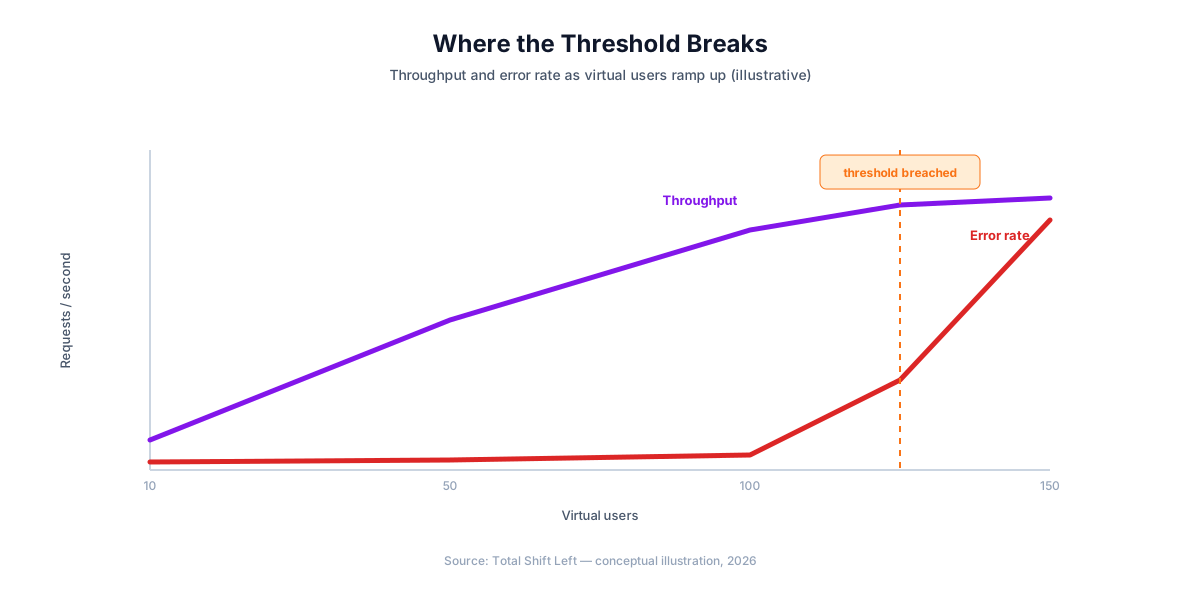
k6 is an open-source load testing tool from Grafana Labs: you write a JavaScript script describing virtual users and the requests they send, run it from the command line with k6 run, and k6 measures response time, throughput, and error rate under that simulated concurrency. It answers the same question as JMeter — does the API hold up under load — but as a CLI-first tool scripted in plain JavaScript, with no GUI step required at any point.
This guide covers a real k6 script from scratch: virtual users and duration, check() assertions, thresholds that gate CI on latency and error rate, staged ramp-up, POST requests, and running it all in a GitHub Actions pipeline. Every script runs as written against JSONPlaceholder, a free public fake REST API.
In this guide
- Why k6 for Load Testing
- What you need before you start
- Your First k6 Script
- check() vs Thresholds
- Staged Ramp-Up
- Testing POST Requests
- Validating Response Content
- Running k6 in CI/CD with GitHub Actions
- Reading the Output
- Common Pitfalls in k6 Scripts
- k6 vs JMeter vs Functional API Testing
- Thresholds are the test; checks are the diagnostics
- Where the numbers come from
- Frequently asked questions about k6 load testing
Why k6 for Load Testing
k6's core design decision is to skip the GUI entirely: a load test is a JavaScript file, checked into version control like any other code, run with a single CLI command both locally and in CI. That makes it a natural fit for teams already comfortable scripting in JavaScript or Node.js — there is no separate authoring tool to learn, and no .jmx XML file to diff in a pull request.
Its scripting model is intentionally minimal rather than full Node.js: k6 runs your script in its own Go-based JavaScript runtime, which supports ES2015+ syntax and k6's built-in modules (k6/http, k6/metrics, k6/data, etc.) but not Node's require() for arbitrary npm packages without a custom build. That tradeoff keeps k6 itself fast and dependency-light.
If you are choosing between runners rather than writing one, the best API load testing tools compares k6, JMeter, Gatling, Locust and the hosted options on protocol support, scripting language and CI integration.
Which version of the spec you are on changes what validators accept — OpenAPI 3.0 vs 3.1 lists every difference.
If you are choosing the runner rather than writing the script, k6 vs JMeter vs Gatling compares all three on scripting, efficiency and CI.
What you need before you start
Install k6 for your platform:
# macOS
brew install k6

# Windows
choco install k6

# Linux — see k6.io/docs/get-started/installation for your distro
Check k6's installation docs for the current instructions on your platform — package manager commands and repository keys change over time.
Your First k6 Script
// load-test.js
import http from 'k6/http';
import { check, sleep } from 'k6';

export const options = {
  vus: 10,
  duration: '30s',
};

export default function () {
  const res = http.get('https://jsonplaceholder.typicode.com/users/1');
  check(res, {
    'status is 200': (r) => r.status === 200,
  });
  sleep(1);
}
Run it:
k6 run load-test.js
vus: 10 means 10 virtual users, each running the default function in a loop for the full duration. sleep(1) between iterations approximates think time between real user actions — remove it only if you deliberately want to hammer the endpoint as fast as possible.
check() vs Thresholds
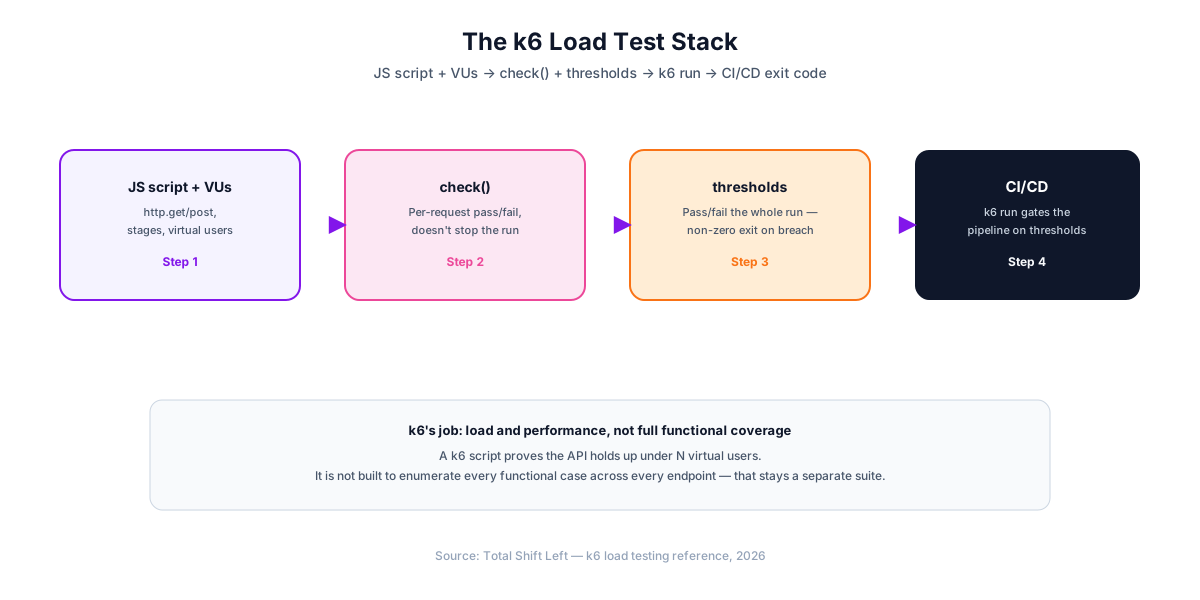
These serve different purposes and are easy to conflate. check() records a pass/fail for an individual assertion on an individual response — it does not stop the test run or fail the CI build by itself, it just contributes to a percentage shown in the summary.
export const options = {
  vus: 10,
  duration: '30s',
  thresholds: {
    http_req_duration: ['p(95)<500'],  // 95th percentile under 500ms
    http_req_failed: ['rate<0.01'],    // less than 1% request failure rate
    checks: ['rate>0.99'],             // at least 99% of checks must pass
  },
};

export default function () {
  const res = http.get('https://jsonplaceholder.typicode.com/users/1');
  check(res, {
    'status is 200': (r) => r.status === 200,
    'has email field': (r) => JSON.parse(r.body).email !== undefined,
  });
}
thresholds is what actually gates CI: if any threshold is breached, k6 run exits with a non-zero status code, and a normal CI step failure follows automatically.
Staged Ramp-Up
A flat vus/duration pair jumps straight to full concurrency, which rarely matches real traffic. stages ramps linearly between target VU counts:
export const options = {
  stages: [
    { duration: '10s', target: 10 },  // ramp up to 10 VUs
    { duration: '30s', target: 10 },  // hold at 10 VUs
    { duration: '10s', target: 0 },   // ramp down to 0
  ],
  thresholds: {
    http_req_duration: ['p(95)<500'],
  },
};
Ready to shift left with your API testing?
Try our no-code API test automation platform free. Generate tests from OpenAPI, run in CI/CD, and scale quality.
stages and vus/duration are mutually exclusive in the same options object — use stages whenever you want anything more realistic than an instant flat load.
Testing POST Requests
import http from 'k6/http';
import { check } from 'k6';

export const options = {
  vus: 5,
  duration: '15s',
};

export default function () {
  const payload = JSON.stringify({ title: 'foo', body: 'bar', userId: 1 });
  const params = {
    headers: { 'Content-Type': 'application/json' },
  };

  const res = http.post('https://jsonplaceholder.typicode.com/posts', payload, params);
  check(res, {
    'status is 201': (r) => r.status === 201,
  });
}
Unlike requests in Python or request.post() in Playwright, k6's http.post() does not auto-serialize a plain object — pass a JSON string via JSON.stringify() and set Content-Type explicitly in params.headers.
Validating Response Content
k6's idiomatic pattern for response validation is manual field checks inside check(), not a bundled JSON Schema validator:
check(res, {
  'status is 200': (r) => r.status === 200,
  'has id': (r) => JSON.parse(r.body).id !== undefined,
  'email contains @': (r) => JSON.parse(r.body).email.includes('@'),
  'response time OK': (r) => r.timings.duration < 500,
});
Note the last check mixes a functional assertion (email contains @) with a performance one (response time OK) in the same block — k6 does not separate the two the way a functional-only tool would, since under-load correctness and speed are usually evaluated together. JSON.parse(r.body) runs once per check unless you cache it in a variable first — for a hot loop, parse once and reuse the object across multiple checks.
Running k6 in CI/CD with GitHub Actions
# .github/workflows/load-test.yml
name: API Load Test

on: [workflow_dispatch, pull_request]

jobs:
  k6-load-test:
    runs-on: ubuntu-latest
    steps:
      - uses: actions/checkout@v4
      - name: Run k6 load test
        uses: grafana/k6-action@v0.3.1
        with:
          filename: load-test.js
Check the grafana/k6-action listing on the GitHub Marketplace for the current version tag before pinning. workflow_dispatch lets you trigger the load test manually on demand; gating it to pull_request as well runs it on every PR — most teams reserve full load tests for PRs or a nightly schedule rather than every commit, given how much longer they run than a functional suite.
Reading the Output
k6's terminal summary at the end of a run reports the metrics that matter most:
- http_req_duration — response time, broken into avg/min/med/max/p90/p95
- http_req_failed — the percentage of requests that errored
- checks — the percentage of
check()assertions that passed - iterations — how many full script iterations completed across all VUs
A threshold breach is marked directly in this summary with a red ✗, alongside the green ✓ for thresholds that passed — the pass/fail state is visible without parsing separate log output.
Common Pitfalls in k6 Scripts
- Confusing
check()withthresholds. A failingcheck()alone does not fail the CI build — only a breachedthresholddoes. - Using
vus/durationwhen you meantstages. A flat load rarely represents real traffic; usestagesfor a ramp. - Re-parsing
JSON.parse(r.body)in every check. Parse once into a variable and reuse it across multiple assertions in a hot loop. - Setting thresholds too loose to ever fail. A threshold that never triggers provides no actual CI gate — set it based on a real SLA, not an arbitrarily generous number.
- Forgetting
sleep()between iterations. Without it, k6 hammers the endpoint as fast as each VU's loop can execute, which may not represent realistic user behavior (though it's sometimes intentional for stress testing). - Running a full load test on every single commit. Reserve it for PRs or a schedule — it takes meaningfully longer than a functional suite.
k6 vs JMeter vs Functional API Testing
| Approach | What it measures | Language | CI/CD fit | Best for |
|---|---|---|---|---|
| k6 | Load, throughput, latency under concurrency | JavaScript | k6 run in CI, official GitHub Action | JavaScript-native teams wanting a lighter, CLI-first load tool |
| JMeter | Load, throughput, latency under concurrency | GUI + XML (.jmx), headless CLI | jmeter -n -t in CI | Teams needing multi-protocol load testing and a mature plugin ecosystem |
| pytest / REST Assured / Playwright | Functional correctness of a single response | Python / Java / TypeScript | Native — same runner as unit tests | Verifying each endpoint's business logic, independent of load |
| AI-generated (Total Shift Left) | Functional correctness, generated from spec | None required | Native CI plugins | Keeping functional coverage complete as the API grows, freeing k6 to focus purely on load |
Like JMeter, k6 and a functional suite measure different things and belong in the same pipeline rather than competing for the same slot. See monitoring API performance in production for what to watch once the load test passes.
Free Guided worksheet
Build Your Testing Strategy in 30 Minutes
A structured worksheet that walks you through defining your testing strategy in 30 minutes. Cover architecture, tools, layers, and team responsibilities.
Download FreeThresholds are the test; checks are the diagnostics
The most common structural mistake in a k6 script is treating check() as an assertion. It is not — a failed check records a statistic and the script keeps going, and the run still exits zero. Only a threshold decides pass or fail.
The two work together: checks tell you what went wrong, thresholds decide whether the build fails. The pattern that gets both is to define a threshold on the check failure rate itself:
import { check } from 'k6';
import http from 'k6/http';

export const options = {
  thresholds: {
    http_req_failed:   ['rate<0.01'],   // under 1% transport errors
    http_req_duration: ['p(95)<400'],   // latency budget
    checks:            ['rate>0.99'],   // and the assertions themselves
  },
};

export default function () {
  const res = http.get(`${__ENV.BASE_URL}/v1/orders`);
  check(res, {
    'status is 200':      (r) => r.status === 200,
    'body has orders':    (r) => r.json('orders') !== undefined,
    'responded under 1s': (r) => r.timings.duration < 1000,
  });
}
Without the checks threshold, every content assertion in the script is advisory — the run reports failures in the summary and still passes CI. That gap is easy to miss precisely because the output looks alarming while the exit code says everything is fine.
One related habit: put the base URL in an environment variable rather than the script. A load test hard-coded to staging is one careless run away from being pointed at production by someone editing the file in a hurry.
Where the numbers come from
k6's summary reports several timings, and mistaking one for another is how load results get misreported to stakeholders.
http_req_duration is the one that matters for an SLO: it is the time from the request being sent to the response being fully received, and it excludes the time k6 spent waiting for a free virtual user. http_req_waiting is time to first byte — server processing, essentially — and comparing it against http_req_duration tells you how much of the total is transfer rather than compute. iteration_duration includes your sleep calls, so it is almost never the number to quote.
The distinction matters most when a run looks bad. If http_req_duration is high but http_req_waiting is low, the server responded quickly and the payload is large or the network is slow — which is a different fix from a slow endpoint. Reading the right metric first saves optimising the wrong layer.
Frequently asked questions about k6 load testing
What is k6 used for? k6 is a load and performance testing tool for APIs and web services. You write a JavaScript script defining virtual users and the requests they send, run it with k6 run, and k6 measures response time, throughput, and error rate under that simulated load.
k6 vs JMeter — which should I use? k6 is JavaScript-native, CLI-first, and lighter weight — a natural fit for teams already scripting in Node.js. JMeter has a deeper GUI, a larger plugin ecosystem, and supports protocols beyond HTTP (JDBC, JMS, FTP). Both run headless in CI/CD; the choice usually comes down to team language preference and whether you need JMeter's non-HTTP protocol support.
How do I fail a CI build based on a k6 load test? Define thresholds in the options object — for example http_req_duration ['p(95)<500'] or http_req_failed ['rate<0.01'] — and k6 exits with a non-zero status code if any threshold is breached. A CI step that runs k6 run script.js will then fail the pipeline automatically.
Does k6 support ramping load up and down gradually? Yes, via the stages array in the options object — each stage specifies a duration and a target number of virtual users, and k6 ramps linearly between them. This is closer to real traffic patterns than an instant jump to full concurrency.
How do I validate a JSON response body in k6? k6's idiomatic pattern is manual field checks inside check() — parsing the body with JSON.parse() and asserting on specific fields — rather than a bundled full JSON Schema validator, since k6's JavaScript runtime does not support Node's require for arbitrary npm packages without a custom build.
Can k6 replace a functional API test suite? No. Its checks and thresholds confirm the API stays fast and mostly error-free under load, not that every endpoint's business logic is correct across positive, negative, and boundary cases — keep a dedicated functional suite (hand-written or AI-generated from your OpenAPI spec) alongside it.
Sources and further reading
- Grafana k6 documentation — scripted load testing with thresholds you can gate on.
- Google SRE Workbook — Implementing SLOs — how to define SLOs and error budgets.
- GitHub Actions documentation — workflow syntax, caching and matrix builds.
Key takeaways
check()records pass/fail per assertion; onlythresholdsfail the CI build. Don't rely on checks alone to gate a pipeline.- Use
stagesfor a realistic ramp, not a flatvus/durationjump to full concurrency. - k6's runtime is not full Node.js — no
require()for arbitrary npm packages, which is why schema validation is typically manual field checks. k6 runexits non-zero on a threshold breach, so CI integration needs no extra parsing logic.- Reserve full load tests for PRs or a schedule, not every commit — they run far longer than a functional suite.
- k6 and a functional suite measure different things. Neither replaces the other; both belong in the same pipeline.
Keep Functional Coverage Complete While k6 Handles Load
k6 tells you whether your API holds up under load. It was never meant to enumerate every functional case across every endpoint — that is a separate, ongoing maintenance burden as your API grows. Total Shift Left generates the functional suite directly from your OpenAPI spec — positive, negative, and boundary cases for every endpoint — so your team's hand-written scripting effort goes into the load and performance testing k6 is actually built for.
Start your free trial to see the generated functional suite, or see plans and pricing if you're already evaluating.
Ready to shift left with your API testing?
Try our no-code API test automation platform free.