
Karate Framework Tutorial: API Testing with Gherkin (2026)
Quick answer
Karate is an open-source API testing framework where tests are Gherkin- style .feature files — no Java step-definition glue code required, unlike Cucumber. Its built-in match keyword validates response structure with fuzzy type markers (#string, #number, #regex) in one assertion, replacing the separate schema-validation library other Java frameworks like REST Assured need. It runs on the JVM via a small JUnit 5 runner, fitting into the same mvn test CI step as any Java suite.
Reviewed by Parveen Kumari
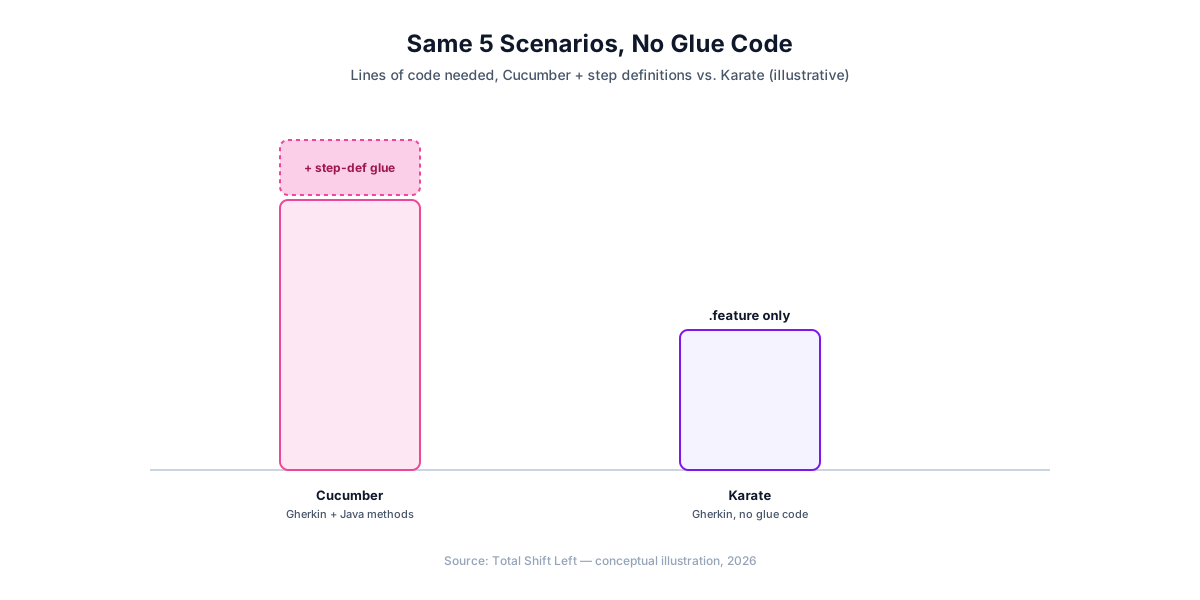
Karate is an open-source API testing framework where the test itself is a Gherkin-style .feature file — Given, When, Then steps that Karate interprets directly, with no Java step-definition methods to write behind them. That is its core difference from Cucumber, which requires exactly that glue code: a Karate .feature file is the complete, runnable test.
This guide builds a real Karate suite from scratch: project setup, the Gherkin syntax for a GET request, the built-in match keyword for structural validation, POST requests, Scenario Outline for data-driven tests, and running everything in CI/CD with Maven. Every example runs as written against JSONPlaceholder, a free public fake REST API.
In this guide
- Why Karate for API Testing
- What you need before you start
- Project Structure
- Your First Feature File
- The match Keyword
- Testing POST Requests
- Data-Driven Tests with Scenario Outline
- Shared Setup with Background
- Running in CI/CD with Maven
- Common Pitfalls in Karate Suites
- Karate vs REST Assured vs pytest
- When to Move Beyond Hand-Written Tests
- Running features in parallel
- Frequently asked questions about Karate API testing
Why Karate for API Testing
Karate's pitch is readability without sacrificing power: a .feature file reads like a specification a non-programmer could review, but its match keyword and JavaScript-compatible expression support give it more built-in assertion power than a typical BDD tool. Because the framework runs on the JVM, it drops into the same mvn test command your Java unit tests already use — no separate CLI tool, no separate CI step.
The tradeoff against REST Assured is where the logic lives: REST Assured tests are Java code with full IDE refactoring and type checking; Karate tests are .feature files that need no Java to write, at the cost of losing some of that tooling support for the test logic itself (though the project scaffolding around it is still plain Java/Maven).
If you have not settled on a framework yet, how to choose an API testing framework walks through the selection criteria before you commit a suite to one.
For the spec-version differences behind this, see OpenAPI 3.0 vs 3.1.
On the JVM the choice is usually between two frameworks — REST Assured vs Karate works through it with the same test written both ways.
What you need before you start
- Java 17+
- Maven (Gradle works identically)
- karate-junit5 — check Maven Central or the karatelabs/karate GitHub README for the current artifact coordinates and version before pinning;
com.intuit.karate:karate-junit5is the historically referenced coordinate, and the project's packaging has evolved since its original release, so verify against the current source rather than this guide alone.
<!-- pom.xml -->
<dependency>
  <groupId>com.intuit.karate</groupId>
  <artifactId>karate-junit5</artifactId>
  <version>REPLACE_WITH_CURRENT_VERSION</version>
  <scope>test</scope>
</dependency>
Project Structure
api-tests/
├── pom.xml
└── src
    └── test
        └── java
            └── examples/
                ├── users.feature
                ├── posts.feature
                └── UsersRunner.java
Karate conventionally places .feature files alongside their JUnit runner in src/test/java, not src/test/resources — this lets a feature file reference another one in the same package with a simple relative path.
Your First Feature File
# users.feature
Feature: Users API

Scenario: get a user returns 200
  Given url 'https://jsonplaceholder.typicode.com'
  And path 'users/1'
  When method get
  Then status 200
  And match response.email contains '@'
Run it with a small JUnit 5 runner class:
// UsersRunner.java
package examples;

import com.intuit.karate.junit5.Karate;

class UsersRunner {
    @Karate.Test
    Karate testUsers() {
        return Karate.run("users").relativeTo(getClass());
    }
}
mvn test -Dtest=UsersRunner
Karate.run("users").relativeTo(getClass()) tells the runner to find users.feature in the same package as UsersRunner.java — no separate configuration file mapping tests to runners.
The match Keyword
match is Karate's single assertion mechanism, and it is more expressive than a simple equality check. It supports exact matching, partial matching, and fuzzy type markers in the same syntax:
Scenario: user response matches expected shape
  Given url 'https://jsonplaceholder.typicode.com'
  And path 'users/1'
  When method get
  Then status 200
  And match response ==
    """
    {
      id: 1,
      name: '#string',
      username: '#string',
      email: '#regex .+@.+',
      address: '#object',
      phone: '#string'
    }
    """
#string, #number, #boolean, #notnull, #uuid, and #regex <pattern> are Karate's built-in fuzzy markers — this single match block replaces the separate JSON Schema file and validator library that pytest or REST Assured need for the same structural check. For a partial check that ignores extra fields, use match response contains { id: 1 } instead of ==.
Ready to shift left with your API testing?
Try our no-code API test automation platform free. Generate tests from OpenAPI, run in CI/CD, and scale quality.
Testing POST Requests
# posts.feature
Feature: Posts API

Scenario: create a post
  Given url 'https://jsonplaceholder.typicode.com'
  And path 'posts'
  And request { title: 'foo', body: 'bar', userId: 1 }
  When method post
  Then status 201
  And match response.title == 'foo'
  And match response.id == '#number'

Scenario: update a post
  Given url 'https://jsonplaceholder.typicode.com'
  And path 'posts/1'
  And request { id: 1, title: 'updated', body: 'bar', userId: 1 }
  When method put
  Then status 200
  And match response.title == 'updated'

Scenario: delete a post
  Given url 'https://jsonplaceholder.typicode.com'
  And path 'posts/1'
  When method delete
  Then status 200
request sets the body for the next method call using plain JSON syntax directly in the .feature file — no serialization step, since Karate's DSL treats JSON as a first-class literal.
Data-Driven Tests with Scenario Outline
Feature: User status codes

Scenario Outline: get user by id
  Given url 'https://jsonplaceholder.typicode.com'
  And path 'users', <userId>
  When method get
  Then status <expectedStatus>

Examples:
  | userId | expectedStatus |
  | 1      | 200            |
  | 10     | 200            |
  | 999    | 404            |
path 'users', <userId> — Karate's path accepts comma-separated segments that it joins with / automatically, so this resolves to /users/1, /users/10, /users/999 across the three Examples rows. Each row runs as its own independent scenario and reports its own pass/fail line, the same granularity @ParameterizedTest gives REST Assured or a loop-based test() gives Playwright.
Shared Setup with Background
Repeating Given url '...' in every scenario invites drift. Background runs before every Scenario in the same feature file:
Feature: Users API

Background:
  * url 'https://jsonplaceholder.typicode.com'

Scenario: get a user returns 200
  Given path 'users/1'
  When method get
  Then status 200

Scenario: get a nonexistent user returns 404
  Given path 'users/999'
  When method get
  Then status 404
The leading * (rather than Given/When/Then) is Karate's convention for a step that doesn't semantically fit the Given-When-Then structure — setup and variable assignment typically use it.
Running in CI/CD with Maven
# .github/workflows/api-tests.yml
name: API Tests

on: [push, pull_request]

jobs:
  api-tests:
    runs-on: ubuntu-latest
    steps:
      - uses: actions/checkout@v4
      - uses: actions/setup-java@v4
        with:
          distribution: 'temurin'
          java-version: '17'
          cache: 'maven'
      - run: mvn -B test
      - uses: actions/upload-artifact@v4
        if: always()
        with:
          name: karate-reports
          path: target/karate-reports/
Karate generates an HTML report under target/karate-reports/ by default, in addition to the standard Surefire XML — upload it as a build artifact for a readable pass/fail breakdown per scenario, not just the raw JUnit output. See our step-by-step CI/CD guide for GitLab CI and Jenkins equivalents.
Common Pitfalls in Karate Suites
- Pinning
com.intuit.karatewithout checking the current version. Verify the exact artifact and version on Maven Central before adding it topom.xml— package coordinates that are wrong fail the build immediately, unlike a stale version number. - Using
==when you meantcontains.match response == {...}requires an exact full match; a response with extra fields you didn't list will fail. Usecontainsfor a partial check. - Repeating the base URL in every scenario. Move it to
Backgroundonce per feature file. - Treating
.featurefiles as free-form prose. Karate's Gherkin parser is strict aboutGiven/When/Then/And/*— a step in the wrong position or an unclosed JSON literal fails with a parse error, not a test failure. - No negative-path coverage. Add invalid IDs and malformed payloads to the same
Scenario OutlineExamplestable as valid cases. - Skipping the fuzzy match markers in favor of hardcoded values.
email: '#regex .+@.+'survives a data change that a hardcodedemail: 'test@example.com'would not.
Karate vs REST Assured vs pytest
| Approach | Language | Learning curve | CI/CD fit | Schema validation | Best for |
|---|---|---|---|---|---|
| Karate | Gherkin (.feature), minimal Java scaffolding | Low for writing tests, some Java for setup | Native — mvn test | Built-in (match with fuzzy markers) | Teams wanting non-Java specialists to read/write tests |
| REST Assured | Java | Medium | Native — same runner as JUnit/TestNG | Automatic (json-schema-validator) | Java/JVM teams wanting full IDE support for test logic |
| pytest + requests | Python | Low | Native — same runner as unit tests | Manual (jsonschema) | Python teams |
| AI-generated (Total Shift Left) | None required | Low — import a spec | Native CI plugins | Automatic — generated from the OpenAPI schema | Teams testing many endpoints across services |
Karate and REST Assured both run inside the standard JVM test toolchain, but they trade off differently: Karate's .feature files are more approachable to a non-Java reader, REST Assured's Java test classes get more from the IDE (refactoring, autocomplete, type checking). See our full tools comparison for the wider field.
Free Guided worksheet
Build Your Testing Strategy in 30 Minutes
A structured worksheet that walks you through defining your testing strategy in 30 minutes. Cover architecture, tools, layers, and team responsibilities.
Download FreeWhen to Move Beyond Hand-Written Tests
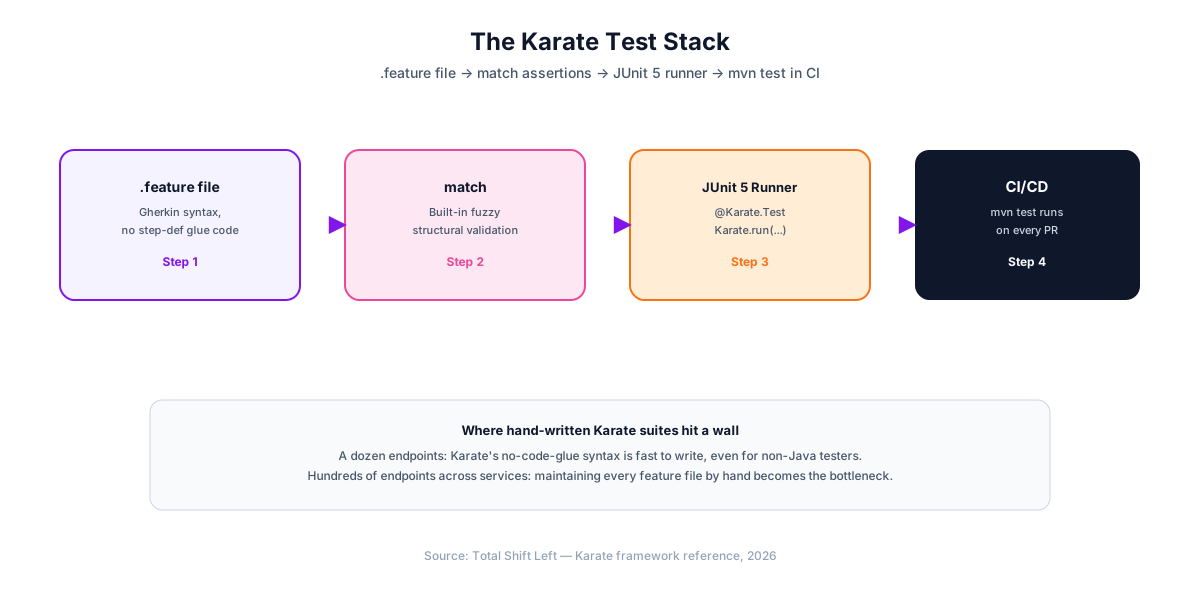
Karate's no-glue-code syntax makes it genuinely fast to write a dozen scenarios by hand — faster, in many cases, than an equivalent REST Assured suite for a team without deep Java experience. The economics still track every other framework in this series past that point: twice the endpoints means roughly twice the .feature files and match blocks to keep in sync with the real API. Somewhere past a few dozen endpoints across multiple services, that maintenance cost starts competing with the API's own development for engineering time.
The alternative is generating the suite directly from the OpenAPI specification instead of hand-writing .feature files. Total Shift Left imports your spec, generates positive, negative, and boundary test cases for every endpoint, and re-generates automatically when the spec changes — so schema drift updates the suite instead of silently breaking it.
Running features in parallel
Karate's parallel runner is where a feature-file suite gets its speed, and it is a runner concern rather than something expressed in the feature files themselves.
@Test
void testParallel() {
    Results results = Runner.path("classpath:orders")
        .outputCucumberJson(true)
        .parallel(8);                      // eight threads
    assertEquals(0, results.getFailCount(), results.getErrorMessages());
}
Two habits keep this reliable. Do not share mutable state between features. Karate scopes variables per scenario by default, which is the right default — the risk comes from features that write to the same records in a shared environment. Generate unique data per scenario instead.
Keep Background cheap. It runs before every scenario in the file, so an expensive call there is multiplied by the scenario count and then by the thread count. Authentication that can be done once belongs in a callonce rather than a plain Background step.
The reporting side matters too: outputCucumberJson(true) produces the artifact CI systems and dashboards consume, which is what turns a passing run into something anyone other than the author can read.
One more note on scaling a Karate suite: keep feature files organised by resource rather than by test type. A orders.feature containing the positive, negative and boundary scenarios for one endpoint is easier to run selectively and easier to review than separate positive.feature and negative.feature files that both touch every endpoint. Tags then handle the cross-cutting selection — karate.options with --tags @smoke gives you the fast subset without reorganising anything.
Finally, a note on when Karate is the wrong choice. Its strength is that a feature file reads almost like documentation, which pays off when the API surface is broad and the logic per endpoint is simple. When a test needs real programming — complex setup, computed expectations, integration with an existing Java test harness — the Gherkin layer becomes something to work around rather than through, and a plain JUnit suite with REST Assured is the more honest tool.
Frequently asked questions about Karate API testing
What makes Karate different from Cucumber for API testing?
Cucumber requires you to write Java step-definition methods behind every Gherkin line. Karate's steps are built in — path, method, status, match — so a .feature file is the complete test with no glue code.
How does Karate's match keyword work?
It compares an actual value against an expected structure — full equality, partial matching with contains, or fuzzy type markers like #string, #number, and #regex <pattern> for validating type or format without pinning an exact value.
Do I need to know Java to use Karate? For writing .feature files, no — the Gherkin syntax and built-in steps require no Java code. You do need a small amount of Java to set up the project structure (a Maven/Gradle pom and one JUnit 5 runner class), which most teams write once and never touch again.
How do I run data-driven tests in Karate?
Use Scenario Outline with an Examples table — each row runs the scenario with its own substituted values and reports its own pass/fail line.
Karate vs REST Assured — which should I use? REST Assured is a Java library — tests are Java code, which suits teams that want full IDE refactoring support and type safety. Karate's .feature files are readable by non-Java specialists and need no step-definition code, which suits teams that want business analysts or manual QA to read or contribute to the test suite directly.
Can a Karate suite fully replace an AI-generated API test suite? For a handful of endpoints, hand-written Karate feature files are often faster to set up than any generator, especially for teams without deep Java experience. Past a few dozen endpoints across multiple services, maintaining every feature file by hand becomes the bottleneck — this is where generating the suite directly from an OpenAPI spec, as Total Shift Left does, keeps coverage complete without the manual upkeep.
Sources and further reading
- Karate documentation — the BDD-style API test DSL.
- REST Assured — the Java DSL for HTTP API tests.
- RFC 9110 — HTTP Semantics — the normative definition of methods, status codes and headers.
Key takeaways
- Karate
.featurefiles need no step-definition glue code —path,method,status, andmatchare built in, unlike Cucumber. matchreplaces a separate schema-validation library. Fuzzy markers like#stringand#regexvalidate structure in the same expression as the assertion.Backgroundcentralizes shared setup like the base URL across everyScenarioin a feature file.- Verify the exact Maven coordinates before pinning them. Package identity matters more than a version number — a wrong artifact ID fails the build immediately.
Scenario Outline+Examplescovers data-driven and negative-path cases the same way@ParameterizedTestdoes in REST Assured.- Hand-written suites scale linearly with endpoint count. Past a few dozen endpoints across services, generating tests from an OpenAPI spec becomes the more maintainable path.
Generate the Equivalent Suite from Your OpenAPI Spec
Every test in this guide can also be generated automatically. Import your OpenAPI specification into Total Shift Left and get positive, negative, and boundary test cases for every endpoint — regenerated the moment your spec changes, with no .feature files to maintain by hand.
Start your free trial and compare the generated suite against your own, or see plans and pricing if you're already evaluating.
Ready to shift left with your API testing?
Try our no-code API test automation platform free.