
How to Use Postman for API Testing: Beginner Guide (2026)
Quick answer
Postman tests APIs through a GUI request builder: set the method and URL, send the request, then add pm.test() assertions in the Tests tab to check the status code and response body. Group related requests into a Collection, use an Environment for variables like {{base_url}}, and chain data between requests with pm.environment.set(). Once the collection is built, run it headless in CI/CD with the Newman CLI instead of the desktop app — the same collection file works in both places.
Reviewed by Smeet Gohel
Postman is a GUI application for building, sending, and testing HTTP requests — you set the method, URL, headers, and body in a visual editor, send the request, and inspect the response without writing any networking code. It remains the most common first tool for API testing because there is nothing to install beyond the app itself and no framework to learn before sending your first request.
This guide covers the actual beginner path: building and sending a request, writing your first pm.test() assertion, organizing requests into a Collection, using an Environment for variables, chaining data between requests, and — the step most beginner tutorials skip — running the whole collection headless in CI/CD with Newman.
In this guide
- Building and Sending Your First Request
- Writing Your First Test Assertion
- Organizing Requests into a Collection
- Using Environments for Variables
- Chaining Requests with Variables
- Testing POST, PUT, and DELETE
- Running a Collection with the Collection Runner
- Running Headless in CI/CD with Newman
- Common Pitfalls for Postman Beginners
- When a Hand-Built Collection Stops Scaling
- The assertions worth writing beyond a status check
- Keeping a collection maintainable
- Where a hand-built collection stops being enough
- Frequently asked questions about Postman API testing
Building and Sending Your First Request
Open Postman, click New → HTTP Request, set the method dropdown to GET, and enter a URL:
https://jsonplaceholder.typicode.com/users/1
Click Send. The response panel below shows the status code, response time, body (formatted as JSON by default), and headers as separate tabs — no code required to get this far.
The head-to-head on the two most common API clients is in Apidog vs Postman, including pricing, offline use and self-hosting.
If you need a target to practise against before pointing this at your own service, public and dummy APIs for testing lists the stable, key-free sandboxes worth using.
The specific limits of running collections as your CI suite are set out in why Postman collections are not enough for CI/CD.
For the head-to-head with the git-native option specifically, see Bruno vs Postman — the storage model is the whole argument.
For the command-line half of the same job — reproducible one-liners, CI smoke checks and TLS debugging — see curl vs Postman.
Writing Your First Test Assertion
Click the Tests tab (next to Body, Headers, etc. in the request editor) and add:
pm.test("Status code is 200", function () {
    pm.response.to.have.status(200);
});

pm.test("Response has an email field", function () {
    const jsonData = pm.response.json();
    pm.expect(jsonData).to.have.property("email");
});
Send the request again. A Test Results tab now appears in the response panel showing each pm.test() as pass or fail. Postman bundles the Chai assertion library, which is where pm.expect()'s fluent syntax (.to.have.status(), .to.have.property(), .to.equal()) comes from.
Organizing Requests into a Collection
Click Save, and Postman prompts you to create or choose a Collection — a named, saved group of requests. Build out a few more requests (list users, get a single post, create a post) and save each into the same Collection. This is the container that gets run all at once later, exported for version control, and executed in CI.
Using Environments for Variables
Hardcoding https://jsonplaceholder.typicode.com into every request works until you need to point the same collection at staging vs. production. Click the Environments tab in the sidebar, create a new Environment, and add a variable:
| Variable | Initial Value |
|---|---|
base_url | https://jsonplaceholder.typicode.com |
Select this Environment from the dropdown in the top-right corner, then rewrite your request URLs to use it:
{{base_url}}/users/1
Switching the active Environment (staging, production, local) now changes every request in the collection with no per-request edits.
Chaining Requests with Variables
A realistic test sequence often needs output from one request as input to the next — create a resource, then fetch it. In the Tests tab of the create request:
pm.test("Status code is 201", function () {
    pm.response.to.have.status(201);
});

const jsonData = pm.response.json();
pm.environment.set("newPostId", jsonData.id);
A later request in the same Collection run can then use {{newPostId}} in its URL:
{{base_url}}/posts/{{newPostId}}
pm.environment.set() writes to the currently active Environment, so this value is available to any request that follows it in the same run — but be aware it persists between runs too unless explicitly cleared, which can cause a stale value to leak into a later, unrelated run.
Testing POST, PUT, and DELETE
Set the method dropdown, go to the Body tab, select raw and JSON, and enter the payload:
{
  "title": "foo",
  "body": "bar",
  "userId": 1
}
// Tests tab for the POST request
pm.test("Status code is 201", function () {
    pm.response.to.have.status(201);
});

pm.test("Title matches request", function () {
    const jsonData = pm.response.json();
    pm.expect(jsonData.title).to.eql("foo");
});
Ready to shift left with your API testing?
Try our no-code API test automation platform free. Generate tests from OpenAPI, run in CI/CD, and scale quality.
The same pattern applies to PUT and DELETE — only the method, path, and expected status code change.
Running a Collection with the Collection Runner
Click the Collection's ⋮ menu → Run collection to open the Collection Runner. It executes every saved request in order, shows a pass/fail summary across all their pm.test() assertions, and supports an Iterations count plus an optional CSV or JSON data file for running the same sequence with different input data per iteration — Postman's equivalent of parametrized tests.
Running Headless in CI/CD with Newman
The desktop app has no place to run inside a CI pipeline. Newman is Postman's official CLI collection runner — it executes the exact same Collection and Environment files from the command line.
Export both from Postman (⋮ menu → Export on the Collection, and the Environment's own export button), then:
npm install -g newman
newman run collection.json -e environment.json
# .github/workflows/api-tests.yml
name: API Tests

on: [push, pull_request]

jobs:
  postman-tests:
    runs-on: ubuntu-latest
    steps:
      - uses: actions/checkout@v4
      - uses: actions/setup-node@v4
        with:
          node-version: '20'
      - run: npm install -g newman
      - run: newman run collection.json -e environment.json --reporters cli,junit --reporter-junit-export results.xml
      - uses: actions/upload-artifact@v4
        if: always()
        with:
          name: newman-results
          path: results.xml
Newman exits with a non-zero status code if any pm.test() assertion fails, which is what lets a normal CI step fail the pipeline. The exported collection.json should be committed to version control alongside your code so CI always runs the version that matches the current branch, not a stale local export.
Common Pitfalls for Postman Beginners
- Hardcoding URLs instead of using an Environment variable. It works for one request; it becomes a find-and-replace exercise across dozens once you need a second environment.
- Forgetting the Environment is selected.
{{base_url}}resolves to nothing if no Environment is active in the top-right dropdown — a common source of confusing failures for beginners. - Testing only the happy path. A collection with only 200-status assertions never proves the API rejects bad input correctly — add requests with invalid IDs or malformed bodies and assert on the expected 4xx.
- Letting chained variables persist stale values between runs. Clear or overwrite
pm.environment.set()values at the start of a run if a previous run's leftover value could produce a false pass. - Exporting a Collection once and never re-exporting after edits. The
collection.jsonNewman runs in CI is a snapshot — if you edit the collection in the app and forget to re-export, CI keeps testing the old version. - Storing secrets as plain Environment values committed to version control. Use a separate, gitignored Environment file for real credentials, or Postman Vault / CI secrets for the values that matter.
When a Hand-Built Collection Stops Scaling
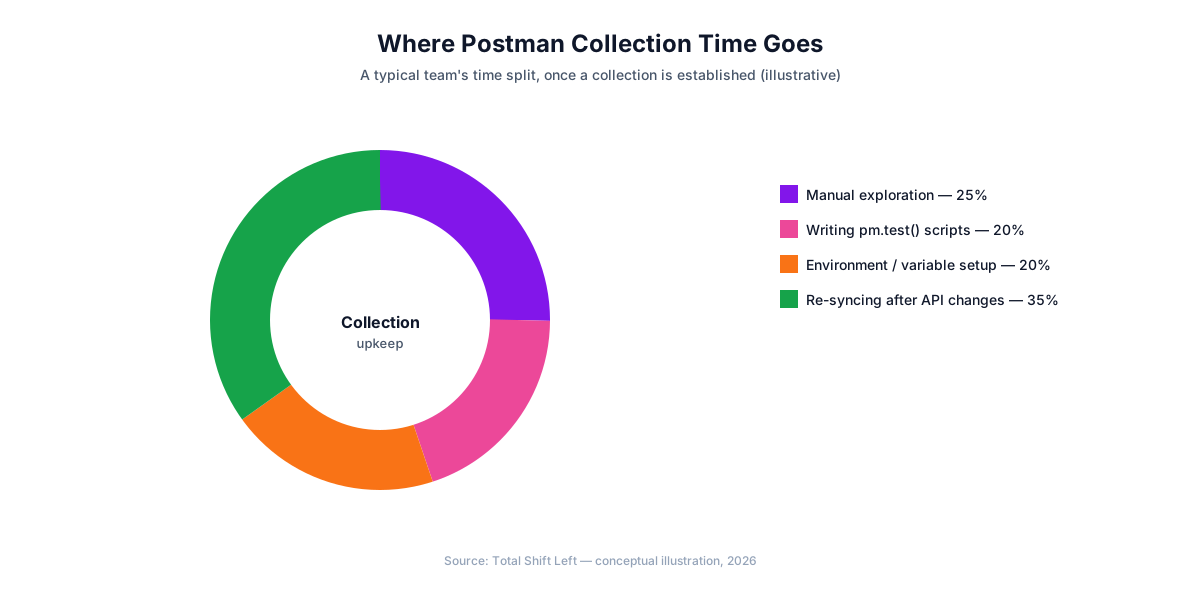
Everything above scales linearly with effort: twice the endpoints means roughly twice the requests, pm.test() blocks, and environment variables to keep in sync with the real API. For a service with a dozen endpoints, that is a completely reasonable, fast way to get both manual exploration and an automated regression suite from one tool.
Somewhere past a few dozen endpoints across multiple services, keeping the collection accurate by hand — updating it every time a field changes, an endpoint is added, or a status code changes — starts competing with the API's own development for engineering time. This is exactly the transition point covered in migrating from Postman to spec-driven testing: instead of hand-maintaining requests and assertions, Total Shift Left generates the equivalent suite directly from your OpenAPI spec and regenerates it automatically when the spec changes.
The assertions worth writing beyond a status check
pm.response.to.have.status(200) is the first assertion everyone writes and the weakest one in the suite. It passes whenever the server responds at all, which includes when it responds with the wrong data. Four additions cover most of what actually breaks.
// 1. the shape, not just the code — catches renamed and missing fields
const body = pm.response.json();
pm.test("order has the fields consumers read", () => {
    pm.expect(body).to.have.all.keys("id", "sku", "qty", "status", "total");
    pm.expect(body.qty).to.be.a("number");
});

// 2. the value you actually care about
pm.test("total reflects quantity and price", () => {
    pm.expect(body.total).to.eql(body.qty * 24.99);
});

// 3. response time, so a slow regression fails loudly
pm.test("responds within budget", () => {
    pm.expect(pm.response.responseTime).to.be.below(500);
});

// 4. the negative case — usually the one nobody writes
pm.test("rejects a negative quantity", () => {
    pm.expect(pm.response.code).to.eql(422);
});
The third one deserves particular attention in a beginner suite, because it costs one line and catches the regressions nobody notices until a user complains.
Keeping a collection maintainable
Collections degrade faster than test code, because everything that makes them convenient — editing during debugging, saving whatever worked — also makes them accumulate.
Free Guided worksheet
Build Your Testing Strategy in 30 Minutes
A structured worksheet that walks you through defining your testing strategy in 30 minutes. Cover architecture, tools, layers, and team responsibilities.
Download FreeNever hard-code a URL. Every request should use {{baseUrl}} from an environment. The day you need to run the collection against staging, this is the difference between changing one variable and editing forty requests.
Keep secrets out of the collection. Environments get exported and shared, and an exported environment containing a real token is a credential leak in a file that looks like configuration. Use environment variables injected at run time, and mark sensitive values accordingly.
Name requests for what they verify. "Copy of Request 4" tells the next person nothing. "Create order — rejects negative quantity" tells them whether the request is still needed.
Delete aggressively. Most large collections contain requests nobody has run in a year. They slow the runner, confuse newcomers and hide the requests that matter.
Put the collection in version control. Export it to the repository and commit it with the code it tests. Without that there is no history, no review and no way to see what changed when the suite starts failing.
Where a hand-built collection stops being enough
Postman is excellent at the thing it is for: exploring an API, debugging a specific request, and sharing a reproduction with a colleague. Two limits are structural rather than fixable with better discipline.
It only knows what someone saved. A collection covers the requests a person thought to create. It cannot tell you that an endpoint has no test, because it has no notion of the endpoints that exist — only of the requests in it. Coverage against a contract is a question a collection cannot answer.
It drifts silently. A saved request keeps passing against an endpoint whose schema changed, as long as the status code holds. Nothing in the collection notices that the response gained, lost or retyped a field.
Neither is a reason to avoid Postman — they are reasons not to treat the collection as the whole test strategy. The common arrangement is a collection for exploration and debugging, and a spec-driven suite for coverage, with the OpenAPI document as the thing both are measured against.
Skipping the negative cases. Beginner collections almost always test that a valid request succeeds and stop there. The requests worth adding next are the ones that should fail — a missing required field, a malformed body, a request with no token — because those are the paths where an API is most likely to behave incorrectly and least likely to have been exercised by hand.
Frequently asked questions about Postman API testing
Do I need to know how to code to use Postman? No, for basic request sending and inspection — Postman's GUI handles that with no scripting required. Writing assertions in the Tests tab uses JavaScript, but the syntax is a small, repeatable pattern (pm.test and pm.expect) that beginners typically pick up from a handful of examples rather than needing broader JavaScript knowledge.
What is the difference between a Postman Collection and an Environment? A Collection is a saved, organized group of requests — the tests themselves. An Environment is a named set of variables (like base_url or api_key) that those requests reference with {{double-curly-brace}} syntax, so switching from a staging Environment to a production one changes every request's target without editing the requests themselves.
How do I pass data from one Postman request to the next? In the first request's Tests tab, call pm.environment.set("variableName", value) to store a value from its response. Any later request in the same Collection run can then reference {{variableName}} in its URL, headers, or body — this is how you chain a create-then-fetch sequence.
How do I run a Postman Collection outside the app? Export the Collection and Environment as JSON, install Newman (npm install -g newman), and run newman run collection.json -e environment.json. Newman executes the exact same requests and Tests-tab assertions from the command line, which is what makes a Postman Collection usable in a CI/CD pipeline.
What is Newman and why do I need it for CI/CD? Newman is Postman's official command-line collection runner. The Postman desktop app has no place to run inside a CI pipeline, but Newman does — it takes the same exported Collection and Environment files and produces the same pass/fail results, with an exit code CI can gate on.
When does a hand-built Postman collection stop scaling? Once an API grows past roughly a few dozen endpoints across services, keeping every request and assertion in the collection synced with the spec by hand becomes a real maintenance burden — this is the point most teams either invest heavily in collection discipline or move to generating the equivalent suite directly from an OpenAPI spec.
Sources and further reading
- Postman Learning Center — Postman's own documentation for collections and scripts.
- Newman — the CLI runner that executes Postman collections in CI.
- RFC 9110 — HTTP Semantics — the normative definition of methods, status codes and headers.
Key takeaways
pm.test()+pm.expect()(via bundled Chai) is Postman's entire assertion model — a small pattern, not a full JavaScript framework to learn.- Environments decouple requests from a specific URL — switch staging/production/local by changing the active Environment, not the requests.
pm.environment.set()chains data between requests, but values persist between runs unless explicitly cleared.- Newman is what makes a Collection CI/CD-usable — the desktop app itself has no place in a pipeline.
- Re-export the Collection after every edit. CI runs whatever
collection.jsonwas last committed, not your current app state. - A hand-built collection scales linearly with endpoint count. Past a few dozen endpoints across services, generating tests from an OpenAPI spec becomes the more maintainable path.
Where to go next
- Migrating from Postman to Spec-Driven Testing — the transition once a hand-built collection stops scaling.
- Postman vs Total Shift Left — a full comparison for teams evaluating both.
- API Testing with Python: pytest + requests Tutorial — a code-first alternative to a GUI-built collection.
- API Test Automation with CI/CD: Step-by-Step Guide — wire any test suite into your pipeline.
When Your Collection Outgrows Hand Maintenance
Every request and assertion in this guide can also be generated automatically. Import your OpenAPI specification into Total Shift Left and get positive, negative, and boundary test cases for every endpoint — regenerated the moment your spec changes, with no Postman collection to keep in sync by hand.
Start your free trial and compare the generated suite against your own collection, or see plans and pricing if you're already evaluating.
Ready to shift left with your API testing?
Try our no-code API test automation platform free.