
API Testing with Python: pytest + requests Tutorial (2026)
Quick answer
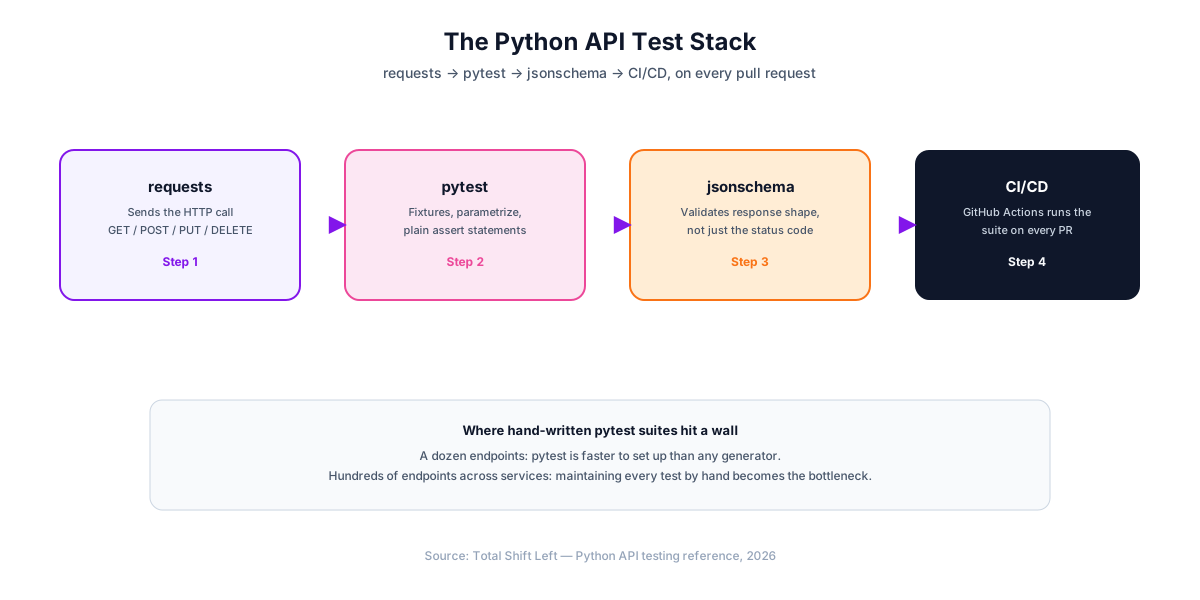
API testing with Python usually means pairing pytest with the requests library — requests sends HTTP calls and parses JSON, while pytest handles fixtures, parametrization, and assertions. Add jsonschema to validate response structure, not just status codes. This combination scales from a handful of smoke checks to a full CI/CD regression suite with almost no framework overhead, though teams testing hundreds of endpoints eventually generate suites from an OpenAPI spec instead of writing every test by hand.
Reviewed by Rishi Gaurav
API testing with Python means using Python's HTTP and testing libraries — most commonly requests and pytest — to send calls to an API and assert that the response matches what you expect. It requires no dedicated GUI tool: a test suite is a handful of .py files that run the same way your unit tests do, in the same CI pipeline, reviewed the same way in the same pull requests.
This guide builds a real pytest + requests suite from scratch: project structure, fixtures, JSON schema validation, parametrized tests across multiple endpoints, and a GitHub Actions workflow that runs it on every push. Every code sample runs as written against JSONPlaceholder, a free public fake REST API, so you can copy the project and run it immediately.
In this guide
- Why Test APIs with Python and pytest
- What you need before you start
- Project Structure
- Writing Your First API Test
- Validating Response Schemas with jsonschema
- Testing POST, PUT, and DELETE Requests
- Parametrizing Tests Across Multiple Endpoints
- Fixtures for Authentication and Shared State
- Running Your Suite in CI/CD with GitHub Actions
- Common Pitfalls in Python API Testing
- How pytest Compares to Postman, REST Assured, and AI-Generated Tests
- When to Move Beyond Hand-Written Tests
- Making the suite fast and parallel-safe
- Frequently asked questions about API testing with Python
Why Test APIs with Python and pytest
Two things make this combination the default choice for Python API testing rather than one of several equal options. requests is the most widely used HTTP client in the Python ecosystem — its API (requests.get(), response.json(), response.status_code) is small enough to hold in your head. pytest replaced unittest as the standard test runner years ago because plain assert statements, dependency-injected fixtures, and the @pytest.mark.parametrize decorator cut the boilerplate that class-based unittest.TestCase suites carry.
Neither library is API-testing-specific — that is the point. You get one dependency tree, one test runner for unit tests and API tests, one CI step, and a suite any Python developer on the team can read without learning a dedicated tool.
If you have not settled on a framework yet, how to choose an API testing framework walks through the selection criteria before you commit a suite to one.
If you need a target to practise against before pointing this at your own service, public and dummy APIs for testing lists the stable, key-free sandboxes worth using.
For the spec-version differences behind this, see OpenAPI 3.0 vs 3.1.
What you need before you start
pip install pytest requests jsonschema
- Python 3.9+ (this guide uses no syntax newer than 3.9)
- pytest — the test runner
- requests — the HTTP client
- jsonschema — response structure validation (added in the section below)
Pin these in a requirements.txt so CI installs the exact versions your local suite uses:
pytest>=8.0
requests>=2.31
jsonschema>=4.20
Project Structure
api-tests/
├── conftest.py
├── pytest.ini
├── requirements.txt
├── schemas/
│   └── user_schema.json
├── test_users_api.py
└── test_posts_api.py
conftest.py holds fixtures shared across every test file — pytest discovers it automatically with no import needed. pytest.ini holds runner configuration and custom markers.
# pytest.ini
[pytest]
markers =
    smoke: fast checks that gate a deploy
    regression: full suite, runs on every PR
# conftest.py
import pytest
import requests

BASE_URL = "https://jsonplaceholder.typicode.com"


@pytest.fixture(scope="session")
def base_url():
    return BASE_URL


@pytest.fixture(scope="session")
def api_session():
    session = requests.Session()
    session.headers.update({"Content-Type": "application/json"})
    yield session
    session.close()
scope="session" means both fixtures are created once for the whole test run, not once per test — a single requests.Session() reuses its TCP connection across every call, which measurably speeds up a large suite.
Writing Your First API Test
# test_users_api.py
def test_get_user_returns_200(api_session, base_url):
    response = api_session.get(f"{base_url}/users/1", timeout=10)
    assert response.status_code == 200


def test_get_user_returns_expected_fields(api_session, base_url):
    response = api_session.get(f"{base_url}/users/1", timeout=10)
    body = response.json()
    assert body["id"] == 1
    assert "name" in body
    assert "email" in body
    assert "@" in body["email"]
Run it:
pytest -v
timeout=10 on every requests call is not optional style — without it, a hung connection blocks the test indefinitely instead of failing fast with a clear timeout error.
Validating Response Schemas with jsonschema
Asserting individual fields works for a small response but does not scale, and it misses an entire class of bugs: a field silently changing type, or an unexpected field appearing. jsonschema validates the whole shape in one call.
schemas/user_schema.json:
{
  "type": "object",
  "required": ["id", "name", "username", "email"],
  "properties": {
    "id": { "type": "integer" },
    "name": { "type": "string" },
    "username": { "type": "string" },
    "email": { "type": "string", "format": "email" },
    "address": { "type": "object" },
    "phone": { "type": "string" },
    "website": { "type": "string" },
    "company": { "type": "object" }
  }
}
Ready to shift left with your API testing?
Try our no-code API test automation platform free. Generate tests from OpenAPI, run in CI/CD, and scale quality.
# test_users_api.py (continued)
import json
import jsonschema


def load_schema(name):
    with open(f"schemas/{name}", encoding="utf-8") as f:
        return json.load(f)


def test_user_matches_schema(api_session, base_url):
    response = api_session.get(f"{base_url}/users/1", timeout=10)
    schema = load_schema("user_schema.json")
    jsonschema.validate(instance=response.json(), schema=schema)
jsonschema.validate() raises jsonschema.exceptions.ValidationError on any mismatch, which pytest reports as a normal test failure with the exact path and reason — no extra assertion wiring required.
Testing POST, PUT, and DELETE Requests
# test_posts_api.py
def test_create_post(api_session, base_url):
    payload = {"title": "foo", "body": "bar", "userId": 1}
    response = api_session.post(f"{base_url}/posts", json=payload, timeout=10)
    assert response.status_code == 201
    body = response.json()
    assert body["title"] == payload["title"]
    assert "id" in body


def test_update_post(api_session, base_url):
    payload = {"id": 1, "title": "updated", "body": "bar", "userId": 1}
    response = api_session.put(f"{base_url}/posts/1", json=payload, timeout=10)
    assert response.status_code == 200
    assert response.json()["title"] == "updated"


def test_delete_post(api_session, base_url):
    response = api_session.delete(f"{base_url}/posts/1", timeout=10)
    assert response.status_code == 200
Passing json=payload instead of data=payload does two things: it serializes the dict to JSON automatically, and it sets the Content-Type: application/json header for you (the session-level header set in conftest.py is a fallback for calls that build the body manually).
Parametrizing Tests Across Multiple Endpoints
Writing one test function per case duplicates the request-and-assert logic. @pytest.mark.parametrize runs the same test body against a table of inputs, and pytest reports each case as its own pass/fail line.
import pytest


@pytest.mark.parametrize(
    "user_id,expected_status",
    [
        (1, 200),
        (10, 200),
        (999, 404),
    ],
)
def test_get_user_status_codes(api_session, base_url, user_id, expected_status):
    response = api_session.get(f"{base_url}/users/{user_id}", timeout=10)
    assert response.status_code == expected_status
The 999 case matters as much as the two valid IDs — a suite that only tests the happy path never catches a 500 where a 404 belongs, or a 200 where a 401 should have been returned.
Fixtures for Authentication and Shared State
Real APIs require a token. Fetch it once per session and inject it into every request via a fixture, rather than re-authenticating in every test:
# conftest.py (continued)
@pytest.fixture(scope="session")
def auth_headers(base_url):
    response = requests.post(
        f"{base_url}/auth/login",
        json={"username": "test-user", "password": "test-pass"},
        timeout=10,
    )
    token = response.json()["token"]
    return {"Authorization": f"Bearer {token}"}


def test_get_protected_resource(api_session, base_url, auth_headers):
    response = api_session.get(
        f"{base_url}/account", headers=auth_headers, timeout=10
    )
    assert response.status_code == 200
Keep credentials out of the repository — read them from environment variables (os.environ["TEST_API_PASSWORD"]) rather than hardcoding them, and set those variables as encrypted secrets in your CI provider.
Running Your Suite in CI/CD with GitHub Actions
# .github/workflows/api-tests.yml
name: API Tests

on: [push, pull_request]

jobs:
  api-tests:
    runs-on: ubuntu-latest
    steps:
      - uses: actions/checkout@v4
      - uses: actions/setup-python@v5
        with:
          python-version: '3.12'
      - run: pip install -r requirements.txt
      - run: pytest -v --junitxml=results.xml
      - uses: actions/upload-artifact@v4
        if: always()
        with:
          name: test-results
          path: results.xml
if: always() on the upload step matters — without it, the artifact only uploads when every prior step succeeds, which means the run that most needs debugging (a failed test) is exactly the one where you would not get the results file. See our step-by-step CI/CD guide for GitLab CI and Jenkins equivalents.
Common Pitfalls in Python API Testing
- No timeout on requests calls. A hung connection blocks the test — and the whole CI job — instead of failing fast. Always pass
timeout=. - Asserting only the status code. A 200 response with a malformed or missing field still passes a status-only check. Validate structure with
jsonschema. - Hardcoding test data that the API can change. JSONPlaceholder-style fake APIs are stable by design; a real API's seed data drifts. Prefer creating the resource your test needs inside the test (or a fixture) over depending on a fixed record existing.
- No negative-path coverage. A suite that only exercises 200s never proves the API rejects bad input correctly. Parametrize invalid IDs, missing fields, and malformed payloads alongside valid ones.
- Comparing floats with
==. Usepytest.approx()for any numeric comparison that involves a computed or rounded value. - Secrets committed to the repo. Read tokens and passwords from environment variables, never from a literal string in a test file.
How pytest Compares to Postman, REST Assured, and AI-Generated Tests
| Approach | Language | Learning curve | CI/CD fit | Schema validation | Best for |
|---|---|---|---|---|---|
| pytest + requests | Python | Low | Native — same runner as unit tests | Manual (jsonschema) | Python teams, mixed unit/API suites |
| Postman + Newman | JSON collections, JS scripts | Low for exploration, higher for CI | Requires exporting/running via Newman CLI | Manual (pm.test scripts) | Manual exploration, small automated suites |
| REST Assured | Java | Medium | Native — same runner as JUnit/TestNG | Manual (Hamcrest matchers) | Java/JVM teams |
| AI-generated (Total Shift Left) | None required | Low — import a spec | Native CI plugins | Automatic — generated from the OpenAPI schema | Teams testing many endpoints across services |
Free Guided worksheet
Build Your Testing Strategy in 30 Minutes
A structured worksheet that walks you through defining your testing strategy in 30 minutes. Cover architecture, tools, layers, and team responsibilities.
Download Freepytest and REST Assured occupy the same role for different languages: both integrate directly into the existing unit-test pipeline with no separate tool. Postman is strongest for manual exploration before a test exists, then weakest for the same reason it is easy to start with — every assertion is hand-written JavaScript inside the collection, not reviewable Python or Java code. See Postman vs Total Shift Left for a deeper comparison, or our full tools comparison for the wider field.
When to Move Beyond Hand-Written Tests
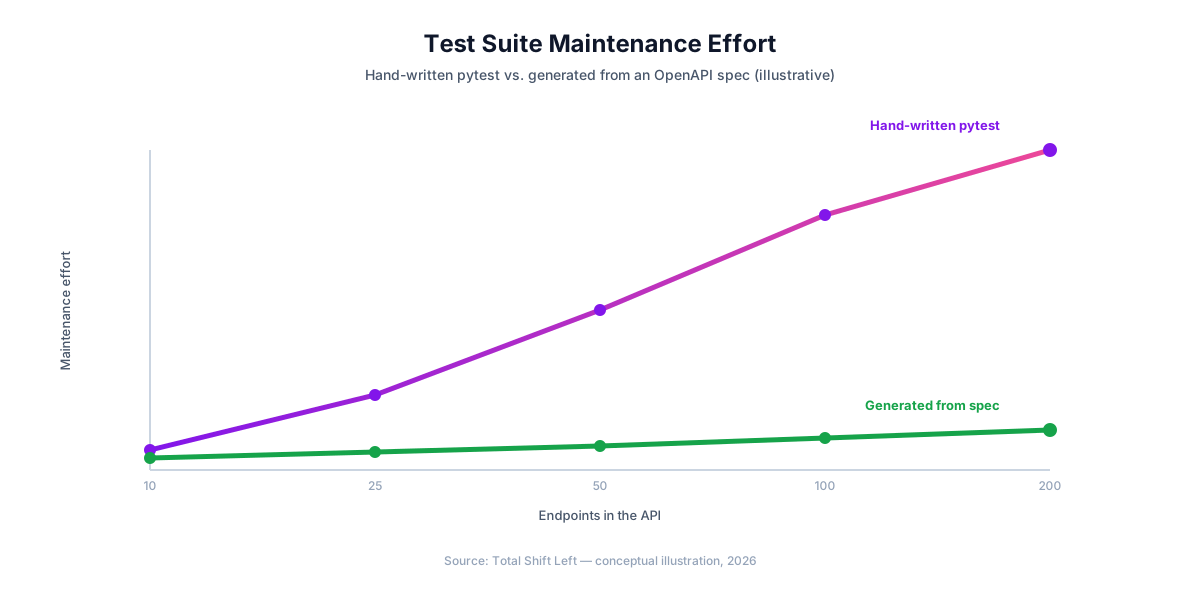
Every technique above scales linearly with effort: twice the endpoints means roughly twice the test code, twice the fixtures to maintain, and twice the schema files to keep in sync with the API. That is a fine trade for a service with a dozen endpoints. It stops being fine somewhere in the range of a few dozen endpoints across multiple services, when the test suite's maintenance cost starts competing with the API's own development for engineering time.
The alternative is generating the suite directly from the source of truth — the OpenAPI specification — instead of hand-translating it into pytest functions. Total Shift Left imports your spec, generates positive, negative, and boundary test cases for every endpoint, and re-generates automatically when the spec changes, so schema drift updates the suite instead of silently breaking it. Teams that outgrow hand-written pytest typically keep it for a handful of hand-tuned edge cases and let generation cover everything the spec already describes — see migrating from Postman to spec-driven testing for the equivalent transition from a manual tool.
Making the suite fast and parallel-safe
A hand-written suite stays pleasant until it takes ten minutes, at which point people stop running it locally. pytest parallelises with one flag, but only if the tests are isolated first.
pip install pytest-xdist
pytest -n auto --dist loadfile     # one worker per core, same file stays together
Two changes make that safe. Give every test its own data. Fixtures that create a user or an order should generate a unique identifier per test rather than reusing a fixed one, because parallel workers will otherwise collide on the same record. Scope fixtures deliberately — scope="session" is right for an auth token and wrong for anything a test mutates, since session-scoped state is shared across workers in ways that produce order-dependent failures.
The symptom of getting this wrong is distinctive: the suite passes serially and fails intermittently in parallel, usually in a different test each time. When that appears, the bug is shared state, not the runner.
Frequently asked questions about API testing with Python
Is Python a good language for API testing? Yes. Python pairs a mature HTTP client (requests) with pytest's fixture and parametrization model, so a working test suite requires almost no boilerplate. Its readability also makes suites easier for non-Python specialists — QA engineers, backend developers on other stacks — to review in a pull request, which matters more for long-term maintenance than raw execution speed.
pytest vs unittest for API testing — which should I use? pytest. unittest's class-based structure and verbose assertion methods (assertEqual, assertIn) add ceremony that API tests do not need. pytest's plain assert statements, fixture injection, and the @pytest.mark.parametrize decorator make suites faster to write and easier to read, and pytest remains the de facto standard for Python API test suites in 2026.
Do I still need Postman if I use pytest for API testing? For ad-hoc exploration and one-off manual checks, yes — Postman's request builder is faster for that. For automated, version-controlled regression testing that runs in CI/CD, pytest is the better long-term home: it lives in your codebase, runs in the same pipeline as your unit tests, and does not depend on exporting and syncing a separate collection file.
How do I validate a JSON response schema in pytest? Install the jsonschema library, define a JSON Schema document describing the expected response shape — required fields, types, formats — and call jsonschema.validate(instance=response.json(), schema=schema) inside the test. This catches structural drift, like a field silently changing type or disappearing, that a status-code-only assertion would miss entirely.
How do I run pytest API tests in CI/CD? Add a workflow step that installs dependencies from requirements.txt and runs pytest -v --junitxml=results.xml, then upload the JUnit XML as a build artifact so failures show up in your CI provider's test report UI. The GitHub Actions workflow in this guide runs on every push and pull request with no extra configuration.
Can a pytest suite fully replace an AI-generated API test suite? For a handful of endpoints, hand-written pytest is often faster to set up. Past a few dozen endpoints across multiple services, generating the suite from an OpenAPI spec keeps coverage complete without the manual upkeep.
Sources and further reading
- pytest documentation — fixtures, parametrization and reporting for Python tests.
- Requests (Python HTTP library) — the HTTP client most Python API tests are built on.
- JSON Schema 2020-12 — the schema dialect OpenAPI 3.1 aligns with.
Key takeaways
requests+pytestis the default Python API testing stack — no dedicated tool required, and it runs in the same CI step as your unit tests.timeout=on every request is not optional. A hung connection without one blocks the entire CI job.- Status-code-only assertions miss structural drift. Validate response shape with
jsonschema, not just individual fields. @pytest.mark.parametrizecovers negative paths cheaply — invalid IDs and malformed payloads belong in the same table as the valid cases.- Session-scoped fixtures for auth and connections avoid re-authenticating or re-connecting on every test.
- Hand-written suites scale linearly with endpoint count. Past a few dozen endpoints across services, generating tests from an OpenAPI spec becomes the more maintainable path.
Generate the Equivalent Suite from Your OpenAPI Spec
Every test in this guide can also be generated automatically. Import your OpenAPI specification into Total Shift Left and get positive, negative, and boundary test cases for every endpoint — regenerated the moment your spec changes, with no pytest fixtures to maintain by hand.
Start your free trial and compare the generated suite against your own, or see plans and pricing if you're already evaluating.
Ready to shift left with your API testing?
Try our no-code API test automation platform free.