
AI Test Fix & Self-Healing
Repair failing tests with one click when your API changes.
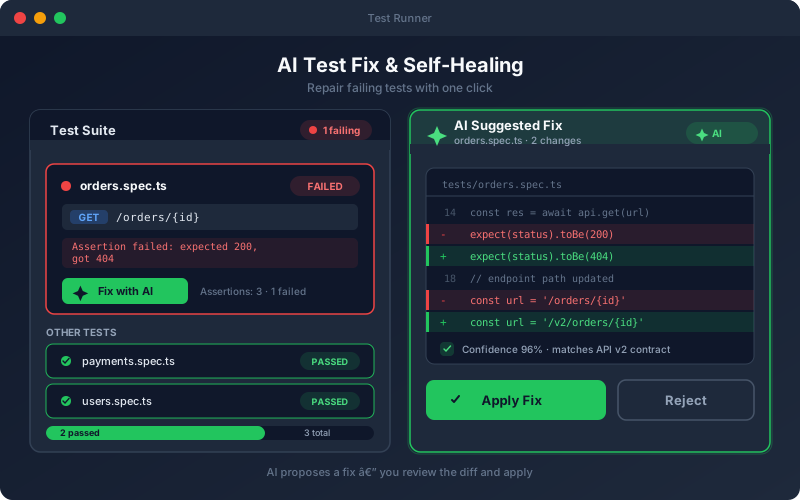
What It Does
AI Test Fix turns a wall of red into a short review queue. When tests fail after an API change, the platform inspects the failure — the expected versus actual response, the affected assertions, and the current specification — and drafts a fix that brings the test back in line with the API. Every suggestion is shown as a clear diff so you can see exactly what would change before approving it. Instead of manually rewriting broken tests after each deployment, you review proposed fixes and apply the ones you trust.
Overview
When a test starts failing because an endpoint, schema, or response shape changed, the platform analyzes the failure and proposes a fix — updated assertions, corrected paths, or refreshed request bodies. Review the suggested change as a side-by-side diff before you apply it, so nothing is altered without your approval. Self-healing keeps regression suites green through routine API evolution instead of leaving you to hand-edit dozens of broken tests after every release.
Key Capabilities
How It Works
- 1
A test fails during a run and is flagged with the failure reason
- 2
Open the failing test and choose "Fix with AI"
- 3
The platform proposes updated assertions, paths, or request data
- 4
Review the change as a side-by-side diff and edit if needed
- 5
Apply the fix and re-run to confirm the test passes
Available on
All Plans
Included in the free trial — no credit card required.
Go deeper
Guides and playbooks that show this capability in practice.
Related Features
Try AI Test Fix Today
Start your 15-day free trial — no credit card required.