
Persona Dashboards
Role-tailored views for every stakeholder, plus TV mode.
What It Does
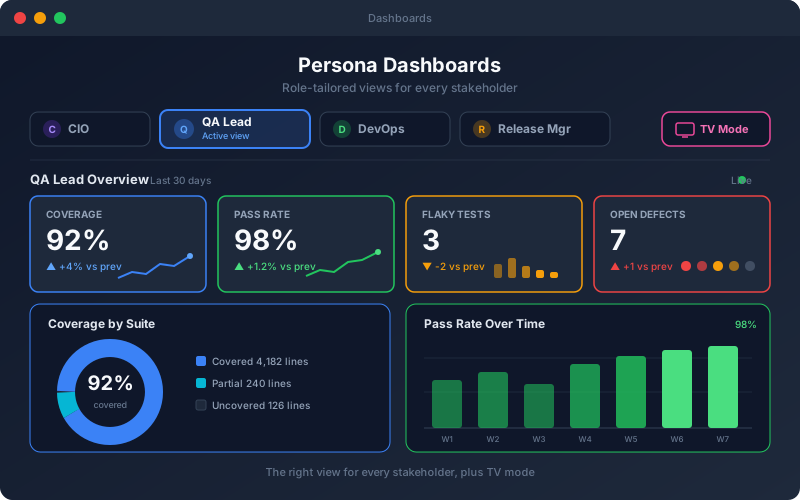
Persona Dashboards recognize that a CIO, a QA lead, and a DevOps engineer do not want to see the same screen. The platform provides views shaped around distinct roles, each highlighting the coverage, stability, performance, and readiness signals that matter to that audience — so stakeholders get an immediate, relevant read on API quality instead of a firehose of raw numbers. A TV mode presents any dashboard full-screen for team spaces and operations centers, keeping status visible to the whole room.
Overview
Instead of one generic dashboard, the platform offers role-specific views tuned to what each stakeholder cares about — executives see quality and risk at a glance, QA leads track coverage and stability, DevOps watches pipeline health, and delivery roles follow release readiness. A full-screen TV mode turns any view into a wall-mounted status board. Everyone gets the signal relevant to their job without wading through metrics meant for someone else.
Key Capabilities
How It Works
- 1
Choose the dashboard that matches your role
- 2
View the coverage, stability, and readiness signals for that role
- 3
Filter by project or environment to focus the picture
- 4
Switch to TV mode for a wall-mounted status board
- 5
Share the relevant view with each stakeholder group
Available on
enterprise Plan & Above
Upgrade to the enterprise plan to unlock this feature.
Go deeper
Guides and playbooks that show this capability in practice.
Try Persona Dashboards Today
Start your 15-day free trial — no credit card required.