
Scheduled Reports
What It Does
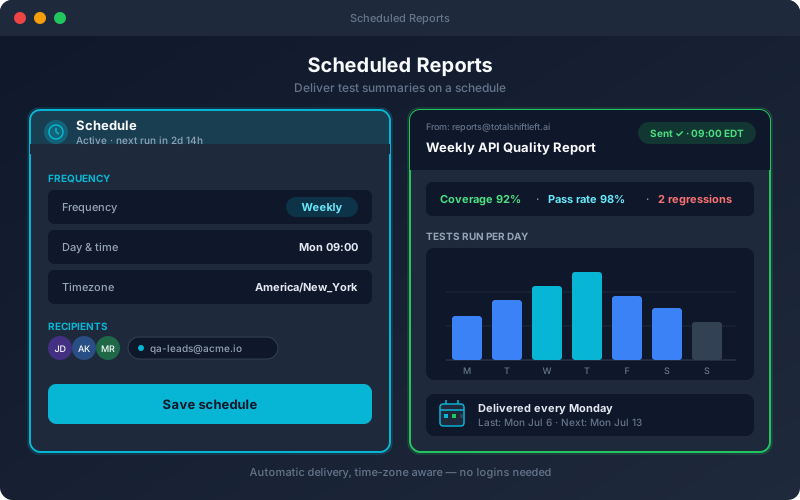
Scheduled Reports automate the recurring "how are the APIs doing?" update. You choose the role view the report is built from, the project and time range, who receives it and how often, and the platform generates and sends it on that cadence. What sets it apart is the first section: instead of a bare failure count, readers see why recent runs failed, cause by cause, with a verdict for each, plus a "passed, but worth a look" section for green runs that may not prove what they claim. Managers get their weekly rollup and clients get their agreed summary without anyone remembering to export and email. Delivery goes through an email profile on your own SMTP server, so it works fully on-premises. A report can also carry an API security section and an API load section. Each is read with the report owner's rights, so a section the owner cannot open is left out and the email says so; the security section needs the API Security add-on and the load section needs the Performance add-on. Each schedule has one time zone; create one schedule per audience if your readers are spread across regions.
Overview
Configure reports to be generated and emailed automatically: daily, weekly, bi-weekly or monthly, at the time of day you choose in the time zone you set for the report. Each report opens with "What failed, and why": recent failed runs grouped into causes, each with a verdict such as environment, test data, tests out of date or likely product bug. Below that come pass rates, the quality score, top failing tests and environment status from the role view you picked. Stakeholders get it in their inbox without logging in. Choose an inline HTML email, a report file to print to PDF, or the data as JSON. Scheduling lives on the Persona Dashboards toolbar, available on Enterprise and in the 15-day Trial.
Key Capabilities
How It Works
- 1
An administrator sets up an email profile for your SMTP server
- 2
Open Analytics → Dashboards → Schedule and create a new report
- 3
Pick the role view, project, time range, frequency, time and time zone
- 4
Add recipients and choose HTML email, report file or JSON
- 5
Use Preview or Send Now to check it, then let the schedule run
Available on
enterprise Plan & Above
Upgrade to the enterprise plan to unlock this feature.
Documentation
Step-by-step guides for setting up and using Scheduled Reports.
Go deeper
Guides and playbooks that show this capability in practice.
Try Scheduled Reports Today
Start your 15-day free trial — no credit card required.