
Postman Collection Import
Bring your Postman collections in and keep your tests.
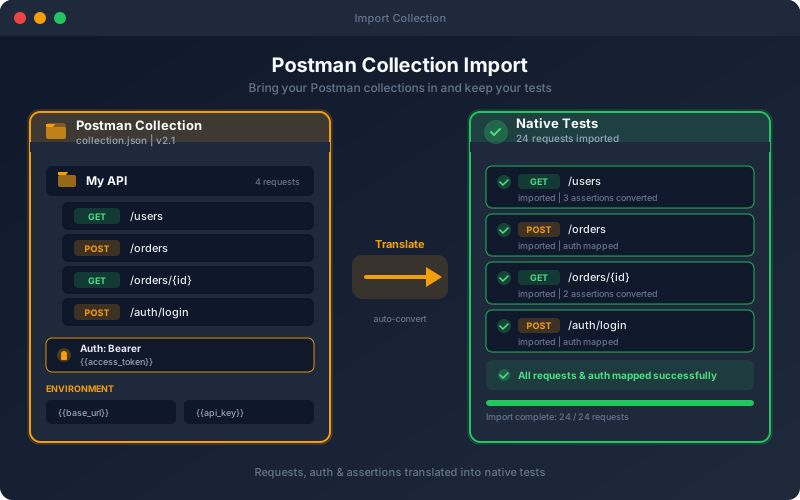
What It Does
Postman Collection Import removes the biggest barrier to switching platforms: the fear of losing existing work. Upload a Postman collection and the platform creates its features, endpoints and tests inside the project you import into, mapping requests, authentication and assertions so they run right away. From there you can enhance the migrated tests with AI test generation, coverage analysis, scheduling and CI/CD, capabilities that plain collections do not offer. Two things stay behind: pre-request scripts are not imported, and Postman environment files are not read, so recreate those values as environments and variables. You can also paste any cURL command (bash, cmd or PowerShell) to get an endpoint plus a test that sends exactly that request.
Overview
Import existing Postman collections (v2.0 and v2.1) into the project you choose, to migrate onto the platform without starting from scratch. Each request with checks becomes its own test, with its body, parameters, headers and checks (bare requests too, with one switch); pm.test assertions are converted, checks the translator cannot map are compiled from the collection script itself, and variable captures become extractions. Authentication is mapped into reusable profiles (API Key, Basic, Bearer, Digest, NTLM, Hawk, JWT Bearer, OAuth 1.0 and OAuth 2.0), with collection and folder auth inherited as in Postman. Form bodies import as real forms, and file parts arrive ready for you to attach the file. Pre-request scripts and Postman environment files are not imported. It is the fastest on-ramp for teams moving from script-based collections to spec-driven, AI-assisted testing.
Key Capabilities
How It Works
- 1
Export your collection from Postman
- 2
Upload the collection file to a project
- 3
The platform creates features, endpoints and tests, with auth mapped into profiles
- 4
Collection assertions are translated into platform assertions
- 5
Recreate environment values, then run, schedule and extend the imported tests with AI
Available on
All Plans
Included in the free trial — no credit card required.
Documentation
Step-by-step guides for setting up and using Postman Import.
- Postman Collection ImportImport a Postman collection (v2.0 or v2.1) into a project: requests become endpoints and tests, pm.test assertions are converted, and anything that needs review is flagged.
- Authentication Profiles: Choose and Configure a MethodMost APIs refuse a request that does not prove who is calling. In Shift-Left API you describe how to prove it once, in an authentication profile, and every test, pack, workflow and performance run in the project uses it.
Go deeper
Guides and playbooks that show this capability in practice.
Related Features
Auth Profiles
OAuth 2.0, NTLM, JWT Bearer, Hawk, Digest, AWS SigV4 and more, configured once per environment.
Learn moreAssertions
Validate every aspect of API responses with 100+ built-in assertions.
Learn moreFile Uploads & Forms
Test multipart uploads, url-encoded forms and raw file bodies, sent the same way everywhere a test runs.
Learn moreTry Postman Import Today
Start your 15-day free trial — no credit card required.