
Many Requirement Documents, One Requirement Set
Upload every BRD, policy, spec and workbook together. Rules are counted once, and disagreements wait for a person.
What It Does
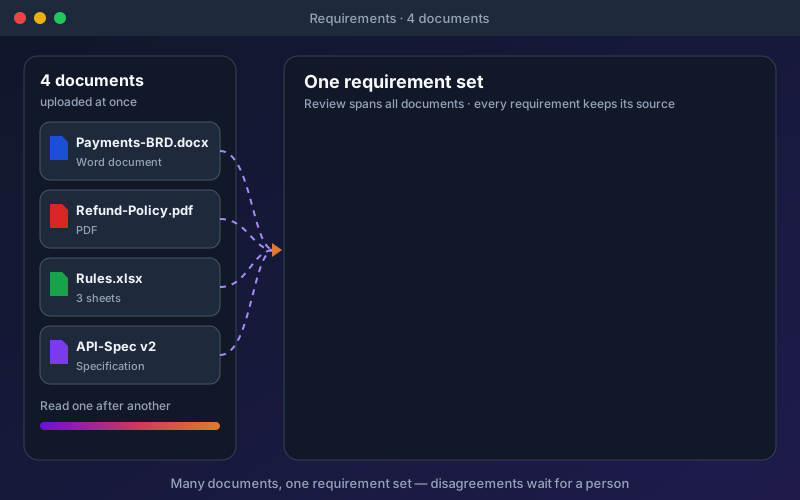
Business analysts and QA leads usually reconcile a requirements document, a policy, a rules workbook and an API specification by hand before a single test is written. Multi-document requirements does that reconciliation with you. Documents are queued and extracted in order, with progress you can follow, and the cross-document view lists look-alike pairs to confirm and disagreements to settle, such as a refund window of 14 days in one document and 30 in another. Workbooks are read by what each sheet is: requirement sheets row by row, test-data sheets become data sets, and glossaries become project terms, and you can correct how a sheet was read. When a document is replaced by a new version, unchanged requirements keep their review decision and test links, changed ones return to review with their tests flagged, and requirements no longer stated are listed for you to retire or keep. Deleting a document tells you what it will remove first.
Overview
Requirements rarely live in one file. Upload several documents at once and Shift-Left API reads them one after another in the background, then presents one requirement set. Every requirement records the document and the section, row or page it came from, and review spans all documents. A rule stated in more than one document is counted once. When documents disagree, the conflict waits for a person to decide; the system never picks a side. Excel workbooks are read sheet by sheet, and a new version of a document keeps everything that did not change.
Key Capabilities
How It Works
- 1
Upload your documents together, optionally marking each one's kind
- 2
Extract in bulk and follow progress while documents are read one after another
- 3
Review requirements from every document in one list, each citing its source
- 4
Confirm look-alike pairs and settle conflicts in the cross-document view
- 5
Upload new versions as documents change; only what changed returns to review
Available on
All Plans
Included in the free trial — no credit card required.
Documentation
Step-by-step guides for setting up and using Multi-Document Requirements.
- Many Requirement Documents: Upload, Queue and Review TogetherMost projects are described by more than one document: a BRD, a rules workbook, a set of user stories, meeting notes, an email thread.
- One Requirement Set: Duplicates and Conflicts Across DocumentsWhen several documents describe the same system, they overlap. The BRD says "Email is required", the meeting notes say "Customer email must be present", and the rules workbook lists it again as BR-007.
- Excel Workbooks: Reading Requirements Sheet by SheetA requirements workbook is rarely one table. A typical file has a cover sheet, a list of numbered requirements under a two-row title, a data dictionary of fields, a sheet of test data, and a glossary.
- Document Versions and Delete ImpactRequirement documents change. When the BRD moves from v1 to v2, you need to know which rules changed, which are new, and which disappeared — without reviewing all of them again and without losing the tests you already built.
Go deeper
Guides and playbooks that show this capability in practice.
Related Features
Try Multi-Document Requirements Today
Start your 15-day free trial — no credit card required.