
Requirements Extraction
Turn specs and business documents into testable requirements.
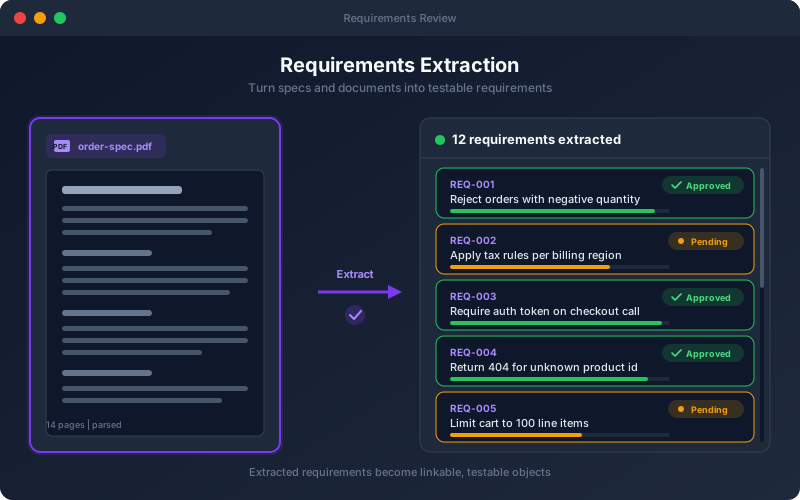
What It Does
Requirements Extraction bridges business intent and test coverage. Point the platform at the documents your team already maintains — API specs, requirement docs, acceptance criteria — and it identifies the individual, testable statements buried inside them. Your team reviews the extracted requirements in a dedicated workspace, keeping the ones that matter and refining the wording. Approved requirements then become the anchor for test generation and traceability, so you can always answer "which test proves this requirement?"
Overview
Upload specifications, PDFs, Word documents, or spreadsheets and the platform extracts discrete, testable requirements you can review, edit, and approve. Each extracted requirement becomes a first-class object that tests can be generated from and traced back to — closing the gap between what the business asked for and what the API actually does. A human-in-the-loop review step lets your team confirm, refine, or reject each requirement before it drives any test generation.
Key Capabilities
How It Works
- 1
Upload a specification or business document to a project
- 2
The platform proposes a set of discrete, testable requirements
- 3
Review each requirement — approve, edit, merge, or discard
- 4
Approved requirements are stored and organized by feature
- 5
Generate tests and traceability directly from the requirements
Available on
All Plans
Included in the free trial — no credit card required.
Go deeper
Guides and playbooks that show this capability in practice.
Related Features
Try Requirements Today
Start your 15-day free trial — no credit card required.