
Jira and Azure DevOps Tickets to API Tests: Traceability That Holds
To trace Jira or Azure DevOps tickets to API tests, break each story into testable acceptance criteria, link every criterion to at least one API test, and report each ticket by what its tests actually did: passing, failing, partly tested, not run or not tested. A ticket marked Done with no passing test is a gap, not a success. Judge a release by fix version or iteration.
Reviewed by Rishi Gaurav
Part of the Shift-Left, DevOps & QA Strategy hub. Start with the pillar guide: What is shift-left testing?.
Ticket-to-test traceability means every Jira or Azure DevOps ticket can be followed to the API tests that cover it and the results those tests produced. It answers the question that "Done" cannot: is this story actually tested, and does it pass? This guide shows how to build the trace, how to report ticket status honestly, and how to keep the trace current when tickets change.
In this guide
- Why "Done" does not mean tested
- The trace chain
- Write acceptance criteria that can be tested
- A worked example
- Report ticket status from test evidence
- Keep the trace current when tickets change
- Judge a release by fix version
- Four ways to do it, compared
- How Shift-Left API handles tracker requirements
- Traceability checklist
- Frequently asked questions
Why "Done" does not mean tested
A ticket moves to Done when a developer merges it and a reviewer agrees. Nothing in that workflow checks that a test exists, or that it ran, or that it asserted the thing the ticket asked for. Over a few sprints the board looks healthy while the real picture hides underneath:
- Stories with acceptance criteria that no test touches.
- Tests that pass but never assert the criterion they are named after.
- Tickets whose text changed after the tests were written.
- Release scopes where nobody can say how many stories are covered.
Traceability fixes this by making the link explicit and by deriving status from results instead of from workflow state. The general idea is old (see the traceability matrix); what has changed is that tickets and test results are now both machine-readable, so you can keep the matrix up to date without a weekly spreadsheet. For the matrix itself, our guide to the requirements traceability matrix for API testing goes deeper.
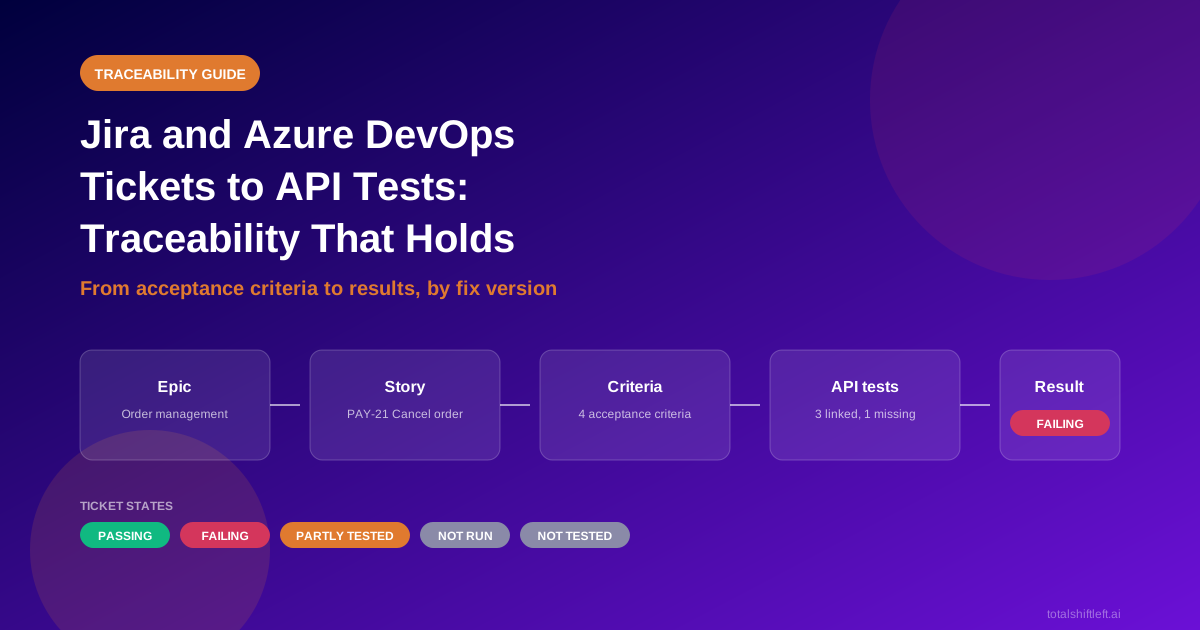
The trace chain from epic to result
Think of the chain as five links:
| Link | Example | Who owns it |
|---|---|---|
| Epic or feature | Self-service order management | Product |
| Story | PAY-21: A customer can cancel an order | Product and engineering |
| Acceptance criterion | A paid order cancelled within 24 hours is refunded in full | Product, with QA input |
| API test | POST /orders/{id}/cancel returns 200 and refund.amount equals the order total | QA or developer |
| Result | Passed on staging, build 482 | The pipeline |
The most common break is between the third and fourth links. Stories exist, tests exist, but nobody connected a specific criterion to a specific test. If you only fix one thing, fix that.
Write acceptance criteria that can be tested
A criterion is testable when two engineers would write the same pass/fail check from it. Vague wording is the enemy.
| Vague | Testable |
|---|---|
| Cancelling an order should work properly | Cancelling a paid order within 24 hours returns 200 and a refund equal to the order total |
| Errors are handled | Cancelling an already shipped order returns 409 with error code ORDER_NOT_CANCELLABLE |
| The API is secure | Cancelling another customer's order returns 403 |
| Performance is acceptable | POST /orders/{id}/cancel responds within 800 ms at the 95th percentile |
A short Given/When/Then form helps, because it forces you to name the starting state, the request and the observable result:
Given a paid order created 2 hours ago
When the customer sends POST /orders/{id}/cancel
Then the response status is 200
And the refund amount equals the order total
See how to write API test cases for patterns that turn criteria like these into assertions.
A worked example: cancel an order
Story PAY-21: A customer can cancel an order has four acceptance criteria. After tracing, the picture looks like this:
| Criterion | Linked test | Last result |
|---|---|---|
| Paid order cancelled within 24 hours is refunded in full | cancel_paid_order_refunds_total | Passed |
| Shipped order cannot be cancelled (409) | cancel_shipped_order_returns_409 | Passed |
| Another customer's order cannot be cancelled (403) | cancel_other_customer_order_returns_403 | Failed |
| Cancellation sends a confirmation email | none | No test |
PAY-21 is marked Done on the board. The trace says otherwise: one criterion fails and one has no test. A fair status for the ticket is Failing, and the board should not let it be closed until that changes. (A criterion that is not an API behaviour, such as the email, may belong to another test layer. The trace still makes the decision visible.)
Report ticket status from test evidence
Use a small, fixed set of states, and define each one so that everyone reads them the same way.
| State | Rule |
|---|---|
| Passing | Every linked criterion has a test, and every test passed on its last run |
| Failing | At least one linked test failed |
| Partly tested | Some criteria have tests and some do not |
| Not run | Tests exist, but none has run (or the last run is too old) |
| Not tested | The ticket has testable criteria and no linked test |
| Nothing to test yet | The ticket has no acceptance criteria |
| Not API-related | The ticket is about something an API test cannot cover |
Ready to shift left with your API testing?
Try our no-code API test automation platform free. Generate tests from OpenAPI, run in CI/CD, and scale quality.
Two rules keep the report honest.
- The worst result wins. One failing test makes the ticket failing, however many others pass.
- Do not say "verified". A passing test shows the checked behaviour worked on that run. It does not prove the requirement is complete. "Passing" says exactly what you know.
Also look for gaps in the other direction: tests with no ticket. They may cover undocumented behaviour, or tickets that were never written. Both are worth a conversation. See how to measure API test coverage for the matching view from the spec side.
Keep the trace current when tickets change
Tickets are edited constantly. A trace that is built once goes stale in a sprint. A workable routine:
- Separate cheap changes from risky ones. A status, sprint or label change needs no review. A change to the text of a story or its criteria does.
- Review changed text in risk order. Start with tickets whose criteria already have passing tests, because those are the tests that may now assert the wrong thing.
- When a criterion changes, flag its tests. Do not silently keep the old link. Send the criterion back for review and mark its tests as needing a look.
- Never read a failed fetch as a deletion. A timeout or a 403 from the tracker is not the same as a removed ticket.
- Run only what is affected. After applying a change, run the tests behind the changed tickets on a non-production environment. You get feedback in minutes, not after a full regression run.
Judge a release by fix version or iteration
Both trackers already group work by release. Use that grouping directly:
- In Jira, select a fix version:
project = PAY AND fixVersion = "4.2" AND issuetype in (Story, Bug). - In Azure DevOps, select an iteration path with a work item query.
Then count states. A sentence such as "38 of the 40 stories in release 4.2 are passing, one is failing, and one has no test" is far more useful in a release meeting than "the sprint is done". Decide in advance what blocks a release. A sensible default is that any story with no passing test blocks it, unless someone records an explicit exception.
You can run exactly the tests behind a set of tickets in CI. Tag each test with its ticket key in the name, then select by key. For example, with pytest:
pytest -k "PAY_21 or PAY_22" --junitxml=results.xml
Add a rule that fails the build when a listed ticket has no matching test, so an untested ticket cannot slip through. Our guide to API quality gates shows where such a check fits in a pipeline, and risk-based test selection covers choosing what to run.
Four ways to build the trace, compared
| Approach | How it works | Strength | Weakness |
|---|---|---|---|
| Spreadsheet matrix | A person maintains ticket, criterion, test and result columns | Free; works for a small project | Stale within a sprint; manual |
| Naming convention + CI script | Tests carry ticket keys; a script reads results and queries the tracker | Cheap; automatable | You build and maintain the glue; no criterion-level view |
| Test-management add-on for the tracker | Test cases live inside Jira or Azure DevOps and link to tickets | Native to the tracker | Results from automated API suites still need importing |
| Requirements-aware testing platform | Imports tickets, extracts criteria, links tests, reports status from runs | Criterion-level trace, kept in sync | Another tool to adopt |
Pick by size. For one team and a few dozen stories, a naming convention is plenty. When several teams share a release, the manual approaches stop scaling.
How Shift-Left API handles tracker requirements
The method above is tool-neutral. This section covers what Shift-Left API's tracker import does, and its limits.
Plans. Import from a tracker is available on Professional, Trial and Enterprise. The Free plan keeps CSV and Excel upload of Jira and Azure DevOps exports.
What it reads. Jira, Azure DevOps, GitHub issues, GitLab issues, and Confluence pages (through a Jira connection). A read-only token is enough, and it is stored write-only and encrypted. A connection lists the projects or spaces people may read, and that list is checked on every read. Azure DevOps is the reader that has been run against a live organisation; for the others, start with a small import to confirm it suits your setup.
How an import works. In Requirements, choose Add without a file, then Import from a tracker. Pick a sprint, release, epic, area path, pasted keys, or a typed JQL, WIQL or CQL query. You see a preview tree and the cost before anything is imported: about one AI call per ticket, billed by your own AI provider. Ticket text goes to the AI provider you have configured. Tickets with no acceptance criteria are flagged, not silently dropped.
Shift Left Testing Playbook
Move testing earlier in your SDLC with a proven adoption roadmap. Includes CI/CD architecture, tool stack recommendations, and metrics to track success.
What becomes a requirement. One ticket becomes one document. A story becomes the story, plus one requirement per acceptance criterion, plus rules for its fields. Epics and features become headings by default, and are extracted only if they have acceptance criteria or you tick them. Test cases in the tracker are never imported. Criteria are read from the custom field where one exists, otherwise from a heading in the description (GitHub and GitLab have no such field, so they use the heading).
Ticket-level traceability. In Traceability, group by Ticket to see epic, story, requirement, tests and result, with the ticket's own tracker status beside them. The states are Passing, Failing, Partly tested, Not run, Not tested, Nothing to test yet and Not API-related. The word "verified" is deliberately not used.
Keeping in sync. "Check for changes" re-reads the tickets and reports; it never spends AI. Status, sprint, label and parent changes apply at once. Changed text waits in an inbox ordered by risk, with tickets whose rules have passing tests first. Applying a change makes a new document version: unchanged rules keep their review, changed rules go back to review and their tests are flagged, and dropped rules are listed. "Run only these" runs just the affected tests on a non-production environment. A partial read, a 403 or a timeout is never treated as "ticket removed". Sources can check on a schedule and, if you opt in, auto-apply up to a monthly ceiling.
Release judgement. A Jira fix version or an Azure DevOps iteration can be judged as a unit, for example "1 of the 40 stories in release 4.2 has no passing test". By default, stories with no passing test block the release, following the project's release policy.
In CI. The runner flag --tickets PROJ-21,PROJ-22 --environment staging runs only the tests behind those tickets. A ticket with no tests fails the build unless you pass --tickets-allow-untested.
What it does not do. Honest limits:
- Tracker sync is polling (every 10 minutes at best), not real time, and it is one-way. It never edits ticket text, status or assignee.
- Connections use API tokens, not OAuth sign-in.
- It does not read Linear, Asana, ServiceNow, Trello, Rally, ClickUp or Bitbucket Issues.
- Extraction runs one document at a time per project, so a first import of a large backlog takes a while. Start with a sprint or an epic.
The step-by-step guide is in Requirements from trackers, and the matrix itself is described in the traceability matrix feature page. A trial includes tracker import, so you can run it on one release and compare it with your current spreadsheet. Start a trial or see pricing.
Ticket traceability checklist
- ✔ Every story has acceptance criteria written so that two engineers would test the same thing
- ✔ Every criterion links to at least one API test
- ✔ Tests carry their ticket key in the name or a tag
- ✔ Ticket status comes from test results, using fixed, defined states
- ✔ "Verified" is not used; "passing" says what you know
- ✔ Tests with no ticket are reviewed, not ignored
- ✔ Changed ticket text sends its criteria and tests back for review
- ✔ A failed fetch is never treated as a deleted ticket
- ✔ Releases are judged by fix version or iteration, with a written blocking rule
- ✔ The pipeline can run just the tests behind a set of tickets, and fails when one has none
Frequently asked questions about ticket traceability
How do I trace Jira tickets to API tests?
Turn each story's acceptance criteria into separate, testable requirements, then link each requirement to one or more API tests. Report each ticket by the results of those tests. Tag tests with the ticket key so a pipeline can find them.
What should ticket status be based on?
On test evidence, not workflow state. Passing means every linked test passed. Partly tested means some criteria have no test. Not run means tests exist but have not run. Not tested means no test is linked at all.
What if a ticket has no acceptance criteria?
Flag it instead of dropping it. Without criteria there is nothing precise to test, so the honest status is "nothing to test yet", and the fix is to add criteria, not to skip the ticket.
Can I judge a release by Jira fix version or Azure DevOps iteration?
Yes. Select the stories in the fix version or iteration and count how many have passing tests. A release with untested stories should be flagged according to your release policy.
Does Shift-Left API import requirements from Jira and Azure DevOps?
Yes, on Professional, Trial and Enterprise. It also reads GitHub issues, GitLab issues and Confluence pages. The Free plan can still upload a Jira or Azure DevOps CSV export.
Does Shift-Left API change my tickets?
No. A read-only token is enough, and it never changes a ticket's status, assignee or text.
Does importing tickets cost AI usage?
Importing needs about one AI call per ticket, billed by your own AI provider, and you see an estimate before anything is imported. Checking for ticket changes does not use AI.
Sources and further reading
- Jira Query Language (JQL) guide: selecting tickets by fix version, sprint or epic.
- Azure DevOps WIQL syntax: querying work items by iteration path.
- Traceability matrix (Wikipedia): the underlying technique.
- Cucumber: Gherkin reference: the Given/When/Then format used above.
Ready to shift left with your API testing?
Import your OpenAPI spec and get a runnable test suite, in our cloud or on your own infrastructure.