
Canary Testing for Microservices: Safe Rollouts (2026)
Quick answer
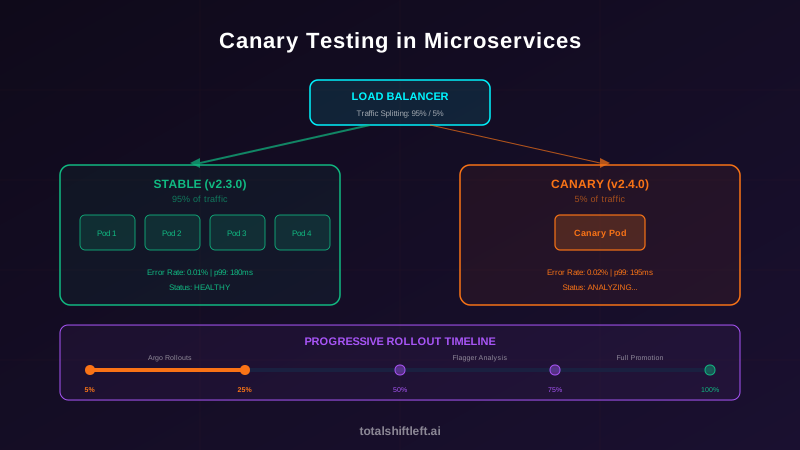
Canary testing in microservices routes a small percentage of production traffic (typically 1-5%) to a new service version, compares its error rate, latency, and success rate against the stable baseline, then progressively increases traffic or automatically rolls back. Argo Rollouts and Flagger are the leading Kubernetes-native controllers; unlike blue-green's all-at-once switch, canary gives finer-grained, staged risk control with rollback in minutes.
Reviewed by Parveen Kumari

Canary testing in microservices is a deployment strategy that routes a small percentage of production traffic to a new service version while monitoring key metrics against the stable baseline. It enables safe, progressive rollouts with automated analysis and instant rollback, minimizing the blast radius of deployment failures.
Canary testing microservices is the practice of deploying a new version of a microservice alongside the stable version, routing a small percentage of production traffic to the canary, comparing its error rate, latency, and throughput against the baseline, and progressively increasing traffic if metrics are healthy — or automatically rolling back if they degrade.
A SaaS company pushes a performance optimization to their search service on a Monday morning. The change looks correct in code review and passes all unit, contract, and integration tests. The deployment goes out to all production pods simultaneously. Within 15 minutes, the search service starts returning empty results for 8% of queries. The bug is a cache invalidation race condition that only manifests under production traffic patterns. By the time the team detects, investigates, and rolls back, 23,000 users have experienced broken search for 40 minutes.
With canary testing, this scenario plays out differently. The new version deploys to a single pod receiving 5% of traffic. Within 3 minutes, the automated canary analysis detects an elevated empty-result rate compared to the stable baseline. The canary is automatically rolled back. Total user impact: 5% of traffic for 3 minutes — roughly 350 users instead of 23,000.
Canary testing is the deployment strategy that transforms "deploy and pray" into "deploy and verify." It works by routing a small fraction of real production traffic to the new version, comparing its metrics against the stable version, and progressively increasing traffic only if the canary is healthy. It is the deployment-time complement to reliability testing — where reliability testing validates behavior before deployment, canary testing validates behavior during deployment.
This guide covers how to implement canary testing for microservices in 2026: progressive rollout strategies, automated canary analysis, Argo Rollouts and Flagger configuration, feature flag integration, and CI/CD pipeline design.
In this guide
- What Is Canary Testing for Microservices?
- Why Canary Testing Matters for Microservices
- Key Components of Canary Testing
- Canary Testing Architecture
- Tools for Canary Testing
- Real-World Example: Payment Service Canary Rollout
- Canary testing challenges and how to solve them
- Best Practices for Canary Testing
- Canary Testing Checklist
- Canary testing FAQ
What Is Canary Testing for Microservices?
Canary testing is a deployment strategy that rolls out a new service version to a subset of production traffic, monitors its behavior against the stable version, and makes a data-driven promotion or rollback decision.
The Canary Process
- Deploy canary: A new version of the service is deployed alongside the stable version
- Route traffic: A small percentage of production traffic (typically 1-5%) is routed to the canary
- Collect metrics: The canary's error rate, latency, and success rate are measured
- Compare baseline: Canary metrics are compared against the stable version's metrics
- Promote or rollback: If metrics are healthy, increase traffic percentage; if degraded, roll back
Canary Testing vs. Other Deployment Strategies
| Strategy | Traffic Shift | Risk Level | Rollback Speed | Complexity |
|---|---|---|---|---|
| Rolling update | Gradual pod replacement | Medium | Minutes (redeploy) | Low |
| Blue-green | 100% switch at once | Medium-high | Seconds (switch back) | Medium |
| Canary | Progressive percentage increase | Low | Seconds (remove canary) | High |
| Feature flags | User-level targeting | Low | Milliseconds (toggle flag) | Medium-high |
Canary testing provides the lowest risk because it limits the blast radius to a small percentage of traffic. The tradeoff is complexity — you need traffic splitting infrastructure, metrics collection, and automated analysis.
Where Canary Testing Fits in the Testing Pipeline
Canary testing is a deployment-time validation that complements pre-deployment testing:
- Pre-merge: Unit tests, contract tests, integration tests
- Pre-deploy: E2E tests, load tests, security scans
- During deploy: Canary testing with automated analysis
- Post-deploy: Synthetic monitoring, error budget tracking
Canary testing catches issues that pre-deployment testing cannot — bugs that only manifest under real production traffic, data, and scale.
Why Canary Testing Matters for Microservices
Blast Radius Control
In a microservices architecture with 50 services deploying multiple times per day, the probability of a bad deployment is not negligible. Canary testing ensures that when a bad deployment happens, it affects 5% of traffic for 5 minutes — not 100% of traffic for 40 minutes.
Production Traffic Validation
Some bugs only manifest under production conditions: real user behavior patterns, production data distributions, third-party API latency, and traffic volume. Pre-deployment tests cannot replicate these conditions perfectly. Canary testing validates against the real thing.
Independent Service Deployment Safety
Microservices are deployed independently. A change to the Order Service might interact poorly with the current production version of the Payment Service — an interaction that staging tests did not catch. Canary testing detects these cross-service issues with production traffic before full rollout.
Automated Rollback
Manual rollback decisions are slow. Teams spend 10-20 minutes debating whether metrics are "bad enough" to warrant a rollback. Automated canary analysis removes this ambiguity — the controller rolls back based on predefined criteria, typically within 2-5 minutes of detecting degradation. This directly reduces Mean Time To Recovery (MTTR) as part of a DevOps testing strategy.
Key Components of Canary Testing
Traffic Splitting
Traffic splitting routes a configurable percentage of requests to the canary version:
Mechanisms:
- Service mesh (Istio, Linkerd): Weighted routing rules at the sidecar proxy level. Most precise — supports percentage-based splitting at the request level.
- Ingress controller (NGINX, Traefik): Annotation-based traffic splitting. Simpler but less granular than service mesh.
- Load balancer (ALB, NLB): Weighted target groups. Works at the infrastructure level.
- DNS (Route 53, Cloudflare): Weighted DNS records. Coarsest granularity — affected by DNS caching.
Canary Analysis
Canary analysis compares the canary's metrics against the stable baseline:
Key metrics:
- Error rate: Percentage of 5xx responses from the canary vs. stable
- Latency: p50, p95, p99 response time comparison
- Success rate: Percentage of successful business transactions
- Saturation: CPU, memory, and connection pool utilization
- Custom metrics: Business-specific indicators (empty search results, failed payments)
Analysis approach:
- Threshold-based: Canary passes if error rate is below X% and latency is below Yms
- Comparison-based: Canary passes if its metrics are within Z% of the stable baseline
- Statistical: Canary passes if the difference between canary and stable metrics is not statistically significant (Mann-Whitney U test, Kolmogorov-Smirnov test)
Ready to shift left with your API testing?
Try our no-code API test automation platform free. Generate tests from OpenAPI, run in CI/CD, and scale quality.
Progressive Rollout Steps
Progressive rollout increases traffic to the canary in defined steps:
Step 1: 5% traffic → analyze for 5 minutes
Step 2: 25% traffic → analyze for 5 minutes
Step 3: 50% traffic → analyze for 10 minutes
Step 4: 75% traffic → analyze for 10 minutes
Step 5: 100% traffic → promotion complete
Each step includes an analysis period where the canary controller verifies metrics. If any step fails, the canary rolls back to 0% immediately.
Feature Flags Integration
Feature flags complement canary deployments by providing user-level control:
How they work together:
- Deploy the new code to all pods (canary deployment handles traffic splitting)
- Use feature flags to control which users see the new behavior (LaunchDarkly, Split.io, Unleash)
- Canary deployment validates infrastructure-level metrics (latency, errors)
- Feature flags validate user-level metrics (conversion rate, engagement)
- Progressive rollout: canary at 100%, feature flag gradually enabled from 5% to 100%
Canary Testing Architecture
The canary testing architecture for microservices has four layers:
Layer 1: Deployment Controller Argo Rollouts or Flagger manages the canary lifecycle — deploying the canary, configuring traffic splits, triggering analysis, and executing promotion or rollback.
Layer 2: Traffic Management Istio, NGINX, or a load balancer splits traffic between stable and canary versions based on the controller's configuration.
Layer 3: Metrics & Analysis Prometheus, Datadog, or New Relic collects metrics from both stable and canary pods. The analysis engine compares metrics and returns a pass/fail verdict.
Layer 4: Alerting & Observability Grafana dashboards show canary progress in real time. Alerts fire if a canary is rolled back. Distributed tracing correlates canary requests f
or debugging.
┌─────────────────────────────────────────────────┐
│           Deployment Controller                   │
│  Argo Rollouts / Flagger — manages canary lifecycle│
├─────────────────────────────────────────────────┤
│           Traffic Management                      │
│  Istio / NGINX — splits traffic stable ↔ canary   │
├─────────────────────────────────────────────────┤
│           Metrics & Analysis                      │
│  Prometheus → AnalysisTemplate → pass/fail        │
├─────────────────────────────────────────────────┤
│           Alerting & Observability                │
│  Grafana dashboards, rollback alerts, tracing     │
└─────────────────────────────────────────────────┘
Tools for Canary Testing
| Tool | Type | Best For | Integration |
|---|---|---|---|
| Argo Rollouts | Deployment controller | Kubernetes-native canary with analysis templates | Istio, NGINX, ALB |
| Flagger | Deployment controller | Automated canary analysis with Prometheus | Istio, Linkerd, NGINX, Gloo |
| Istio | Service mesh | Fine-grained traffic splitting and fault injection | Argo Rollouts, Flagger |
| LaunchDarkly | Feature flags | User-level progressive rollout | Any application |
| Split.io | Feature flags | Feature flags with experimentation | Any application |
| Unleash | Feature flags (OSS) | Self-hosted feature flag management | Any application |
| Prometheus | Metrics | Canary metric collection and querying | Argo Rollouts, Flagger |
| Datadog | Observability | Canary analysis with APM metrics | Argo Rollouts |
| Shift-Left API | API testing | Pre-deployment API validation before canary | CI/CD pipeline |
| Grafana | Dashboards | Real-time canary progress visualization | Prometheus, Datadog |
Argo Rollouts Configuration Example
apiVersion: argoproj.io/v1alpha1
kind: Rollout
metadata:
  name: payment-service
spec:
  replicas: 5
  strategy:
    canary:
      canaryService: payment-service-canary
      stableService: payment-service-stable
      trafficRouting:
        istio:
          virtualService:
            name: payment-service-vsvc
            routes:
              - primary
      steps:
        - setWeight: 5
        - pause: { duration: 5m }
        - analysis:
            templates:
              - templateName: success-rate-analysis
        - setWeight: 25
        - pause: { duration: 5m }
        - analysis:
            templates:
              - templateName: success-rate-analysis
        - setWeight: 50
        - pause: { duration: 10m }
        - analysis:
            templates:
              - templateName: success-rate-analysis
        - setWeight: 100
      analysis:
        templates:
          - templateName: success-rate-analysis
        args:
          - name: service-name
            value: payment-service-canary
---
apiVersion: argoproj.io/v1alpha1
kind: AnalysisTemplate
metadata:
  name: success-rate-analysis
spec:
  metrics:
    - name: success-rate
      interval: 60s
      successCondition: result[0] >= 0.99
      provider:
        prometheus:
          address: http://prometheus:9090
          query: |
            sum(rate(http_requests_total{service="{{args.service-name}}",status=~"2.."}[2m]))
            /
            sum(rate(http_requests_total{service="{{args.service-name}}"}[2m]))
    - name: latency-p99
      interval: 60s
      successCondition: result[0] <= 200
      provider:
        prometheus:
          address: http://prometheus:9090
          query: |
            histogram_quantile(0.99,
              sum(rate(http_request_duration_ms_bucket{service="{{args.service-name}}"}[2m]))
              by (le))
Real-World Example: Payment Service Canary Rollout
A fintech company rolls out a new version of their Payment Service that optimizes database queries for faster checkout. Here is how canary testing validates the deployment:
Pre-deployment (CI/CD): Unit tests, contract tests, integration tests, and API tests pass. A load test in staging verifies the SLO thresholds (p99 < 300ms, error rate < 0.01%).
Canary step 1 (5% traffic, 5 minutes): The new version deploys as a canary pod. Istio routes 5% of production traffic to it. After 5 minutes, the AnalysisTemplate queries Prometheus:
- Success rate: 99.98% (baseline: 99.97%) — PASS
- p99 latency: 195ms (baseline: 210ms) — PASS (improvement detected)
Canary step 2 (25% traffic, 5 minutes): Traffic increases to 25%. Analysis runs again:
- Success rate: 99.96% — PASS
- p99 latency: 198ms — PASS
Canary step 3 (50% traffic, 10 minutes): At higher traffic, a subtle issue appears — the optimized query performs poorly for a specific merchant category:
- Success rate: 99.91% — PASS (still above 99% threshold)
- p99 latency: 280ms — PASS (still below 300ms threshold)
- Custom metric (payment failures): 0.15% — FAIL (threshold: 0.1%)
Automatic rollback: The analysis fails on the custom metric. Argo Rollouts immediately shifts traffic back to 100% stable. Total exposure: 50% of traffic for 10 minutes on a metric that was only slightly degraded. The team investigates the merchant category issue, fixes it, and redeploys with the canary process.
Without canary testing: The full deployment would have gone to 100% of traffic. The payment failure rate would have affected all users for the 25 minutes it took the team to detect, investigate, and manually roll back.
Canary testing challenges and how to solve them
| Challenge | Impact | Solution |
|---|---|---|
| Low traffic services | Not enough requests for statistical significance | Extend analysis duration; use lower traffic thresholds; combine with synthetic traffic |
| Stateful services | Database schema changes affect both canary and stable | Use backward-compatible schema migrations; separate canary data path where possible |
| Async service interactions | Canary effects not visible in synchronous metrics | Monitor downstream service metrics; include queue depths and processing rates in analysis |
| Metric noise | Normal variance triggers false rollbacks | Use statistical comparison (not just thresholds); require sustained degradation before rollback |
| Canary analysis configuration | Wrong thresholds lead to false positives or missed issues | Start with conservative thresholds and tune based on historical data; review after every rollback |
| Multi-service dependencies | Canary interacts with stable versions of other services | Test contract compatibility in CI before canary deployment |
| Feature flag + canary coordination | Confusion about which layer controls the rollout | Use canary for infrastructure validation, feature flags for user-facing behavior; document the boundary |
Free 1-page checklist
API Testing Checklist for CI/CD Pipelines
A printable 25-point checklist covering authentication, error scenarios, contract validation, performance thresholds, and more.
Download FreeBest Practices for Canary Testing
- Start with 1-5% canary traffic. The initial canary step should expose the fewest users possible while still generating meaningful metrics. For high-traffic services, 1% is sufficient.
- Include custom business metrics in analysis. Error rate and latency are necessary but not sufficient. Add business-specific metrics — payment success rate, search result quality, conversion rate — to catch functional regressions.
- Automate rollback decisions. Manual rollback decisions introduce delay and debate. Configure automated rollback with well-tuned thresholds so the system acts faster than humans can.
- Extend analysis duration at higher traffic percentages. At 5% traffic, 5 minutes may be enough. At 50% traffic, run analysis for 10-15 minutes to catch issues that emerge under sustained load.
- Use comparison-based analysis, not just thresholds. Comparing canary metrics against the stable baseline accounts for normal traffic variations. A canary with 0.5% error rate is concerning if the baseline is 0.01% but acceptable if the baseline is also 0.5%.
- Test the rollback mechanism. Deploy a deliberately failing canary and verify that the automated rollback triggers correctly, traffic shifts back to stable, and alerts fire.
- Combine canary deployment with feature flags. Use canary for infrastructure-level validation (latency, errors, resource usage) and feature flags for user-level validation (behavior changes, UI updates). This gives you two layers of progressive rollout control.
- Run pre-deployment tests before canary. Canary testing catches production-specific issues, but it should not be your first line of defense. Run unit, contract, integration, and E2E tests in CI before initiating a canary deployment, wiring API validation into your pipeline through CI/CD integrations for GitHub Actions, GitLab, Jenkins, and Argo.
- Monitor canary deployments in real time. Grafana dashboards showing canary progress, current step, and metric comparisons give the team visibility without requiring manual metric queries.
- Document canary rollback incidents. Every automated rollback is a learning opportunity. Review what the canary caught, whether the analysis thresholds were appropriate, and whether pre-deployment tests could have caught the issue earlier.
Canary Testing Checklist
Infrastructure Setup
- ✔ Traffic splitting mechanism configured (Istio, NGINX, ALB)
- ✔ Deployment controller installed (Argo Rollouts or Flagger)
- ✔ Metrics pipeline connected (Prometheus, Datadog)
- ✔ Analysis templates defined with success/failure criteria
- ✔ Rollback mechanism tested with deliberate failures
Canary Analysis Configuration
- ✔ Error rate threshold defined (canary vs. baseline)
- ✔ Latency thresholds defined (p95, p99)
- ✔ Custom business metrics included in analysis
- ✔ Analysis interval and duration configured per step
- ✔ Statistical comparison method selected (threshold vs. comparison vs. statistical)
Progressive Rollout Steps
- ✔ Step 1: 1-5% traffic with 5-minute analysis
- ✔ Step 2: 25% traffic with 5-minute analysis
- ✔ Step 3: 50% traffic with 10-minute analysis
- ✔ Step 4: 75% traffic with 10-minute analysis (optional)
- ✔ Step 5: 100% traffic — promotion complete
Observability
- ✔ Grafana dashboard shows canary progress and metrics
- ✔ Alerts configured for canary rollback events
- ✔ Distributed tracing correlates canary requests
- ✔ Canary deployment logs captured and searchable
- ✔ Rollback incidents documented and reviewed
CI/CD Integration
- ✔ Pre-deployment tests (unit, contract, integration, E2E) run before canary
- ✔ Canary deployment triggered automatically on main branch merge
- ✔ Rollback does not require manual intervention
- ✔ Promotion notification sent to team on successful canary
- ✔ Feature flag coordination documented for combined rollouts
Canary testing FAQ
What is canary testing in microservices?
Canary testing in microservices is a deployment strategy where a new version of a service receives a small percentage of production traffic (typically 1-5%) while the stable version continues serving the majority. The canary version's metrics (error rate, latency, success rate) are compared against the stable version. If metrics are healthy, traffic is progressively shifted to the canary; if not, the canary is automatically rolled back.
How does canary testing differ from blue-green deployment?
Canary testing gradually shifts traffic from the stable version to the new version in incremental steps (5%, 25%, 50%, 100%), allowing metrics comparison at each stage. Blue-green deployment switches 100% of traffic from the old (blue) environment to the new (green) environment at once. Canary testing provides finer-grained risk control because issues are detected with minimal user impact.
What tools support canary deployments for microservices?
Argo Rollouts and Flagger are the two leading Kubernetes-native canary deployment controllers. Argo Rollouts provides a custom Rollout resource with built-in canary steps, analysis templates, and traffic management via Istio or NGINX. Flagger automates canary analysis with Prometheus metrics and supports progressive delivery with multiple mesh providers.
How do you automate canary analysis?
Automate canary analysis by defining success metrics (error rate below 1%, p99 latency within 10% of baseline), configuring an analysis template in Argo Rollouts or Flagger, and connecting it to your metrics backend (Prometheus, Datadog, New Relic). The controller automatically compares canary metrics against the stable baseline and promotes or rolls back based on the results.
What is a feature flag rollout vs. canary deployment?
A canary deployment routes traffic at the infrastructure level — the load balancer sends a percentage of all requests to the canary pods. A feature flag rollout deploys the new code to all pods but enables the feature only for a subset of users via runtime flags (LaunchDarkly, Split.io). Feature flags offer user-level targeting (beta users, specific regions) while canary deployments operate at the request level.
When should you roll back a canary deployment?
Roll back a canary deployment when the canary version shows elevated error rates compared to the stable baseline, increased p95/p99 latency beyond configured thresholds, elevated resource consumption (CPU, memory), or any metric that breaches the analysis template's failure criteria. Automated rollback should trigger within minutes of detecting degradation.
Sources and further reading
- Argo Rollouts — canary and blue-green progressive delivery with analysis gates.
- Flagger — automated canary analysis driven by metrics.
- Google SRE Workbook — Implementing SLOs — how to define SLOs and error budgets.
Key takeaways
- Canary testing is the deployment strategy that turns production releases from high-risk events into controlled experiments.
- By routing a small percentage of real traffic to the new version and comparing its metrics against the stable baseline, canary testing catches production-specific failures that no amount of pre-deployment testing can simulate.
- The most effective canary testing implementations share common characteristics: automated analysis with well-tuned thresholds, progressive rollout steps with increasing traffic percentages, custom business metrics alongside standard infrastructure metrics, and instant automated rollback when degradation is detected.
- If your team deploys microservices directly to 100% of production traffic, you are accepting unnecessary risk.
- Start with Argo Rollouts or Flagger, configure a simple canary strategy with error rate and latency thresholds, and experience the difference between deploying with confidence and deploying with hope.
Ready to strengthen your pre-deployment testing before canary rollouts? Start your free trial with Shift-Left API to automate API testing in your CI/CD pipeline, ensuring every canary deployment starts with a thoroughly tested build.
Related Articles: Microservices Testing: The Complete Guide | API Testing: The Complete Guide | Microservices Reliability Testing Guide | End-to-End Testing Strategies for Microservices | Contract Testing for Microservices | DevOps Testing Strategy
Ready to shift left with your API testing?
Try our no-code API test automation platform free.