
SLO-Based Reliability Testing for Microservices
Quick answer
SLO-based reliability testing turns each service's Service Level Objectives into pass/fail test criteria. You pick SLIs (success rate, p95/p99 latency, throughput), set targets, and assert them in load, soak and failure tests in CI and staging. The error budget, the failure the SLO allows, decides how much risk a release may take: a burning budget blocks or slows deploys.
Reviewed by Sushant Joshi

Part of the API Performance, Reliability & Observability hub. Start with the pillar guide: API performance testing: how to load test an API.
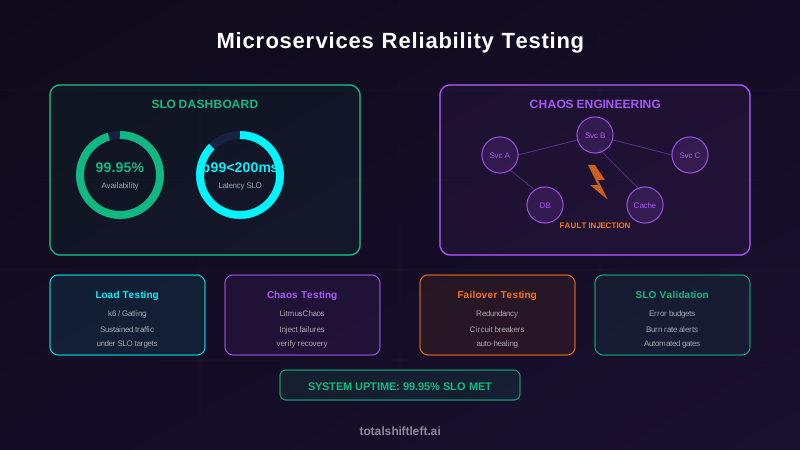
SLO-based reliability testing uses each service's Service Level Objectives as the pass/fail criteria for tests: a load test passes when the service stays inside its success-rate and latency targets, not merely when requests return 200. It is the reliability practice in our API performance, reliability and observability hub (its pillar is the API performance testing guide), and it answers one question: will this service keep its promises at real traffic, over hours, and while a dependency is failing?
A fintech team running 40 microservices showed 99.99% on its status page. Then one Redis node failed at peak. The auth service fell back to the database, the connection pool emptied in 30 seconds, and the platform was down for 47 minutes — the whole quarterly error budget in one incident. Nobody had ever asked whether the auth SLO held with the cache gone. The dashboard was green because it measured availability under normal conditions only.
That gap — SLOs on a dashboard, no test that proves them — is what this guide closes. It covers choosing SLIs, writing SLOs into load and soak tests, error budget gates in CI/CD, composite SLOs for user journeys and what to run where. The failure-injection side (chaos experiments, circuit breakers, retries) has its own guide: fault injection testing.
In this guide
- What is SLO-based reliability testing?
- Choosing SLIs and SLOs you can test
- Error budgets as a test gate
- Five reliability tests that use the SLO
- Writing SLO thresholds into tests
- Where each reliability test runs
- Worked example: an e-commerce platform
- SLO-based reliability testing challenges and best practices
- SLO-based reliability testing FAQ
What is SLO-based reliability testing?
Reliability testing verifies that a distributed system keeps defined levels of availability, latency and correctness across a range of conditions — normal traffic, peak traffic, long runs and dependency failures. Making it SLO-based means the definition of "acceptable" is not invented per test; it comes from the SRE vocabulary the service is already run by:
- SLI (Service Level Indicator) — a measurement, such as the share of requests that return a non-5xx status within 300 ms, or p99 latency.
- SLO (Service Level Objective) — the target for that SLI over a window, such as 99.95% over 30 days, or p99 under 200 ms.
- Error budget — what the SLO allows to go wrong: 100% minus the target.
- SLA — the external contract, usually looser than the SLO, with penalties attached.
| Aspect | Functional testing | SLO-based reliability testing |
|---|---|---|
| Question answered | Does it return the right result? | Does it keep its targets under stress? |
| Conditions | Normal inputs, expected state | Load, duration, dependency failure |
| Pass criteria | Correct output | SLIs within SLO targets |
| Duration | Seconds to minutes | Minutes to hours |
| Environment | Local or CI | CI, staging and production-like |
You need both. A service that returns correct results but falls over at twice normal traffic is functionally correct and unreliable. A broader microservices testing strategy puts the two side by side.
Choosing SLIs and SLOs you can test
An SLO you cannot measure in a test environment is an SLO you cannot test. Good testable SLIs share three properties: they are computed from requests (not host metrics), they are measured from the caller's side, and they use percentiles rather than averages.
| SLI | Typical SLO | How a test measures it |
|---|---|---|
| Availability (success rate) | 99.9–99.99% of requests non-5xx | Failed-request rate in the load tool, counting unexpected statuses as failures |
| Latency | p95 < 100 ms, p99 < 200 ms | Percentiles from merged histograms, never an average of averages |
| Throughput | ≥ N requests/s sustained | Achieved arrival rate, including requests the tool could not send |
| Freshness / correctness | Data no older than X; zero duplicates | Functional assertions run during the load |
Three rules keep SLOs testable:
- Set them per endpoint or per journey, not per cluster. "Checkout p95 under 800 ms" can fail a test; "the platform is fast" cannot.
- Start from production history. Base the first targets on what the service actually achieved last quarter, then tighten as reliability improves. Targets that fail every run teach teams to ignore them.
- Write down the degraded SLO. For each critical dependency, decide what the service promises while it is down — "product page p95 under 300 ms without reviews". That becomes the pass criterion for failure tests.
Keep the targets in one place. When the SLO lives on a dashboard and the threshold lives in a script, they drift. In Shift-Left API, performance targets are defined once per project, optionally per endpoint and environment, with p95, p99, error-rate and minimum-throughput figures; the same target is then judged on functional runs and inside load tests, and it can be linked to the requirement it protects.
Error budgets as a test gate
The error budget turns an SLO into a decision rule for releases:
| SLO (30 days) | Error budget | In minutes of full outage |
|---|---|---|
| 99.9% | 0.1% | 43.2 min |
| 99.95% | 0.05% | 21.6 min |
| 99.99% | 0.01% | 4.3 min |
Used in testing, the budget does three jobs:
- Deploy gate. Before a production deploy, the pipeline checks how much of the service's monthly budget is left. A common policy: above 50% left, deploy normally; below 20%, require SRE approval; exhausted, freeze features and ship only reliability fixes.
- Release risk estimate. A failover drill that took 90 seconds of errors at 30% of traffic costs about 27 seconds of budget. If the service has 4.3 minutes a month, you know how many such events it can absorb.
- Burn-rate alerts. In production, alert when the budget burns much faster than the window allows — the Google SRE workbook's multi-window, multi-burn-rate approach — so a slow leak and a sudden outage are both caught.
Error budgets and burn-rate alerting live in your monitoring stack (Prometheus, Grafana, a commercial SLO tool); the test side contributes the evidence of how much budget each scenario would cost.
Five reliability tests that use the SLO
Ready to shift left with your API testing?
Try our no-code API test automation platform free. Generate tests from OpenAPI, run in CI/CD, and scale quality.
Each test below has the same pass criterion: the SLIs stay within the SLO (or the agreed degraded SLO) for the duration.
1. SLO load test (normal and peak traffic)
- Latency SLO holds at normal traffic and at expected peak (p95, p99)
- Error-rate SLO holds at both levels
- Headroom: 2–3x normal traffic without breaching the SLO
- Replicas scale throughput close to linearly
2. Soak test (time)
Short tests miss memory leaks, connection-pool creep and log-volume growth. Run the normal-traffic profile for 2–4 hours in staging on a schedule and check that p99 at hour three matches p99 at minute ten.
3. Spike and breakpoint tests (headroom)
A spike test jumps to several times normal traffic and checks the SLO recovers within an agreed window after the spike. A breakpoint test raises the arrival rate until the SLO breaks, which tells you how much headroom the current capacity really has.
4. Degraded-SLO tests (dependency failure)
While one dependency is unavailable or slow, the service must meet its degraded SLO. Inject the failure with your fault injection tool and assert the degraded targets, then remove it and assert the normal SLO returns. The injection techniques themselves — Toxiproxy, LitmusChaos, circuit-breaker state tests — are covered in fault injection testing.
5. Failover tests (redundancy)
- Database primary-to-replica failover completes within the time the error budget can afford, without data loss
- Load balancers remove unhealthy instances before the error-rate SLO is breached
- Multi-AZ or multi-region failover activates when the primary is unavailable
- Recovery does not cause a thundering herd: retries use exponential backoff with jitter
Writing SLO thresholds into tests
k6 thresholds
k6 maps SLOs directly to thresholds; a breached threshold fails the run and the CI job:
import http from 'k6/http';
import { check, sleep } from 'k6';

export const options = {
  stages: [
    { duration: '2m', target: 100 },  // ramp to normal load
    { duration: '5m', target: 100 },  // hold normal load
    { duration: '2m', target: 300 },  // spike to 3x
    { duration: '3m', target: 100 },  // recover
    { duration: '1m', target: 0 },
  ],
  thresholds: {
    http_req_failed: ['rate<0.001'],                  // SLO: < 0.1% errors
    http_req_duration: ['p(95)<100', 'p(99)<200'],    // SLO: p95 < 100 ms, p99 < 200 ms
    'http_req_duration{name:orders}': ['p(95)<150'], // per-endpoint SLO
  },
};

export default function () {
  const res = http.get('https://staging.api.example.com/orders', { tags: { name: 'orders' } });
  check(res, { 'status is 200': (r) => r.status === 200 });
  sleep(1);
}
Two details matter. Put every percentile for one metric in a single array (in a JavaScript object a repeated http_req_duration key replaces the earlier one). And tag requests by journey so each SLO has its own threshold. Our k6 load testing tutorial walks through scenarios and thresholds in depth.
Judging SLOs without generating load
A latency SLO can give an early signal long before anyone schedules a load test: compute p95 and the error rate over the last N functional runs of that endpoint. Shift-Left API does this for every performance target every 15 minutes, using true percentiles over the last 50 runs by default (it needs at least five), and reports met, at risk (within 90% of the target), breached or not enough data. It cannot judge throughput this way and says so. When you do run load, the same target can be attached to the scenario; a target the run could not judge — wrong environment, endpoint not called — is reported as not evaluated with the reason rather than silently passing. Linked to a requirement, the load outcome appears in the traceability matrix's Under load column, separate from the functional verdict. Performance targets and API load testing are a paid add-on, included in the Trial.
Comparing against a baseline
A single run that is 6% slower may be noise. Pin a known-good run as the baseline and compare each new run's p95 with a statistical test, so normal variation is not reported as a regression and a real one is not waved through.
Where each reliability test runs
| Stage | What runs | Gate |
|---|---|---|
| Pull request / staging deploy | Short SLO load test (minutes), resilience unit tests, functional-run SLO verdicts | Fail the pipeline on a breached threshold |
| Staging (scheduled) | Full-traffic load, 2–4 h soak, spike and breakpoint, degraded-SLO and failover drills | Block the release train if a scheduled run breaches |
| Production (controlled) | Canary analysis against the SLO (canary testing), synthetic checks, burn-rate alerts, game days | Error budget policy |
┌────────────────────────────────────────────┐
│          Production                         │
│  Canary vs SLO, synthetics, burn-rate alerts│
├────────────────────────────────────────────┤
│          Staging (scheduled)                │
│  Soak, spike, failover, degraded SLOs       │
├────────────────────────────────────────────┤
│          CI/CD gates                        │
│  Short load tests with SLO thresholds       │
└────────────────────────────────────────────┘
| Tool | Role in SLO-based testing |
|---|---|
| k6 / Gatling | Load, soak and spike tests with SLO thresholds in code |
| Shift-Left API | Load, stress, spike, soak and breakpoint runs built from existing API tests; performance targets judged on functional and load runs (paid add-on) |
| LitmusChaos / Chaos Mesh / Toxiproxy | Dependency failure for degraded-SLO tests |
| Prometheus + Grafana / SLO tooling | SLI recording rules, error budgets and burn-rate alerts |
| Argo Rollouts / Flagger | Canary analysis against SLO metrics |
For a wider comparison of load tools see API load testing tools.
Worked example: an e-commerce platform
| Service | Availability SLO | Latency SLO (p99) | Error budget (30 days) |
|---|---|---|---|
| Product catalog | 99.95% | 150 ms | 21.6 min |
| Order service | 99.99% | 200 ms | 4.3 min |
| Payment service | 99.99% | 300 ms | 4.3 min |
Free PDF guide (12 pages)
Top 50 API Testing Mistakes
50 real-world API testing mistakes organized by category — from authentication to performance — each with a concrete fix strategy.
Download FreeOn every staging deploy, a k6 run simulates 500 requests/s (normal) and 1,500 requests/s (peak) with the thresholds above. A breach blocks the deploy.
Weekly in staging, three degraded-SLO tests run: one catalog pod is killed (the remaining pods must hold the catalog SLO); 500 ms of latency is added between orders and payments (orders must return a retry-later response within its p99); and the Redis cluster is taken away (services must fall back to database reads and meet their degraded SLOs). A 3-hour soak at normal traffic runs on Sunday.
Monthly, a game day exercises PostgreSQL failover, a Redis node failure and a multi-AZ failover, recording how many seconds of errors each costs — which is then converted into error budget.
Before production, the pipeline reads the remaining budget. If the order service has used more than 80% of its monthly budget, deploys need SRE approval.
The result is that every number on the SLO dashboard has a test behind it — including the Redis-down scenario that took the fintech team in the introduction offline.
SLO-based reliability testing challenges and best practices
| Challenge | Impact | Solution |
|---|---|---|
| Unrealistic load | Tests at the wrong traffic shape miss problems | Model scenarios from production traffic and access logs |
| Threshold calibration | Too strict fails constantly; too loose proves nothing | Start from production history and tighten gradually |
| Environment fidelity | Staging capacity differs from production | Infrastructure as code for parity; production-scale data volumes |
| Cost of load | Sustained load is expensive | Short SLO checks per PR, full runs on a schedule |
| Service SLOs met, journey breached | Each service is fine; checkout is not | Composite SLOs per critical journey, measured from the caller |
| Noisy results | Teams stop trusting the gate | Baselines and statistical comparison, deterministic environments |
Best practices
- Define the SLO before the test. No SLO, no pass criterion. Start with availability and latency for your three most critical services.
- Use percentiles, never averages. Averages hide the tail the SLO is about.
- Gate on the SLO in CI. If a service misses its SLO in staging, it does not go to production.
- Write degraded SLOs for every critical dependency and test them with the dependency failing.
- Soak weekly. Leaks and pool creep only show up over hours.
- Measure budget, not just uptime. A healthy budget means ship faster; a low one means invest in reliability.
- Test journeys, not only services. Composite SLOs catch breaches that per-service targets miss.
- Keep one source of truth for targets so the dashboard, the test and the requirement cannot disagree.
SLO-based reliability testing checklist
- ✔ SLIs and SLOs defined per critical endpoint or journey, from production history
- ✔ Degraded SLOs written for every critical dependency
- ✔ Error budget and deploy policy agreed for each service
- ✔ Short SLO load test with thresholds on every staging deploy
- ✔ Peak (2–3x) and spike tests with recovery criteria
- ✔ 2–4 hour soak test on a schedule
- ✔ Degraded-SLO tests with the dependency failing
- ✔ Failover drills measured in seconds of errors and converted to budget
- ✔ Baseline comparison so noise is not reported as regression
- ✔ Composite SLOs validated for critical user journeys
- ✔ Burn-rate alerts in production using the same SLOs
SLO-based reliability testing FAQ
What is SLO-based reliability testing?
SLO-based reliability testing uses a service's Service Level Objectives as the pass/fail criteria for tests. Instead of asking "did the request succeed?", each test asks "did the service stay within its success-rate and latency targets under this load or this failure?" The same targets are used in CI, staging and production monitoring.
How do you test SLOs in microservices?
Pick SLIs per service (success rate, p95 and p99 latency, throughput), write the SLO targets into load-test thresholds, and run them at normal and peak traffic against staging on every deployment. Add soak tests for slow leaks and failure tests that check the degraded SLO while a dependency is down. Fail the pipeline when a threshold is breached.
What is the difference between an SLI, an SLO and an SLA?
An SLI is the measurement, such as the share of requests that return 2xx within 300 ms. An SLO is the internal target for that measurement, such as 99.9% over 30 days. An SLA is the external contract with customers, usually looser than the SLO, with financial penalties when it is missed.
What is error budget testing?
The error budget is the failure an SLO allows: 100% minus the target. A 99.9% availability SLO over 30 days allows 43.2 minutes of unavailability. Error budget testing checks how much budget a release, a failure scenario or a maintenance window would consume, and gates deployments on how much budget is left.
How do you test reliability before running a load test?
Judge the latency and error-rate SLOs against the response times of ordinary functional test runs. They will not tell you about throughput or saturation, but a p95 that drifts across the last 50 functional runs is an early warning that costs no load generation at all.
Which reliability tests should run in CI and which in staging?
Run short load tests with SLO thresholds and resilience unit tests on every pull request or staging deploy. Schedule full-traffic load tests, multi-hour soak tests, failover drills and chaos experiments in staging, and keep canary analysis and burn-rate alerts for production.
Sources and further reading
- Google SRE Book — Service Level Objectives — SLIs, SLOs and SLAs defined.
- Google SRE Workbook — Implementing SLOs — how to define SLOs and error budgets.
- Google SRE Workbook — Alerting on SLOs — multi-window, multi-burn-rate alerts.
- k6 documentation — Thresholds — encoding SLOs as pass/fail criteria.
- Martin Fowler — Testing Strategies in a Microservice Architecture — the canonical breakdown of microservice test layers.
Key takeaways
- SLO-based reliability testing is the bridge between defining SLOs and actually meeting them: every target on the dashboard gets a test that can fail.
- Choose SLIs measured from the caller, as percentiles, per endpoint or journey; base the first targets on production history.
- The error budget turns SLOs into a release policy and tells you what each failure scenario costs.
- Five tests cover most of reliability: SLO load, soak, spike/breakpoint, degraded-SLO under dependency failure, and failover.
- Run short SLO gates on every deploy, the long and destructive tests on a schedule in staging, and burn-rate alerts in production.
Want SLO verdicts before you schedule a single load test? Start a free trial: define performance targets on the endpoints that matter, watch them judged against your functional runs, and attach the same targets to load runs built from those tests — the Trial includes the performance add-on.
Related Articles: Fault Injection Testing | Observability in DevOps | Monitoring API Performance in Production | Canary Testing in Microservices Deployments | k6 Load Testing Tutorial | Microservices Testing
Continue learning
Go deeper in the Learning Center
Hands-on lessons with runnable code against our live sandbox.
The network is unreliable. Here's how clients should retry, how servers should behave, and how to test both.
Happy paths prove your API works. Negative paths prove it fails safely. Here are the seven categories, a worked example, and where AI generation helps.
Ready to shift left with your API testing?
Import your OpenAPI spec and get a runnable test suite, in our cloud or on your own infrastructure.