
Distributed Tracing for Microservices Explained
Quick answer
Distributed tracing follows one request across every microservice it touches, linking each service's span to a shared trace ID so you can see where time went and where it failed. Instrument with OpenTelemetry, propagate the W3C traceparent header across HTTP and messaging, keep every error and slow trace with tail sampling, and query a backend such as Jaeger.
Reviewed by Parveen Kumari
Part of the API Performance, Reliability & Observability hub. Start with the pillar guide: API performance testing: how to load test an API.
Distributed tracing is the practice of tracking a single request as it flows through multiple microservices, creating a complete timeline of every service interaction, database query, and external API call. It uses trace IDs and span hierarchies to connect operations across service boundaries, enabling engineers to diagnose latency bottlenecks and failures in distributed systems.
It is the request-level view in our API performance, reliability and observability hub (its pillar is the API performance testing guide). When a single user request touches 10-20 services and something goes wrong, finding the root cause without distributed tracing is like debugging a program without a stack trace.
In a monolithic application, a stack trace shows you exactly which function calls led to an error. In a microservices architecture, there is no equivalent—unless you implement distributed tracing. Each service has its own logs, its own metrics, and its own error tracking. Without a mechanism to connect these isolated data points into a coherent story, debugging requires manually correlating timestamps across dozens of log streams.
This guide covers the concepts, the standards and the tools, then the two things most readers come for: how to debug microservices with traces, and how to run Jaeger in production. Whether you are building a new microservices testing strategy or improving observability for an existing system, distributed tracing is the foundational capability you need.
In this guide
- What Is Distributed Tracing?
- Why Distributed Tracing Matters for Microservices
- Core Concepts and Components
- Trace Context Propagation
- Architecture of a Distributed Tracing System
- Tools for Distributed Tracing
- Real-World Example: Payment Processing Pipeline
- Debugging microservices with distributed tracing
- Jaeger for microservices debugging
- Distributed tracing challenges and how to solve them
- Best Practices for Implementation
- A trace, from the header to the assertion
- Distributed tracing FAQ
What Is Distributed Tracing?
Distributed tracing is a method for tracking the lifecycle of a request as it propagates through a distributed system. When a user makes a request—loading a product page, submitting an order, processing a payment—that request may be handled by a dozen services, each performing a specific function.
A distributed trace captures this entire journey as a tree of operations called spans. The root span represents the initial request. Each downstream service call creates a child span. The parent-child relationship between spans mirrors the actual call graph of the request.
Each span records four critical pieces of information: the service name, the operation being performed (HTTP request, database query, message publish), the start and end timestamps, and the outcome (success, error, timeout). Together, the spans in a trace create a complete timeline that shows exactly what happened, in what order, and how long each step took.
The trace is identified by a globally unique trace ID that propagates from service to service via HTTP headers or message metadata. Every service that participates in the request includes this trace ID in its spans, enabling the tracing backend to reconstruct the full request path from independently submitted span data.
Why Distributed Tracing Matters for Microservices
Cross-Service Visibility
Microservices decompose a single application into independently deployed services. This improves development velocity and deployment flexibility but creates a visibility gap. No single team owns the entire request path. Distributed tracing provides the cross-service visibility that reconnects these isolated services into a coherent view.
Latency Diagnosis
In a monolith, profiling tools show exactly where time is spent. In microservices, latency can accumulate across multiple services, network hops, and serialization boundaries. A request that takes 800ms might spend 200ms in the API gateway, 50ms in auth, 300ms in the product service, and 250ms in the recommendation engine—with most of that time being database queries. Distributed tracing reveals this breakdown instantly.
Dependency Mapping
Service dependency graphs evolve over time. Teams add new services, introduce new inter-service calls, and create unexpected dependency chains. Distributed tracing produces accurate, real-time dependency maps derived from actual production traffic rather than outdated architecture diagrams. This is critical for understanding blast radius during incidents and for planning a microservices testing strategy.
Error Propagation Tracking
When an error occurs deep in a service chain, the upstream services often mask the original error with generic 500 responses. Distributed tracing preserves the original error context: which service failed, what error was thrown, and how that error propagated through the call chain. This eliminates the need to check logs in every service to find the origin of an error.
The same masking problem shows up in API test results before anything reaches production: a test sees "403" or "500" and nothing more. Shift-Left API's failure analysis reads the body the server actually returned, separating a gateway or firewall page, a login redirect, rate limiting and a missing record from a real refusal, and groups the failed tests into a few causes with a verdict on each. Traces then answer the question the verdict raises: which service produced it.
Core Concepts and Components
Traces
A trace represents the complete end-to-end journey of a single request through the distributed system. It is a directed acyclic graph (DAG) of spans, rooted at the initial request entry point. The trace is identified by a 128-bit trace ID that is globally unique.
Spans
A span is a named, timed operation within a trace. Each span has a span ID, a parent span ID (except for the root span), a service name, an operation name, start and end timestamps, status (OK, ERROR), and optional attributes (key-value pairs with contextual data).
Spans model the actual work performed by each service: handling an HTTP request, executing a database query, publishing a message, calling a downstream service. The span hierarchy mirrors the call graph.
Span Context
The span context is the minimal set of data that must be propagated across service boundaries to maintain trace continuity. It includes the trace ID and the current span ID. When Service A calls Service B, it injects the span context into the outgoing request. Service B extracts the context and creates a new span that references Service A's span as its parent.
Span Attributes and Events
Attributes are key-value pairs attached to spans that provide context: http.method=GET, http.status_code=200, db.statement=SELECT..., user.tier=enterprise. Events are timestamped annotations within a span that mark significant occurrences: cache_miss, retry_attempt, circuit_breaker_open.
Baggage
Baggage is application-specific data that propagates through the entire trace, accessible by every downstream service. Unlike span attributes (which are local to a span), baggage travels across service boundaries. Common uses include propagating user IDs, feature flag states, or A/B test group assignments. Use baggage sparingly—every item adds overhead to every request.
Sampling
Not every request needs to be traced. Sampling strategies control which requests generate traces. Head-based sampling makes the decision at the trace root (simple but may miss interesting traces). Tail-based sampling makes the decision after the trace completes (captures all errors and slow traces but requires buffering). Adaptive sampling adjusts rates based on traffic patterns.
Trace Context Propagation
Trace context propagation is the mechanism that makes distributed tracing work across service boundaries. Without it, each service would create isolated spans with no connection to the broader request flow.
The W3C Trace Context standard defines two HTTP headers for propagation: traceparent (containing the trace ID, parent span ID, and trace flags) and tracestate (containing vendor-specific state). This standard ensures interoperability between different tracing implementations.
When Service A makes an HTTP call to Service B, the tracing library in Service A serializes the current span context into the traceparent header. Service B's tracing library extracts this header, deserializes the context, and creates a new span that is a child of Service A's span. This happens automatically with OpenTelemetry auto-instrumentation.
Propagation is not limited to HTTP. Message queues (Kafka, RabbitMQ) carry trace context in message headers. gRPC uses metadata. The principle is the same: inject context at the producer, extract context at the consumer.
The critical implementation detail is ensuring that context propagation covers every service boundary. A single service that does not propagate context breaks the trace—all downstream spans become orphaned root spans in separate traces. This is the most common distributed tracing implementation failure and requires systematic testing across all service integration points. Exercising those hops as multi-step integration test workflows is an effective way to confirm context survives every boundary before code ships.
Architecture of a Distributed Tracing System
A production distributed tracing system has four layers: instrumentation, collection, storage, and visualization.
The instrumentation layer runs within each service. OpenTelemetry SDKs provide the API for creating spans, recording attributes, and propagating context. Auto-instrumentation libraries handle common frameworks automatically—HTTP servers, HTTP clients, database drivers, message clients. Manual instrumentation adds business-specific spans for operations that auto-instrumentation does not cover.
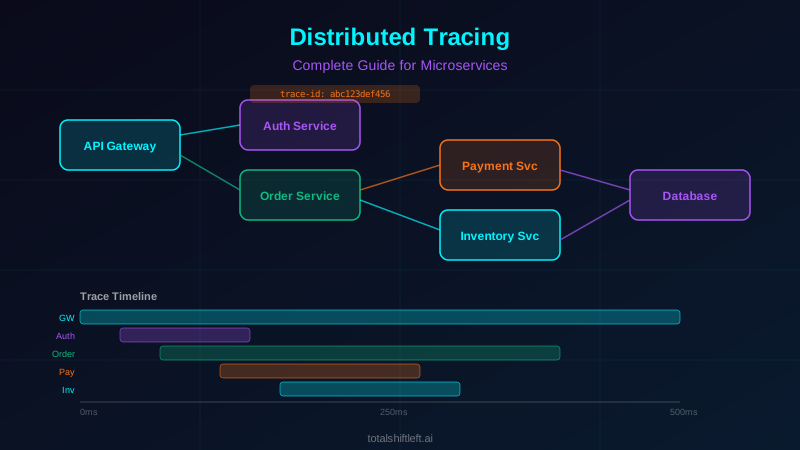
The collection layer sits between services and the storage backend. The OpenTelemetry Collector is the standard component here. It receives spans from services (via OTLP protocol), processes them (batching, filtering, sampling, attribute enrichment), and exports them to one or more backends. The Collector decouples services from specific backends, enabling backend migration without application changes.
The storage layer persists trace data for querying. Jaeger supports Elasticsearch, Cassandra, and Kafka-based backends. Grafana Tempo uses object storage (S3, GCS) for cost-effective trace retention. The storage choice depends on query patterns, retention requirements, and scale. Most organizations retain detailed traces for 7-14 days and sampled traces for 30-90 days.
The visualization layer provides the interface for querying and analyzing traces. Jaeger UI and Grafana Explore provide trace search, trace detail views (Gantt charts showing span timing), service dependency graphs, and comparison tools. Engineers use this layer during incident response to find the traces associated with errors or latency anomalies.
Ready to shift left with your API testing?
Try our no-code API test automation platform free. Generate tests from OpenAPI, run in CI/CD, and scale quality.
Tools for Distributed Tracing
| Tool | Type | Best For | Open Source |
|---|---|---|---|
| OpenTelemetry | Instrumentation SDK | Vendor-neutral trace instrumentation | Yes |
| Jaeger | Trace Backend | Production-scale trace storage and analysis | Yes |
| Zipkin | Trace Backend | Simple deployments and quick prototyping | Yes |
| Grafana Tempo | Trace Backend | Cost-effective storage with Grafana integration | Yes |
| AWS X-Ray | Cloud Tracing | AWS-native distributed tracing | No |
| Datadog APM | Full Platform | Unified tracing with metrics and logs | No |
| Lightstep | Trace Analysis | High-cardinality trace analysis at scale | No |
| Honeycomb | Observability | Event-based trace exploration and analysis | No |
| SigNoz | Full Platform | Open-source alternative to Datadog | Yes |
| Dynatrace | Full Platform | AI-powered root cause analysis | No |
When selecting tools, consider how tracing integrates with your broader testing and observability strategy. The instrumentation layer (OpenTelemetry) should be decoupled from the backend choice to preserve flexibility.
Real-World Example: Payment Processing Pipeline
Problem: A fintech company processing 50,000 transactions per hour experienced intermittent payment failures affecting 0.3% of transactions. Monitoring showed elevated error rates in the payment gateway service, but the errors were generic timeout exceptions. The team spent an average of 4 hours per incident manually correlating logs across 8 services involved in payment processing to identify the root cause.
Solution: The team instrumented all 8 payment pipeline services with OpenTelemetry, deployed Jaeger as the trace backend, and ensured W3C Trace Context propagation across all HTTP and Kafka boundaries. They added custom span attributes for business context: payment method, transaction amount range, merchant category, and customer region.
They also implemented tail-based sampling to retain 100% of error traces and 100% of traces with latency above the p95 threshold, while sampling only 5% of successful, normal-latency traces.
Results: On the next incident, the team queried Jaeger for traces with error status in the payment gateway. Within 3 minutes, they identified the pattern: all failing transactions involved a specific third-party fraud detection service that was intermittently responding after the 2-second timeout. The trace showed the exact call chain: API Gateway → Payment Service → Fraud Detection (timeout) → Payment Gateway (generic error). The fix was a configuration change to increase the fraud detection timeout and add a circuit breaker. Total diagnosis time dropped from 4 hours to under 10 minutes.
Debugging microservices with distributed tracing
Debugging microservices is different from debugging a monolith for four reasons. Network boundaries add failure modes (DNS, TLS handshakes, pool exhaustion, misrouting) that are transient and hard to reproduce locally. Error context is stripped at each boundary — Service B's stack trace becomes Service A's generic "downstream error". Timing-dependent bugs (races, stale caches, eventual-consistency windows, mismatched timeouts) appear and vanish on their own. And the blast radius is unpredictable: a slow query in inventory causes order-service timeouts, gateway retries and more load on inventory.
Traces fix the core problem because they record causation, not just co-occurrence: the parent-child links say A called B, B called C, C failed. Logs from three services at the same second only suggest it.
Six techniques that find most root causes
- Latency waterfall analysis — find the critical path (the chain of spans that sets total duration) and look for the span that is far slower than usual. An 800 ms database span in a service that normally answers in 50 ms is your bottleneck.
- Error propagation tracing — start from the user-facing error and walk down the span tree; the deepest span with error status is the origin. Then check how each hop above it handled the error.
- Fan-out bottleneck detection — when A calls B, C and D in parallel, total latency is the slowest branch. If D takes 500 ms while B and C take 50-60 ms, optimizing B and C changes nothing.
- Retry storm identification — several sibling spans from the same parent to the same downstream service mean retries. If each retry lands on a service that is already struggling, you need a circuit breaker, not more retries.
- Timeout chain analysis — in A → B → C → D, each caller should wait longer than its callee. Spans cut off by a parent's timeout before they finish show a misconfigured chain.
- Trace comparison — for intermittent problems, pull a failing and a successful trace for the same endpoint and time window and diff them. Extra calls, different code paths or one span 100x slower point to the trigger.
Failure patterns and their trace signatures
| Pattern | What the trace shows | Usual fix |
|---|---|---|
| Cascading timeouts | Repeated timeout errors on spans calling one downstream service, growing durations, retry siblings | Circuit breakers at each boundary; timeouts that shrink with depth |
| Connection pool exhaustion | One service's spans are long, with a gap before the first database operation (waiting for a connection) | Separate pools for batch and real-time work, fail-fast pool timeouts, fix slow queries |
| Partial fan-out failure | Most parallel children OK, one ERROR, and the parent fails anyway | Graceful degradation for non-critical branches |
| Stale cache | A cache hit (no downstream span) followed by failures further down; a cache-miss trace succeeds | Invalidation events, shorter TTLs, cache versioning |
| Token expiry race | Mixed 200 and 401 results from the same auth-dependent service in a short window | Refresh tokens before expiry; serialize refreshes |
The trace-to-log workflow
During an incident the loop is always the same: query the trace backend by service, error status, latency or endpoint; read the waterfall to find the failing or slow span; pivot to logs with that span's trace ID and span ID; read the error, stack trace and payload there. The pivot only works if every structured log line carries trace_id and span_id and your log store can query on them — which is why structured logging belongs in the same rollout as tracing. Grafana's Tempo, Prometheus and Loki stack is built for this jump between metrics, traces and logs.
The same moves work before production. Traces from an integration run show which hop broke, without parsing test-runner output. When an API run fails in Shift-Left API, failure analysis first sorts the red tests into a few causes with a verdict on each (test defect, data issue, environment problem or suspected product bug), which tells you whether to open the trace backend at all.
Example: a checkout latency spike
An online marketplace saw checkout p99 jump from 1.2 to 8+ seconds a few times a day at peak, with no single service erroring. Querying for checkout traces over 5 seconds showed the inventory stock-check span taking 3-4 seconds instead of 30 ms — and only for products with more than 50 variants, where the query fell back to a table scan. Fast and slow traces had identical span trees; only that span's duration differed. An index fixed it. Because the bug needs real concurrency and varied data, it slipped past functional tests; a stress run of the existing checkout API tests, bound to a data set that includes high-variant products, is the way to catch the next one before release — Shift-Left API's load testing builds such runs from tests you already have and splits each step's time into connection wait, DNS, connect, TLS, time to first byte and download (load testing is a paid add-on, included in the Trial).
Jaeger for microservices debugging
Jaeger is an open-source, CNCF-graduated distributed tracing backend, originally built at Uber. It stores spans and gives you four debugging tools: trace search (by service, operation, tags, duration and time window), the waterfall view, trace comparison (two traces side by side) and a service dependency graph built from real traffic.
Jaeger components
- Instrumentation: Jaeger's own client libraries are deprecated; instrument with OpenTelemetry SDKs and export to Jaeger over OTLP.
- Collector: receives, validates and indexes spans; scales horizontally and can write to Kafka as a buffer.
- Ingester: reads from Kafka and writes to storage in the streaming setup.
- Query service and UI: the API and web UI used for search, waterfall, comparison and the dependency graph.
- Storage: Elasticsearch/OpenSearch (richest queries) or Cassandra (easier write scaling), plus remote-storage plugins.
- Kubernetes Operator: deploys all-in-one (development), production (separate components) or streaming (with Kafka) topologies.
A production Jaeger architecture
Services export OTLP to an OpenTelemetry Collector, which applies tail-based sampling (keep every error and slow trace), enriches attributes and forwards to the Jaeger Collector. High-throughput deployments put Kafka between the Jaeger Collector and storage. Most teams keep full traces for 7-14 days. Add Jaeger as a Grafana data source so a click on a latency graph opens the matching traces.
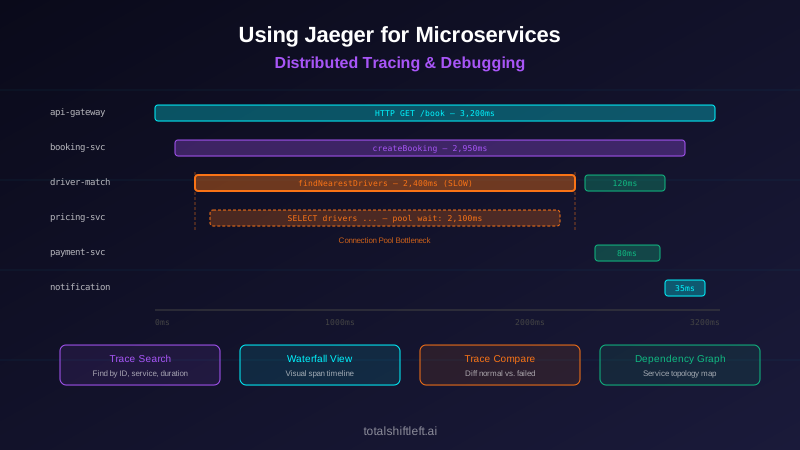
Debugging step by step with Jaeger
A booking API intermittently took 8-12 seconds instead of 500 ms; averages and error rates looked normal.
- Search:
booking-servicetraces longer than 5 seconds in the last hour returned dozens of matches. - Waterfall: in a slow trace,
driver-matching-service.findNearestDriverstook 7.8 seconds; every other span was under 50 ms. - Span details: the query itself took 600 ms; the span log recorded about 7.2 seconds waiting for a database connection.
- Compare: a normal trace of the same operation finished in 450 ms with no pool wait.
- Correlate: pool metrics sat at 20 of 20 connections during spikes — a batch job updating driver locations was holding them.
- Fix and verify: separate pools for batch and real-time work, a 500 ms pool timeout to fail fast, and traces confirming latency under 600 ms afterwards.
Query Jaeger from scripts and tests
The UI is for exploring; the HTTP API is for finding:
# every errored trace in the orders service in the last 30 minutes
curl -s "http://jaeger:16686/api/traces?service=orders&tags=%7B%22error%22%3A%22true%22%7D&lookback=30m&limit=50" \
  | jq -r '.data[] | "\(.traceID) \(.spans[0].operationName)"'

# traces slower than 2 seconds
curl -s "http://jaeger:16686/api/traces?service=orders&minDuration=2s&lookback=1h" \
  | jq -r '.data[] | {id: .traceID, ms: (.spans | map(.duration) | max / 1000)}'

# the five slowest spans in one trace
curl -s "http://jaeger:16686/api/traces/4bf92f3577b34da6a3ce929d0e0e4736" \
  | jq -r '.data[0].spans | sort_by(-.duration)[0:5][]
           | "\(.process.serviceName) \(.operationName) \(.duration/1000)ms"'
Jaeger vs Zipkin vs Grafana Tempo
Jaeger offers adaptive sampling, a component architecture that scales to large deployments and native OTLP ingestion. Zipkin is simpler to run and fine for small environments. Grafana Tempo stores traces in object storage (S3, GCS) and is the cheapest to retain at volume, with search through Grafana. Because all three accept OpenTelemetry data, you can switch backends without re-instrumenting.
Free PDF guide (12 pages)
Top 50 API Testing Mistakes
50 real-world API testing mistakes organized by category — from authentication to performance — each with a concrete fix strategy.
Download FreeDistributed tracing challenges and how to solve them
Incomplete Trace Context Propagation
Challenge: A single service that does not propagate trace context breaks the trace chain. Downstream spans appear as orphaned root traces, making end-to-end analysis impossible. This commonly happens with custom HTTP clients, async operations, or services written in languages without auto-instrumentation support.
Solution: Implement a propagation verification test in your CI/CD pipeline. For every service-to-service integration, verify that the outgoing request includes the traceparent header with a valid trace ID matching the incoming request. This is a form of contract testing that validates observability contracts alongside API contracts.
High Cardinality Data Explosion
Challenge: Adding too many unique values as span attributes (user IDs, session IDs, full request bodies) creates high-cardinality data that explodes storage costs and slows down queries.
Solution: Be deliberate about which attributes you add. Use low-cardinality attributes for indexing (service name, HTTP method, status code, error type) and reserve high-cardinality attributes for non-indexed fields. Store request/response bodies in logs linked by trace ID rather than as span attributes.
Sampling Bias
Challenge: Head-based sampling randomly discards traces at the entry point. This means some error traces and slow traces are never captured. At 1% sampling, you miss 99% of interesting traces.
Solution: Implement tail-based sampling using the OpenTelemetry Collector's tail sampling processor. Keep 100% of traces with errors, 100% of traces exceeding latency thresholds, and sample normal traces at a lower rate. This ensures you always have complete data for the traces that matter most.
Async and Event-Driven Architectures
Challenge: Trace context propagation is straightforward for synchronous HTTP calls but more complex for async patterns. Message queues, event buses, and scheduled jobs do not automatically carry trace context.
Solution: For message-based communication, inject trace context into message headers at the producer and extract it at the consumer. OpenTelemetry provides instrumentation for Kafka, RabbitMQ, and SQS that handles this automatically. For scheduled jobs triggered by events, create a new trace that references the originating trace as a link rather than a parent.
Multi-Language Service Instrumentation
Challenge: Organizations often have microservices written in different languages (Java, Python, Go, Node.js). Ensuring consistent instrumentation across all languages requires effort.
Solution: OpenTelemetry provides SDKs for all major languages with consistent APIs. Use auto-instrumentation where available (Java Agent, Python auto-instrumentation, Node.js auto-instrumentation) to minimize per-service effort. Standardize on the same span naming conventions and attribute keys across languages through a shared instrumentation guide.
Clock Skew Distorts Timelines
Challenge: Span timestamps come from each host's clock. Unsynchronized clocks make child spans appear to start before their parent, produce negative gaps and turn the waterfall into fiction.
Solution: Synchronize every host and node to the same NTP source and alert when drift exceeds a few milliseconds. Jaeger's UI adjusts child spans for clock skew, but treat that as a safety net, not a fix.
Trace Data Retention Costs
Challenge: Storing every span from every traced request for 30+ days generates significant storage costs, especially at high traffic volumes.
Solution: Implement tiered retention. Store full-fidelity traces for 7-14 days in a hot tier (Elasticsearch, Cassandra) for active debugging. Move aggregated trace summaries to a cold tier (object storage) for 90-day trend analysis. Use Grafana Tempo with S3 backend for cost-effective long-term storage.
Best Practices for Implementation
- Adopt OpenTelemetry as your instrumentation standard across all services and languages
- Use auto-instrumentation as the baseline and add manual instrumentation only for business-critical code paths
- Implement W3C Trace Context propagation across every service boundary, including async messaging
- Deploy the OpenTelemetry Collector as a centralized processing layer between services and the trace backend
- Implement tail-based sampling to retain 100% of error and high-latency traces
- Add business context as span attributes: customer tier, feature flags, transaction type
- Verify trace context propagation in your CI/CD pipeline with automated integration tests
- Name spans consistently across services:
{service}.{operation}(e.g.,payment.processCharge) - Set appropriate trace data retention policies based on debugging needs and cost constraints
- Link traces to logs by including trace ID and span ID in every structured log entry
- Build trace-based SLOs: track the percentage of traces that complete within latency targets
- Create saved trace queries for common investigation patterns to speed up incident response
Trace-based SLOs measure latency in production; it helps to hold the same targets before release. Shift-Left API lets you define performance targets, such as "checkout p95 under 800 ms and errors under 1% on staging", that are judged continuously against the response times of ordinary functional test runs, and inside load tests when you run them. Linked to a requirement, a target shows met or missed in the traceability matrix's Under load column beside the functional verdict. Performance targets are part of the performance and load testing add-on, a paid add-on to Professional, Custom and Enterprise licences that the Trial includes, although the functional-run check does not require running any load.
Distributed tracing implementation checklist
- ✔ OpenTelemetry SDK is installed and configured in every microservice
- ✔ Auto-instrumentation covers HTTP, database, and messaging operations
- ✔ W3C Trace Context headers propagate correctly across all service boundaries
- ✔ Trace context propagates through message queues and async operations
- ✔ A trace backend (Jaeger, Tempo, or commercial) is deployed and receiving spans
- ✔ OpenTelemetry Collector is deployed for centralized span processing
- ✔ Tail-based sampling retains all error and high-latency traces
- ✔ Business context attributes are attached to spans (customer tier, transaction type)
- ✔ Structured logs include trace ID and span ID for cross-pillar correlation
- ✔ Span naming follows a consistent convention across all services
- ✔ Service dependency graph is generated from live trace data
- ✔ Trace context propagation is validated in CI/CD integration tests
- ✔ Data retention policies are configured for cost-effective storage
- ✔ On-call runbooks include trace query templates for common incident types
A trace, from the header to the assertion
A trace is a tree of spans stitched together by one header. This is the whole mechanism — the caller injects, the callee extracts, and the backend reassembles:
traceparent: 00-4bf92f3577b34da6a3ce929d0e0e4736-00f067aa0ba902b7-01
             │  │                                │                │
             │  │                                │                └─ flags (01 = sampled)
             │  │                                └─ parent span id (8 bytes)
             │  └─ trace id (16 bytes, constant for the whole request)
             └─ version
Instrument once at the edge of each service and the ids propagate themselves; then a test can assert on the shape of the trace, not just the response:
# service: extract the incoming context, create a child span, inject on the way out
from opentelemetry import trace
from opentelemetry.propagate import extract, inject

tracer = trace.get_tracer("inventory")

def handle(request):
    ctx = extract(request.headers)                       # continue the caller's trace
    with tracer.start_as_current_span("reserve_stock", context=ctx) as span:
        span.set_attribute("sku", request.json["sku"])
        downstream = {}
        inject(downstream)                               # pass it on
        return call_warehouse(request.json, headers=downstream)
Capture the same id in the test client, so a failing test hands you the exact trace instead of a timestamp to search around, and assert on the trace's shape:
def test_place_order_is_traceable(client, jaeger):
    r = client.post("/v1/orders", json={"sku": "A-1", "qty": 2})
    trace_id = r.headers["traceparent"].split("-")[1]
    spans = jaeger.get(f"/api/traces/{trace_id}").json()["data"][0]["spans"]
    services = {s["process"]["serviceName"] for s in spans}
    assert {"gateway", "inventory", "billing"} <= services     # context survived every hop
    assert not [s for s in spans if s.get("tags", {}).get("error")]
    reserve = [s for s in spans if s["operationName"] == "reserve_stock"]
    assert len(reserve) == 1, f"N+1 call pattern: {len(reserve)} reserve_stock spans"
The last assertion turns a pattern you once debugged (an accidental fan-out) into a regression test, so it cannot come back unnoticed.
Distributed tracing FAQ
What is distributed tracing in microservices?
Distributed tracing is the practice of tracking a single request as it flows through multiple microservices. Each service creates a "span" representing its work, and all spans are linked by a shared trace ID. This creates a complete timeline showing exactly how the request was processed, how long each service took, and where failures or bottlenecks occurred.
How does OpenTelemetry support distributed tracing?
OpenTelemetry provides vendor-neutral SDKs and APIs for instrumenting applications with distributed tracing. It handles trace context creation, span management, context propagation across service boundaries (via HTTP headers or message metadata), and telemetry export to backends like Jaeger, Zipkin, or commercial platforms. It is the CNCF standard for observability instrumentation.
What is trace context propagation?
Trace context propagation is the mechanism that carries trace identity (trace ID and parent span ID) across service boundaries. When Service A calls Service B, the trace context is injected into the request (typically as HTTP headers using the W3C Trace Context standard). Service B extracts this context and creates child spans linked to the same trace.
How do I choose between Jaeger and Zipkin for distributed tracing?
Jaeger and Zipkin are both open-source distributed tracing backends. Jaeger offers more advanced features including adaptive sampling, a more scalable architecture with Kafka-based ingestion, and native OpenTelemetry support. Zipkin is simpler to deploy and has a smaller operational footprint. Choose Jaeger for production-scale deployments and Zipkin for smaller environments or quick prototyping.
How do I use Jaeger to debug latency issues in microservices?
Search the Jaeger UI (or its HTTP API) for traces of the affected service above a duration threshold, open one and find the longest span on the critical path, read that span's tags and logs (query, status code, pool wait), then compare it with a normal trace of the same operation. The difference between the two span trees is usually the root cause.
How do I debug intermittent failures in microservices?
Keep every error trace with tail-based sampling, then pull failing and successful traces for the same endpoint and time window and compare them. An extra downstream call, a much slower span or a different code path points to the condition that triggers the failure: a data pattern, a timing window or one unhealthy instance.
Sources and further reading
- OpenTelemetry documentation — the vendor-neutral tracing, metrics and logs standard.
- W3C Trace Context — the header format that propagates a trace across services.
- Jaeger documentation — the open-source distributed tracing backend.
- Jaeger architecture — collector, query, storage and ingester components.
- OpenTelemetry Collector tail sampling processor — keep every error and slow trace.
- Grafana Tempo documentation — object-storage trace backend.
Key takeaways
- Distributed tracing is not optional for organizations running microservices in production.
- Without it, debugging cross-service failures devolves into time-consuming log correlation exercises that extend MTTR and frustrate engineering teams.
- The path to effective distributed tracing is clear: adopt OpenTelemetry for vendor-neutral instrumentation, ensure trace context propagates across every service boundary (HTTP, messaging, async), deploy a trace backend that supports your scale and query patterns, and implement intelligent sampling that captures the traces you need while controlling costs.
- Debugging with traces is a small set of repeatable moves: read the waterfall's critical path, follow the first error span, compare a failing trace with a good one, then pivot to logs by trace ID.
- Jaeger is a solid open-source backend: instrument with OpenTelemetry, put the OTel Collector (with tail sampling) in front of it, and query its API from tests as well as from the UI.
Want the same "which hop broke" answer before release? Start a free trial: generate API tests and multi-step workflows from your OpenAPI spec, run them against staging with tracing on, and let failure analysis tell you whether to open the trace backend or fix the environment first.
Related Articles: Observability vs Monitoring in DevOps | OpenTelemetry for Microservices Observability | Logging Strategies for Microservices Testing | Root Cause Analysis in Distributed Systems | Microservices Testing
Ready to shift left with your API testing?
Import your OpenAPI spec and get a runnable test suite, in our cloud or on your own infrastructure.