
Centralized Logging for Microservices: Tools & Strategy
Quick answer
Microservices logging strategies are deliberate conventions for what to log, how to format it, and how to make it queryable across distributed services — structured JSON logs with consistent fields, correlation IDs that link every service's log entries for a single request, centralized aggregation via the ELK stack or Grafana Loki, and defined ERROR/WARN/INFO/ DEBUG conventions. Teams without this spend 26%+ of debugging time searching scattered logs.
Reviewed by Sushant Joshi
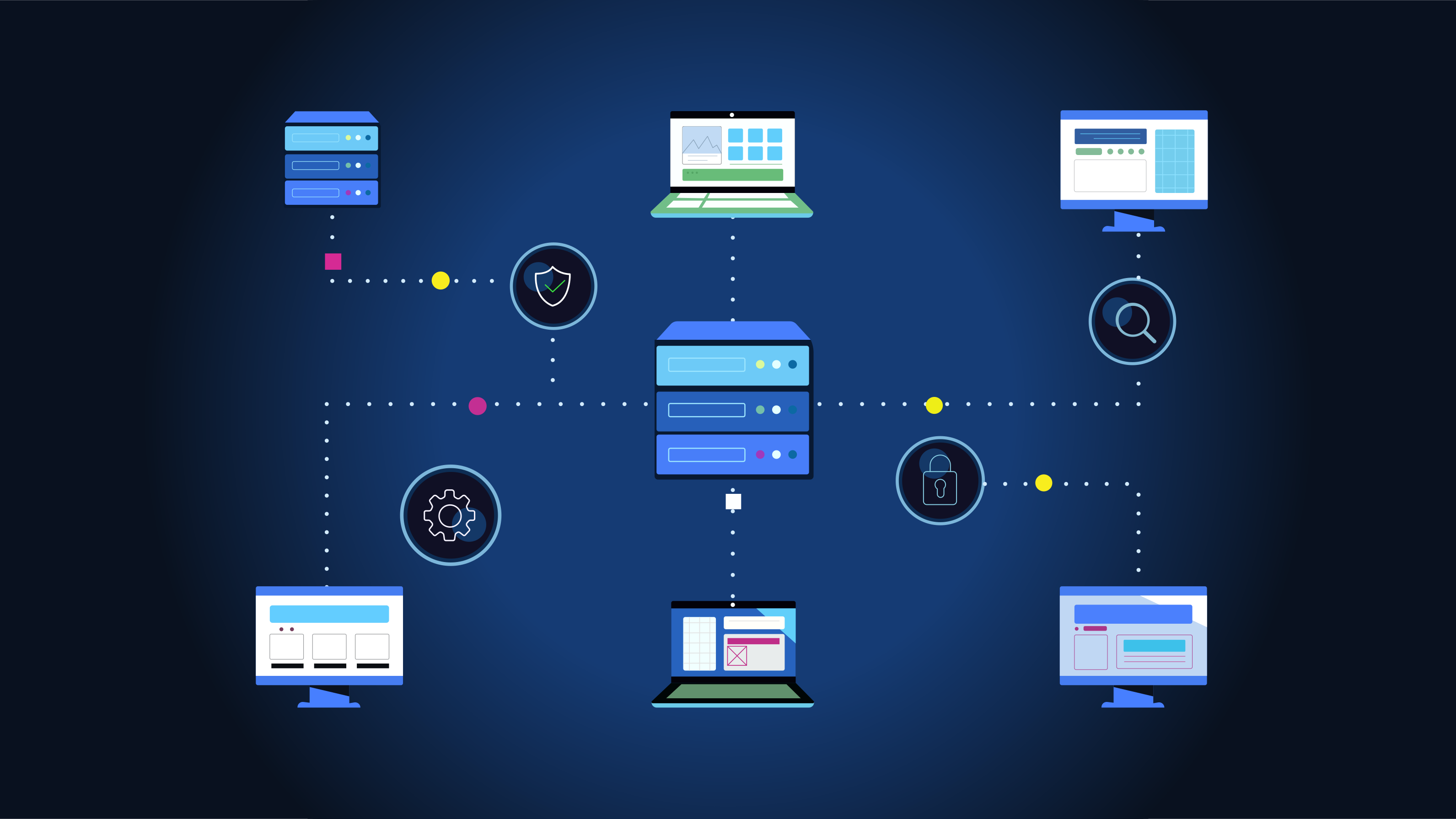
Microservices logging strategies are structured approaches to generating, collecting, and analyzing log data across distributed services. Effective strategies use structured JSON logging with correlation IDs, centralized log aggregation via platforms like the ELK stack, and consistent log level conventions to transform scattered service logs into a unified, searchable debugging resource.
A 2025 survey by Logz.io found that engineering teams spend an average of 26% of their debugging time searching through logs—and that percentage doubles for teams running microservices without a centralized logging strategy. The core problem is not that microservices generate too many logs. The problem is that those logs are scattered, inconsistent, and disconnected.
When your monolith logs to a single file, grep is a viable debugging tool. When your 30 microservices log to 30 different locations in 30 different formats, grep is useless. You need a strategy that standardizes how logs are generated, where they are collected, and how they are connected across service boundaries.
This guide covers the logging strategies that make microservices testing and debugging effective: structured logging, correlation IDs, centralized aggregation, log level conventions, and the specific patterns that connect logging to distributed tracing and observability practices. Whether you are building new services or retrofitting logging into an existing microservices architecture, these strategies transform logging from noise into signal.
In this guide
- What Are Microservices Logging Strategies?
- Why Logging Strategies Matter for Microservices Testing
- Core Components of Effective Microservices Logging
- Structured Logging Implementation
- Architecture: Centralized Log Aggregation
- Tools for Microservices Logging
- Real-World Example: Integration Test Debugging
- Microservices logging challenges and how to solve them
- Best Practices for Microservices Logging
- Microservices Logging Readiness Checklist
- Structured logs that a test can assert on
- Microservices logging FAQ
What Are Microservices Logging Strategies?
Microservices logging strategies are the deliberate decisions about what to log, how to format it, where to send it, and how to make it queryable across a distributed system. They are not about choosing a logging library. They are about establishing conventions and infrastructure that make logs useful for debugging, testing, and operational awareness.
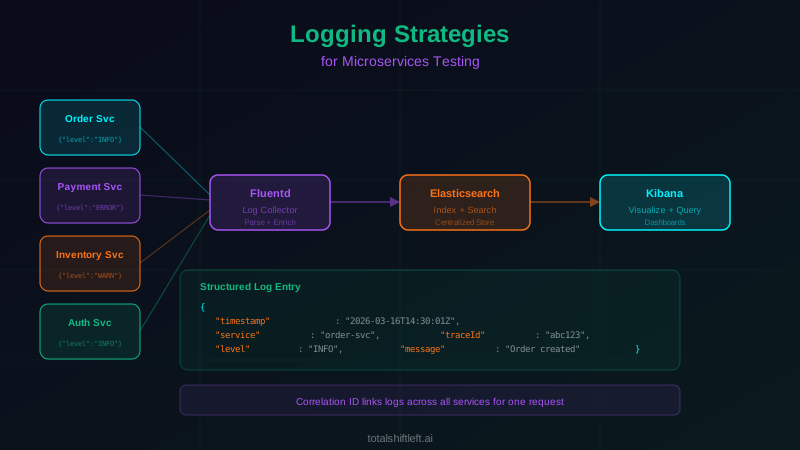
A logging strategy answers five questions. What format should log entries use? (Structured JSON with consistent field names.) What context should every log entry include? (Timestamp, service name, log level, trace ID, request ID.) Where should logs be aggregated? (Centralized system like Elasticsearch or Grafana Loki.) How should logs connect to distributed traces? (Shared trace IDs and span IDs.) How should log levels be used consistently across all services? (Defined conventions for ERROR, WARN, INFO, DEBUG.)
Without explicit answers to these questions, each development team makes independent decisions. One team logs plain text, another logs JSON. One team uses "error" for everything unexpected, another reserves it for fatal conditions. One team includes request IDs, another does not. The result is a logging landscape that cannot be queried, correlated, or analyzed as a unified system—which defeats the purpose of centralized logging entirely.
Why Logging Strategies Matter for Microservices Testing
Test Failure Diagnosis
When an integration test or end-to-end test fails against a microservices environment, the test runner reports the failure symptom: "expected 200, got 500" or "timeout after 30 seconds." The logs tell you why. But only if every service in the test environment produces structured, correlated logs that you can query by the test's request identifier. Without this, test failure investigation requires the same manual log-hunting that production debugging does.
Verifying Business Logic Across Services
Some business requirements span multiple services. An order creation involves the order service, inventory service, payment service, and notification service. Testing that the entire flow works correctly requires verifying behavior in each service. Structured logs with correlation IDs let test suites query for all log entries related to a specific test request and verify that each service performed its expected operations.
Detecting Silent Failures
Not all failures produce errors visible to the caller. A service might swallow an exception, return a default value, and log a warning. The test passes (it received a valid response) but the behavior is incorrect. Log monitoring during tests catches these silent failures—warnings and errors that occur during ostensibly successful test executions.
Performance Regression Detection
Log timestamps, combined with trace data, reveal performance regressions in CI/CD pipelines. If the same integration test suite takes 20% longer this week compared to last week, log analysis can identify which service calls are slower, which database queries take longer, and whether new log volume indicates increased processing.
Core Components of Effective Microservices Logging
Structured Log Format
Every log entry should be a JSON object with consistent field names across all services. The minimum fields are: timestamp (ISO 8601 with timezone), level (ERROR, WARN, INFO, DEBUG), service (service name), message (human-readable description), traceId (distributed trace identifier), and spanId (current span identifier).
Additional contextual fields enrich the log: requestId, userId, httpMethod, httpPath, httpStatusCode, durationMs, errorType, errorMessage, and any business-specific attributes (orderId, paymentMethod, customerTier).
The key discipline is consistency. Every service must use the same field names and formats. timestamp in one service and ts in another prevents unified querying. Enforce consistency through shared logging libraries or configuration templates.
Correlation IDs
A correlation ID (typically the trace ID from distributed tracing) links all log entries across all services for a single request. When a request enters the system, it receives a trace ID. Every service that handles the request includes this ID in every log entry it produces. Querying the log aggregation system for this single ID returns the complete log history of the request across all services.
For services that produce logs outside of request context (background jobs, scheduled tasks, event consumers), generate a unique correlation ID at the entry point and propagate it through all downstream operations. The goal is: every log entry is connected to a workflow that can be queried as a unit.
Log Levels
Consistent log level usage across services is essential for filtering and alerting. Define and document the meaning of each level:
- ERROR: The operation failed and requires attention. Unhandled exceptions, data integrity violations, failed external dependencies that block the request. Every ERROR log should be actionable.
- WARN: Something unexpected happened but the operation continued. Retries that succeeded, cache failures with fallback, deprecated API usage, approaching resource thresholds. WARN logs indicate potential future problems.
- INFO: Significant business events and request lifecycle markers. Request received, request completed, order created, payment processed. INFO is the default production level.
- DEBUG: Detailed technical information for development and investigation. Variable values, branching decisions, query parameters, intermediate results. DEBUG is disabled in production by default.
Log Enrichment
Raw log data becomes far more useful when enriched with metadata. Add deployment version to every log entry so you can filter logs by release. Add environment (production, staging, test) so logs from different environments are distinguishable. Add pod/container ID for Kubernetes environments so you can identify which instance produced the log.
For testing environments specifically, enrich logs with test suite name, test case ID, and test run ID. This enrichment enables precise filtering: "show me all logs from the order service during test case TC-1234 in run #567."
Contextual Logging
Contextual logging attaches request-scoped data to every log entry automatically, without requiring developers to manually include context in each log statement. In Java, this is achieved with MDC (Mapped Diagnostic Context). In Node.js, libraries like pino and cls-hooked provide similar functionality. In Go, context.Context carries logging fields.
Ready to shift left with your API testing?
Try our no-code API test automation platform free. Generate tests from OpenAPI, run in CI/CD, and scale quality.
The middleware at the service entry point extracts correlation IDs, user IDs, and other context from the incoming request and attaches them to the logging context. Every subsequent log statement in that request's execution automatically includes these fields. This eliminates the most common logging failure: log entries that lack the context needed to connect them to a specific request.
Structured Logging Implementation
Implementing structured logging across a microservices fleet requires three things: a shared logging configuration, framework-specific interceptors, and output format standardization.
Start with a shared logging configuration that defines the JSON schema for log entries. This schema specifies the required fields, their types, and their format. Distribute this configuration as a shared library or configuration file that every service includes. For Node.js services, a shared pino configuration. For Java services, a shared Logback configuration with JSON encoder. For Python services, a shared structlog configuration.
Framework interceptors automatically capture request metadata. An Express.js middleware captures httpMethod, httpPath, httpStatusCode, and durationMs for every request. A Spring Boot filter does the same for Java services. These interceptors eliminate the need for
developers to manually log request details—reducing inconsistency and increasing coverage.
Output standardization ensures that all services produce logs in the same format regardless of the logging library they use. JSON is the universal choice because every log aggregation system can parse it. Configure log output to write to stdout (standard in containerized environments), where the container runtime or a log agent collects and forwards it to the aggregation system.
Architecture: Centralized Log Aggregation
A centralized logging architecture for microservices consists of four layers: log generation, log collection, log processing, and log storage/query.
Services generate structured JSON logs to stdout. In Kubernetes environments, the container runtime captures stdout and writes it to node-level log files. A log agent (Filebeat, Fluentd, or Vector) runs on each node as a DaemonSet, reads the log files, and forwards the entries to the processing layer.
The processing layer (Logstash, Fluentd, or Vector) receives raw log entries and applies transformations: parsing JSON, enriching with Kubernetes metadata (pod name, namespace, deployment), normalizing field names, and routing logs to the appropriate storage backend.
The storage and query layer is where engineers interact with logs. Elasticsearch stores logs and provides full-text search and aggregation capabilities. Kibana provides the visualization and exploration interface. Alternatively, Grafana Loki stores logs with label-based indexing optimized for Grafana integration. The choice depends on query patterns: Elasticsearch excels at full-text search across log messages; Loki excels at label-based filtering with lower storage costs.
For testing environments, the same architecture applies but with separate indices or labels that isolate test logs from production logs. Test logs often have higher DEBUG-level verbosity and shorter retention periods. Pairing these logs with an aggregated view of test-run health and trends gives teams a single place to spot failing services before the log volume becomes overwhelming.
Tools for Microservices Logging
| Tool | Type | Best For | Open Source |
|---|---|---|---|
| ELK Stack | Full Platform | Full-text log search and visualization | Yes |
| Grafana Loki | Log Storage | Cost-effective logging with Grafana integration | Yes |
| Fluentd | Log Collector | Flexible log routing and processing | Yes |
| Filebeat | Log Shipper | Lightweight log forwarding to Elasticsearch | Yes |
| Vector | Log Pipeline | High-performance log collection and transformation | Yes |
| Pino | Node.js Logger | Fast structured logging for Node.js services | Yes |
| Logback | Java Logger | Standard structured logging for Java/Spring Boot | Yes |
| structlog | Python Logger | Structured logging for Python services | Yes |
| Serilog | .NET Logger | Structured logging for .NET services | Yes |
| Datadog Logs | Full Platform | Unified log management with APM integration | No |
| Splunk | Log Analytics | Enterprise log analysis and alerting | No |
| Papertrail | Cloud Logging | Simple cloud-hosted log aggregation | No |
These tools integrate with distributed tracing backends and testing tool chains to create a complete observability stack for microservices.
Real-World Example: Integration Test Debugging
Problem: A healthcare SaaS company ran nightly integration tests across 22 microservices. Test failure rates averaged 12%, but 60% of those failures took more than 2 hours to diagnose because engineers had to manually search logs across multiple services. The test runner reported "assertion failed: expected patient record to include insurance details" but did not indicate which service dropped the insurance data or why.
Solution: The team implemented a unified logging strategy. They standardized on structured JSON logging across all services using shared library configurations. Every log entry included the test run ID, test case ID, and trace ID. They deployed the ELK stack for centralized log aggregation and configured Kibana dashboards specifically for test debugging—filtered by test run with service-by-service log timelines.
They also implemented log-level assertions in their test framework: critical business operations (patient record creation, insurance data enrichment, billing calculation) were required to produce specific INFO-level log entries. If a service silently dropped data without logging an error or warning, the test framework flagged the missing log entry as a test failure.
Results: Test failure diagnosis time dropped from an average of 2.2 hours to 18 minutes. The log-level assertions caught 4 silent data-dropping bugs that existing tests had missed for months. Engineers could open Kibana, enter the failing test case ID, and immediately see the complete log timeline across all 22 services—identifying exactly where the insurance data was lost (a missing field mapping in the insurance enrichment service that logged a DEBUG message but not a WARN).
Microservices logging challenges and how to solve them
Inconsistent Log Formats Across Services
Challenge: Different teams use different logging libraries, field names, and formats. The order service logs {"time": "...", "msg": "..."} while the payment service logs {"timestamp": "...", "message": "..."}. Unified querying is impossible without normalization.
Solution: Create shared logging configuration packages for each language in your stack. Publish them as internal libraries that teams include as dependencies. The shared configuration enforces the log schema: field names, timestamp format, JSON structure. Supplement with a CI/CD check that validates log output format against the schema.
Log Volume and Storage Costs
Challenge: Microservices at scale generate terabytes of logs per day. Storing everything is expensive. Reducing log volume risks losing the data you need during an incident.
Solution: Implement tiered log retention. Store DEBUG and verbose INFO logs for 3-7 days. Store WARN and ERROR logs for 30-90 days. Use log sampling for high-volume, low-value log entries (health check requests, routine polling). Configure per-service log level overrides that allow temporarily increasing verbosity for specific services during investigation without changing the global configuration.
Missing Correlation Context
Challenge: Some services do not propagate correlation IDs. Background workers triggered by message queues create log entries without any connection to the originating request. Async operations lose the logging context.
Solution: Instrument message queue consumers to extract trace context from message headers and attach it to the logging context. For background jobs that are not triggered by user requests, generate a workflow correlation ID at the job entry point. Use OpenTelemetry context propagation to automatically carry correlation IDs through async boundaries in supported frameworks.
Free Visual blueprint + guide
Microservices Testing Strategy Blueprint
A visual testing strategy for microservices architectures. Covers testing layers, contract testing, service mesh validation, and tool selection.
Download FreeLog Noise Obscures Signal
Challenge: Services log everything at INFO level—health checks, routine internal operations, framework lifecycle events. When searching for a specific request's logs, the results are buried in noise.
Solution: Audit log statements and adjust levels. Health check responses should be TRACE or DEBUG, not INFO. Framework startup messages should be INFO on first start and DEBUG on restarts. Define what constitutes an INFO-worthy event: meaningful business operations, request lifecycle markers, and state changes. Everything else drops to DEBUG.
Sensitive Data in Logs
Challenge: Logs inadvertently contain sensitive data: authentication tokens, personal information, credit card numbers, medical records. Centralized logging makes this a compliance risk—sensitive data is now stored in a searchable system accessible by operations teams.
Solution: Implement log sanitization at the logging library level. Create a redaction middleware that scrubs known sensitive patterns (credit card regex, SSN patterns, JWT tokens) from log entries before they leave the service. Additionally, establish a logging review process: new log statements that include request or response bodies must be reviewed for sensitive data exposure.
Cross-Language Logging Inconsistency
Challenge: A polyglot microservices architecture (Java, Node.js, Python, Go) means different logging libraries with different default behaviors. Achieving consistent structured output across languages requires per-language configuration.
Solution: Create language-specific logging wrapper libraries that enforce the shared log schema. Each wrapper configures the language's standard logging library (Logback for Java, pino for Node.js, structlog for Python, zerolog for Go) to produce identical JSON output. The wrappers also provide helper functions for common patterns: contextual logging, request logging, and error logging with stack traces.
Best Practices for Microservices Logging
- Use structured JSON logging across all services with consistent field names enforced by shared configurations
- Include trace ID and span ID in every log entry to enable trace-to-log correlation
- Implement contextual logging that automatically attaches request-scoped data to all log entries in a request
- Use correlation IDs for every workflow—request-driven and background job alike
- Define and document log level conventions: reserve ERROR for actionable failures, use INFO for business events
- Deploy centralized log aggregation (ELK, Loki) accessible to all engineering teams
- Create test-specific log enrichment: test run ID, test case ID, test environment
- Implement log-level assertions in integration tests to catch silent failures
- Sanitize logs to remove sensitive data before aggregation
- Configure per-service dynamic log level adjustment for production debugging without redeployment
- Set tiered retention: short retention for DEBUG, long retention for ERROR
- Build Kibana/Grafana dashboards for CI/CD pipeline test result analysis using correlated logs
Microservices Logging Readiness Checklist
- ✔ All services produce structured JSON logs with consistent field names
- ✔ Every log entry includes timestamp, service name, log level, and correlation ID
- ✔ Trace ID and span ID are included for distributed trace correlation
- ✔ Contextual logging automatically attaches request-scoped metadata
- ✔ Log level conventions are documented and enforced across all teams
- ✔ Centralized log aggregation is deployed and receiving logs from all services
- ✔ Log sanitization removes sensitive data before aggregation
- ✔ Test environments enrich logs with test run and test case identifiers
- ✔ Log-level assertions verify critical business operations in integration tests
- ✔ Dynamic log level adjustment is available for production debugging
- ✔ Kibana or Grafana dashboards support cross-service log exploration
- ✔ Log retention policies balance debugging needs with storage costs
- ✔ Logging is integrated with observability tooling for unified debugging
Structured logs that a test can assert on
Unstructured logs are unqueryable and untestable. Emit JSON with the trace id in every record, and the log becomes both a debugging tool and a test surface:
# logging_setup.py — one configuration, every service
import logging, json, sys
from opentelemetry import trace

class TraceJsonFormatter(logging.Formatter):
    def format(self, record):
        ctx = trace.get_current_span().get_span_context()
        payload = {
            "ts":      self.formatTime(record, "%Y-%m-%dT%H:%M:%S.%fZ"),
            "level":   record.levelname,
            "service": SERVICE_NAME,
            "msg":     record.getMessage(),
            "logger":  record.name,
            "trace_id": format(ctx.trace_id, "032x") if ctx.is_valid else None,
            "span_id":  format(ctx.span_id, "016x") if ctx.is_valid else None,
        }
        if record.exc_info:
            payload["error"] = self.formatException(record.exc_info)
        payload.update(getattr(record, "extra_fields", {}))
        return json.dumps(payload)

handler = logging.StreamHandler(sys.stdout)
handler.setFormatter(TraceJsonFormatter())
logging.basicConfig(level=logging.INFO, handlers=[handler])
Because the shape is fixed, the logging contract can be tested like any other — including the rule that matters most, that nothing sensitive is ever written:
def test_logs_are_structured_correlated_and_clean(client, capture_logs):
    r = client.post("/v1/orders", json={"sku": "A-1", "qty": 2, "card": "4111111111111111"})
    records = [json.loads(line) for line in capture_logs.splitlines()]
    assert records, "no logs emitted"
    for rec in records:
        assert {"ts", "level", "service", "msg", "trace_id"} <= set(rec)
        assert "4111111111111111" not in json.dumps(rec), "card number written to the log"
    assert {rec["trace_id"] for rec in records} == {r.headers["traceparent"].split("-")[1]}
Microservices logging FAQ
What is structured logging in microservices?
Structured logging outputs log entries as machine-parseable data (typically JSON) with consistent field names rather than free-text strings. Each log entry includes standardized fields like timestamp, service name, log level, trace ID, span ID, and request context. This enables automated querying, filtering, and aggregation across services—which is impossible with unstructured text logs.
Why do microservices need centralized logging?
Microservices generate logs across dozens of independently deployed services, each running multiple instances. Without centralized logging, debugging requires SSH-ing into individual containers or pods to read local log files. Centralized logging aggregates all service logs into a single searchable system (like Elasticsearch), enabling cross-service log correlation, pattern detection, and efficient debugging.
What are correlation IDs and why do they matter?
Correlation IDs are unique identifiers that propagate through every service in a request chain. When a user request enters the system, it receives a correlation ID that every downstream service includes in its log entries. This allows you to query the centralized log system for a single ID and retrieve every log entry from every service that participated in handling that request.
How should log levels be used in microservices?
Use ERROR for failures requiring immediate attention (unhandled exceptions, data corruption). Use WARN for degraded conditions that do not block the request (cache misses, retry successes, approaching thresholds). Use INFO for significant business events (order created, payment processed). Use DEBUG for detailed technical data needed during development. In production, set the baseline to INFO and enable DEBUG per-service when investigating specific issues.
How does logging support microservices testing?
Effective logging transforms test debugging from guesswork into systematic analysis. When an integration test fails, structured logs with correlation IDs let you trace the exact request path, see which service produced unexpected output, and understand the data flow. Log assertions can also be used in tests to verify that services emit expected log events for critical business operations.
What is the ELK stack and how does it work for microservices logging?
The ELK stack consists of Elasticsearch (search and storage), Logstash (log processing and enrichment), and Kibana (visualization and exploration). Services ship logs to Logstash (or Filebeat), which processes and forwards them to Elasticsearch for indexing. Engineers use Kibana to search, filter, and visualize logs. For microservices, the ELK stack provides the centralized, searchable log repository needed for cross-service debugging.
Sources and further reading
- OpenTelemetry documentation — the vendor-neutral tracing, metrics and logs standard.
- Google SRE Book — Monitoring Distributed Systems — the four golden signals and alerting philosophy.
- Grafana documentation — dashboards and alerting over metrics, logs and traces.
Key takeaways
- Logging in microservices is not about writing more log statements. It is about implementing a strategy that makes every log entry useful, connected, and queryable across your entire distributed system.
- The foundation is structured JSON logging with consistent field names and correlation IDs that link entries across services.
- The infrastructure is centralized aggregation that makes all logs searchable from a single interface.
- The practice is consistent log level usage that separates signal from noise.
- For testing specifically, logging strategies directly impact your team's ability to diagnose test failures quickly.
- Structured, correlated logs turn a vague "integration test failed" into a precise "the insurance enrichment service dropped the coverage field because the mapping configuration is missing field X." That precision is the difference between a 15-minute fix and a 2-hour investigation.
Ready to improve your microservices testing workflow? Start your free trial of Total Shift Left and see how automated API testing, combined with effective logging and observability practices, catches issues before they compound across your service mesh.
Related Articles: Distributed Tracing Explained for Microservices | Debugging Microservices with Distributed Tracing | Observability vs Monitoring in DevOps | Monitoring API Performance in Production | API Testing Strategy for Microservices | DevOps Testing Best Practices
Ready to shift left with your API testing?
Try our no-code API test automation platform free.