
Debugging Microservices with Distributed Tracing
Quick answer
Debugging microservices with distributed tracing means using end-to-end request traces — rather than manually correlating logs across services — to pinpoint which service failed, what error occurred, and how it propagated. Core techniques include latency waterfall analysis, error propagation tracing, fan-out bottleneck detection, retry storm identification, and comparing failing traces against successful ones, which together cut mean time to resolution from hours to minutes.
Reviewed by Smeet Gohel
Debugging microservices with distributed tracing is the practice of using end-to-end request traces to systematically identify the root cause of failures, latency issues, and unexpected behavior in distributed systems. It replaces manual log correlation with structured trace analysis, reducing mean time to resolution from hours to minutes.
Gartner's 2025 infrastructure and operations report found that organizations running microservices spend 42% of their engineering time on debugging and incident response—nearly double the percentage for teams running monolithic applications. The complexity is not in the individual services. The complexity is in the interactions between services.
A checkout failure in an e-commerce platform might involve the API gateway, authentication service, cart service, inventory service, pricing service, payment gateway, notification service, and order service. When the checkout fails, the user sees a generic error. The engineering team sees an alert. Between that alert and the root cause are 8 services, each with its own logs, its own error handling, and its own view of what happened.
Without distributed tracing, debugging this failure means opening log viewers for each service, finding the relevant timestamps, mentally reconstructing the request flow, and testing hypotheses one service at a time. With distributed tracing, you query for the failing trace, see the complete request timeline, identify the failing span, and read the error—all in one view.
This guide covers practical debugging techniques using distributed tracing: the patterns, the workflows, the tools, and the real-world scenarios that every microservices engineer encounters. It builds on the foundations covered in distributed tracing explained and the broader observability vs monitoring framework.
In this guide
- What Makes Microservices Debugging Different
- Why Distributed Tracing Is Essential for Debugging
- Core Debugging Techniques with Traces
- Common Failure Patterns in Microservices
- Debugging Architecture and Workflow
- Tools for Microservices Debugging
- Real-World Example: Checkout Latency Spike
- Debugging microservices challenges and how to solve them
- Best Practices for Microservices Debugging
- Microservices Debugging Readiness Checklist
- Follow one request across every service
- Debugging microservices FAQ
What Makes Microservices Debugging Different
Debugging microservices is fundamentally different from debugging monolithic applications because of four properties of distributed systems.
Network boundaries introduce failure modes that do not exist in monoliths. Every inter-service call can fail due to network partitions, DNS resolution failures, TLS handshake timeouts, connection pool exhaustion, or load balancer misrouting. These failures are transient, non-deterministic, and impossible to reproduce in local development environments.
Error context is lost at service boundaries. When Service A calls Service B and Service B returns a 500 error, Service A typically logs a generic "downstream service error" and returns its own 500 to the caller. By the time the error reaches the user, the original error message, stack trace, and context from Service B are gone. Each service boundary strips diagnostic information.
Timing-dependent bugs are pervasive. Race conditions, stale caches, eventual consistency windows, and timeout mismatches between services create failures that depend on specific timing conditions. These bugs appear intermittently, resist reproduction, and often resolve themselves before anyone investigates—only to recur under similar load conditions.
The blast radius is unpredictable. A failure in one service can cascade through the system in unexpected ways. A slow database query in the inventory service causes timeouts in the order service, which causes retries from the API gateway, which increases load on the inventory service, which makes the original problem worse. Understanding these cascading effects requires a system-wide view that individual service logs cannot provide.
Why Distributed Tracing Is Essential for Debugging
Eliminates Manual Log Correlation
The traditional microservices debugging workflow is: open logs for Service A, find the request, note the timestamp, open logs for Service B, search for requests at that timestamp, repeat for every service in the chain. This process takes 15-60 minutes per incident and is error-prone. Distributed tracing replaces this with a single query: find the trace by trace ID, error status, or affected endpoint. Every service's contribution to the request is immediately visible.
Reveals Causation, Not Just Correlation
Logs from multiple services show what happened at roughly the same time. Traces show what caused what. The parent-child relationship between spans explicitly models causation: Service A called Service B, which called Service C, which threw an error. This causal chain is the debugging information you need. Timestamps can only approximate it.
Enables Comparative Debugging
The most powerful trace-based debugging technique is comparison: pull a failing trace and a successful trace for the same endpoint, then compare them. The differences reveal the root cause. Maybe the failing trace includes a call to a service that the successful trace does not. Maybe one span is 10x slower. Comparison requires structured data that traces provide and unstructured logs do not.
Supports Pre-Production Debugging
Distributed tracing is not only for production debugging. Traces generated during integration testing and CI/CD pipeline execution provide the same diagnostic value. When an integration test fails, the trace shows exactly which service interaction failed and why, eliminating the need to parse test runner output and correlated logs. Modeling those service interactions as multi-step integration test workflows makes the failing hop obvious the moment a test breaks.
Core Debugging Techniques with Traces
Latency Waterfall Analysis
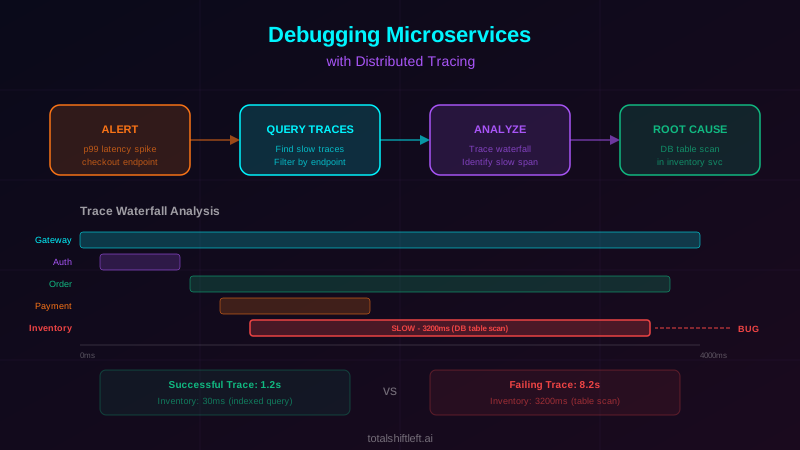
The trace waterfall (Gantt chart) view shows every span's duration and its relationship to other spans. To debug latency issues, examine the waterfall for the critical path—the sequence of spans that determines the total request duration. Look for spans that are disproportionately long relative to their expected duration. A database query span taking 800ms in a service that typically responds in 50ms immediately identifies the bottleneck.
Error Propagation Tracing
When debugging errors, start from the user-facing error and trace backward through the span hierarchy. The first span with an error status is the origin. Examine its attributes and events for the specific error: exception type, error message, HTTP status code. Then examine how the error propagated upstream—did each service handle it gracefully or did it cascade into generic 500 responses?
Fan-Out Bottleneck Detection
Many microservices use parallel fan-out patterns: Service A calls Services B, C, and D concurrently and waits for all responses. The total latency is determined by the slowest response. The trace waterfall reveals which parallel call is the bottleneck. If Service B responds in 50ms, Service C in 60ms, and Service D in 500ms, optimizing B and C has zero impact on total latency.
Retry Storm Identification
Retries are a standard resilience pattern, but misconfigured retries create cascading load that worsens failures. In a trace, retry storms appear as multiple child spans from the same parent to the same downstream service. If you see 3 retry attempts per request, and each retry adds load to an already struggling service, you have identified a retry storm that needs circuit breaker intervention.
Timeout Chain Analysis
In a service chain A → B → C → D, timeouts must be configured hierarchically: A's timeout must be longer than B's, which must be longer than C's. When timeouts are misconfigured, A might timeout before C has a chance to respond, causing unnecessary failures. Trace analysis reveals these misconfigurations by showing spans that are interrupted by parent timeouts before they complete.
Trace Comparison for Intermittent Issues
For intermittent failures, query for both failing and successful traces for the same endpoint within the same time window. Use the tracing tool's comparison feature (Jaeger supports this natively) to overlay the traces. Differences in the span tree—additional service calls, different code paths, varying span durations—point to the conditions that trigger the failure.
Ready to shift left with your API testing?
Try our no-code API test automation platform free. Generate tests from OpenAPI, run in CI/CD, and scale quality.
Common Failure Patterns in Microservices
Cascading Timeout Failures
Pattern: Service D becomes slow. Service C's calls to D start timing out. Service C returns errors to Service B. Service B retries its call to C. The retries multiply the load on C and D, making them slower. Service A sees cascading timeouts from B.
Trace signature: Multiple timeout errors in spans calling the same downstream service, with increasing durations over time. Parent spans show retry patterns.
Resolution: Implement circuit breakers at each service boundary. When a downstream service exceeds error thresholds, the circuit breaker fails fast without making the call, stopping the cascade.
Database Connection Pool Exhaustion
Pattern: Under load, a service exhausts its database connection pool. New requests queue waiting for connections. Response times spike. Upstream services timeout waiting for responses.
Trace signature: A single service shows dramatically elevated span durations with database query spans waiting in queue (visible as gap between span start and first database operation).
Resolution: Increase connection pool size, optimize long-running queries identified through trace analysis, or implement connection pooling middleware like PgBouncer.
Partial Failure in Fan-Out
Pattern: Service A calls Services B, C, and D in parallel. Service C fails, but A does not handle partial failures. The entire request fails even though B and D succeeded.
Trace signature: Two or three parallel child spans succeed (status OK), one fails (status ERROR), and the parent span fails.
Resolution: Implement grac
eful degradation for non-critical fan-out calls. If the recommendation service fails, the product page should still load without recommendations rather than returning an error.
Stale Cache Serving Incorrect Data
Pattern: A service caches data from a downstream service. The downstream data changes but the cache has not expired. Requests receive stale data that causes incorrect behavior downstream.
Trace signature: The trace shows a cache hit (no downstream call) in the caching service, but subsequent services fail because they received outdated data. Comparing with a trace that had a cache miss reveals the discrepancy.
Resolution: Implement cache invalidation events from the data source, reduce cache TTLs for frequently changing data, or use cache versioning.
Authentication Token Expiration Race
Pattern: A service obtains an authentication token with a limited lifetime. Multiple concurrent requests share the token. The token expires mid-batch, causing some requests to fail with 401 errors while others succeed.
Trace signature: Traces within a short time window show mixed results from the same auth-dependent service—some succeed, some fail with 401 errors. The timing correlates with token refresh intervals.
Resolution: Implement proactive token refresh before expiration, or use token refresh middleware that serializes refresh requests and updates the shared token atomically.
Debugging Architecture and Workflow
An effective microservices debugging architecture has three components working together: trace collection, log aggregation, and a correlation layer.
During an incident, the debugging workflow follows a consistent pattern. First, identify the affected traces—query the trace backend by service name, error status, latency threshold, or specific endpoint. Second, examine the trace waterfall to identify the failing or slow span. Third, pivot from the trace to logs—use the span's trace ID and span ID to query the log aggregation system for detailed log entries from the specific service and request. Fourth, examine the log context—error messages, stack traces, request payloads—to understand the specific failure.
This trace-to-log pivot is the critical architectural requirement. It only works if every structured log entry includes the trace ID and span ID, and if the log aggregation system supports querying by these fields. Organizations that implement structured logging strategies alongside distributed tracing get the fastest debugging workflows.
The architecture should also support trace-to-metric correlation. When a metric anomaly triggers an alert (elevated p99 latency, increased error rate), the engineer should be able to query for traces that occurred during the anomaly window with matching characteristics. Grafana's Tempo + Prometheus + Loki stack excels at this cross-pillar correlation.
Tools for Microservices Debugging
| Tool | Type | Best For | Open Source |
|---|---|---|---|
| Jaeger | Trace Analysis | Trace search, comparison, and dependency graphs | Yes |
| Grafana Tempo | Trace Backend | Cost-effective trace storage with Grafana integration | Yes |
| OpenTelemetry | Instrumentation | Consistent trace and log instrumentation | Yes |
| Grafana Loki | Log Aggregation | Trace-correlated log queries | Yes |
| ELK Stack | Log Analysis | Full-text log search and analysis | Yes |
| Datadog | Full Platform | Unified traces, logs, metrics debugging | No |
| Honeycomb | Trace Exploration | High-cardinality trace exploration and queries | No |
| Sentry | Error Tracking | Exception tracking with trace context | Yes |
| Rookout | Live Debugging | Non-breaking breakpoints in production | No |
| Lightrun | Live Debugging | Real-time logs and snapshots without redeployment | No |
| kubectl + stern | Kubernetes Logs | Multi-pod log streaming for Kubernetes services | Yes |
| Grafana | Visualization | Unified dashboard for traces, logs, and metrics | Yes |
Integrate your debugging tools with testing tools for microservices to enable trace-based debugging during both testing and production incident response.
Real-World Example: Checkout Latency Spike
Problem: An online marketplace experienced intermittent checkout latency spikes where p99 response times jumped from 1.2 seconds to 8+ seconds. The spikes lasted 2-5 minutes, occurred 3-4 times per day during peak hours, and affected approximately 5% of users during each spike. Monitoring dashboards showed elevated latency across multiple services, but no single service showed consistent errors.
Solution: The team had OpenTelemetry instrumentation across all 12 checkout-path services with Jaeger as the trace backend. When the next spike occurred, they queried Jaeger for traces exceeding 5 seconds on the checkout endpoint.
The trace waterfall revealed a clear pattern: the inventory service's stock-check span normally took 30ms but was taking 3-4 seconds during spikes. Drilling into the span attributes, they found that the slow requests all involved products with more than 50 variants (sizes and colors). The inventory query was performing a table scan instead of using an index when the variant count exceeded 50.
Comparing slow traces against fast traces confirmed the diagnosis: identical request flow, identical services called, but the inventory span duration differed by 100x for high-variant products.
Results: The team added a database index on the variant lookup query. Checkout p99 latency dropped from 8 seconds to 1.1 seconds during peak hours. The debugging process took 20 minutes from alert to root cause identification—a process that previously took the team 3-4 hours of manual log analysis across services.
Debugging microservices challenges and how to solve them
Missing Traces for Intermittent Failures
Challenge: Head-based sampling discards traces randomly at the entry point. If you sample 5% of traffic, there is only a 5% chance of capturing a specific intermittent failure when it occurs.
Solution: Implement tail-based sampling with the OpenTelemetry Collector. Configure it to retain 100% of traces with error status and 100% of traces with latency exceeding the p95 threshold. This ensures that every interesting trace is captured regardless of the overall sampling rate.
Context Loss in Async Operations
Challenge: When services communicate through message queues or event buses, the trace context is often lost. The consumer creates a new trace with no connection to the producer's trace, making it impossible to follow the full request path.
Solution: Inject trace context into message headers at the producer. OpenTelemetry provides auto-instrumentation for Kafka, RabbitMQ, SQS, and most major messaging systems. For custom messaging, manually inject and extract using the OpenTelemetry propagation API.
Free Visual blueprint + guide
Microservices Testing Strategy Blueprint
A visual testing strategy for microservices architectures. Covers testing layers, contract testing, service mesh validation, and tool selection.
Download FreeToo Many Traces, Hard to Find Relevant Ones
Challenge: Production systems generate thousands of traces per minute. Finding the specific trace that represents the reported issue requires effective filtering.
Solution: Add business context as span attributes: user ID, order ID, session ID, feature flag state. When a user reports "my checkout failed at 2:15 PM," query for traces matching the user ID and time window rather than sifting through all checkout traces. Also tag traces with deployment version to isolate issues introduced by specific releases.
Debugging in Local Development
Challenge: Engineers cannot reproduce production-level distributed tracing in local development environments where they typically run only 1-2 services.
Solution: Deploy Jaeger as a Docker container in the local development environment. Configure services to export traces to local Jaeger. Even with only 2-3 services running locally, traces provide valuable debugging information. For end-to-end debugging, maintain a shared staging environment with full tracing that mirrors production.
Trace Data is Too Shallow
Challenge: Auto-instrumentation captures HTTP calls and database queries but misses business logic. A span showing "POST /api/orders took 500ms" does not explain what happened during those 500ms.
Solution: Add manual spans for significant business operations: order validation, inventory reservation, price calculation, fraud check. Each manual span adds depth to the trace without replacing auto-instrumentation. Focus manual instrumentation on operations that frequently appear in debugging workflows.
Cross-Team Debugging Coordination
Challenge: When a trace spans services owned by different teams, debugging requires coordination between teams. Each team understands their service but not the broader request flow.
Solution: Establish a shared tracing dashboard with saved queries for common cross-service flows. During incidents, the on-call engineer uses the trace to identify the responsible service and engages that team's on-call with the specific trace ID and span details. This replaces the "shotgun" approach of paging multiple teams simultaneously.
Best Practices for Microservices Debugging
- Always start debugging from the trace—let the trace guide you to the failing service before looking at logs
- Use trace comparison as your primary technique for intermittent failures: compare failing vs. successful traces
- Add business context to spans (user ID, order ID, deployment version) to enable targeted trace queries
- Implement tail-based sampling to guarantee capture of error and high-latency traces
- Propagate trace context through all communication channels: HTTP, gRPC, message queues, event buses
- Link structured logs to traces via trace ID and span ID for seamless trace-to-log pivoting
- Add manual spans for business-critical operations that auto-instrumentation does not cover
- Build saved trace queries for your most common debugging scenarios (checkout failures, payment errors, slow searches)
- Maintain a runbook that maps alert types to specific trace query patterns
- Use trace data to validate API testing coverage—untested service paths visible in traces indicate testing gaps
- Share trace IDs in incident communication channels so all responders can view the same trace
- Review trace-based debugging patterns after each incident to improve instrumentation and runbooks
Microservices Debugging Readiness Checklist
- ✔ Distributed tracing is deployed across all services in the request path
- ✔ Trace context propagates through all service boundaries including async messaging
- ✔ Tail-based sampling captures 100% of error and high-latency traces
- ✔ Structured logs include trace ID and span ID for correlation
- ✔ Business context attributes (user ID, order ID) are attached to trace spans
- ✔ Manual spans cover business-critical operations beyond auto-instrumentation
- ✔ Trace backend supports trace comparison for side-by-side analysis
- ✔ Log aggregation system supports querying by trace ID
- ✔ Saved trace queries exist for common incident types
- ✔ On-call runbooks include trace-based debugging workflows
- ✔ Local development environments support trace export to a local Jaeger instance
- ✔ Cross-team debugging procedures include trace ID sharing protocols
- ✔ Trace-based debugging is integrated into CI/CD pipeline test failure analysis
Follow one request across every service
Debugging starts with a trace id that survives the hop. W3C Trace Context is the header the whole toolchain agrees on — propagate it and the timeline assembles itself:
# gateway service — start a span and let the SDK inject traceparent downstream
from opentelemetry import trace
from opentelemetry.propagate import inject
import requests

tracer = trace.get_tracer(__name__)

def place_order(payload):
    with tracer.start_as_current_span("place_order") as span:
        span.set_attribute("order.sku", payload["sku"])
        headers = {}
        inject(headers)          # adds traceparent / tracestate
        inv = requests.post("http://inventory/v1/reserve", json=payload, headers=headers)
        span.set_attribute("inventory.status_code", inv.status_code)
        if inv.status_code >= 400:
            span.set_status(trace.Status(trace.StatusCode.ERROR, "reserve failed"))
        return inv
Capture the same id in the test client so a failing test hands you the exact trace instead of a timestamp to search around:
def test_place_order_is_traceable(client, jaeger):
    r = client.post("/v1/orders", json={"sku": "A-1", "qty": 2})
    trace_id = r.headers["traceparent"].split("-")[1]
    spans = jaeger.get(f"/api/traces/{trace_id}").json()["data"][0]["spans"]
    services = {s["process"]["serviceName"] for s in spans}
    assert {"gateway", "inventory", "billing"} <= services
    assert not [s for s in spans if s.get("tags", {}).get("error")]
Debugging microservices FAQ
Why is debugging microservices harder than debugging monoliths?
Microservices distribute business logic across independently deployed services communicating over networks. A single user request may traverse 10-20 services, each with its own logs and error handling. Failures can cascade unpredictably, errors get masked by upstream services returning generic 500 responses, and timing-dependent bugs are difficult to reproduce. There is no single stack trace that shows the complete execution path.
How does distributed tracing help debug microservices?
Distributed tracing creates a complete timeline of a request across all services. When a failure occurs, you can query for the specific trace, see exactly which service failed, what error occurred, how long each service took, and how the failure propagated through the call chain. This eliminates the need to manually correlate logs across services and reduces debugging time from hours to minutes.
What are the most common microservices debugging patterns?
The most common patterns are: latency waterfall analysis (identifying which service adds the most time), error propagation tracing (following an error from origin through upstream services), fan-out bottleneck detection (finding the slowest parallel call), retry storm identification (detecting cascading retry loops), and timeout chain analysis (finding mismatched timeout configurations across services).
What tools are best for debugging microservices?
Jaeger and Grafana Tempo are leading open-source tools for trace-based debugging. OpenTelemetry provides the instrumentation layer. For log-based debugging, the ELK Stack and Grafana Loki are standard. Datadog and New Relic offer unified platforms that combine tracing, logging, and metrics. The most effective debugging uses traces for identifying the failing service and logs for understanding the specific failure within that service.
How do I debug intermittent failures in microservices?
Intermittent failures require tail-based sampling that captures 100% of error traces. When the failure occurs, query for error traces filtered by the affected endpoint and time window. Compare failing traces against successful traces for the same endpoint to identify what differs—a specific downstream service, a particular data pattern, or a timing condition. Trace comparison is the most effective technique for intermittent failures.
Sources and further reading
- OpenTelemetry documentation — the vendor-neutral tracing, metrics and logs standard.
- Jaeger documentation — the open-source distributed tracing backend.
- W3C Trace Context — the header format that propagates a trace across services.
Key takeaways
- Debugging microservices without distributed tracing is like debugging code without a debugger—technically possible, but painfully slow and error-prone.
- The investment in distributed tracing instrumentation pays for itself in the first production incident where you identify the root cause in 15 minutes instead of 4 hours.
- The key is making trace-based debugging a habit, not a last resort. Start every debugging session by finding the relevant trace.
- Let the trace waterfall guide you to the problematic service. Pivot to logs for the specific error details.
- Use trace comparison for intermittent issues. Build this workflow into your runbooks, train your team on it, and optimize your instrumentation based on what you learn from each incident.
- Combined with comprehensive API testing and monitoring strategies, distributed tracing gives your team the diagnostic capability to maintain reliability as your microservices architecture grows.
Ready to catch microservices issues before they reach production? Start your free trial of Total Shift Left and see how automated API testing reduces the debugging burden on your engineering team.
Related Articles: Distributed Tracing Explained for Microservices | Observability vs Monitoring in DevOps | Logging Strategies for Microservices Testing | Monitoring API Performance in Production | API Testing Strategy for Microservices | Best Testing Tools for Microservices
Ready to shift left with your API testing?
Try our no-code API test automation platform free.