
Observability in DevOps: Monitoring vs Observability (2026)
Quick answer
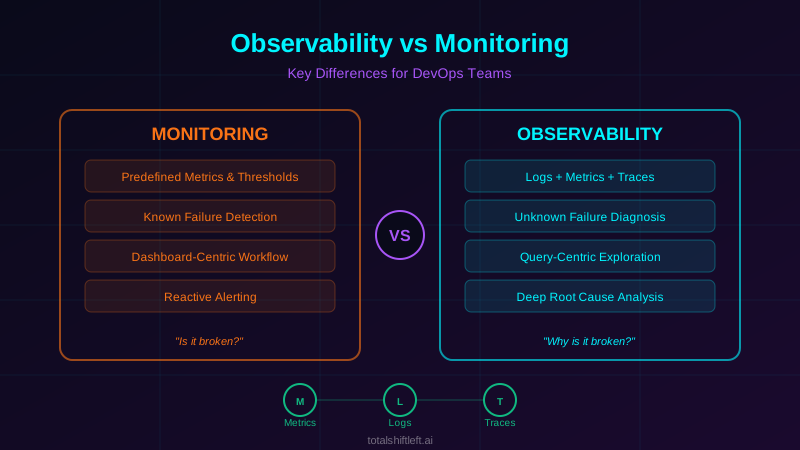
Observability in DevOps is a system property—how well you can understand a system's internal state from its external outputs (metrics, logs, and traces)—that lets engineers diagnose failures they never anticipated. Monitoring, by contrast, alerts on predefined conditions you already knew to watch for. You need both: monitoring for fast alerting on known failure modes (disk space, error-rate thresholds, SLO violations), and observability for investigating the novel, cross-service failures that monitoring alone can't explain. The standard open-source DevOps stack is OpenTelemetry for instrumentation, Prometheus and Grafana for metrics and dashboards, Jaeger or Grafana Tempo for distributed tracing, and Loki or the ELK Stack for structured logs; Datadog, New Relic, Honeycomb and Elastic Observability are the main commercial platforms. Choose between them on OpenTelemetry support, cardinality tolerance, deployment model (self-hosted vs SaaS), and cost model. Database observability extends the same discipline past the connection pool, capturing query-level latency, pool saturation, lock waits and schema change events—which application tracing alone treats as a black box.
Reviewed by Sushant Joshi
Observability in DevOps is the practice of instrumenting systems—with metrics, structured logs, and distributed traces—so engineers can understand what a system is doing internally just from its external outputs, including for failures no one anticipated. It's often framed against monitoring, which is the older, narrower practice: tracking predefined metrics and alerting on known failure conditions. The distinction matters because monitoring tells you that something broke; observability tells you why.
According to a 2025 Splunk State of Observability report, 97% of organizations experienced challenges with monitoring-only approaches when managing distributed systems. The root cause is straightforward: monitoring was designed for monolithic architectures where failure modes are predictable. Modern microservices architectures introduce failure modes that are impossible to anticipate.
When your application was a single deployed artifact, monitoring CPU, memory, disk, and error rates told you most of what you needed to know. When your application is 50 microservices communicating over networks, a 200ms latency increase in the checkout flow could be caused by any combination of services, database queries, network partitions, or third-party API slowdowns. Traditional monitoring dashboards cannot diagnose this.
This guide explains the differences between observability and monitoring, when each approach is appropriate, and how to implement both effectively. Whether you are operating a growing microservices architecture or scaling your DevOps testing practices, understanding this distinction is critical for maintaining system reliability.
In this guide
- What Is Monitoring in DevOps?
- What Is Observability in DevOps?
- Why the Distinction Matters
- Key Differences Between Observability and Monitoring
- The Three Pillars of Observability
- Architecture: From Monitoring to Observability
- Tools for Monitoring and Observability
- How to choose observability tools for your DevOps stack
- Database observability in DevOps
- Observability-Driven Testing
- Real-World Example: E-Commerce Platform Migration
- Observability in DevOps challenges and how to solve them
- Best Practices for Implementation
- Observability and Monitoring Readiness Checklist
- The same incident, from a monitoring view and an observability view
- Observability in DevOps FAQ
What Is Monitoring in DevOps?
Monitoring is the practice of collecting, aggregating, and alerting on predefined metrics to determine whether a system is functioning within acceptable parameters. It is a reactive approach built on the assumption that you know what failure looks like before it happens.
A monitoring system collects data points—CPU utilization, request latency, error rates, disk usage—and compares them against thresholds. When a metric exceeds its threshold, an alert fires. The operations team investigates using runbooks that map known alert conditions to known remediation steps.
Monitoring works exceptionally well for infrastructure-level concerns and known application failure modes. Server disk at 90% capacity is a well-understood problem with a well-understood fix. HTTP 500 error rate exceeding 1% is a clear signal that something is wrong. These scenarios have predictable causes and predictable solutions.
The limitation emerges when failures are novel. When a metric breaches a threshold but the cause is not in your runbook, monitoring tells you something is wrong without telling you why. In a distributed system, "something is wrong" is the starting point of a potentially hours-long investigation.
Picking the runner first? Our comparison of continuous integration testing tools covers the CI systems, languages and licence models side by side.
What Is Observability in DevOps?
Observability is a property of a system that determines how well you can understand its internal state from its external outputs. An observable system produces enough telemetry data—structured logs, metrics, and distributed traces—that an engineer can diagnose any problem by querying that data, even if the problem was never anticipated.
The concept originates from control theory in engineering, where observability describes whether a system's internal state can be inferred from its outputs. Applied to software systems, observability means that your instrumentation is rich enough to answer questions you have not yet thought to ask.
Unlike monitoring, which requires you to define what to watch before problems occur, observability allows you to explore system behavior after a problem surfaces. You start with a symptom—slow checkout times—and use telemetry to trace the request path, examine service-to-service communication, and isolate the root cause without prior knowledge of what went wrong.
Observability does not replace monitoring. It extends monitoring by adding the diagnostic depth needed for complex distributed systems. Monitoring alerts you to problems. Observability helps you understand and resolve them.
Why the Distinction Matters
Distributed Systems Demand More Than Dashboards
Modern applications are composed of dozens or hundreds of independently deployed services. A single user action may trigger a chain of 15 service calls, 8 database queries, and 3 external API requests. When that action fails, the failure point could be anywhere in the chain. Static dashboards showing per-service metrics cannot reveal cross-service causation.
Mean Time to Resolution Is the Critical Metric
Organizations that adopt observability practices reduce their mean time to resolution (MTTR) by 50-70% compared to monitoring-only approaches. The difference is not in detection speed—monitoring detects problems quickly. The difference is in diagnosis speed. With observability, engineers query telemetry data to pinpoint root causes instead of manually checking service after service.
Unknown Unknowns Are the Costly Failures
The failures that cause extended outages and revenue loss are almost never the ones you anticipated. They are emergent behaviors: a specific combination of request patterns, data conditions, and timing that produces a failure no one predicted. Monitoring cannot detect what it was not configured to watch. Observability lets you investigate any anomaly regardless of whether you anticipated it.
Testing and Production Observability Are Connected
Teams that invest in comprehensive testing strategies still need observability in production. Testing validates known behaviors. Observability catches the edge cases that testing missed. The most effective engineering teams treat testing and observability as complementary practices in a unified quality strategy, feeding pre-production signals into an aggregated analytics dashboard so test health and production telemetry can be read side by side.
Key Differences Between Observability and Monitoring
Reactive vs Exploratory
Monitoring is reactive: it waits for a predefined condition to trigger an alert. Observability is exploratory: it provides the data and tools to investigate system behavior without predefined queries. An engineer can start with a symptom and follow the evidence wherever it leads.
Known vs Unknown Failure Modes
Monitoring excels at detecting known failure modes—the scenarios you anticipated and built alerts for. Observability excels at diagnosing unknown failure modes—the novel combinations of conditions that produce unexpected behavior.
Threshold-Based vs Correlation-Based
Monitoring compares individual metrics against static or dynamic thresholds. Observability correlates data across multiple dimensions—time, service, request path, user segment—to reveal patterns that individual metrics cannot show.
Dashboard-Centric vs Query-Centric
Monitoring workflows center on dashboards that display predefined views of system health. Observability workflows center on ad-hoc queries that let engineers slice and dice telemetry data to answer specific questions about specific incidents.
Instrumentation Depth
Monitoring requires basic instrumentation: emit metrics at key points. Observability requires deep instrumentation: structured logs with correlation IDs, distributed trace context propagation, high-cardinality metric labels, and custom business-context attributes.
Cost and Complexity
Monitoring is less expensive to implement and operate. The data volumes are smaller, the tooling is more mature, and the required expertise is lower. Observability requires larger data volumes, more sophisticated tooling, and engineers who know how to query telemetry data effectively.
The Three Pillars of Observability
Metrics
Metrics are numerical measurements collected at regular intervals. They are the most storage-efficient form of telemetry and the foundation of alerting systems. Examples include request rate, error rate, latency percentiles, CPU utilization, and memory usage.
Metrics answer aggregate questions: what is the p99 latency of the payment service over the last hour? They do not answer specific questions about individual requests. For observability, metrics are enhanced with high-cardinality labels—customer tier, deployment version, region—that enable fine-grained breakdowns.
Logs
Logs are discrete event records that capture what happened at a specific moment. For observability, logs must be structured (JSON format with consistent field names) rather than unstructured (free-text strings). Structured logs enable querying and correlation.
Every log entry should include a trace ID and spa
n ID that links it to a distributed trace. This connection between logs and traces is what transforms logging from a debugging afterthought into an observability pillar. Without correlation IDs, logs are isolated data points that require manual effort to connect. Teams building microservices logging strategies should prioritize structured, correlated output from day one.
Traces
Traces record the complete path of a request through a distributed system. A trace consists of spans—each span represents a unit of work in a single service. The parent-child relationship between spans reveals the exact execution flow and timing of every operation.
Distributed tracing is the pillar that most differentiates observability from monitoring. It provides the causal chain that connects a user-facing symptom to a root cause buried three services deep. Without traces, diagnosing cross-service failures requires correlating timestamps across multiple log streams—a manual, error-prone process. For a detailed walkthrough, see our guide on distributed tracing for microservices.
Architecture: From Monitoring to Observability
A monitoring architecture typically follows a simple pattern: agents on each host collect metrics and forward them to a central time-series database. A visualization layer (Grafana, Datadog) displays dashboards. An alerting engine evaluates rules against the metrics and sends notifications.
Ready to shift left with your API testing?
Try our no-code API test automation platform free. Generate tests from OpenAPI, run in CI/CD, and scale quality.
An observability architecture adds several layers. Instrumentation libraries (OpenTelemetry SDK) in each service emit traces and structured logs in addition to metrics. A collection layer (OpenTelemetry Collector, Fluentd, Vector) receives telemetry from all services, processes it (sampling, enrichment, filtering), and routes it to appropriate backends. Traces go to a trace storage backend (Jaeger, Tempo). Logs go to a log aggregation system (Elasticsearch, Loki). Metrics go to a time-series database (Prometheus, Mimir).
A correlation layer ties everything together. When an engineer investigates an incident, they can jump from a metric anomaly to the traces that occurred during that anomaly, then to the logs emitted by those traced requests. This seamless navigation between pillars is what makes observability effective. The architecture must support trace-to-log and metric-to-trace correlation through shared identifiers like trace IDs and consistent labeling.
Tools for Monitoring and Observability
| Tool | Type | Best For | Open Source |
|---|---|---|---|
| Prometheus | Metrics | Time-series collection and alerting | Yes |
| Grafana | Visualization | Dashboards and data exploration | Yes |
| Jaeger | Tracing | Distributed trace storage and analysis | Yes |
| Zipkin | Tracing | Lightweight distributed tracing | Yes |
| OpenTelemetry | Instrumentation | Vendor-neutral telemetry collection | Yes |
| ELK Stack | Logging | Log aggregation and search | Yes |
| Datadog | Full Platform | Unified monitoring and observability | No |
| New Relic | Full Platform | APM and full-stack observability | No |
| Grafana Tempo | Tracing | Scalable trace backend for Grafana | Yes |
| Grafana Loki | Logging | Log aggregation optimized for Grafana | Yes |
| PagerDuty | Alerting | Incident management and on-call routing | No |
| Nagios | Monitoring | Infrastructure and network monitoring | Yes |
| Honeycomb | Full Platform | High-cardinality event analysis, query-driven debugging | No |
| Elastic (Elastic Observability) | Full Platform | Logs, metrics, and APM built on the Elastic Stack | Partial (Elastic License) |
Teams evaluating these tools should consider how they integrate with existing CI/CD testing pipelines and test automation frameworks to create a unified quality and reliability workflow. OpenTelemetry, a CNCF project, has become the de facto vendor-neutral instrumentation standard—most tools in this table can ingest OTel-formatted telemetry directly, so standardizing on it avoids re-instrumenting every time you switch backends.
How to choose observability tools for your DevOps stack
The table above lists what exists; it does not tell you what to buy. Five criteria separate a tool that fits from one that becomes shelfware:
- Instrumentation standard. Prefer tools that ingest OpenTelemetry natively. OTel is a CNCF project and the de facto vendor-neutral standard — instrumenting once against it means a backend swap is a config change, not a re-instrumentation project. Tools that require a proprietary agent create switching costs that compound every quarter.
- Cardinality tolerance. Metrics-first tools (Prometheus) degrade badly when you attach high-cardinality attributes like
user_idortenant_id. Event-first tools (Honeycomb) are built for exactly that. If your hardest questions start with "which customers were affected," cardinality is your deciding criterion, not price. - Deployment model. Self-hosted (Prometheus, Grafana, Jaeger, Loki, SigNoz) keeps telemetry inside your network — often mandatory in regulated industries where request bodies may contain regulated data. SaaS platforms (Datadog, New Relic) trade that for zero operational burden. This is the same constraint that governs where your API testing runs, and the answer should usually match.
- Cost model. Per-host pricing punishes horizontal scaling; per-GB-ingested pricing punishes verbose logging; per-custom-metric pricing punishes exactly the high-cardinality dimensions that make telemetry useful. Model your bill against your actual growth curve before signing.
- Query ergonomics. The practical test is how long it takes an on-call engineer at 3am to go from an alert to the responsible service. Trace-to-log correlation in one click is worth more than a longer feature list.
A practical default for teams starting out: OpenTelemetry for instrumentation, Prometheus and Grafana for metrics and dashboards, Grafana Tempo or Jaeger for traces, and Loki for logs — all self-hostable, all OTel-native, and no vendor lock-in while you learn what questions you actually ask.
Database observability in DevOps
Application observability usually stops at the connection pool. A trace shows that a request spent 1,400ms in SELECT, and the investigation ends there — the database is a black box that returned a number. Database observability is the practice of extending the same telemetry discipline across that boundary, so that query behaviour, schema changes, and connection health are first-class signals rather than an inference from application latency.
This matters in a DevOps context specifically because the database is usually the last part of the stack still governed by manual change control. Application deploys are automated and observable; schema changes are often a ticket and a maintenance window.
Database observability vs database monitoring
The distinction mirrors the one this guide draws for applications. Database monitoring watches predefined health signals — CPU, memory, disk, replication lag, connection count — and alerts when a threshold is crossed. It answers "is the database healthy?" Database observability captures query-level telemetry with enough context to ask questions you did not predefine: which query plan regressed after Tuesday's deploy, which tenant's workload is consuming the connection pool, which migration correlates with the p99 increase. It answers "why did this query get slow, and what changed?"
The practical difference is that a monitoring dashboard tells you the database is at 90% CPU. Observability tells you that a missing index on a column added in last week's migration turned a 4ms lookup into a 900ms sequential scan for one specific query shape.
Database observability vs data observability
These are routinely confused and are not the same discipline:
| Database observability | Data observability | |
|---|---|---|
| Subject | The database as a running system | The data flowing through pipelines |
| Questions | Why is this query slow? What changed in the schema? | Is this table fresh? Are these values in range? Did row counts drop? |
| Owner | Platform, SRE, and DevOps teams | Data engineering and analytics teams |
| Failure it catches | Performance regression, connection exhaustion, schema drift | Broken pipeline, silent nulls, stale dashboard |
| Typical tools | pganalyze, Percona PMM, Datadog Database Monitoring, pg_stat_statements | Monte Carlo, Great Expectations, Soda |
A team can have excellent data observability and still be blind to a query plan regression, and vice versa. If your incident was "the checkout API got slow," you need the first. If it was "the revenue dashboard is wrong," you need the second.
What to instrument
Six signals cover most database incidents:
| Signal | What it catches | Where it comes from |
|---|---|---|
| Query latency by normalized query shape (p50/p95/p99) | Plan regressions, missing indexes | pg_stat_statements, Performance Schema |
| Query throughput and error rate | Load shifts, lock contention, deadlocks | Database stats views, driver instrumentation |
| Connection acquisition time and pool saturation | Pool exhaustion — frequently misdiagnosed as slow queries | Application-side pool metrics |
| Lock waits and blocking chains | Contention from long transactions | pg_locks, sys.dm_tran_locks |
| Replication lag | Stale reads on replicas | Replication status views |
| Schema change events | Migrations correlated with performance shifts | Migration tooling, deployment events |
The connection pool metric deserves emphasis because it is the most commonly missed. When acquisition time climbs, every query appears slow from the application's perspective while the database itself is idle. Without pool telemetry, teams spend hours optimising queries that were never the problem.
Two practices make the rest of the data usable. First, normalize queries before aggregating — group by query shape (SELECT * FROM orders WHERE id = ?) rather than by literal text, or high-cardinality parameters will fragment the data into uselessness. Second, propagate trace context into database spans so a slow endpoint links directly to the statement responsible, rather than leaving an engineer to correlate timestamps by hand.
DORA metrics applied to database change
The four DORA metrics — deployment frequency, lead time for changes, change failure rate, and time to restore service — are normally computed across application deploys only, which quietly excludes the riskiest changes a team makes. Measuring them separately for schema changes usually exposes an uncomfortable gap: application deploy frequency measured in deploys per day, schema change frequency measured in weeks; application lead time in hours, schema lead time in sprints.
Tracking the database's own DORA numbers turns "our database process is slow" from a complaint into a number with a trend line, and it makes the case for automating schema change on the same evidence the team already accepts for application deploys.
Where testing closes the loop
Database observability is diagnostic — it tells you what a schema change did after it reached an environment. The complementary control is catching the breaking change earlier, which is a testing problem rather than a telemetry one.
Schema drift is the shared failure mode. A column renamed in a migration and a response field that quietly changes type are the same class of defect observed at two different layers: the database sees a plan change, the API consumer sees a broken contract. API contract testing catches the consumer-facing half of that in CI, before a migration reaches an environment where observability would be the thing that finds it. Teams running both get the full picture — schema validation as a deployment gate, database telemetry as the diagnostic layer when something still slips through.
Total Shift Left generates contract and regression tests directly from an OpenAPI specification, so a schema change that alters an API response surfaces as a failing pipeline stage rather than as an anomaly on a dashboard three days later.
Observability-Driven Testing
Observability and testing are usually discussed as separate disciplines, but the most effective teams connect them directly: production telemetry informs what to test, and test telemetry feeds the same observability pipeline.
Feed test runs into your observability stack. Emit the same structured logs, trace spans, and metrics from CI/CD test runs that your production services emit. A failing integration test produces a trace exactly like a failing production request—if it lands in the same backend (Jaeger, Tempo, Honeycomb), engineers can debug test failures with the same tools and query skills they already use for incidents.
Free Visual blueprint + guide
Microservices Testing Strategy Blueprint
A visual testing strategy for microservices architectures. Covers testing layers, contract testing, service mesh validation, and tool selection.
Download FreeUse production traces to find testing gaps. Distributed tracing surfaces the actual request paths users take in production—including combinations of services, feature flags, and edge cases that were never explicitly designed for. Periodically reviewing high-latency or high-error traces reveals untested paths: a service dependency your test suite never exercises, or a request pattern only real traffic produces.
Alert on SLOs, verify with tests before they fire. Define your Service Level Objectives once, then write tests that assert the same thresholds pre-deployment (e.g., p99 latency under 300ms for a given endpoint) so regressions are caught in CI before they ever reach the alerting layer. API performance testing in production and pre-production load testing should validate against the same SLO thresholds your observability stack alerts on—divergent thresholds mean one of the two systems is lying to you.
Real-World Example: E-Commerce Platform Migration
Problem: A mid-size e-commerce company migrated from a monolithic application to 35 microservices over 18 months. Their existing monitoring stack (Nagios, custom dashboards) detected when services were down but could not diagnose the increasingly frequent latency spikes during peak traffic. MTTR increased from 15 minutes (monolith) to 3.5 hours (microservices) because engineers spent most of their time manually correlating logs across services.
Solution: The team implemented a layered observability strategy. They adopted OpenTelemetry for instrumentation across all services, deployed Jaeger for distributed tracing, migrated to structured JSON logging with trace context propagation, and used Grafana with Prometheus for metrics visualization. Critically, they maintained their existing monitoring alerts while adding observability capabilities on top.
Results: Within 4 months, MTTR dropped from 3.5 hours to 25 minutes. Engineers could trace a slow checkout request across all 12 services involved, identify that a specific database query in the inventory service was causing the bottleneck, and deploy a fix—all within a single incident response session. The monitoring system still handled routine alerts (disk space, certificate expiration, health checks) while the observability stack handled complex diagnostic workflows.
Observability in DevOps challenges and how to solve them
Data Volume and Cost
Challenge: Observability generates significantly more data than monitoring. A single traced request across 15 services produces 15 spans, each with metadata. At scale, storage and processing costs can escalate rapidly.
Solution: Implement intelligent sampling. Head-based sampling decides at the start of a request whether to trace it. Tail-based sampling keeps traces that exhibit interesting behavior (errors, high latency) and discards routine traces. Most organizations find that sampling 1-10% of traffic provides sufficient diagnostic coverage while controlling costs.
Instrumentation Overhead
Challenge: Adding observability instrumentation to existing services requires development effort. Each service needs trace context propagation, structured logging, and custom metric emission.
Solution: Use OpenTelemetry auto-instrumentation for common frameworks (Spring Boot, Express.js, Django). Auto-instrumentation captures HTTP requests, database calls, and messaging operations without code changes. Add manual instrumentation only for business-critical code paths that auto-instrumentation does not cover.
Alert Fatigue
Challenge: More data often leads to more alerts, which leads to alert fatigue. Teams that monitor too many metrics with too many thresholds stop responding to alerts entirely.
Solution: Separate alerting (monitoring) from investigation (observability). Keep alerts focused on a small set of high-signal Service Level Objectives (SLOs): availability, latency, and error rate. Use observability tools for investigation only after an alert fires. This keeps alert volume low while maintaining deep diagnostic capability.
Organizational Resistance
Challenge: Developers view instrumentation as extra work that does not ship features. Operations teams are comfortable with existing monitoring and resist change.
Solution: Start with a single high-pain incident type. Show the team how observability reduces the investigation time for that specific incident. Concrete MTTR improvements overcome resistance faster than theoretical arguments. Once one team demonstrates success, others follow.
Tooling Fragmentation
Challenge: Organizations accumulate multiple monitoring and observability tools over time, each covering a different slice of the stack. Engineers must switch between 4-5 tools during an incident.
Solution: Converge on a unified platform or a tightly integrated open-source stack. Grafana + Prometheus + Loki + Tempo provides a cohesive open-source observability platform. Commercial alternatives like Datadog offer a single pane of glass. Reducing tool-switching during incidents directly reduces MTTR.
Lack of Context in Telemetry
Challenge: Raw metrics, logs, and traces lack business context. A trace showing 500ms latency means nothing without knowing whether the affected user is on a free tier or an enterprise contract worth $500K/year.
Solution: Enrich telemetry with business attributes: customer tier, feature flag state, deployment version, geographic region. This enrichment enables prioritization during incidents and provides the context needed for effective diagnosis.
Best Practices for Implementation
- Start with monitoring fundamentals before adding observability—you need reliable alerting as a foundation
- Adopt OpenTelemetry as your instrumentation standard to avoid vendor lock-in
- Implement structured logging with consistent field names across all services
- Propagate trace context (W3C Trace Context) across every service boundary, message queue, and async operation
- Define SLOs for every user-facing service and alert only on SLO violations
- Sample traces intelligently—keep 100% of error traces and sample normal traces at 1-10%
- Correlate all three pillars by including trace IDs in every log entry and linking metrics to traces
- Build runbooks that start with monitoring alerts and escalate to observability investigation
- Instrument API endpoints with custom business metrics (orders per minute, payment success rate)
- Automate dashboard provisioning so every new service gets baseline observability on deployment
- Review and prune alerts quarterly—remove alerts that have never fired or always fire without action
- Invest in observability training for developers, not just operations teams
Observability and Monitoring Readiness Checklist
- ✔ All services emit standard health metrics (CPU, memory, request rate, error rate, latency)
- ✔ Alerting rules are defined for critical SLOs with clear escalation paths
- ✔ Structured logging is implemented with consistent JSON format across services
- ✔ Distributed tracing is deployed with trace context propagation across all service boundaries
- ✔ Every log entry includes a trace ID for correlation
- ✔ A sampling strategy is in place to control trace data volume
- ✔ Dashboards exist for both high-level system health and per-service deep dives
- ✔ Engineers can navigate from a metric anomaly to related traces to relevant logs
- ✔ Business context attributes are attached to telemetry data
- ✔ On-call runbooks reference both monitoring alerts and observability investigation workflows
- ✔ Observability tooling is integrated with your CI/CD pipeline
- ✔ Alert noise is reviewed quarterly and thresholds are tuned
See also: contract testing in our learn hub for the underlying concept.
The same incident, from a monitoring view and an observability view
Monitoring answers a question you predicted. It is a threshold on a series you already decided to collect:
# monitoring: a pre-declared question, a pre-declared alert
sum(rate(http_requests_total{status=~"5.."}[5m]))
  / sum(rate(http_requests_total[5m])) > 0.01
Observability answers the question you did not predict — which tenant, which dependency, which code path — because the telemetry carries enough dimensions to slice after the fact:
# observability: slice the same failure by dimensions nobody alerted on
topk(5,
  sum by (tenant_id, route, upstream, deployment_version) (
    rate(http_requests_total{status=~"5.."}[5m])
  )
)

# and the trace that explains one of those rows
# curl "http://jaeger:16686/api/traces?service=orders&tags=%7B%22tenant_id%22%3A%22acme%22%7D&lookback=15m"
Observability in DevOps FAQ
What is the main difference between observability and monitoring?
Monitoring tracks predefined metrics and alerts you when known conditions fail. Observability goes further by enabling you to ask arbitrary questions about system behavior using logs, metrics, and traces—even for failures you did not anticipate. Monitoring answers "is it broken?" while observability answers "why is it broken?"
Do I need both observability and monitoring?
Yes. Monitoring provides baseline health checks and alerting for known failure modes. Observability adds the ability to investigate novel failures and understand complex system interactions. Together they give you proactive alerting and deep diagnostic capability.
What are the three pillars of observability?
The three pillars of observability are metrics (numerical measurements over time), logs (discrete event records with context), and traces (end-to-end request paths across services). Combined, they provide a complete picture of system behavior.
How does observability help with microservices?
Microservices create distributed systems where a single request can traverse dozens of services. Observability tools like distributed tracing let you follow a request across every service boundary, identify which service caused a failure, and understand cascading effects that monitoring alone cannot detect.
What tools support observability in DevOps?
Popular observability tools include Grafana for visualization, Prometheus for metrics collection, Jaeger and Zipkin for distributed tracing, the ELK Stack for log aggregation, OpenTelemetry for vendor-neutral instrumentation, and commercial platforms like Datadog, New Relic, Honeycomb, and Elastic Observability for unified observability.
What is the difference between database observability and database monitoring?
Database monitoring watches predefined health signals — CPU, memory, disk, replication lag, connection count — and alerts when a threshold is crossed, answering "is the database healthy?" Database observability captures query-level telemetry with enough context to answer questions you did not predefine: which query plan regressed after a deploy, which tenant is exhausting the connection pool, which migration correlates with a p99 increase. Monitoring tells you the database is at 90% CPU; observability tells you a missing index on a newly added column turned a 4ms lookup into a 900ms sequential scan.
Is database observability the same as data observability?
No. Database observability treats the database as a running system and catches performance regressions, connection exhaustion, and schema drift — it is owned by platform, SRE, and DevOps teams. Data observability tracks the data flowing through pipelines and catches stale tables, silent nulls, and dropped row counts — it is owned by data engineering. A team can have excellent data observability and still be blind to a query plan regression.
What is observability in DevOps?
Observability in DevOps is a property of a system, not a tool—it describes how well engineers can understand what's happening inside a system just from the telemetry it emits externally (metrics, logs, and traces). A DevOps team achieves observability by instrumenting every service to emit structured, correlated telemetry, then giving engineers query tools to investigate any anomaly, including failures no one anticipated when the system was designed. It's the practice that lets teams answer "why is this broken?" rather than just "is this broken?"
Sources and further reading
- OpenTelemetry documentation — the vendor-neutral tracing, metrics and logs standard.
- Google SRE Book — Monitoring Distributed Systems — the four golden signals and alerting philosophy.
- Prometheus documentation — the metrics model most alerting is built on.
Key takeaways
- The distinction between observability and monitoring is not academic—it directly impacts how quickly your team can detect, diagnose, and resolve production incidents.
- Monitoring remains essential for baseline health checks and known-failure alerting.
- Observability extends that foundation with the diagnostic depth required for modern distributed systems.
- Start by solidifying your monitoring fundamentals: reliable metrics collection, meaningful alerts, and clear runbooks.
- Then layer observability on top: structured logging with trace correlation, distributed tracing across service boundaries, and the tooling that lets engineers investigate any anomaly without predefined queries.
- The organizations that master both practices achieve the reliability that customers expect from modern software.
They detect problems in minutes, diagnose root causes in minutes more, and resolve issues before most users notice.
Ready to improve your API testing and observability workflow? Start your free trial of Total Shift Left and see how automated API testing integrates with modern observability practices to catch issues before they reach production.
Related Articles: API Testing Strategy for Microservices | Distributed Tracing Explained for Microservices | Debugging Microservices with Distributed Tracing | Monitoring API Performance in Production | Logging Strategies for Microservices Testing | DevOps Testing Best Practices
Ready to shift left with your API testing?
Try our no-code API test automation platform free.