
How to Add API Tests to CI/CD Pipelines: Complete Implementation Guide (2026)
Quick answer
Automating API testing in CI/CD means triggering the API suite on every pull request, blocking merge on failures, and producing a report developers can act on without leaving their PR review. The setup that works in 2026: generate tests from OpenAPI, run them in a containerised test environment, and surface failures with a one-click trace back to the failing assertion.
Reviewed by Sushant Joshi
Adding API tests to a CI/CD pipeline means configuring automated test execution, JUnit reporting, and quality gates inside your build workflow so that every code change is validated against your API contracts before deployment.
In This Guide You Will Learn
- What automated API testing in CI/CD means
- Why API testing belongs in every pipeline
- Key components of a CI/CD API testing setup
- Pipeline architecture and workflow
- Tools for API testing in CI/CD
- Real implementation: Azure DevOps and Jenkins examples
- Common challenges and solutions
- Best practices for pipeline API testing
- Implementation checklist
- Frequently asked questions
Introduction
Most development teams have API tests. Far fewer teams run those tests automatically on every build. The result is predictable: a developer pushes a change that breaks an API contract, nobody catches it until the broken code reaches staging or production, and the team spends hours debugging what an automated pipeline would have caught in minutes.
The gap between having tests and having automated quality enforcement is where defects escape. According to industry research, fixing defects in production costs up to 30 times more than catching them during development. For API-first teams shipping microservices, that cost multiplies across every service that depends on the broken contract.
This guide walks through how to add API tests to your CI/CD pipeline from scratch, including tool selection, pipeline configuration, quality gate setup, and tiered testing strategies that balance speed with thoroughness. Whether you use Azure DevOps, Jenkins, GitHub Actions, or another platform, the principles and patterns apply.
What Is Automated API Testing in CI/CD?
Automated API testing in CI/CD is the practice of running API test suites as part of your build and deployment pipeline, where test execution is triggered automatically by code changes and test results determine whether the pipeline proceeds or stops.
Unlike manual testing where a developer runs tests locally and interprets results, CI/CD API testing removes human intervention from the feedback loop. The pipeline executes tests, evaluates results against predefined thresholds, and either advances the build toward deployment or blocks it with a clear failure report.
The concept builds on three core principles. First, every code change triggers test execution -- no change reaches a downstream environment without automated validation. Second, test results feed into quality gates that enforce pass/fail decisions programmatically. Third, standardized reporting (typically JUnit XML) provides consistent visibility across the team.
For teams working with OpenAPI specifications, the process becomes even more streamlined. You can generate API tests directly from your OpenAPI spec, producing comprehensive coverage across all endpoints without writing test code manually. These generated tests integrate directly into CI/CD pipelines with standard output formats.
Why API Testing in CI/CD Matters
Catch Breaking Changes Before They Propagate
API contracts are the interfaces that bind your services together. When a contract breaks, every consumer of that API is affected. Running API tests in CI/CD catches breaking changes at the source -- the commit that introduced the change -- before it propagates to staging, production, or downstream teams.
Reduce Defect Escape Rate
The defect escape rate measures how many bugs reach production that automated testing should have caught. Teams without pipeline API testing typically see 3-5 times more API-related production incidents than teams with automated gates. Each escaped defect carries the cost of production debugging, hotfix cycles, and customer impact.
Enforce Consistent Quality Standards
Without automation, quality depends on individual discipline. Some developers run all tests. Others skip them when deadlines press. CI/CD API testing removes this variability by making test execution and quality enforcement a pipeline responsibility, not an individual one.
Accelerate Release Confidence
When every build passes a comprehensive API test suite, the team develops justified confidence in their releases. This confidence translates to faster release cycles, smaller batch sizes, and the ability to deploy on demand rather than on fixed schedules.
Enable Shift-Left Testing
Adding API tests to CI/CD embodies the shift-left testing philosophy -- moving quality validation earlier in the development lifecycle. Rather than discovering API defects during manual QA sprints or production monitoring, you catch them at the moment of code change.
Key Components of CI/CD API Testing
Test Suite Generation and Maintenance
Your pipeline needs tests to run. The two primary approaches are spec-driven generation (importing an OpenAPI specification to produce tests automatically) and script-based authoring (writing tests with frameworks like REST Assured, pytest, or Supertest). Most mature teams combine both: generated tests for broad coverage and hand-written tests for complex business logic.
Headless Test Execution
CI/CD environments do not have graphical interfaces. Your testing tool must execute from a command line, inside a container, or through a CLI invocation. Tools that require a desktop GUI are not viable for pipeline integration without additional adapters.
Standardized Report Output
JUnit XML is the standard reporting format that CI/CD platforms consume. Azure DevOps, Jenkins, GitHub Actions, and GitLab CI all parse JUnit XML natively for test result visualization. Your testing tool must produce this format without manual transformation.
Environment Configuration
Tests need to target different environments as they move through the pipeline. Base URLs, API keys, and credentials must be injectable through environment variables or configuration files -- never hardcoded. Pipeline secrets management handles sensitive values.
Quality Gate Enforcement
Ready to shift left with your API testing?
Try our no-code API test automation platform free. Generate tests from OpenAPI, run in CI/CD, and scale quality.
Quality gates evaluate test results against thresholds and translate them into pass/fail pipeline decisions. Without gates, tests run and produce reports, but nothing stops a failing build from progressing. See the complete guide to API quality gates for detailed threshold configuration.
Exit Code Compliance
The testing tool must return non-zero exit codes when tests fail. This is the mechanism by which CI/CD platforms detect failures without parsing output files. A tool that always returns exit code 0 regardless of results will never trigger a pipeline failure.
CI/CD API Testing Architecture
The diagram below shows the end-to-end architecture for API testing in a CI/CD pipeline, from source commit through quality gate evaluation to deployment decisions.
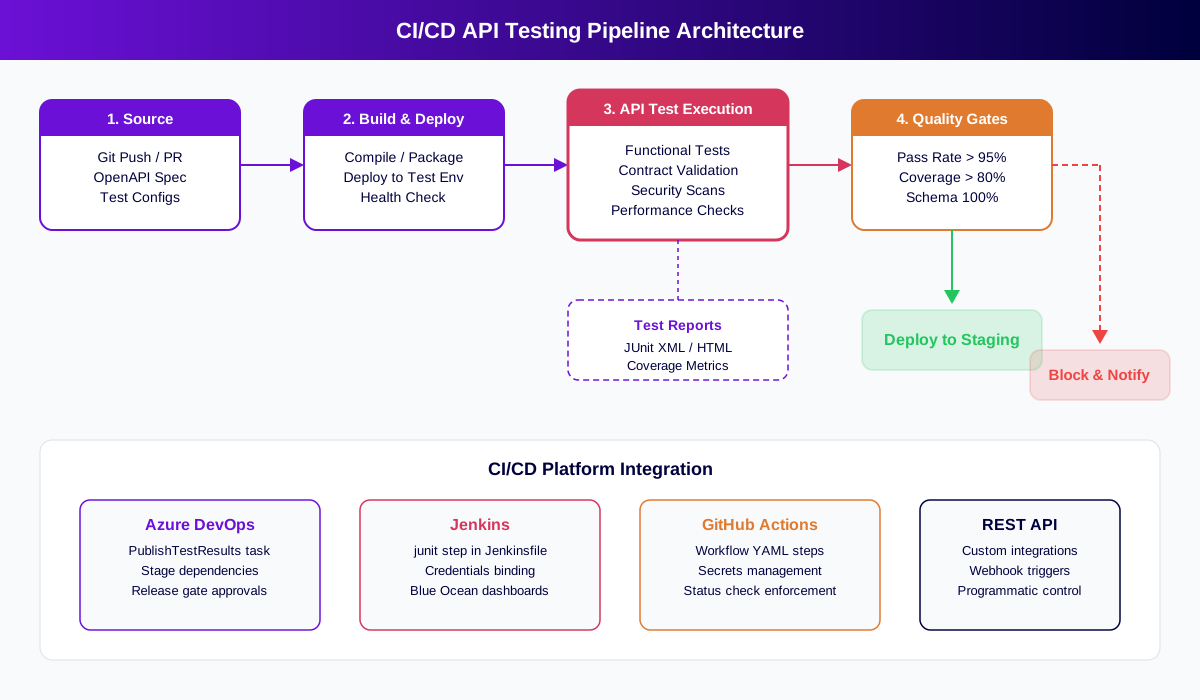
The architecture follows a four-stage flow:
Stage 1 -- Source. A developer pushes code or opens a pull request. The pipeline triggers automatically, pulling the latest code, OpenAPI specification, and test configuration files.
Stage 2 -- Build and Deploy. The application compiles, packages, and deploys to a test environment. A health check confirms the API is running before tests execute.
Stage 3 -- API Test Execution. The test suite runs against the deployed environment, covering functional tests, contract validation, security scans, and performance checks. Results output to JUnit XML files.
Stage 4 -- Quality Gates. The pipeline evaluates test results against defined thresholds (pass rate, coverage percentage, schema compliance). Passing gates advance the build to deployment. Failing gates block deployment and notify the team.
This architecture scales across CI/CD platforms. The specific task names and syntax differ between Azure DevOps, Jenkins, and GitHub Actions, but the four-stage structure remains consistent.
Tools for API Testing in CI/CD Pipelines
| Category | Tool | CI/CD Integration | JUnit Output | No-Code Option |
|---|---|---|---|---|
| AI-Powered Platform | Total Shift Left | Native (Azure DevOps, Jenkins, REST API) | Yes | Yes -- import OpenAPI spec |
| CLI Runner | Newman (Postman) | Via CLI command | Yes (with reporter) | No -- requires Postman collections |
| Java Framework | REST Assured | Via Maven/Gradle build | Yes (via TestNG/JUnit) | No -- requires Java code |
| Python Framework | pytest + requests | Via pip install + pytest command | Yes (with pytest-junit-xml) | No -- requires Python code |
| Node.js Framework | Supertest + Jest | Via npm test command | Yes (with jest-junit) | No -- requires JavaScript code |
| Contract Testing | Pact | Via CLI or build plugin | Yes | No -- requires code |
| Performance | k6 | Via CLI command | Partial (custom output) | No -- requires JavaScript |
When selecting a tool for CI/CD integration, prioritize native JUnit output, headless execution, environment variable support, and proper exit codes. Tools built for pipeline-first workflows like Total Shift Left handle these requirements out of the box, while desktop-first tools require additional configuration layers.
For a deeper comparison, see our analysis of the best API test automation tools.
Real Implementation Example
Azure DevOps Pipeline Configuration
In Azure DevOps, API testing integrates into a YAML pipeline with three key tasks: deploy to test environment, execute API tests, and publish results with quality gate enforcement.
The pipeline structure follows this pattern: a build stage compiles and deploys the application, a test stage runs the API test suite using a CLI command with the base URL injected from pipeline variables, and a publish stage processes JUnit XML results. Setting the failTaskOnFailedTests option to true on the PublishTestResults task enforces the quality gate -- any test failure blocks the pipeline.
For release pipelines with multiple environments, add the API test stage as a gate between environments. Tests must pass against staging before the production deployment stage executes. Azure DevOps stage dependencies enforce this automatically.
Jenkins Declarative Pipeline Configuration
In Jenkins, a declarative pipeline with a dedicated API testing stage provides the same enforcement. The test stage uses a shell step to execute the testing tool CLI, with credentials injected through Jenkins credentials binding. The junit post step publishes results from the XML output path.
Set healthScaleFactor on the junit step to control how test results affect build health. For strict quality gates, configure the pipeline to mark the build as FAILURE (not UNSTABLE) when any test fails. This prevents the deployment stage from executing.
Jenkins Blue Ocean provides trend visualization for test results, making it easy to identify patterns like gradually increasing failure rates that indicate technical debt accumulation.
Connecting the Pipeline to Test Generation
For teams using spec-driven API testing, the pipeline can also trigger test generation from OpenAPI specs. When the OpenAPI specification changes, the pipeline regenerates the test suite before execution, ensuring tests always match the current API contract. This eliminates the manual step of updating tests after API changes.
Common Challenges in CI/CD API Testing
Test Environment Availability
API tests require a running API to test against. The three main approaches are dedicated persistent environments, ephemeral per-build environments, and API mocking. Dedicated environments are simplest to configure but require maintenance. Ephemeral environments provide isolation but add pipeline complexity. API mocking via service virtualization enables testing without deploying real services, which is especially useful for microservices architectures.
Free 1-page checklist
API Testing Checklist for CI/CD Pipelines
A printable 25-point checklist covering authentication, error scenarios, contract validation, performance thresholds, and more.
Download FreeFlaky Tests Eroding Pipeline Trust
Tests that pass and fail inconsistently cause teams to distrust and eventually disable quality gates. The primary causes are shared mutable test data between tests, timing issues with asynchronous operations, and reliance on external third-party APIs. Solutions include independent test data setup and teardown, polling-based waits instead of fixed delays, and mocking external dependencies. For a detailed approach, see the API regression testing guide.
Slow Test Suites Blocking Delivery
Large test suites that take 30+ minutes on every commit slow development velocity to a crawl. The solution is tiered testing: run fast smoke tests on every commit, full suites on PR merges, and comprehensive validation only before production deployments. Parallel execution across multiple agents further reduces execution time.
Managing Credentials and Secrets
API tests need authentication tokens, API keys, and service credentials. Never store these in code repositories or test configuration files. Use your CI/CD platform's secrets management -- Azure DevOps variable groups, Jenkins credentials store, or GitHub Actions secrets -- to inject credentials at runtime.
Schema Drift Between Environments
When the API specification diverges from the actual implementation, tests validate the wrong contract. Integrate API contract testing into your pipeline to detect schema drift automatically. Contract tests compare responses against the OpenAPI specification and fail when discrepancies appear.
Best Practices for CI/CD API Testing
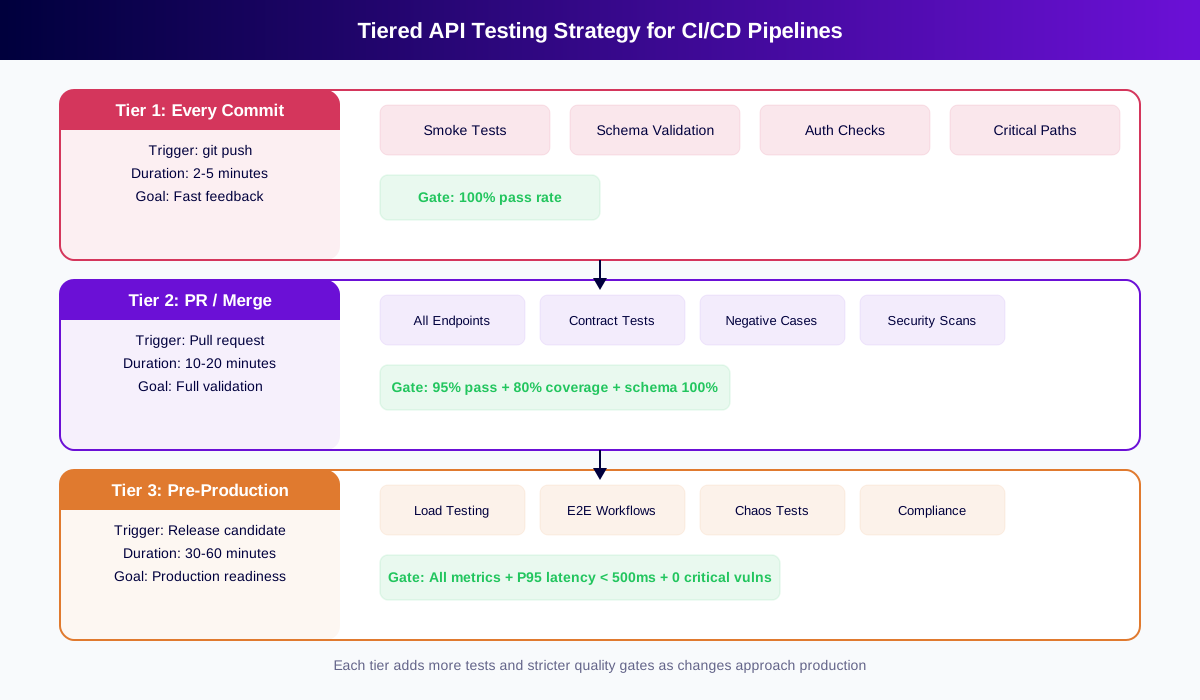
The tiered testing strategy below shows how to balance fast feedback with comprehensive validation across your pipeline stages.
-
Start with spec-driven test generation to achieve broad coverage quickly. Importing an OpenAPI spec produces tests for all endpoints, methods, and status codes without writing code. Add hand-written tests for complex business logic later.
-
Use tiered testing to balance speed and thoroughness. Grouping tests into reusable smoke and regression test packs makes each tier easy to trigger at the right stage. Tier 1 (every commit): smoke tests and schema validation in under 5 minutes. Tier 2 (PR merge): full endpoint coverage, contract tests, and security scans in 10-20 minutes. Tier 3 (pre-production): load tests, chaos tests, and compliance validation in 30-60 minutes.
-
Set quality gate thresholds conservatively at first and ratchet them upward. Start with 90% pass rate and increase by 2-5% each sprint. Jumping to 100% on day one leads teams to disable gates entirely.
-
Isolate test data per test run. Tests that share mutable state become flaky. Each test should set up its own data, execute, and clean up independently.
-
Mock external dependencies that are outside your control. Third-party APIs go down, rate-limit, or change behavior. Mock them in your test environment to keep your pipeline stable.
-
Run tests in parallel when your suite grows beyond 5 minutes. Split by endpoint, service, or test category across multiple pipeline agents.
-
Monitor test execution trends over time. Track pass rate, execution duration, and coverage percentage across builds. Declining trends signal technical debt before individual failures surface.
-
Treat the pipeline as code. Version your pipeline definitions alongside application code. Review pipeline changes in pull requests just like application changes.
CI/CD API Testing Checklist
Use this checklist when setting up or auditing your CI/CD API testing pipeline:
- ✔ API testing tool selected with headless execution, JUnit XML output, and proper exit codes
- ✔ Test suite generated from OpenAPI spec or authored to cover all critical endpoints
- ✔ Pipeline configured to trigger test execution on every code change
- ✔ Environment-specific configuration (base URLs, credentials) managed through pipeline variables and secrets
- ✔ JUnit XML results published to CI/CD dashboard for team visibility
- ✔ Quality gates configured with pass rate, coverage, and schema compliance thresholds
- ✔ Tiered testing strategy implemented (smoke on commit, full on merge, comprehensive pre-production)
- ✔ Flaky test detection and quarantine process established
- ✔ Test execution parallelized for suites exceeding 5-minute target
- ✔ External dependencies mocked to prevent third-party outages from blocking pipeline
- ✔ Test trend monitoring configured to track pass rate, duration, and coverage metrics over time
- ✔ Pipeline definitions version-controlled and reviewed through pull requests
See also: contract testing in our learn hub for the underlying concept.
Frequently Asked Questions
What output format should API tests produce for CI/CD?
JUnit XML is the universal standard. Azure DevOps, Jenkins, GitHub Actions, and GitLab CI all consume JUnit XML natively for test result visualization and quality gate enforcement. Select a testing tool that produces JUnit XML without requiring custom transformation scripts.
Should API tests run on every commit or only before deployment?
Use a tiered approach. Run fast smoke tests (under 5 minutes) on every commit to catch breaking changes immediately. Run comprehensive test suites on PR merges for full validation. Run extended tests including load and security before production deployment.
How do you handle test environment setup in CI/CD API testing?
Inject environment-specific configuration through pipeline variables and secrets. Deploy your API to a dedicated test environment before running tests. For microservices, use service virtualization or API mocking to isolate dependencies and prevent cascading failures from blocking your pipeline.
How long should API tests take in a CI/CD pipeline?
Target under 5 minutes for commit-triggered smoke tests, 10-20 minutes for PR merge validation, and 30-60 minutes for pre-production comprehensive testing. If tests exceed these thresholds, parallelize execution and implement selective test running based on changed code paths.
What is the difference between API testing in CI/CD and manual API testing?
Manual API testing depends on individual developers remembering to run tests before pushing code. CI/CD API testing runs automatically on every change, produces standardized JUnit reports, enforces quality gates that block bad deployments, and provides team-wide visibility into API health trends over time.
Can I add API tests to CI/CD without writing code?
Yes. No-code platforms like Total Shift Left let you import an OpenAPI specification and generate comprehensive test suites automatically. These tests produce JUnit XML output and integrate with Azure DevOps, Jenkins, and other platforms through CLI commands or REST API triggers.
Conclusion
Adding API tests to your CI/CD pipeline transforms testing from a manual checkpoint into an automated safety net. The key is building incrementally: start with a basic test suite and simple pass/fail gate, then layer on coverage thresholds, tiered execution, and performance validation as your pipeline matures.
The teams that ship reliable APIs are not the teams with the most tests -- they are the teams whose pipelines enforce quality on every change. Start by importing your OpenAPI spec and generating your first test suite.
Ready to automate API testing in your pipeline? Start a free 15-day trial and have CI-ready tests running in minutes. Working solo? Grab the free Citizen Developer Edition — single-user, no expiry. See pricing plans for team options.
Continue learning
Go deeper in the Learning Center
Hands-on lessons with runnable code against our live sandbox.
A contract is a promise. Contract testing keeps you honest. Here's how to do it right.
Turn an OpenAPI spec into hundreds of tests in minutes. Here's what the AI actually does well — and where it still needs you.
Ready to shift left with your API testing?
Try our no-code API test automation platform free.