
Test Data Automation in CI/CD: Seed, Mask, Reset (2026)
Quick answer
Automate test data in CI/CD by making three pipeline steps explicit: seed (generate valid records from your OpenAPI spec or DB schema before tests run), mask (anonymize or tokenize any field sourced from production so no real PII ever reaches a test environment), and reset (destroy or truncate all data tagged with the run ID after tests finish, via if: always() / post { always {} }). Ephemeral containers handle isolation between concurrent runs; schema-driven generation keeps data valid as the API evolves.
Reviewed by Smeet Gohel

Test data automation in CI/CD is the practice of programmatically generating, provisioning, masking, isolating, and cleaning up test data as integrated pipeline stages. Automated test data eliminates manual setup, keeps real PII out of test environments, ensures consistency across runs, enables parallel execution, and makes pipelines self-sufficient—every run produces its own data, uses it, and cleans it up without human intervention.
Test data is the silent dependency that determines whether your CI/CD pipeline is reliable or flaky. A pipeline that generates perfect test data on every run produces consistent results. A pipeline that depends on shared, manually maintained test data produces intermittent failures that erode developer trust and slow releases. The difference between these two pipelines is test data automation.
Modern CI/CD pipelines are expected to run dozens or hundreds of times per day across multiple services, branches, and environments. Each run requires test data—valid inputs for API endpoints, database seed data for integration tests, mock responses for external service dependencies. The question is not whether you need test data, but how you provision it.
Most teams start with static fixtures: JSON files, SQL seed scripts, or hardcoded values in test files. This works initially, but it breaks down as the system grows. Schemas change and fixtures become outdated. Multiple developers modify the same fixtures, creating merge conflicts. Parallel pipeline runs interfere with each other's data. Shared test databases accumulate stale data that causes unpredictable failures.
Test data automation solves these problems by making test data a first-class pipeline artifact—generated programmatically, scoped to each run, and cleaned up automatically. This guide shows you how to implement it, building on the CI/CD testing pipeline foundation and integrating with your DevOps testing best practices.
In this guide
- What Is Test Data Automation in CI/CD
- Test Data Automation vs. Data Pipeline Testing (dbt, Great Expectations)
- Why Automating Test Data Matters
- Key Components of Test Data Automation
- Architecture for Pipeline-Integrated Test Data
- Tools for Test Data Automation
- Test data automation in practice: a worked example
- Test data automation challenges and how to solve them
- Test data automation best practices
- Test data automation checklist
- Frequently asked questions about test data automation
What Is Test Data Automation in CI/CD
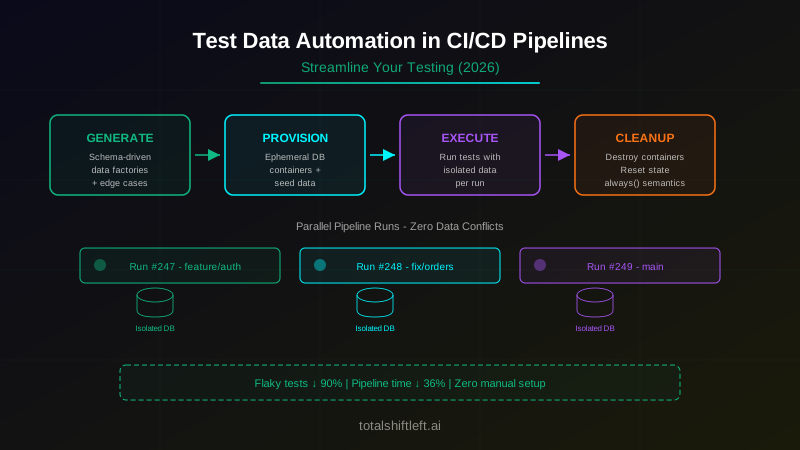
Test data automation in CI/CD encompasses four capabilities that work together to make test data self-managing within the pipeline:
1. Automated Generation: Test data is created programmatically using data factories, schema-based generators, or specification-driven tools. No human manually creates test records. Every data object is generated from code that understands the schema, constraints, and business rules.
2. Automated Provisioning: Generated data is loaded into the appropriate data stores—databases, message queues, cache layers, file systems—as a pipeline step. The provisioning process is idempotent and can run against fresh or existing environments.
3. Automated Isolation: Each pipeline run operates on isolated data. Whether through ephemeral database containers, tenant-based partitioning, or namespace isolation, no two concurrent pipeline runs share mutable data state.
4. Automated Cleanup: After test execution, test data is destroyed or reset. For ephemeral environments, this means destroying the container. For shared environments, this means executing cleanup scripts that remove or reset all data created during the run.
5. Automated Masking: Any field sourced from production—directly or via a snapshot—is anonymized or tokenized before it reaches a test environment. Real customer PII should never exist outside production, regardless of how well the test environment is access-controlled.
When these capabilities are automated, the pipeline becomes self-sufficient. It does not depend on external data state, shared databases, or manual preparation. Every run is identical in its data setup, regardless of when or how many times it runs.
Across service boundaries the problem changes shape — test data challenges in distributed systems covers consistency and setup across services.
Test Data Automation vs. Data Pipeline Testing (dbt, Great Expectations)
These two disciplines are easy to conflate because both involve "testing" and "data," but they answer different questions.
Test data automation (this guide) answers: how do I get valid, isolated data into my test environment so my application and API tests have something to run against? The output is data—rows in a database, payloads for an API call, events on a queue.
Data pipeline testing answers: did my ETL/ELT pipeline transform and move data correctly? The output is a pass/fail verdict on the pipeline itself—checking that a dbt model's output has the expected row count, that no unexpected nulls appear in a required column, that referential integrity holds after a join, or that an Airflow DAG completed all tasks without silently dropping records. Tools built for this are dbt tests (schema and data tests defined alongside your models) and Great Expectations (a Python library for defining and running data quality "expectations" against a dataset).
The two are complementary, not competing: a well-run data platform automates its test data generation for application-level tests and runs pipeline-level data-quality checks in the same CI/CD system. If you arrived here looking for the latter—validating transformation logic in dbt or Airflow—the tools table below lists Great Expectations as a starting point; everything else in this guide covers the former.
Why Automating Test Data Matters
Manual Test Data Setup Does Not Scale
A team deploying 3 times per day needs test data for 3 pipeline runs. A team deploying 30 times per day needs it for 30 runs. If each run requires 5 minutes of manual data setup, the team spends 2.5 hours per day just preparing test data. Manual test data setup creates a linear cost that grows with deployment frequency—the opposite of what CI/CD is supposed to deliver.
Static Fixtures Become Stale
Static test data fixtures (JSON files, SQL scripts) are snapshots of a schema at a point in time. As the schema evolves—new required fields, changed validation rules, deprecated endpoints—fixtures become invalid. Teams either update fixtures reactively (when tests break) or proactively (with every schema change). Both approaches are maintenance burdens that automated generation eliminates.
Shared Data Causes Interference
When multiple pipeline runs share a test database, they interfere with each other. Run A creates a customer with email "test@example.com". Run B creates the same customer, violating a unique constraint. Run A deletes a product that Run B is about to query. These interference patterns are non-deterministic—they depend on execution timing—making them extremely difficult to diagnose and impossible to prevent without isolation.
Compliance Requirements Prohibit Production Data
Regulations like GDPR, HIPAA, and CCPA restrict the use of production data in non-production environments. Automated synthetic data generation satisfies compliance requirements by design—no real customer data is ever used in testing. This is a regulatory necessity, not a preference, for teams handling personal or health data.
Key Components of Test Data Automation
Schema-Driven Data Generators
The most maintainable approach to test data generation is deriving test data from the source of truth: the API specification or database schema. When test data is generated from the schema, it automatically stays in sync with the application. Pairing that generation with data-driven testing lets a single test template run across many generated data rows, multiplying coverage without multiplying pipeline code.
// Generate test data from OpenAPI spec
const spec = loadOpenAPISpec('./api/openapi.yaml');
const generator = new SchemaDataGenerator(spec);

// Generates valid request body for POST /orders
const orderPayload = generator.generate('CreateOrderRequest');
// { customerId: "uuid-...", items: [...], shippingMethod: "standard" }
Shift-Left API takes this approach to its logical conclusion—generating entire test suites with valid request data directly from OpenAPI specifications. The test data is always valid because it is derived from the spec that defines validity.
Pipeline Data Seeding Steps
Ready to shift left with your API testing?
Try our no-code API test automation platform free. Generate tests from OpenAPI, run in CI/CD, and scale quality.
Data seeding is a dedicated pipeline step that runs before test execution:
# GitHub Actions example
jobs:
  test:
    steps:
      - name: Start test database
        run: docker compose -f docker-compose.test.yml up -d

      - name: Run migrations
        run: npm run db:migrate:test

      - name: Seed test data
        run: npm run db:seed:test

      - name: Run tests
        run: npm test

      - name: Cleanup
        if: always()
        run: docker compose -f docker-compose.test.yml down -v
The seeding step is explicit, versioned, and reproducible. Every developer can run the same seeding locally. Every pipeline run produces the same initial data state.
Ephemeral Environment Provisioning
Ephemeral environments provide the strongest isolation guarantee. Each pipeline run creates its own infrastructure, uses it, and destroys it:
- Database containers: Testcontainers or Docker Compose for PostgreSQL, MySQL, MongoDB
- Cloud-provisioned instances: Terraform or Pulumi for AWS RDS, DynamoDB, or similar
- In-memory databases: H2, SQLite for lightweight integration tests
- Service mesh isolation: Kubernetes namespaces for full-service environment isolation
The trade-off is provisioning time versus isolation strength. Docker containers take 2-5 seconds. Cloud instances take 1-3 minutes. Choose based on your pipeline's time budget and isolation requirements.
Data Cleanup Automation
For environments that persist between runs (shared staging, long-lived test environments), automated cleanup is essential:
// Cleanup strategy: tag and sweep
class TestDataCleaner {
  constructor(db) { this.db = db; }

  async cleanup(runId) {
    // All test data tagged with run ID during creation
    await this.db.query('DELETE FROM orders WHERE test_run_id = $1', [runId]);
    await this.db.query('DELETE FROM customers WHERE test_run_id = $1', [runId]);
  }
}
Tag-and-sweep cleanup uses a run identifier to tag all test data created during a pipeline run, then sweeps all tagged data after test execution. This is safer than truncation because it only removes data from the current run.
Data Masking and Anonymization
When test data originates from a production snapshot rather than pure synthetic generation—common for load testing or reproducing a specific bug—it must be masked before it reaches any non-production environment:
// Format-preserving masking: keeps data shape valid, removes real values
function maskCustomerRecord(record) {
  return {
    ...record,
    email: `user${hash(record.email)}@test.example`,
    ssn: record.ssn.replace(/\d(?=\d{4})/g, 'X'), // preserve last 4 digits
    phone: fakerPhoneFromSeed(record.id),          // deterministic fake, same shape
    creditCard: tokenize(record.creditCard),        // reversible only with a vault key
  };
}
Three approaches, in order of preference for CI/CD pipelines:
- Synthetic generation (best): Skip masking entirely by never touching production data—generate realistic fake data from the schema instead. No masking pipeline to maintain, no risk of an unmasked field slipping through.
- Deterministic masking: Replace real values with fake ones derived from a seed (e.g., hash of the original value), so the same input always masks to the same output—useful when tests depend on referential consistency across tables.
- Tokenization: Replace sensitive values with a reversible token backed by a secure vault, used when a small number of authorized processes need to reverse the mask (rare in test pipelines; more common in staging).
Run masking as its own pipeline step, before the data is provisioned into the test environment—never mask "in place" after unmasked data has already landed somewhere it could be queried, cached, or logged.
Architecture for Pipeline-Integrated Test Data
┌─────────────────────────────────────────────────────────────┐
│ CI/CD Pipeline Run │
│ │
│ ┌─────────┐ ┌──────────┐ ┌──────┐ ┌─────────────┐ │
│ │ Checkout │──▶│ Provision │──▶│ Seed │──▶│ Execute │ │
│ │ Code │ │ Infra │ │ Data │ │ Tests │ │
│ └─────────┘ └──────────┘ └──────┘ └─────────────┘ │
│ │ │ │ │
│ ▼ ▼ ▼ │
│ ┌──────────────────────────────────────┐ │
│ │ Ephemeral Test Environment │ │
│ │ ┌────────┐ ┌────────┐ ┌──────────┐ │ │
│ │ │ DB │ │ Cache │ │ Message │ │ │
│ │ │ (fresh)│ │ (fresh)│ │ Queue │ │ │
│ │ └────────┘ └────────┘ └──────────┘ │ │
│ └──────────────────────────────────────┘ │
│ │ │
│ ┌────────▼────────┐ │
│ │ Cleanup/Destroy │ │
│ └─────────────────┘ │
└─────────────────────────────────────────────────────────────┘
Data Sources:
┌──────────────┐ ┌──────────────┐ ┌──────────────────────┐
│ OpenAPI Spec │ │ DB Schema │ │ Business Rule Engine │
│ (API data) │ │ (seed data) │ │ (edge cases) │
└──────┬───────┘ └──────┬───────┘ └──────────┬───────────┘
│ │ │
└─────────────────┼──────────────────────┘
▼
┌──────────────────────┐
│ Data Factory Layer │
│ (generates all │
│ test data) │
└──────────────────────┘
The architecture separates concerns clearly: infrastructure provisioning, data generation, test execution, and cleanup are independent pipeline stages. The data factory layer derives all test data from authoritative sources (API specs, database schemas, business rules) rather than maintaining separate fixture files.
Tools for Test Data Automation
| Tool | Category | Best For | CI/CD Integration |
|---|---|---|---|
| Shift-Left API | Spec-Driven Generation | API test data from OpenAPI | Excellent—full pipeline integration |
| Faker.js / Faker (Python) | Synthetic Generation | Realistic field-level data | Good—language-native integration |
| Factory Bot (Ruby) | Object Factories | Rails test data patterns | Good—Ruby ecosystem standard |
| Bogus (.NET) | Synthetic Generation | .NET test data | Good—fluent API for data rules |
| Testcontainers | Ephemeral Infrastructure | Isolated DB/cache per run | Excellent—Docker-native |
| LocalStack | Cloud Emulation | AWS services in CI | Excellent—full AWS API mock |
| Flyway / Liquibase | Schema + Seed | Migration + seed scripts | Excellent—CLI for pipelines |
| Great Expectations | Data Validation | Verify generated data quality | Good—Python pipeline integration |
| Docker Compose | Environment Orchestration | Multi-service test environments | Good—standard CI/CD pattern |
| Kubernetes Jobs | Provisioning | Cloud-native data setup | Good—GitOps compatible |
Test data automation in practice: a worked example
Scenario: A SaaS platform team with 6 microservices, using GitHub Actions for CI/CD, running 40-50 pipeline executions per day across feature branches and main.
Before: Static SQL seed files shared across all services. A single test database instance used by all pipeline runs. Average of 8 flaky test failures per day attributed to data state issues. Pipeline runs took 22 minutes average, with 4 minutes spent on data-related retries.
Implementation:
-
Week 1 - Data Factories: Created Faker.js-based data factories for each service. Replaced all hardcoded test data with factory-generated data. Unit tests became fully self-contained.
-
Week 2 - Ephemeral Databases: Added Testcontainers to integration test suites. Each service's integration tests now spin up their own Postgres container, apply migrations, and seed data through factories.
-
Week 3 - Pipeline Integration: Modified GitHub Actions workflows to include explicit data provisioning and cleanup steps. Added a
docker compose upstep for multi-service integration tests with isolated containers per run. -
Week 4 - API Test Data Automation: Integrated Shift-Left API to generate API test data from OpenAPI specs. API tests no longer needed manual test data maintenance—valid request payloads were generated automatically from the spec.
Free PDF + code examples
OpenAPI to Test Generation Template Pack
Go from OpenAPI spec to full test coverage. Includes sample specs, example generated tests, edge case patterns, and CI/CD integration guides.
Download FreePipeline structure after implementation:
jobs:
  unit-tests:
    steps:
      - uses: actions/checkout@v4
      - run: npm ci
      - run: npm run test:unit  # factories generate all data

  integration-tests:
    steps:
      - uses: actions/checkout@v4
      - run: npm ci
      - run: npm run test:integration  # Testcontainers handles DB

  api-tests:
    steps:
      - uses: actions/checkout@v4
      - run: docker compose -f docker-compose.test.yml up -d
      - run: npm run test:api  # Shift-Left API generates test data
      - run: docker compose -f docker-compose.test.yml down -v
        if: always()
Results:
- Flaky test failures dropped from 8/day to fewer than 1/day
- Pipeline duration decreased from 22 minutes to 14 minutes (eliminated retry loops)
- 50 parallel pipeline runs per day with zero data conflicts
- Zero manual test data maintenance effort per sprint
Test data automation challenges and how to solve them
Challenge: Generated Data Does Not Cover Edge Cases
Synthetic data generators produce "happy path" data by default. Edge cases—boundary values, unicode characters, extremely long strings, null combinations—are often missed.
Solution: Create explicit edge case data factories alongside normal factories. Define a standard set of edge cases per data type (empty strings, max-length strings, special characters, boundary numbers) and include them in every test suite. Some generators like Shift-Left API include edge case generation from API spec constraints automatically.
Challenge: Data Dependencies Between Pipeline Stages
Integration tests may depend on data created during a prior seed step. If seeding fails silently, tests fail with confusing errors.
Solution: Make data seeding a verified pipeline step. After seeding, run a quick validation query that confirms expected data counts and key records exist. If validation fails, the pipeline stops with a clear error message before test execution begins. Treat the seed step as tested infrastructure, not a fire-and-forget script.
Challenge: Ephemeral Environment Provisioning Is Too Slow
Spinning up Docker containers or cloud instances adds latency to every pipeline run. For teams optimizing for sub-5-minute pipelines, this overhead is significant.
Solution: Use layered caching. Pre-build Docker images with migrations already applied up to a recent baseline. At pipeline run time, only apply incremental migrations from the baseline forward. For cloud-provisioned databases, maintain warm pools of pre-provisioned instances that pipeline runs claim and release. In-memory databases (H2, SQLite) are appropriate for many integration tests and add zero provisioning time.
Challenge: Test Data for Event-Driven Systems
Services that consume events from message queues need test data in the form of events, not database records. Seeding an event-driven system requires publishing events in the correct order with correct payloads.
Solution: Create event factories alongside data factories. Define event sequences for common test scenarios (e.g., "customer registration flow" = CustomerCreated event followed by EmailVerified event). Publish these event sequences into a test message broker (local RabbitMQ or Kafka container) as part of the seeding step. This approach also supports testing in microservices architectures where event-driven communication is common.
Test data automation best practices
- Derive test data from the source of truth. Generate data from OpenAPI specs, database schemas, or protobuf definitions. This eliminates data-schema drift automatically.
- Make every pipeline run data-independent. No pipeline run should depend on data from a previous run. Each run creates, uses, and destroys its own data.
- Use ephemeral environments as the default. Docker containers for databases and caches are cheap, fast, and provide perfect isolation. Only use shared environments when ephemeral is genuinely impractical.
- Validate seeded data before running tests. A quick count query or existence check after seeding prevents confusing test failures caused by silent seeding errors.
- Include edge case data generation explicitly. Do not rely on random generation to cover edge cases. Define boundary values, unicode strings, and null combinations as explicit factory variants.
- Mask before provisioning, never after. Run masking as its own pipeline step ahead of data provisioning. If synthetic generation is an option, prefer it over masking a production snapshot—there is nothing to leak if the data was never real.
- Version data factories with application code. Data factories should be in the same repository as the application and updated in the same PR that changes the schema or API spec.
- Monitor data-related pipeline failures separately. Track flaky tests caused by data issues as a distinct metric from tests caused by code bugs. This makes it visible when test data automation needs attention.
- Automate cleanup with
always()semantics. Cleanup steps should run regardless of test pass/fail status. In GitHub Actions, useif: always(). In Jenkins, usepost { always { } }.
Test data automation checklist
- ✔ Data factories exist for all service domain objects
- ✔ Factories generate data from API specs or database schemas (not hardcoded)
- ✔ Edge case data variants are defined for all critical data types
- ✔ Unit tests use in-memory factories with zero external dependencies
- ✔ Integration tests use ephemeral database containers (Testcontainers)
- ✔ Pipeline includes explicit data seeding step with validation
- ✔ Pipeline includes explicit cleanup step with
always()semantics - ✔ No pipeline run depends on data from any other run
- ✔ No pipeline run uses production data or production database connections
- ✔ Any field sourced from a production snapshot is masked or tokenized before provisioning
- ✔ Parallel pipeline runs execute without data conflicts
- ✔ API test data is generated from OpenAPI specifications
- ✔ Data factories are versioned alongside application source code
- ✔ Data-related flaky test rate is tracked as a distinct metric
- ✔ Event factories exist for event-driven services
See also: validation errors in our learn hub for the underlying concept.
Frequently asked questions about test data automation
What is test data automation in CI/CD?
Test data automation in CI/CD is the practice of programmatically generating, provisioning, and cleaning up test data as an integrated part of the continuous integration and continuous delivery pipeline. Instead of relying on static test data fixtures or shared databases, automated test data is created fresh for each pipeline run, used during test execution, and destroyed afterward. This ensures consistent, isolated, and repeatable test results regardless of how many pipeline runs execute concurrently or how frequently they run.
How do you automate test data generation in a pipeline?
Automate test data generation by embedding data factory libraries (like Faker.js, Bogus, or Factory Bot) into your test suite, defining data schemas that mirror your API contracts or database schemas, and invoking data generation as a pipeline step before test execution. For API testing, tools like Shift-Left API generate valid test data directly from OpenAPI specifications, eliminating manual factory code entirely. The key principle is deriving test data from the source of truth rather than maintaining separate fixture files.
What are the benefits of ephemeral test data in CI/CD?
Ephemeral test data—created at pipeline start and destroyed at pipeline end—provides complete isolation between pipeline runs, eliminates data state drift that causes flaky tests, enables parallel pipeline execution without data conflicts, removes the need for manual data cleanup, and ensures compliance by never persisting test data beyond its immediate use. The main trade-off is provisioning time, which can be mitigated with cached base images and in-memory databases.
How do you handle test data for parallel pipeline runs?
Use ephemeral data environments for each parallel run. Each pipeline execution creates its own isolated data store via Docker containers or cloud-provisioned instances, generates its own test data, runs tests against that isolated data, and destroys the environment on completion. This eliminates data conflicts entirely. For shared infrastructure where ephemeral environments are impractical, use tenant-based isolation with unique identifiers per pipeline run to partition data.
Should test data automation replace manual test data setup?
For CI/CD pipeline testing, yes. Manual test data setup is incompatible with automated pipelines—it introduces human latency, creates inconsistency between runs, and does not scale with pipeline frequency. Automated test data generation should handle all pipeline testing. Manual data setup may still be appropriate for exploratory testing sessions or ad-hoc debugging, but these activities should not be part of the CI/CD pipeline execution path.
Sources and further reading
- Faker (Python) — locale-aware fake data generation.
- Great Expectations — declarative data quality checks for pipelines.
- dbt data tests — assertions that run as part of a data build.
Key takeaways
- Test data automation is the missing piece in most CI/CD pipeline implementations.
- Teams invest heavily in test frameworks, pipeline orchestration, and deployment automation, then undermine all of that investment by depending on manually maintained test data that drifts, conflicts, and causes flaky failures.
- Automating test data—generation, provisioning, isolation, and cleanup—transforms the pipeline from a fragile sequence of steps into a self-sufficient, repeatable process.
- The implementation path is incremental. Start with data factories that replace static fixtures.
- Add ephemeral database containers for integration tests. Integrate schema-driven generation for API tests.
- Layer in edge case factories and event factories as your architecture demands.
Each step reduces flaky tests, accelerates pipeline execution, and eliminates manual maintenance. For API test data specifically—where maintaining valid request payloads across dozens of endpoints and schema versions is the most labor-intensive part—Shift-Left API generates comprehensive test suites with valid test data directly from your OpenAPI specifications. No factories to write, no fixtures to maintain, and automatic updates when your spec changes.
Start your free trial and automate test data in your CI/CD pipeline today.
Related: How to Build a CI/CD Testing Pipeline | DevOps Testing Best Practices | Automated Testing in CI/CD | Managing Test Data in Microservices | How to Generate Test Data for API Testing | Top Test Automation Tools for CI/CD | Platform | Start Free Trial
Ready to shift left with your API testing?
Try our no-code API test automation platform free.